1. Introduction
This manual provides comprehensive instructions for the installation, operation, maintenance, and troubleshooting of the MAKO AIRTEK KHR3825 Monitor, designed specifically for Sumitomo Excavator SH200-A3 models. Please read this manual thoroughly before using the product to ensure safe and efficient operation.
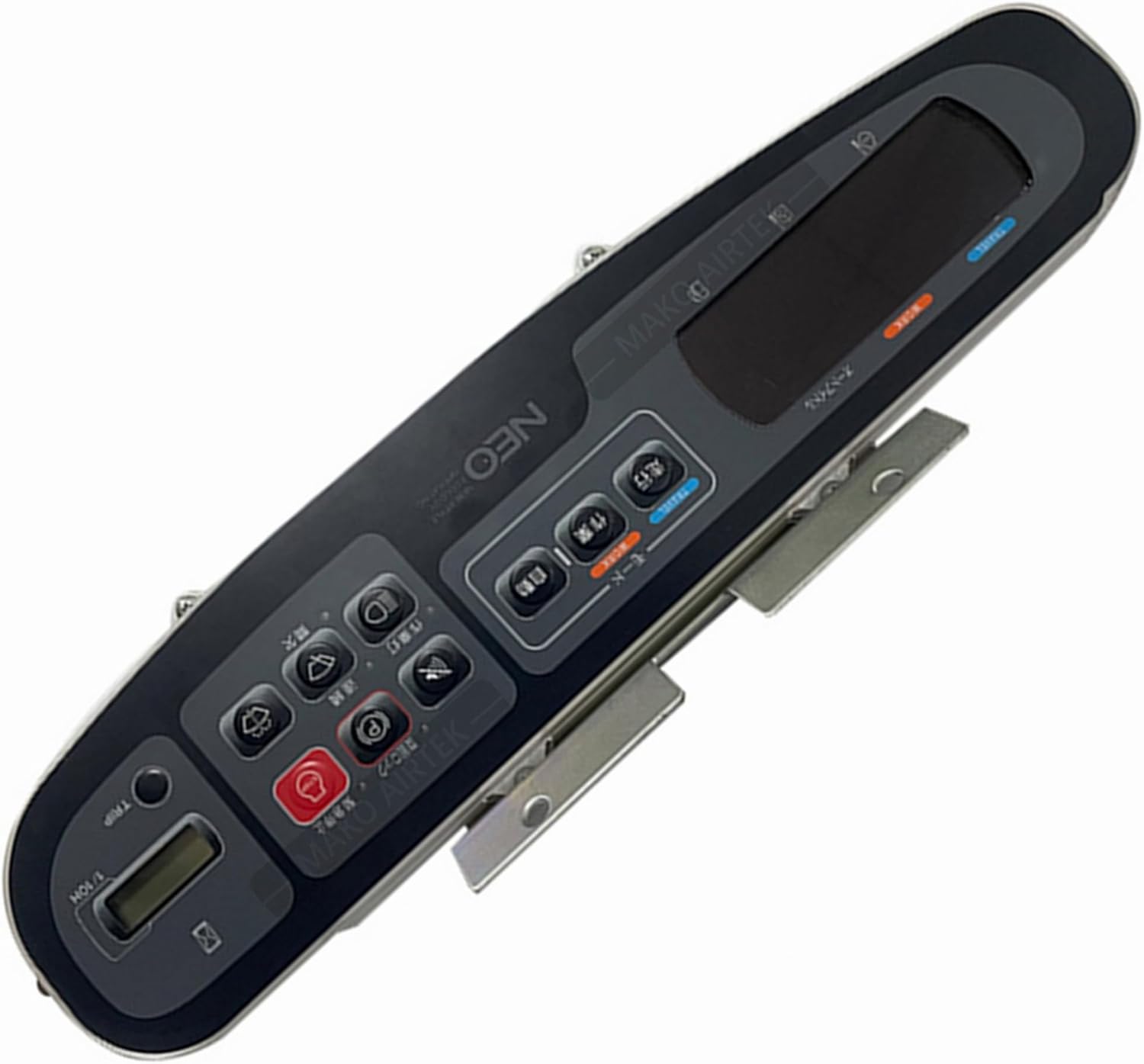
Figure 1.1: The MAKO AIRTEK KHR3825 Monitor. This image displays the monitor's front panel, featuring a central display screen, various control buttons with Japanese labels, and mounting brackets on the sides. Key buttons include those for 'TRIP', 'MODE', 'Work Light', 'Travel', 'Auto', 'Emergency Stop', and 'Continuous' functions, along with a 'P' button and a small digital readout.
2. Installation and Setup
The KHR3825 Monitor is designed for easy installation and is a direct replacement for the original monitor in compatible Sumitomo Excavator SH200-A3 models. Professional installation is recommended.
2.1. Pre-Installation Checklist
- Ensure the excavator's power is completely off and the battery is disconnected.
- Gather necessary tools (e.g., screwdrivers, wrenches).
- Verify the KHR3825 monitor matches the original unit's connectors.
2.2. Installation Steps
- Carefully remove the existing monitor from its mounting location. Disconnect all wiring harnesses.
- Align the MAKO AIRTEK KHR3825 Monitor with the mounting points.
- Connect all wiring harnesses to the corresponding ports on the new monitor. Ensure connections are secure and properly seated.
- Secure the monitor using the original mounting hardware. Do not overtighten.
- Reconnect the excavator's battery and restore power.
- Turn on the excavator's ignition and verify the monitor powers on and displays information correctly.
- Perform a functional check of all buttons and display modes.
Note: If you encounter any difficulties during installation, refer to the excavator's service manual or contact a qualified technician.
3. Operating Instructions
The KHR3825 monitor provides essential information and control functions for your Sumitomo Excavator. Familiarize yourself with the button layout and display indicators.
3.1. Button Functions (Refer to Figure 1.1 for layout)
| Button Label (Approximate) | Function |
|---|---|
| TRIP | Resets or cycles through trip meter readings. |
| MODE (モード) | Switches between different display modes or operational settings. |
| P | Likely related to parking brake or power mode selection. |
| Work Light (作業灯) | Activates or deactivates the excavator's work lights. |
| Travel (走行) | Controls or indicates travel mode settings. |
| Auto (自動) | Engages or disengages automatic functions, such as auto-idle. |
| Emergency Stop (急停止) | Initiates an immediate shutdown or emergency braking sequence. (Use with caution) |
| Continuous (連続) | Activates continuous operation for certain hydraulic functions. |
| Auto Idle (オートアイドル) | Toggles the automatic engine idle feature for fuel efficiency. |
3.2. Display Indicators
The central display shows critical operational data. Common indicators include:
- Engine RPM
- Fuel Level
- Coolant Temperature
- Hydraulic Pressure
- Error Codes / Warning Lights
- Operating Hours (1/10H)
Consult your excavator's specific operation manual for detailed explanations of all display icons and warnings.
4. Maintenance
Proper maintenance ensures the longevity and optimal performance of your KHR3825 Monitor.
4.1. Cleaning
- Use a soft, damp cloth to clean the monitor screen and casing.
- Avoid abrasive cleaners, solvents, or harsh chemicals, as these can damage the display or plastic components.
- Do not spray cleaning solutions directly onto the monitor. Apply to the cloth first.
4.2. Inspection
- Regularly inspect the monitor for any signs of physical damage, such as cracks or loose connections.
- Ensure all cables are securely connected and free from fraying or pinching.
- Check for any unusual display behavior or unresponsive buttons.
5. Troubleshooting
This section provides solutions to common issues you might encounter with your KHR3825 Monitor.
| Problem | Possible Cause | Solution |
|---|---|---|
| Monitor does not power on. | No power supply; Loose connection; Blown fuse. | Check excavator's power supply. Verify all cable connections. Inspect and replace relevant fuses if necessary. |
| Display is blank or distorted. | Loose video cable; Monitor malfunction; Software issue. | Ensure video cables are securely connected. Restart the excavator. If problem persists, contact support. |
| Buttons are unresponsive. | Software glitch; Physical damage to buttons. | Restart the excavator. Inspect buttons for physical obstruction or damage. |
| Incorrect readings on display. | Sensor malfunction; Calibration issue; Wiring problem. | Verify sensor connections. Consult excavator service manual for calibration procedures. Contact support if issue persists. |
If the problem persists after attempting these solutions, please contact MAKO AIRTEK customer support.
6. Specifications
| Feature | Detail |
|---|---|
| Model Number | KHR3825 |
| Brand | MAKO AIRTEK |
| Manufacturer Part Number | KHR3825 |
| Compatibility | Sumitomo Excavator SH200-A3 |
| ASIN | B0CD3X5GBQ |
| Date First Available | July 29, 2023 |
7. Warranty and Support
MAKO AIRTEK is committed to providing reliable products and excellent customer service.
7.1. Warranty Information
This product is covered by a standard manufacturer's warranty. For specific warranty terms and conditions, please refer to the documentation provided with your purchase or contact MAKO AIRTEK directly. The item is designed to directly replace damaged or faulty original items, ensuring reliable maintenance.
7.2. Customer Support
For any inquiries, technical assistance, or after-sale problems, please do not hesitate to contact MAKO AIRTEK customer support. We aim to reply within 1 business day (excluding public holidays).
Work Hours: Monday to Friday
Service: 24/7 support for your after-sale problems.
For the most up-to-date contact information, please visit the official MAKO AIRTEK store on Amazon: MAKO AIRTEK Store