1. Product Overview
The HOOBRO Rolling TV Stand with Mount and Power Outlet (Model BF66UDS01) is a versatile and functional entertainment center designed for modern living spaces. It features a robust construction, mobility, and integrated power solutions, making it ideal for various room configurations and uses.

Image 1.1: The HOOBRO Rolling TV Stand in a living room, showcasing its design and functionality with a TV mounted and items on shelves.
Key Features:
- Movable & Lockable: Equipped with four heavy-duty casters, two of which are lockable, allowing for easy relocation and stable positioning.
- Adjustable TV Mount: Supports TVs up to 55 inches with adjustable height and horizontal positioning for optimal viewing.
- Integrated Power Outlet: Features a built-in socket with 4 AC outlets (125V/12A, Max. 1500 Watts) and a 4.9-foot power cord for convenient device charging.
- Ample Storage: Three open storage shelves provide space for media devices, game consoles, books, and decorative items.
- Durable Construction: Made from premium particleboard and metal, ensuring stability and longevity. Includes adjustable feet for uneven surfaces.
- Cable Management: Side cable clips on the metal frame help organize cables for a tidy appearance.
2. Safety Information
Please read and understand all instructions before assembly and use. Failure to follow these instructions may result in injury or damage to the product.
- Keep all small parts and packaging materials away from children and pets to prevent choking hazards.
- Ensure all connections are secure before placing a TV or other heavy items on the stand.
- Do not exceed the maximum weight capacity for the TV mount or shelves. Refer to the Specifications section for details.
- Use the lockable casters to secure the stand in place when not moving it to prevent accidental rolling.
- Avoid placing the stand in areas with high humidity or direct sunlight to prevent material degradation.
- Do not attempt to modify the product in any way, as this may compromise its structural integrity and void the warranty.
- When moving the stand, ensure the TV and other items are securely placed and the path is clear of obstacles.
3. Package Contents
Before beginning assembly, verify that all parts listed below are present and undamaged. If any parts are missing or damaged, please contact customer support.
| Part | Description | Quantity |
|---|---|---|
| A | Top Shelf | 1 |
| B | Middle Shelf | 1 |
| C | Bottom Shelf | 1 |
| D | Left Frame Leg | 1 |
| E | Right Frame Leg | 1 |
| F | TV Mount Bracket | 1 |
| G | Casters (2 lockable) | 4 |
| H | Adjustable Feet | 4 |
| I | Power Outlet Unit | 1 |
| J | Hardware Pack (Screws, Allen Wrench, etc.) | 1 |
4. Assembly Instructions
Follow these steps carefully to assemble your HOOBRO Rolling TV Stand. It is recommended to assemble with two people for easier handling.
- Unpack and Identify Parts: Lay out all components on a clean, soft surface to prevent scratches. Refer to the Package Contents list to identify each part.
- Attach Casters/Adjustable Feet: Decide whether to use casters for mobility or adjustable feet for stationary use. Screw the chosen components into the designated holes on the bottom of the frame legs (Parts D & E).

Image 4.1: Detail of the smooth casters and adjustable feet, highlighting the two lockable casters.
- Assemble Frame: Connect the frame legs (Parts D & E) using the provided crossbars and screws from the Hardware Pack (Part J). Do not fully tighten screws until all parts are aligned.
- Install Shelves: Attach the bottom shelf (Part C), then the middle shelf (Part B), and finally the top shelf (Part A) to the assembled frame using the appropriate screws. Ensure the power outlet cutout on the top shelf is correctly oriented.
- Install Power Outlet Unit: Insert the Power Outlet Unit (Part I) into the cutout on the top shelf and secure it with screws.

Image 4.2: The integrated power outlet with 4 AC outlets, 1500 Watts max power, and a 4.9-foot power cord.
- Attach TV Mount Bracket: Secure the TV Mount Bracket (Part F) to the vertical support bars of the stand using the designated hardware. Ensure it is centered and level.

Image 4.3: Illustration of the adjustable TV mount, showing how it can be moved left, right, up, and down to fit various TV sizes.
- Final Tightening: Once all parts are in place and aligned, fully tighten all screws.
- Mount TV: Carefully attach your TV to the TV Mount Bracket using the appropriate screws for your TV model (refer to your TV's manual for VESA compatibility). Adjust the TV's height and position as desired.
- Cable Management: Use the integrated cable clips on the metal frame to route and organize your TV and device cables.

Image 4.4: Detail of the cable clips on the side of the metal frame for neat cable organization.
5. Operating Instructions
5.1 Positioning the TV Stand
Place the TV stand in your desired location. If using casters, ensure the two lockable casters are engaged to prevent unintended movement when the stand is stationary. If using adjustable feet, ensure all four feet are firmly on the ground and adjusted to level the stand.
5.2 Using the Adjustable TV Mount
The TV mount allows for vertical and horizontal adjustment. Loosen the adjustment screws on the mount, carefully slide the TV to your preferred height or horizontal position, and then securely tighten the screws. Always ensure the TV is balanced before releasing your grip.
5.3 Utilizing the Integrated Power Outlet
Plug the stand's main power cord into a wall outlet. You can then plug up to four electronic devices (e.g., TV, game console, soundbar, streaming device) into the integrated power outlets on the top shelf. Ensure the total power consumption does not exceed 1500 Watts.
5.4 Moving the TV Stand (with Casters)
To move the stand, unlock the two lockable casters. Gently push or pull the stand to its new location. Once in position, engage the locks on the casters to secure the stand and prevent accidental rolling.
6. Maintenance
Regular maintenance will help prolong the life and appearance of your HOOBRO TV Stand.
- Cleaning: Wipe surfaces with a soft, damp cloth. Avoid harsh chemicals or abrasive cleaners, as they may damage the finish.
- Dusting: Regularly dust the shelves and frame to prevent buildup.
- Hardware Check: Periodically check all screws and connections to ensure they remain tight. Retighten if necessary.
- Caster/Feet Inspection: If using casters, ensure they roll smoothly and are free of debris. If using adjustable feet, ensure they are stable and level.
- Cable Management: Periodically check cables for wear or damage and ensure they are neatly organized to prevent tripping hazards.
7. Troubleshooting
If you encounter any issues with your TV stand, refer to the following common problems and solutions:
| Problem | Possible Cause | Solution |
|---|---|---|
| Stand is wobbly/unstable. | Screws are loose; uneven floor; adjustable feet not properly set. | Tighten all assembly screws. Adjust the leveling feet (if used) to compensate for uneven flooring. Ensure casters are locked if stationary. |
| TV mount does not hold TV securely. | Mounting screws not tightened; TV too heavy for mount. | Ensure all TV mounting screws are securely tightened. Verify your TV's weight is within the stand's maximum capacity (see Specifications). |
| Power outlets are not working. | Stand's main power cord unplugged; circuit overload; internal issue. | Check if the stand's power cord is fully plugged into a working wall outlet. Unplug some devices if total wattage exceeds 1500W. If problem persists, contact customer support. |
| Casters are difficult to roll. | Casters are locked; debris caught in wheels. | Ensure both lockable casters are in the unlocked position. Clear any hair or debris from the caster wheels. |
8. Specifications
| Feature | Detail |
|---|---|
| Product Dimensions | 23.6 x 17.9 x 28.7 inches (L x W x H) |
| Item Weight | 26.7 pounds |
| Brand | HOOBRO |
| Model Number | BF66UDS01 |
| Material | Engineered Wood, Metal |
| Mounting Type | Wheeled Mount (with optional adjustable feet) |
| Movement Type | Rolling |
| Maximum Compatible TV Size | Up to 55 Inches |
| Power Outlet | 4 AC Outlets, 125V/12A, Max. 1500 Watts |
| Power Cord Length | 4.9 feet |
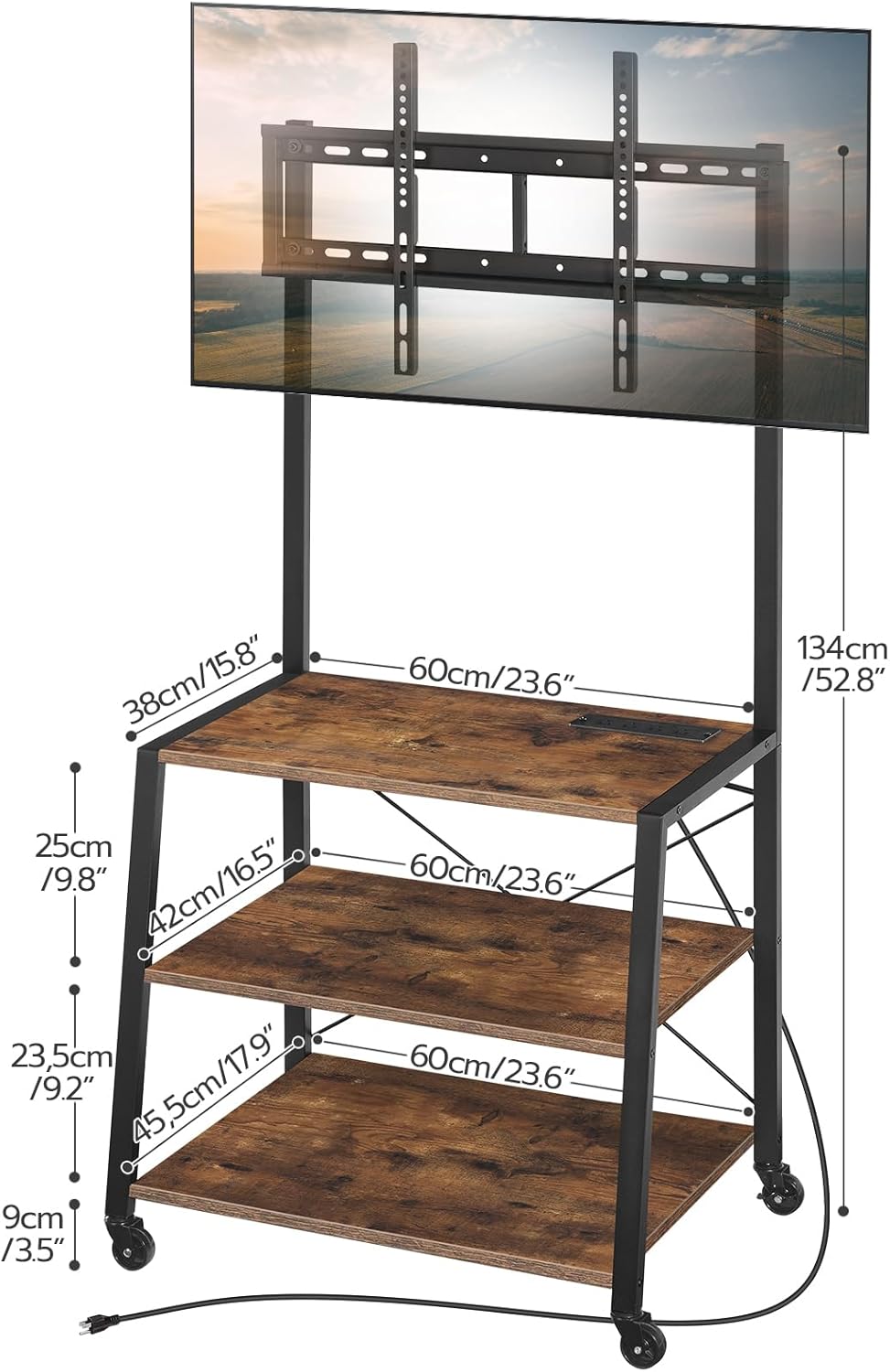
Image 8.1: Detailed dimensions of the TV stand, including shelf heights and overall height with the TV mount.
9. Warranty and Support
HOOBRO products are designed for quality and durability. This product comes with a standard manufacturer's warranty against defects in materials and workmanship. For specific warranty details, please refer to the documentation included with your purchase or visit the official HOOBRO website.
For technical support, missing parts, or any other inquiries, please contact HOOBRO customer service:
- Website: www.hoobro.com (placeholder)
- Email: support@hoobro.com (placeholder)
- Phone: 1-800-XXX-XXXX (placeholder)
Please have your model number (BF66UDS01) and purchase date ready when contacting support.


