1. Product Overview
The WayPonDEV youyeetoo X1 is a high-performance X86 single board computer (SBC) designed for a wide range of applications, including AIoT, automation, and robotics. It features an Intel Celeron N5105 11th Gen Jasper Lake processor, offering robust performance for daily usage and 4K video streaming. The compact design (115mm x 75mm x 22mm) integrates extensive onboard interfaces and supports multiple operating systems.

Figure 1: WayPonDEV youyeetoo X1 Single Board Computer with heatsink.
2. What's in the Box
The standard package for the youyeetoo X1 includes the following components:
- youyeetoo X1 x86 Single Board Computer (RAM/Storage depends on your order)
- 12V DC / 3A Power Supply
- Heatsink (pre-installed)

Figure 2: Contents of the youyeetoo X1 package.
3. Setup Guide
3.1. Initial Unboxing and Inspection
Carefully remove all components from the packaging. Inspect the youyeetoo X1 board and accessories for any signs of damage. Ensure all listed items are present.
Video 1: Unboxing and initial overview of the youyeetoo X1 SBC.
3.2. Connecting Peripherals
- Display: Connect your monitor to the full-size HDMI or Micro HDMI port. The board supports dual 4K output.
- Power: Connect the provided 12V DC / 3A power supply to the DC Power input port.
- USB Devices: Connect your keyboard, mouse, and other USB peripherals to the available USB 2.0 (x2) or USB 3.0 (x2) ports.
- Network: For wired internet, connect an Ethernet cable to the Gigabit network port.
- Audio: If needed, connect audio devices to the 3.5mm headphone socket.
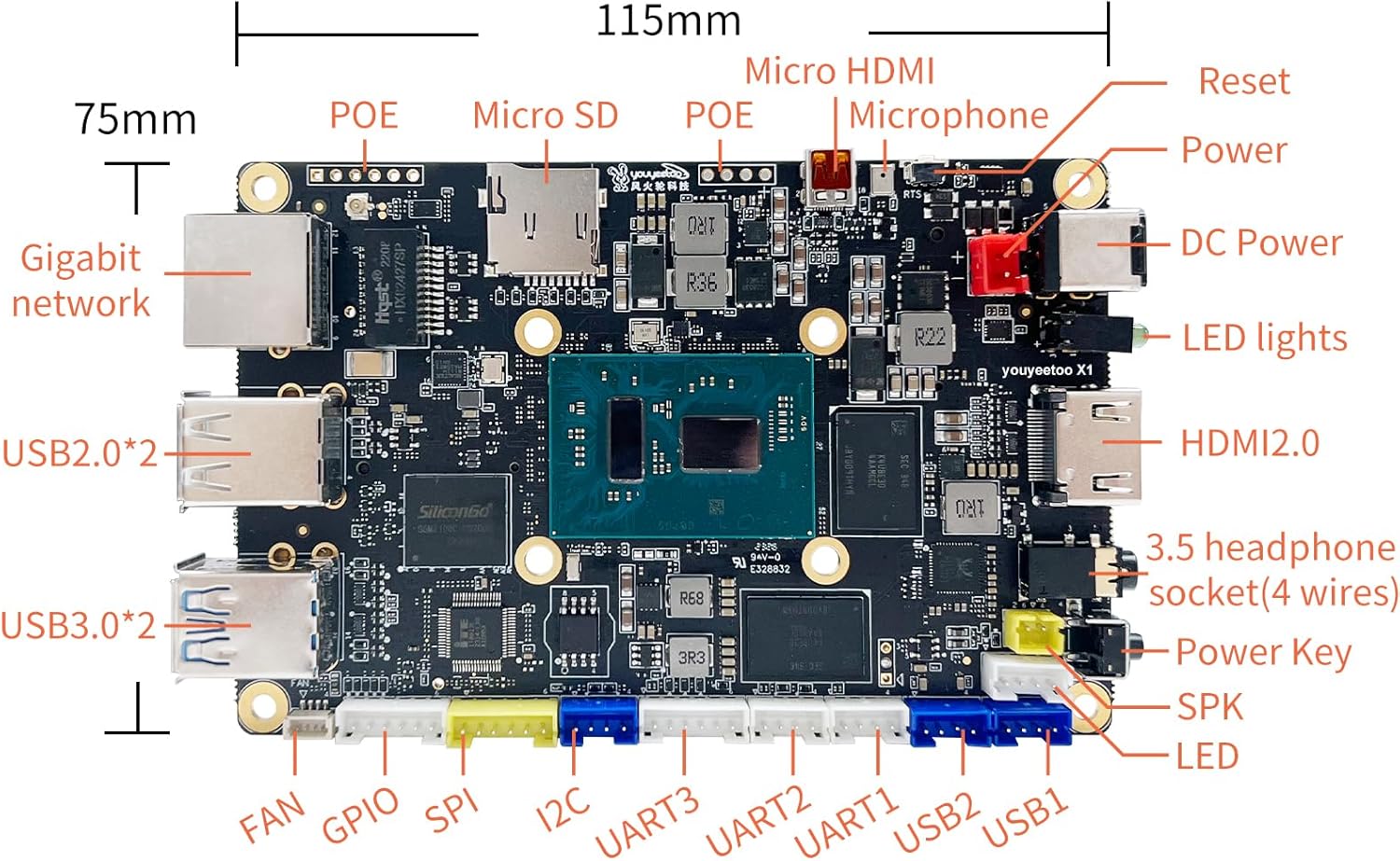
Figure 3: Detailed port layout and dimensions of the youyeetoo X1.
3.3. Operating System Installation
The youyeetoo X1 supports Windows 10/11, Ubuntu, and Debian Linux distributions. If your model did not come with a pre-installed OS or you wish to change it, you can install your preferred operating system onto an M.2 NVMe/SATA SSD or the onboard eMMC storage (if available). Refer to the official youyeetoo Wiki for detailed installation guides.

Figure 4: Supported operating systems for the youyeetoo X1.
4. Operating Instructions
4.1. Powering On/Off
Press the Power Key on the board to power on the device. To power off, use the operating system's shutdown function or press and hold the Power Key for a few seconds.
4.2. Display Output
The youyeetoo X1 supports dual 4K display output via its full-size HDMI and Micro HDMI ports. It also features a MIPI FPC interface for connecting compatible displays, such as a 7-inch MIPI LCD touch screen.

Figure 5: The youyeetoo X1 supports multiple displays and USB cameras.
4.3. 4K Video Playback
The Intel Celeron N5105 CPU with Intel UHD iGPU (24 EUs) provides excellent performance for 4K video playback. You can stream 4K content smoothly from various platforms.
Video 2: Demonstration of 4K video playback capabilities on the youyeetoo X1.
4.4. Wireless Connectivity
The youyeetoo X1 features an M.2 E-key slot for optional WiFi (2.4G/5G) and Bluetooth (BT5.0/BT5.2) modules, or a 4G LTE module. This allows for flexible wireless network options.

Figure 6: The youyeetoo X1 supports NFC and various wireless modules via M.2 E-key.
5. Maintenance
5.1. Cooling
The youyeetoo X1 comes with an active heatsink and fan to ensure optimal thermal performance and prevent throttling. Ensure the fan is clear of obstructions for proper airflow.
5.2. Storage Expansion
The board includes an M.2 2280 M-key socket for NVMe or SATA SSDs, allowing for significant storage expansion. Additionally, a Micro SD card slot is available for extended storage. For models without eMMC, an NVMe SSD is recommended for the operating system.

Figure 7: Storage options for the youyeetoo X1, including eMMC, NVMe, and M.2 SSD.
5.3. BIOS Updates
Regularly check the official youyeetoo Wiki for BIOS updates and driver information to ensure optimal performance and compatibility.
6. Troubleshooting
- No Display: Ensure the power supply is connected correctly and the display cable is securely plugged into both the board and the monitor. Try a different display port or cable.
- Operating System Issues: If the OS is not booting, verify the storage device (eMMC or NVMe SSD) is properly installed and contains a valid operating system. Refer to the youyeetoo Wiki for OS installation guides.
- Peripheral Not Detected: Check USB connections. For optional WiFi/Bluetooth modules, ensure they are correctly installed in the M.2 E-key slot and drivers are installed in the OS.
- Overheating: Ensure the heatsink fan is spinning and not obstructed. Maintain adequate airflow around the board.
For further technical support, please contact WayPonDEV at wpd@youyeetoo.com or visit the official forum at forum.youyeetoo.com.
7. Specifications
| Feature | Description |
|---|---|
| Processor | Intel Celeron N5105 (4 Cores, up to 2.9 GHz) |
| Graphics | Intel UHD Graphics (24 EUs, up to 800 MHz) |
| RAM | 4GB/8GB/16GB LPDDR4 (soldered) |
| Storage | Optional 64GB/128GB/256GB eMMC; 1x M.2 2280 M-key (PCIe 3.0 NVMe or SATA SSD); Micro SD slot |
| Video Output | Full-size HDMI 2.0 (4K/60Hz), Micro HDMI 2.0 (4K/60Hz), MIPI FPC (Supports 7-inch MIPI LCD) |
| USB Ports | 2x USB 2.0, 2x USB 3.0 |
| Network | Gigabit Ethernet (RJ45) |
| Wireless | M.2 E-key slot for optional WiFi/BT (WiFi5/BT5.0, WiFi6/BT5.2) or 4G LTE module |
| Audio | 3.5mm Headphone Socket, Microphone connector, SPK connector |
| Expansion Headers | GPIO, SPI, I2C, UART (x3), USB (x2) |
| Power Input | 12V DC / 3A, PoE (802.3AT 24W default, optional 60W/72W) |
| Operating System | Windows 10/11, Ubuntu, Debian Linux |
| Dimensions | 115mm x 75mm x 22mm |
| Weight | 14 ounces (approx.) |

Figure 8: Rich extension interfaces of the youyeetoo X1.
8. Warranty and Support
8.1. Warranty Information
The product typically comes with a 30-day return policy for refund or replacement. For specific warranty details, please refer to your purchase documentation or contact WayPonDEV directly.
8.2. Technical Support
For any customization requirements or technical assistance, please contact WayPonDEV via email at wpd@youyeetoo.com. You can also post your questions and find community support on the official youyeetoo forum: forum.youyeetoo.com.


