
ULTIMEA U2100
Contents
ULTIMEA Nova S40 Sound Bar User Manual
Model: U2100
Brand: ULTIMEA
Introduction
Thank you for choosing the ULTIMEA Nova S40 Sound Bar. This ultra-slim 2.1 channel sound system with a wired subwoofer is designed to enhance your audio experience for TV, PC gaming, and other compatible devices. This manual provides essential information for setting up, operating, maintaining, and troubleshooting your new sound bar.
Safety Information
Please read all safety instructions carefully before using this product. Keep this manual for future reference.
- Do not expose this appliance to dripping or splashing liquids.
- Do not place objects filled with liquids, such as vases, on the apparatus.
- Ensure proper ventilation. Do not block any ventilation openings.
- Place the sound bar and subwoofer on a stable, flat surface.
- Use only the power adapter supplied with the unit.
- Unplug the appliance during lightning storms or when unused for long periods.
- Do not attempt to repair or disassemble the unit yourself. Refer all servicing to qualified personnel.
Package Contents
Carefully unpack your ULTIMEA Nova S40 Sound Bar and ensure all items are present:
- ULTIMEA Nova S40 Sound Bar
- Wired Subwoofer
- Remote Control
- HDMI eARC Cable
- Optical Cable
- 3.5mm Audio Cable
- Wall Mount Kit
- Power Adapter
- User Manual (this document)
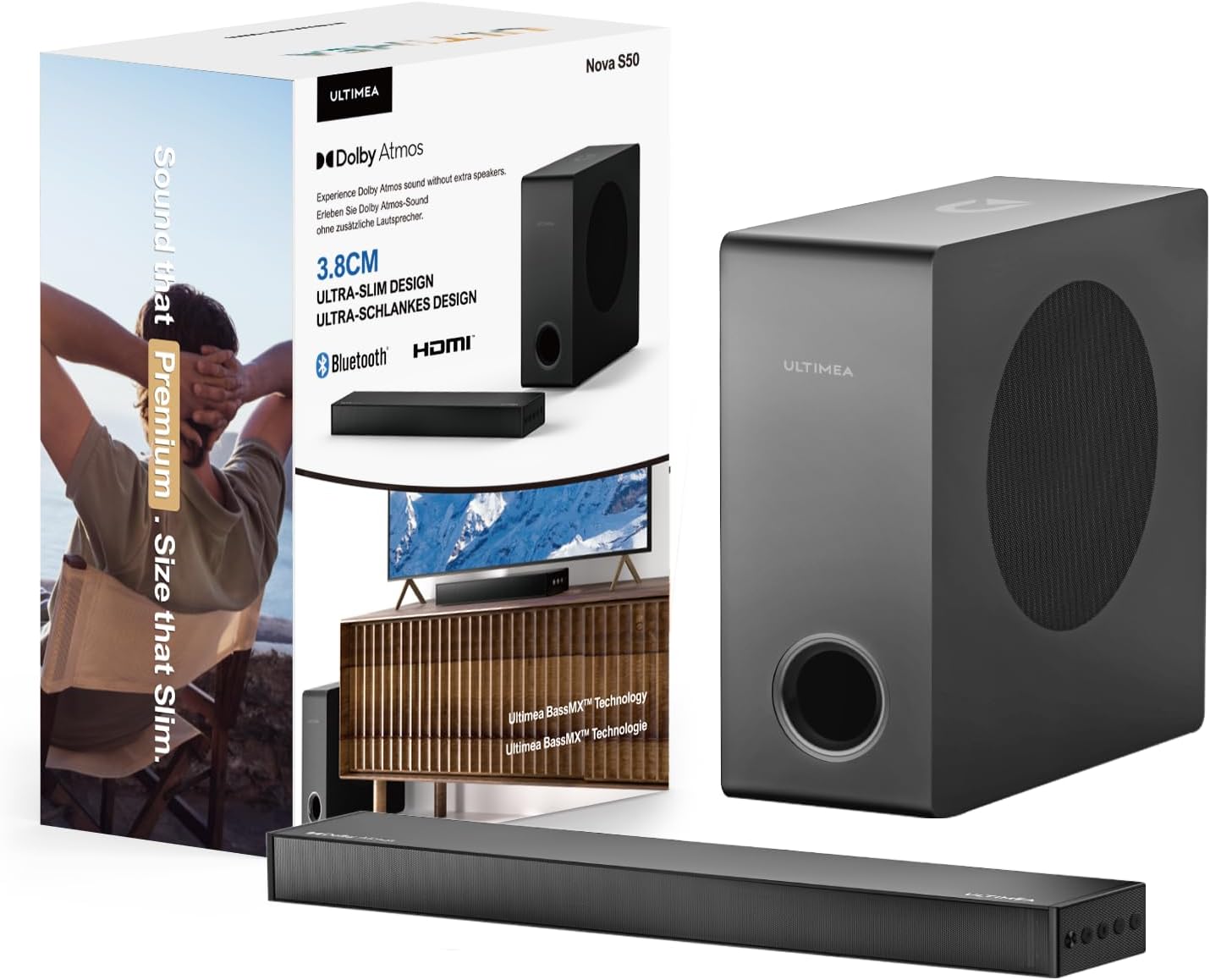
This image displays the ULTIMEA Nova S40 Sound Bar and its accompanying subwoofer, both packaged and as standalone units, highlighting their sleek design.
Setup
1. Physical Placement
- Sound Bar: Place the sound bar directly below your TV, centered for optimal audio alignment. Ensure it is on a stable, flat surface or mounted securely to the wall using the provided kit.
- Subwoofer: Position the wired subwoofer near the sound bar, ideally on the floor. Ensure the subwoofer cable can reach the sound bar's "SUB OUT" port.
2. Connecting the Sound Bar
Choose one of the following connection methods:
- HDMI (eARC):
Connect one end of the HDMI eARC cable to the HDMI (eARC) port on the sound bar and the other end to the HDMI eARC/ARC port on your TV. This connection supports high-quality audio and allows TV remote control of the sound bar volume.
- Optical (OPT):
Connect one end of the Optical cable to the OPT port on the sound bar and the other end to the Optical Digital Audio Out port on your TV. Ensure to remove protective caps from the optical cable before connecting.
- AUX:
Connect one end of the 3.5mm Audio cable to the AUX port on the sound bar and the other end to the 3.5mm audio output (headphone jack) on your device (e.g., TV, PC, smartphone).
- USB:
Insert a USB drive into the USB port for direct audio playback from compatible files. (Note: Functionality may vary based on file format and USB drive specifications).
- Bluetooth 5.3:
For wireless connection, select Bluetooth mode on the sound bar. Enable Bluetooth on your device (e.g., smartphone, tablet, laptop) and select "ULTIMEA Nova S40" from the list of available devices to pair.
Detail of the sound bar's rear panel, illustrating the various input ports including AUX, OPT, HDMI (eARC), USB, and DC IN.
3. Power Connection
Connect the power adapter to the DC IN port on the sound bar, then plug the adapter into a wall outlet. The subwoofer is wired and connects directly to the sound bar via the SUB OUT port.
Operating Instructions
- Power On/Off: Press the Power button on the remote control or the sound bar to turn the unit on or off.
- Input Selection: Press the Input button on the remote control or the sound bar to cycle through available input sources (HDMI, Optical, AUX, USB, Bluetooth). The current input will be indicated by an LED light or display.
- Volume Control: Use the Volume Up (+) and Volume Down (-) buttons on the remote control or the sound bar to adjust the master volume.
- Bluetooth Pairing: In Bluetooth mode, the sound bar will automatically enter pairing mode. On your device, search for "ULTIMEA Nova S40" and connect. If already paired, it will automatically reconnect when in range.
- Sound Modes: The sound bar may feature preset sound modes (e.g., Movie, Music, News). Refer to your remote control for dedicated buttons to switch between these modes for optimized audio.
Maintenance
To ensure the longevity and optimal performance of your ULTIMEA Nova S40 Sound Bar:
- Cleaning: Use a soft, dry cloth to wipe the surfaces of the sound bar and subwoofer. Do not use liquid cleaners or aerosol sprays.
- Storage: If storing the unit for an extended period, disconnect it from the power outlet and store it in a cool, dry place away from direct sunlight and extreme temperatures.
- Ventilation: Ensure that the ventilation openings are not blocked by dust or debris. Regularly check and clean if necessary.
Troubleshooting
If you encounter issues with your sound bar, please refer to the following common problems and solutions:
| Problem | Possible Cause / Solution |
|---|---|
| No sound from the sound bar. |
|
| Distorted or poor sound quality. |
|
| Bluetooth pairing fails. |
|
| Remote control not working. |
|
Specifications
| Feature | Detail |
|---|---|
| Model Name | U2100 |
| Speaker Type | Soundbar |
| Surround Sound Channel Configuration | 2.1 |
| Connectivity Technology | Bluetooth 5.3, HDMI (eARC), Optical, AUX, USB |
| Audio Output Mode | Dolby Atmos |
| Speaker Maximum Output Power | 200 Watts |
| Product Dimensions | 15.75"D x 6.1"W x 10.63"H |
| Item Weight | 10.25 pounds (4.66 Kilograms) |
| Included Components | Soundbar, Subwoofer, Remote Control, Cables (HDMI, Optical, 3.5mm Audio), Wall Mount Kit, Power Adapter |
| Manufacturer | ULTIMEA |
| Color | Metallic |
Warranty and Support
The ULTIMEA Nova S40 Sound Bar comes with a limited warranty. For detailed warranty information, product registration, or technical support, please visit the official ULTIMEA website or contact their customer service. Keep your proof of purchase for warranty claims.
For further assistance, you may also refer to the contact information provided in your product packaging or on the ULTIMEA brand store page on Amazon.
Note: No official seller videos were available for embedding in this manual.
Ask a question about this manual
Ask about setup, troubleshooting, compatibility, parts, safety, or missing instructions. Manuals+ will review the question and use this page’s manual context to help answer it.