
Hobbywing 30205351
HOBBYWING Skywalker 30A V2 User Manual
Model: 30205351
Brand: Hobbywing
1. Product Overview
The HOBBYWING Skywalker 30A V2 is an advanced Electronic Speed Controller (ESC) designed for various brushless motors. It incorporates a high-performance 32-bit microprocessor operating at up to 96MHz, ensuring precise control and efficient operation.
Key features include DEO (Driving Efficiency Optimization) Technology for improved throttle response and reduced ESC temperature, and a separate programming cable for easy configuration with an LED program box. The ESC supports Normal/Reverse brake modes, including a reverse brake mode to shorten aircraft landing distances. A unique search mode assists in locating the aircraft by alarm beeps if it falls into complex environments. Multiple protection features such as start-up, thermal, over-current, and throttle signal loss protection enhance the longevity and reliability of the ESC.

Figure 1: HOBBYWING Skywalker 30A V2 ESC unit.
2. Safety Information
Before operating the HOBBYWING Skywalker 30A V2 ESC, please read and understand all safety guidelines to prevent damage to the unit, other components, or personal injury. Adherence to these instructions is crucial for safe and reliable operation.
- Always read the manuals for all power devices and the aircraft itself. Ensure that the power configuration is rational and compatible before connecting this ESC.
- Verify that all wires and connections are properly insulated before connecting the ESC to any related devices. Short circuits can cause severe damage to your ESC and other components.
- Ensure all devices are securely connected to prevent poor connections. Loose connections can lead to loss of control of your aircraft or other unpredictable issues, including device damage.
- If soldering is required for input/output wires and connectors, use a soldering iron with sufficient power to ensure strong and reliable joints.
- Never allow the motor to lock up during high-speed rotation. This can destroy the ESC and damage the motor. If the motor locks up, immediately move the throttle stick to the bottom position or disconnect the battery.
- Avoid using this unit in extremely hot weather conditions or continuing operation when the unit becomes excessively hot. High temperatures can activate the ESC's thermal protection or cause permanent damage.
- Always disconnect and remove batteries after use. The ESC will continue to consume a small amount of current if left connected, which can lead to complete discharge and damage to the batteries or the ESC. Damage resulting from prolonged connection will not be covered under warranty.
3. Setup and Connection
Proper setup and connection are essential for the optimal performance and safety of your HOBBYWING Skywalker 30A V2 ESC. Follow these steps carefully:
- Connect the Motor: Connect the three output wires from the ESC to the three phase wires of your brushless motor. The order of connection may affect the motor's rotation direction. If the motor spins in the wrong direction, swap any two of the ESC's output wires.
- Connect to Receiver: Plug the throttle signal cable (usually a black, red, and white wire bundle) from the ESC into the throttle channel (typically channel 3) of your RC receiver. Ensure the polarity is correct.
- Connect Battery: Connect the battery connector (red for positive, black for negative) from the ESC to your LiPo battery pack. Ensure correct polarity to prevent damage. The Skywalker 30A V2 supports 3-4S LiPo batteries.
- Throttle Range Calibration:
- Turn on your transmitter and set the throttle stick to its maximum position.
- Connect the battery to the ESC. The ESC will emit a series of beeps.
- When you hear a specific tone (refer to the full manual for exact tones), move the throttle stick to its minimum position.
- The ESC will emit another series of beeps, indicating that the throttle range has been successfully calibrated.
- Disconnect the battery to save the settings.
- Programming (Optional): For advanced settings, connect the ESC to a HOBBYWING LED program box using the dedicated programming cable. Refer to the LED program box user manual for detailed programming instructions. Settings such as brake mode, cut-off voltage, and start-up mode can be adjusted.
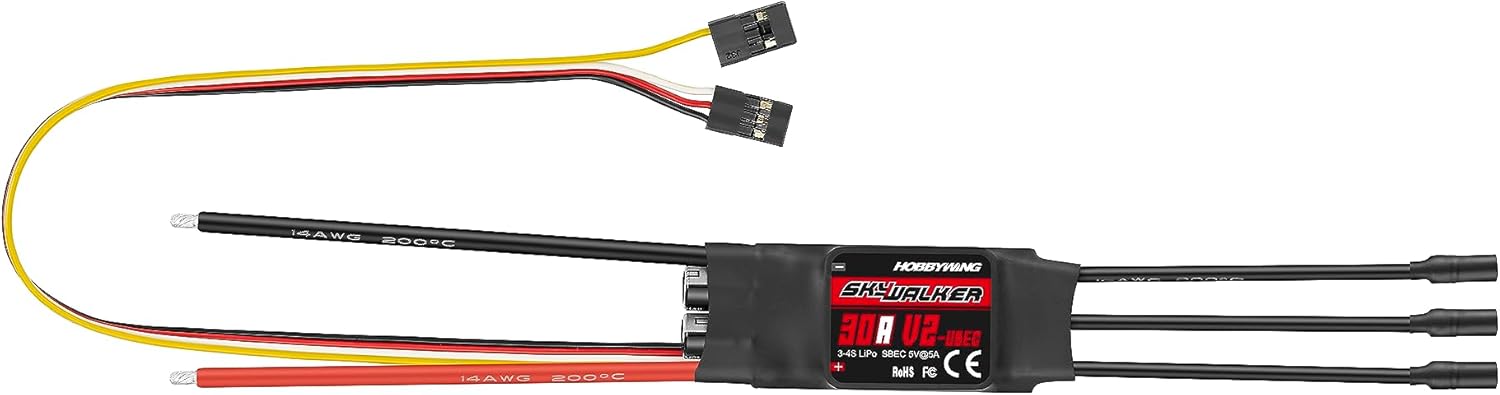
Figure 2: HOBBYWING Skywalker 30A V2 ESC showing input and output wiring.
4. Operating Instructions
Once the ESC is properly set up, you can begin operation. Always ensure your aircraft is in a safe environment before powering on.
- Power On: Connect the flight battery to the ESC. The ESC will initialize and emit a series of tones. Ensure the throttle stick is at the minimum position before connecting the battery.
- Throttle Control: Gradually increase the throttle stick on your transmitter to control the motor speed. The DEO (Driving Efficiency Optimization) technology ensures a fast and smooth throttle response.
- Brake Modes: The Skywalker V2 supports various brake modes:
- Normal Brake: Applies a configurable braking force when the throttle is at minimum.
- Reverse Brake: Allows the motor to spin in reverse, effectively shortening landing distances. This mode is particularly useful for simulating real aircraft landings.
- Brake Disabled: The motor will freewheel when the throttle is at minimum.
- Search Mode: If your aircraft lands in a visually obstructed area, activate the search mode (if configured). The ESC will pulse the motor to emit alarm beeps, helping you locate the aircraft. This mode can also be used to remind users to disconnect the battery after a set idle time to prevent over-discharge.
- Protection Features: The ESC is equipped with multiple protection features that may activate during operation:
- Abnormal Input Voltage Protection: Protects against incorrect voltage input.
- ESC Thermal Protection: Reduces power or shuts down if the ESC temperature becomes too high.
- Throttle Signal Loss (Fail Safe): If the throttle signal is lost, the ESC will cut power to the motor to prevent runaway.
- Low Voltage Cut-off: Prevents over-discharge of the battery by reducing or cutting power when the battery voltage drops below a safe level.
5. Maintenance
Regular maintenance ensures the longevity and reliable performance of your HOBBYWING Skywalker 30A V2 ESC.
- Cleaning: Periodically clean the ESC to remove dust, dirt, and debris. Use a soft brush or compressed air. Avoid using liquids or solvents that could damage electronic components.
- Inspection: Regularly inspect all wires, connectors, and solder joints for signs of wear, fraying, or corrosion. Replace any damaged components immediately.
- Storage: When not in use, store the ESC in a cool, dry place away from direct sunlight and extreme temperatures. Ensure batteries are disconnected before storage.
- Firmware Updates: Check the official HOBBYWING website periodically for any available firmware updates for your ESC model. Updates can improve performance or add new features.
6. Troubleshooting
This section addresses common issues you might encounter with your HOBBYWING Skywalker 30A V2 ESC.
| Problem | Possible Cause | Solution |
|---|---|---|
| Motor does not spin or stutters. | Incorrect motor/ESC wiring, throttle range not calibrated, low battery voltage, motor locked up. | Check motor phase wire connections. Perform throttle range calibration. Check battery voltage. Ensure motor is free to rotate. |
| ESC beeps continuously after power on. | Throttle stick not at minimum, throttle signal loss, abnormal input voltage. | Ensure throttle stick is at minimum. Check receiver connection and transmitter. Verify battery voltage is within specified range. |
| Motor spins in the wrong direction. | Incorrect motor phase wire connection. | Swap any two of the three motor phase wires connected to the ESC. |
| ESC gets very hot during operation. | Overload, insufficient cooling, incorrect propeller size, motor issue. | Reduce load, ensure adequate airflow around ESC, check propeller size for suitability, inspect motor for damage. |
| Aircraft loses power mid-flight. | Low voltage cut-off activated, thermal protection activated, throttle signal loss. | Check battery charge. Allow ESC to cool down. Verify transmitter and receiver connection. |
7. Specifications
| Feature | Detail |
|---|---|
| Model | Skywalker 30A V2 |
| Continuous Current | 30A |
| Peak Current | 45A (for 10 seconds) |
| Input Voltage | 3-4S LiPo |
| BEC Output | 5V/5A (Switch Mode) |
| Dimensions | Approx. 68 x 25 x 10 mm (L x W x H) |
| Weight | Approx. 36g |
| Processor | High-performance 32-bit ARM M0 (up to 96MHz) |
| Max RPM (2-pole motor) | Up to 300,000 RPM |
| DEO Technology | Yes |
| Programmable | Via LED Program Box or Transmitter |
| Protection Features | Start-up, ESC Thermal, Capacitor Thermal, Over-current, Over-load, Abnormal Input Voltage, Throttle Signal Loss |
Note: Specifications are subject to change without prior notice. Always refer to the latest product documentation.
8. Warranty and Support
For detailed warranty information, including terms, conditions, and duration, please refer to the official HOBBYWING warranty policy provided with your product or visit the official HOBBYWING website. Warranty coverage typically applies to manufacturing defects and does not cover damage caused by misuse, improper installation, or unauthorized modifications.
For technical support, troubleshooting assistance beyond this manual, or service inquiries, please contact HOBBYWING customer support through their official channels. Contact information can usually be found on the HOBBYWING website or on the product packaging.
It is recommended to retain your proof of purchase for warranty claims.
Related Documents - 30205351
 |
Hobbywing Skywalker V2 ESC User Manual User manual for the Hobbywing Skywalker V2 series of brushless electronic speed controllers (ESCs), detailing features, specifications, connections, programming, and troubleshooting. |
 |
HOBBYWING Skywalker V2 Series Brushless ESC User Manual Comprehensive user manual for the HOBBYWING Skywalker V2 series of brushless electronic speed controllers (ESCs), covering features, specifications, installation, calibration, programming, and troubleshooting. |
 |
HOBBYWING SkyWalker V2 Series ESC: Features, Specifications, and Programmable Options Explore the HOBBYWING SkyWalker V2 series of Electronic Speed Controllers (ESCs), featuring Reverse Brake, DEO Technology, Search Mode, and multiple protections. View detailed specifications and programmable parameters for RC models. |
 |
Hobbywing Skywalker V2 Series ESC User Manual Comprehensive user manual for the Hobbywing Skywalker V2 series of Brushless Electronic Speed Controllers (ESCs), covering features, specifications, setup, programming, and troubleshooting. |
 |
Hobbywing Skywalker V2 Series ESC User Manual User manual for the Hobbywing Skywalker V2 series of brushless electronic speed controllers (ESCs), covering models like the 40A, 50A, 80A, and 100A V2. Provides instructions on connections, ESC programming via transmitter or LED program box, features, specifications, troubleshooting, and multiple protections. |
 |
Hobbywing Skywalker V2 Brushless ESC User Manual User manual for the Hobbywing Skywalker V2 series of brushless electronic speed controllers (ESCs), covering models 40A, 50A, 80A, and 100A. Includes warnings, features, specifications, user guide, ESC programming instructions via transmitter and LED program box, and troubleshooting tips. |
Ask a question about this manual
Ask about setup, troubleshooting, compatibility, parts, safety, or missing instructions. Manuals+ will review the question and use this page’s manual context to help answer it.