1. Introduction
Welcome to the instruction manual for your new DAJUNGUO 1002S 2.0 Bluetooth Amplifier Board. This manual provides essential information for setting up, operating, and maintaining your amplifier board to ensure optimal performance and longevity. Please read this manual thoroughly before use.
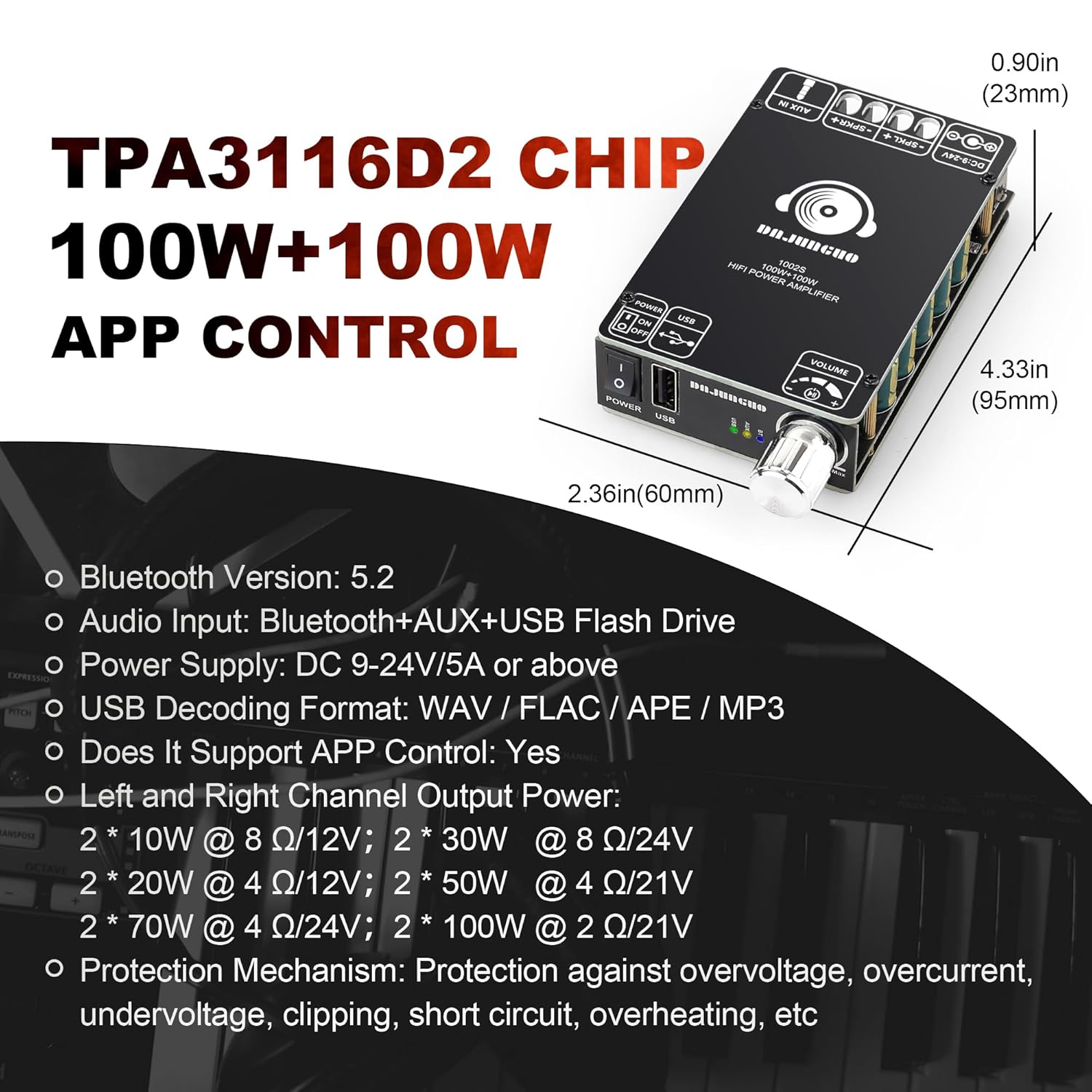
This amplifier board features dual TPA3116D2 chips, delivering 100W+100W power output, and supports multiple input methods including Bluetooth, USB, and 3.5mm AUX. It is designed for various audio applications, offering high-fidelity sound within a wide voltage range.
2. Safety Precautions
WARNING: To prevent fire or electric shock, do not expose this appliance to rain or moisture. Do not open the casing. Refer servicing to qualified personnel only.
- Ensure the power supply voltage is within the specified DC 9-24V range.
- Connect speakers with appropriate impedance (4-8 ohms recommended) to avoid damage.
- Avoid short circuits on speaker outputs.
- Do not expose the board to excessive heat or direct sunlight.
- Keep out of reach of children.
- Disconnect power before making any connections or performing maintenance.
3. What's in the Box
Upon opening the package, verify that all components are present:
- 1 x DAJUNGUO 1002S Bluetooth Amplifier Board
- 1 x Power Cable (approx. 6 inches)
- 1 x Screwdriver
- Mounting hardware (standoffs, screws, nuts, washers)
- 1 x Front Panel (for DIY enclosure)
- 1 x Bottom Plate (for protection)

This image displays the DAJUNGUO 1002S Bluetooth Amplifier Board along with its accompanying accessories, including the power cable, screwdriver, mounting hardware, and the DIY front panel and bottom plate.
4. Setup
4.1 Component Identification

This diagram highlights the main components of the amplifier board, including the dual TPA3116D2 chips, large heat sink, DC 9-24V input, 3.5mm AUX input, USB input, power switch, Bluetooth antenna base (IPEX1), and the multifunctional knob with various click functions.
- Multifunctional Knob: Controls volume, power on/standby, mode switching, and track navigation.
- DC 9-24V Input (5.5x2.5mm): Power input for the amplifier.
- 3.5mm AUX Input: For connecting external audio devices via an auxiliary cable.
- USB Input: For playing music from a USB flash drive.
- Power Switch: Toggles the amplifier on/off.
- Speaker Outputs (L+/L- and R+/R-): Connect your passive speakers here.
- Bluetooth Antenna Base (IPEX1): For connecting an external Bluetooth antenna (not included).
4.2 Assembly (Optional for DIY Enclosure)
The amplifier board comes with components for a DIY enclosure. Follow these steps if you wish to assemble it:
- Remove the bottom panel: Use the provided screwdriver to remove the screws securing the bottom panel.
- Remove the top panel: Similarly, remove the screws from the top panel.
- Replace the small panel with a large panel: The kit includes a larger front panel designed for easier DIY integration.
- Remove the pre-drilled hole position plate: This plate helps in aligning components for custom enclosures.
- Install the large panel: Secure the larger front panel to the amplifier board.
- Install the bottom plate: Attach the protective bottom plate using the provided standoffs and screws to prevent short circuits.

This image illustrates the process of customizing the amplifier board for a DIY enclosure, showing how to remove the bottom board, drill through pre-designated holes, remove the small panel, and install the larger panel for a custom front.
This video demonstrates how to modify the amplifier board for DIY projects, specifically showing how to utilize the bottom board to create a custom front panel by removing the original small panel and installing a larger, pre-drilled one.
4.3 Power Connection
Connect the provided power cable to the DC 9-24V input. The upgraded DC socket ensures a spark-free connection. Ensure the power source is within the specified voltage range.

This image provides a close-up view of the upgraded DC socket on the amplifier board, highlighting its 5.5x2.5mm specification and noting that a DC terminal can also be used if a compatible plug is unavailable. This design aims to prevent sparks during power connection.
This video demonstrates the DAJUNGUO 1002S Bluetooth amplifier board being powered by a 19V 4.74A DC power supply, showcasing its operation with a stable power input.
4.4 Speaker Connection
Connect your passive speakers to the L+/L- and R+/R- terminals. Ensure correct polarity for optimal sound quality.

This table details the power output of the 1002S amplifier based on different DC voltages and speaker impedances. It provides guidelines for optimal performance and speaker compatibility, noting specific recommendations for 2-ohm and 4-ohm speaker setups.
| DC Voltage | Channel | Speaker Impedance | Power Output |
|---|---|---|---|
| 12V | R & L | 8Ω | 10W+10W |
| 4Ω | 20W+20W | ||
| 21V | R & L | 8Ω | 25W+25W |
| 4Ω | 50W+50W | ||
| 2Ω | 100W+100W | ||
| 24V | R & L | 8Ω | 30W+30W |
| 4Ω | 70W+70W | ||
1. If the speaker impedance is 2 ohms, the voltage should not exceed 21V; 20V or 19V is recommended. 2. When the input voltage is 24V, the impedance of the left and right channel speakers must be greater than or equal to 4 ohms. | |||
5. Operating Instructions
5.1 Power On/Off
Turn the multifunctional knob clockwise until you hear a "click" to power on the amplifier. Turn it counter-clockwise until it clicks again to power off.
This image shows a close-up of the power switch and USB port on the amplifier board, indicating their positions for user interaction.
5.2 Input Modes
The amplifier supports Bluetooth, USB, and 3.5mm AUX input modes. Input mode indicators provide visual feedback on the currently active mode.

This image illustrates the various input methods supported by the amplifier board: Bluetooth Input, USB Flash Drive, and 3.5mm AUX, highlighting its versatility for connecting different audio sources.
- Bluetooth Input:
- Turn on the amplifier. The Bluetooth indicator will blink, indicating pairing mode.
- Enable Bluetooth on your device (smartphone, tablet, etc.) and search for "DAJUNGUO 1002S".
- Select the amplifier to pair. Once connected, the indicator will remain solid.
- You can customize the Bluetooth name and set a password via the APP (if supported and activated).
- USB Input:
- Insert a USB flash drive (FAT32 format, 32GB or less) into the USB port.
- The amplifier supports MP3, FLAC (bitrate within 1500kbps), WAV (sampling rate within 44100Hz), and APE formats.
- The USB indicator will light up when active.
- 3.5mm AUX Input:
- Connect your audio device (TV, MP3 player, laptop) to the 3.5mm AUX input using an auxiliary cable.
- The AUX indicator will light up when active.
This video demonstrates the DAJUNGUO 1002S Bluetooth Amplifier Board in operation, showcasing its various input modes (Bluetooth, USB, AUX) and how to switch between them, providing a visual guide to its functionality.
5.3 Multifunctional Knob Operations
- 1 Click: Play/Pause (in Bluetooth/USB mode)
- 2 Clicks: Next Song (in Bluetooth/USB mode)
- 3 Clicks: Previous Song (in Bluetooth/USB mode)
- 4 Clicks: Switch Input Mode (Bluetooth/USB/AUX)
- 5 Clicks: Factory Reset
- Long Press: Power On/Standby
6. Maintenance
- Keep the amplifier board clean and free from dust. Use a soft, dry cloth for cleaning.
- Avoid exposing the board to liquids or excessive humidity.
- Ensure proper ventilation to prevent overheating, especially during prolonged use. The large heat sink is designed for efficient heat dissipation.
- Regularly check all connections for secure fit.
7. Troubleshooting
| Problem | Possible Cause | Solution |
|---|---|---|
| No power | Incorrect power supply voltage or polarity; loose power connection. | Verify DC 9-24V input and correct tip-positive polarity. Check power cable connection. |
| No sound output | Incorrect input mode selected; loose speaker connections; speaker impedance mismatch. | Press the knob 4 times to cycle through input modes. Check speaker wiring and ensure correct polarity. Refer to the Specifications table for compatible speaker impedances. |
| Bluetooth pairing issues | Amplifier not in pairing mode; device too far; interference. | Ensure amplifier is on and Bluetooth indicator is blinking. Move device closer to the amplifier. Reduce interference from other wireless devices. Perform a factory reset (5 clicks on knob). |
| USB playback issues | Incorrect USB format or capacity; unsupported music format. | Ensure USB flash drive is FAT32 formatted and 32GB or less. Verify music files are MP3, FLAC (within 1500kbps), WAV (within 44100Hz), or APE. |
| Distorted sound | Volume too high; speaker impedance mismatch; faulty audio source. | Reduce volume. Check speaker impedance. Test with a different audio source. |
8. Specifications
- Model: 1002S
- Chipset: Dual TPA3116D2 Chips
- Power Output: 100W+100W (peak @ 1kHz, 21V, 4-ohm speakers)
- Voltage Range: DC 9-24V
- Audio Input: Bluetooth, 3.5mm AUX, USB Flash Drive
- Bluetooth Version: 5.2
- USB Decoding Formats: MP3, FLAC, WAV, APE
- USB Flash Drive Compatibility: FAT32 format, 32GB or less
- Protection Mechanisms: Overvoltage, overcurrent, undervoltage, clipping, short circuit, overheating
- Product Dimensions: 4.33 x 2.32 x 0.9 inches
- Item Weight: 5.61 ounces
9. Warranty and Support
DAJUNGUO offers 7 * 24 Hours After-sales Service. Your satisfaction is our service tenet. If you have any questions about the product, or if the product has quality problems, please contact us at any time. We are committed to providing a 100% satisfactory answer and support.
For further assistance, please refer to the contact information provided with your purchase or visit the official DAMGOO store on Amazon.