
Introduction
This manual provides instructions for the safe and efficient use of your Lifetime Air Mini USB Table Fan. Please read this manual thoroughly before operating the device and retain it for future reference. This compact and portable fan is designed to provide personal cooling in various indoor environments.
Safety Instructions
To reduce the risk of fire, electric shock, or injury, always follow these basic safety precautions:
- Ensure the power source voltage matches the fan's requirements (5V DC).
- Do not immerse the fan, cord, or plug in water or other liquids.
- Keep the fan away from heat sources, direct sunlight, and flammable materials.
- Do not insert fingers or any objects into the fan grille when it is operating.
- Unplug the fan from the USB port when not in use, before cleaning, or before moving it.
- Do not operate the fan with a damaged cord or plug, or if the fan malfunctions or has been dropped or damaged in any manner.
- This appliance is not intended for use by persons (including children) with reduced physical, sensory, or mental capabilities, or lack of experience and knowledge, unless they have been given supervision or instruction concerning use of the appliance by a person responsible for their safety.
- Children should be supervised to ensure that they do not play with the appliance.
- Use only the provided USB cable.
Package Contents
Verify that all items are present in the package:
- 1 x Lifetime Air Mini USB Table Fan
- 1 x USB Power Cable
- 1 x User Manual (this document)

Image: Product packaging for the Lifetime Air Mini USB Fan, highlighting its features like 3 speeds, tilt function, and included USB cable.
Product Features
- Compact and Portable Design: Easy to carry and place on any flat surface.
- USB Powered: Connects to any standard USB port (computer, laptop, power bank, USB adapter).
- 3 Speed Settings: Adjustable airflow for personalized comfort.
- Adjustable Tilt: Direct airflow where needed.
- Touchpad Control: Simple operation with an electronic touch switch.
- Low Noise Level: Designed for quiet operation.

Image: Front view of the white Lifetime Air Mini USB Fan, showing the fan blades and protective grille.

Image: Side view of the fan, illustrating its adjustable tilt feature with an arrow indicating movement.
Setup
- Unpack: Carefully remove the fan and all accessories from the packaging.
- Placement: Place the fan on a stable, flat surface such as a desk, table, or nightstand. Ensure there is adequate space around the fan for proper airflow.
- Connect Power: Insert the small end of the provided USB cable into the USB port located at the back of the fan.
- Power Source: Plug the larger end of the USB cable into a compatible USB power source (e.g., computer USB port, laptop, power bank, or a USB wall adapter).
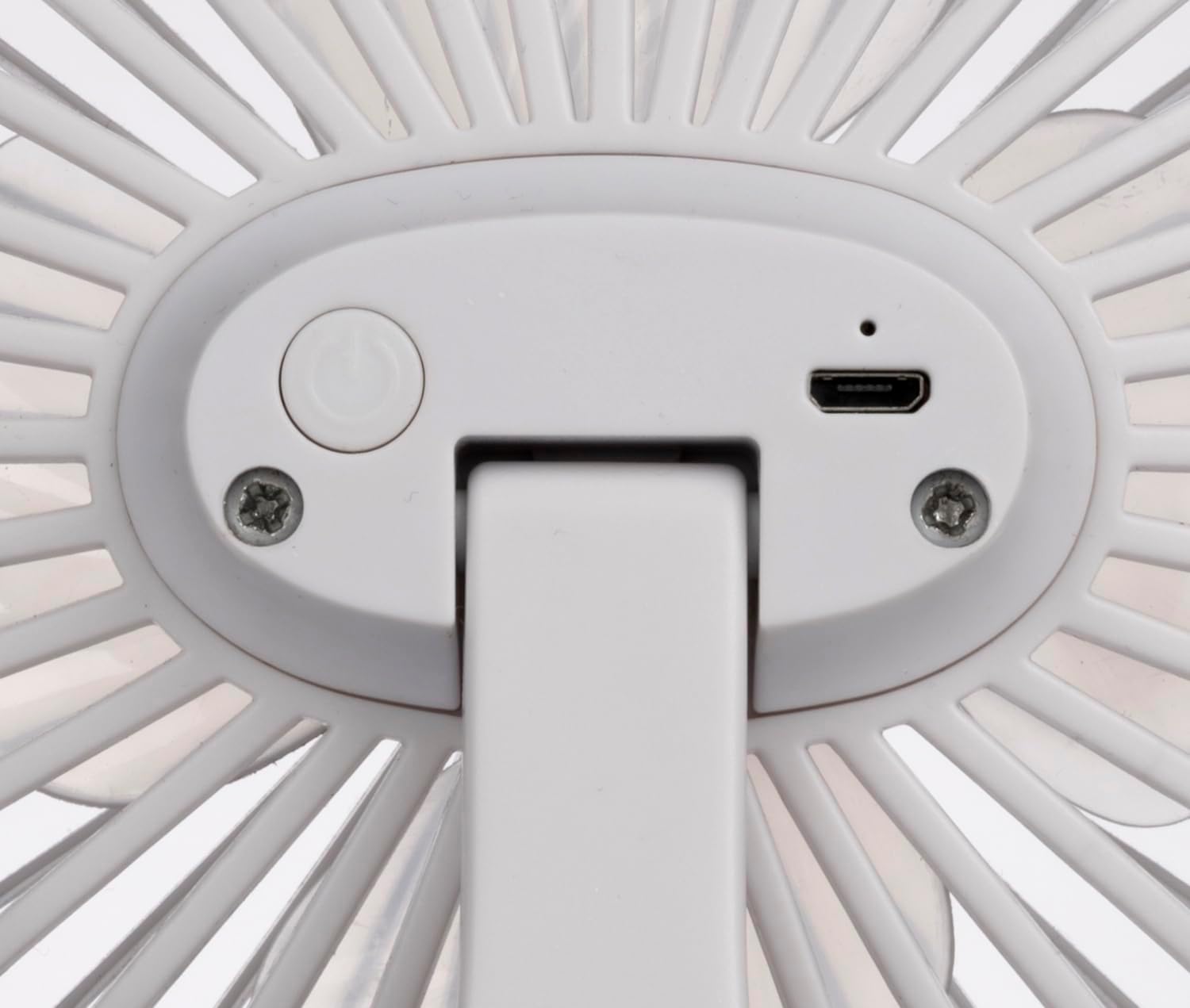
Image: Close-up of the back of the fan, showing the power button and the micro-USB input port.

Image: The mini USB fan placed on a wooden desk, connected via USB cable to a laptop, with a smartphone nearby.
Operating Instructions
- Power On/Off: Press the power button located on the back of the fan once to turn it on. Press it again to cycle through speeds or turn it off.
- Adjust Speed:
- Press once for Speed 1 (Low).
- Press twice for Speed 2 (Medium).
- Press three times for Speed 3 (High).
- Press four times to turn the fan off.
- Adjust Tilt: Gently tilt the fan head up or down to direct the airflow to your desired angle.

Image: The mini USB fan operating on a desk, with blue lines indicating airflow towards a person working.

Image: The mini USB fan placed on a white bedside table next to a sleeping person, providing gentle airflow.
Maintenance
Regular maintenance helps ensure the longevity and optimal performance of your fan.
- Cleaning:
- Always unplug the fan before cleaning.
- Use a soft, damp cloth to wipe the exterior surfaces of the fan.
- Do not use abrasive cleaners or solvents.
- To clean dust from the fan blades, use a soft brush or a vacuum cleaner with a brush attachment. Do not attempt to disassemble the fan.
- Ensure the fan is completely dry before plugging it back in.
- Storage: When not in use for extended periods, store the fan in a cool, dry place, preferably in its original packaging, away from direct sunlight and moisture.
Troubleshooting
| Problem | Possible Cause | Solution |
|---|---|---|
| Fan does not turn on. | No power supply. USB cable not properly connected. Faulty USB port. |
Ensure the USB cable is securely plugged into both the fan and the power source. Try a different USB port or power adapter. Check if the power source is active. |
| Fan makes unusual noise. | Obstruction in fan blades. Fan not on a stable surface. |
Unplug the fan and carefully check for any obstructions. Remove if safe to do so. Place the fan on a firm, level surface. |
| Airflow is weak. | Fan speed set too low. Dust accumulation on blades/grille. |
Increase the fan speed using the power button. Clean the fan blades and grille as per maintenance instructions. |
Specifications
| Brand: | Lifetime Air |
| Model Name: | 871125224954 |
| Color: | White |
| Power Source: | USB |
| Input Voltage: | 5 VDC |
| Maximum Power Consumption: | 4 Watts |
| Number of Speeds: | 3 |
| Number of Blades: | 4 |
| Material: | Acrylonitrile Butadiene Styrene (ABS) Plastic |
| Dimensions (L x W x H): | 120 x 77 x 150 mm (approx.) |
| Weight: | 159 g (approx.) |
| Control Type: | Touchpad Control / Electronic Touch-Control |
| Indoor/Outdoor Use: | Indoor |
Warranty and Support
For warranty information and customer support, please refer to the documentation provided at the time of purchase or contact your retailer. Keep your proof of purchase for warranty claims.
