
Saker SAK
Saker Rechargeable Camping Fan User Manual
Model: SAK
Introduction
Thank you for choosing the Saker Rechargeable Camping Fan. This manual provides comprehensive instructions for the safe and efficient operation, maintenance, and troubleshooting of your new fan. Please read this manual thoroughly before first use and retain it for future reference.
Product Overview
Components
- Fan Unit: Features double-blades for powerful airflow and a protective grille.
- Base Unit: Houses the control panel, battery, and charging ports.
- LED Lanterns: Integrated lights around the fan grille.
- Hanging Hook: Located on the top handle for suspending the fan.
- Remote Control: For convenient operation from a distance. Includes a storage slot on the base.
- Charging Ports: Type-C and USB-A ports for charging the fan and external devices.
Key Features
- Rechargeable 20000mAh Battery: Provides 8.5-200 hours of operation and functions as a power bank.
- 3-Level Brightness LED Lights: Aids navigation in low-light conditions.
- 4 Adjustable Fan Speeds: Offers personalized cooling from natural wind to high speed.
- Remote and Button Control: Flexible operation options.
- Double-Blade Design: Enhances airflow.
- 270° Rotation & 45°/90° Auto-Oscillation: Directs airflow efficiently.
- Sleep Mode: Turns off indicator lights for undisturbed sleep.
- Timer Function: Customizable working times (1, 2, 4, or 8 hours).
- Portable & Lightweight: Weighs 3.08 lbs, designed for easy carrying.
- Versatile Placement: Can be hung or placed on a flat surface.

Image: The Saker Rechargeable Camping Fan, showing its main unit, remote control, and a smartphone connected for charging, highlighting its power bank capability.
Setup
Initial Charging
Before first use, fully charge the fan. Connect the provided Type-C cable to the fan's Type-C input port and the other end to a compatible USB power adapter (not included). The battery indicator lights on the control panel will show charging progress. A full charge typically takes 9-10 hours.

Image: A person using the Saker Camping Fan outdoors while working on a laptop, demonstrating its portability and battery life for extended use.
Placement Options
- Standing: Place the fan on any flat, stable surface. Ensure the base is secure to prevent tipping.
- Hanging: Utilize the built-in hook on the top handle to hang the fan inside a tent, from a branch, or other suitable overhead support. Ensure the hook is securely fastened.
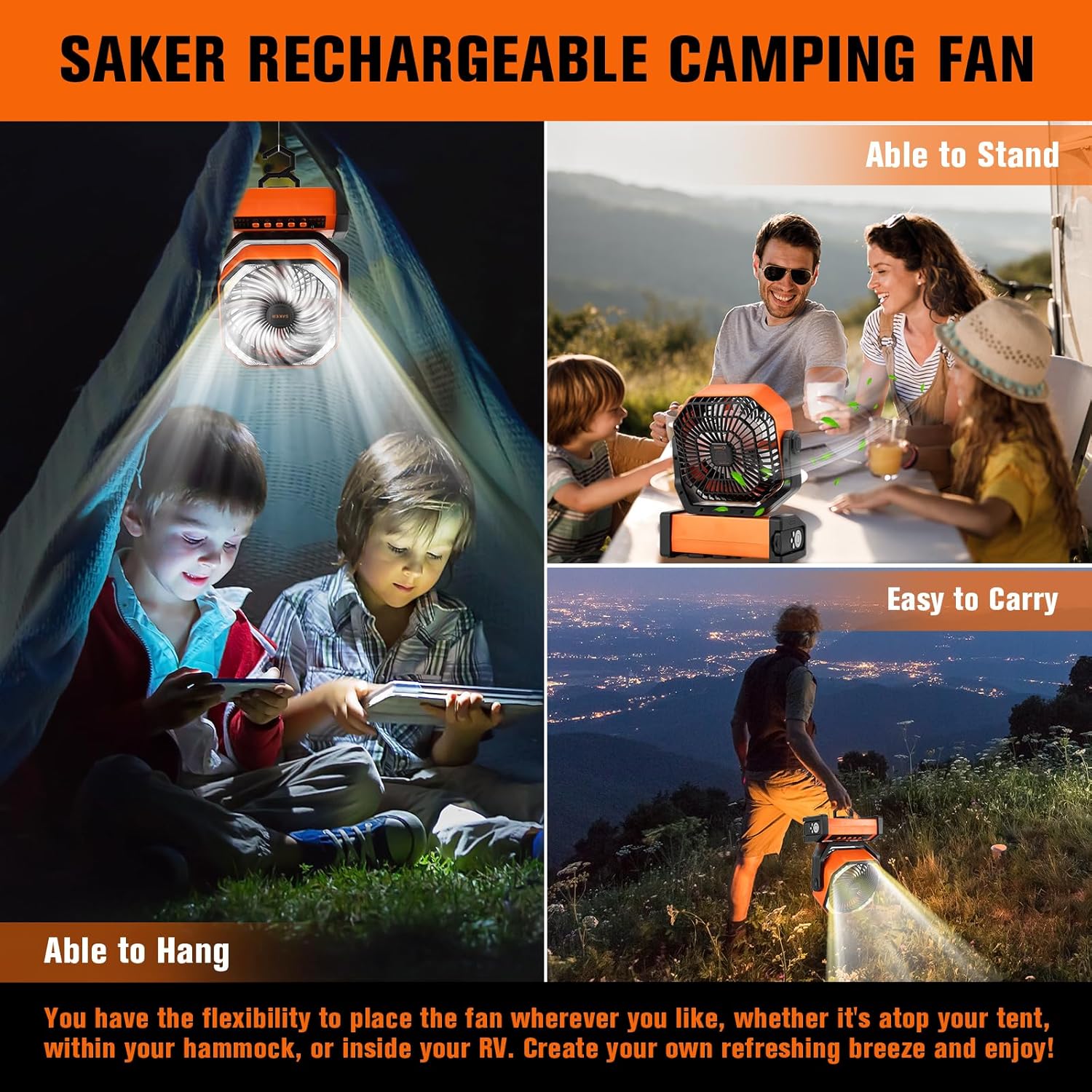
Image: The Saker Camping Fan displayed in two scenarios: hanging inside a tent providing light and airflow, and standing on a table for outdoor dining, illustrating its versatile placement options.
Operating Instructions
Control Methods
The Saker Camping Fan can be operated using either the control buttons on the base unit or the included remote control.
- Button Control: Press the corresponding buttons on the fan's base to adjust settings.
- Remote Control: The remote allows control from up to 16.4 feet away. Store the remote in the designated slot on the side of the base when not in use to prevent misplacement.

Image: A close-up of the Saker Camping Fan's control panel on the base and the remote control, demonstrating both methods of operation and the fan's rotation and oscillation capabilities.
Fan Operation
- Power On/Off: Press the power button on the control panel or remote to turn the fan on or off.
- Adjust Fan Speed: Press the fan speed button (usually indicated by fan icons or +/-) to cycle through the 4 available speeds: Natural Wind, Low, Medium, and High.
- Rotation and Oscillation:
- The fan head can be manually rotated 270° vertically to direct airflow.
- Press the oscillation button to activate automatic horizontal oscillation (45° to 90°). Press again to stop.
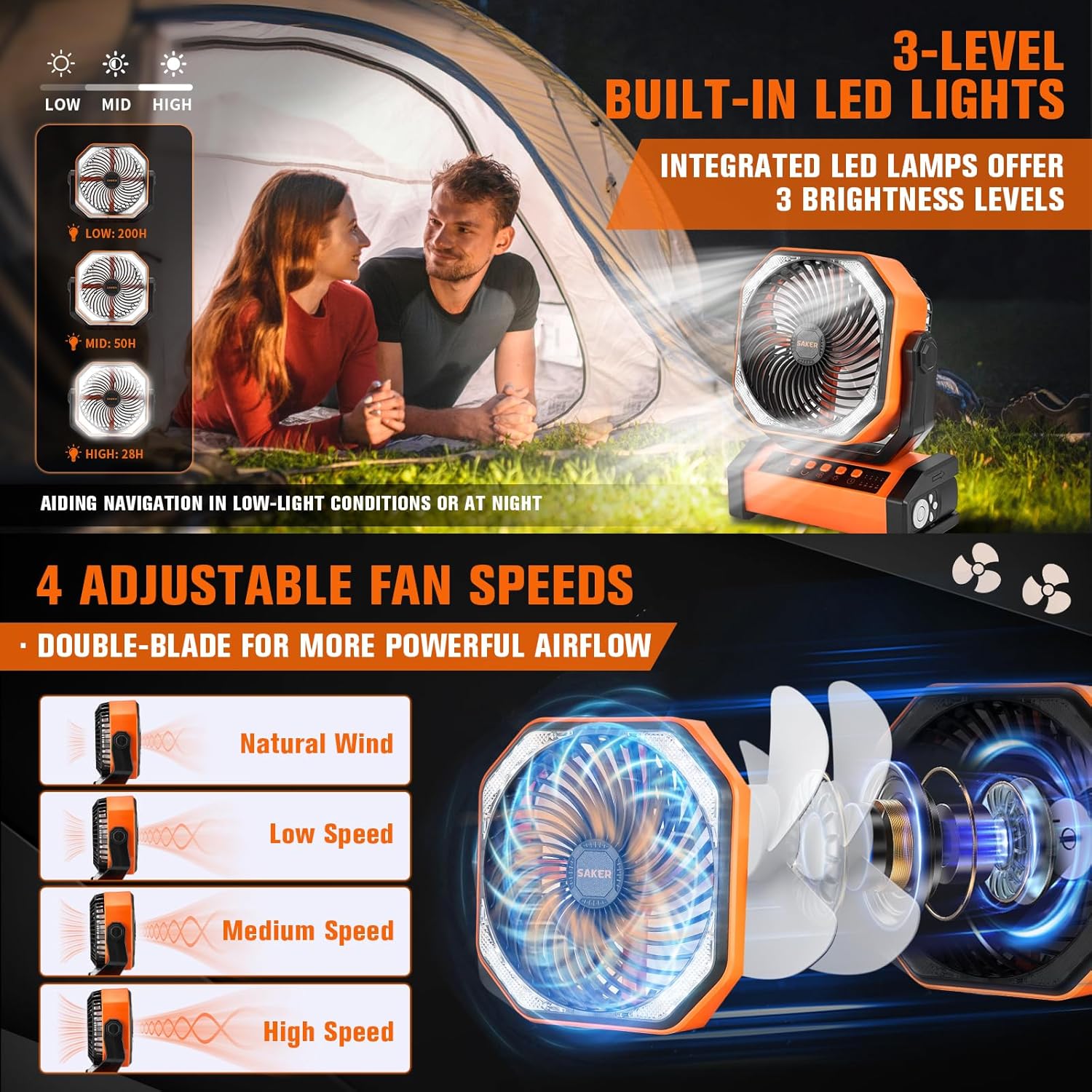
Image: A visual representation of the Saker Camping Fan's three LED light brightness levels and four adjustable fan speeds, illustrating the different airflow patterns.
LED Lantern Operation
Press the light button (indicated by a light bulb icon) on the control panel or remote to cycle through the 3 brightness levels of the integrated LED lanterns. Press again to turn the lights off.
Advanced Functions
- Sleep Mode: Press the sleep mode button (indicated by a crescent moon icon) to activate sleep mode. This will turn off all indicator lights on the fan for undisturbed sleep. The fan will continue to operate at its current settings. Press again to exit sleep mode.
- Timer Function: Press the timer button (indicated by a clock icon) to set the fan to automatically turn off after a specified duration. Available timer settings are 1, 2, 4, or 8 hours. Cycle through the options by pressing the button repeatedly.

Image: A child sleeping peacefully with the Saker Camping Fan operating in sleep mode, demonstrating the low noise level and timer function for power conservation.
Using as a Power Bank
The Saker Camping Fan can be used to charge external devices. Connect your device's charging cable to the USB-A output port on the side of the fan's base. The fan's battery will then supply power to your device.
Maintenance
- Cleaning: Ensure the fan is turned off and unplugged before cleaning. Use a soft, dry cloth to wipe down the exterior surfaces. For stubborn dirt, a slightly damp cloth can be used, followed by a dry cloth. Do not use abrasive cleaners or allow water to enter the fan motor or electrical components.
- Grille Cleaning: Periodically clean the fan grille to remove dust and debris that may accumulate and affect airflow. Use a soft brush or a vacuum cleaner with a brush attachment.
- Battery Care: To prolong battery life, avoid fully discharging the battery frequently. Recharge the fan regularly, especially if it will be stored for an extended period. Store the fan in a cool, dry place.
- Storage: When not in use, store the fan in its original packaging or a protective cover to prevent dust accumulation.
Troubleshooting
| Problem | Possible Cause | Solution |
|---|---|---|
| Fan does not turn on. | Battery is depleted. | Charge the fan fully. |
| Fan does not turn on. | Power button not pressed correctly. | Ensure the power button is pressed firmly. If using remote, check remote battery. |
| LED lights are dim or not working. | Battery is low. | Charge the fan. |
| Fan is not oscillating. | Oscillation function not activated. | Press the oscillation button to activate. |
| External device not charging from fan. | Fan battery is low or cable is faulty. | Ensure fan is charged. Try a different USB cable. |
Specifications
- Brand: Saker
- Model Name: SAK
- Color: Orange
- Electric Fan Design: Table Fan
- Power Source: Battery Powered
- Style: Modern
- Product Dimensions: 4.05"D x 8.58"W x 10.66"H
- Special Features: Lightweight, Oscillating, Portable
- Recommended Uses: Cooling
- Finish Type: Powder Coated
- Air Flow Capacity: 213 CMPH
- Speed: 4 RPM (refers to number of speeds, not actual RPM)
- Voltage: 3.7 Volts
- Included Components: Remote
- Indoor/Outdoor Usage: Outdoor
- Control Method: Remote
- Connector Type: USB Type C, USB Type A
- Blade Material: Plastic
- Is Cordless?: Yes
- Number of Power Levels: 4
- Size: 20000 mAh
- Item Weight: 3.45 pounds
- Batteries: 1 Lithium Ion batteries required (included)
Official Product Video
Video: An official product video demonstrating the features and usage of the Saker Rechargeable Camping Fan, including its portability, adjustable settings, and power bank functionality.
Warranty and Support
Saker products are designed for durability and performance. For any questions, technical assistance, or warranty claims, please refer to the contact information provided with your purchase or visit the official Saker website. Please retain your proof of purchase for warranty purposes.
For more information, visit the Saker Store on Amazon.
Related documentsSAK

Ask a question about this manual
Ask about setup, troubleshooting, compatibility, parts, safety, or missing instructions. Manuals+ will review the question and use this page’s manual context to help answer it.