
1. Important Safety Information
Please read and understand all instructions before assembly and use. Failure to follow these instructions may result in injury or damage to the product.
- Assembly: This desk requires assembly. Always follow the provided instructions and use appropriate tools. It is recommended that two people assemble the desk for ease and safety.
- Electrical Safety: Be cautious when using the USB charging ports and power outlets to prevent electrical shock. Do not overload the outlets. Ensure all connections are secure.
- LED Lights: The LED lights should be used in a well-lit environment to avoid eye strain.
- Stability: This desk is designed for adult use. Always ensure the desk is stable and balanced before use to prevent tip-over hazards. Do not climb or sit on the desk.
- Weight Capacity: Do not exceed the maximum weight recommendation of 150 pounds for the desktop.
2. Package Contents
Before beginning assembly, ensure all parts are present and in good condition. Refer to the included parts list in your package for verification.

Image: Overview of desk components with key dimensions.
3. Setup and Assembly
The assembly process typically takes between 30 minutes to 1 hour with two people. Follow the steps carefully.
3.1. Assembly Video Guide
For a visual guide, please watch the official ODK installation video:
Video: Step-by-step installation guide for the ODK Computer Desk.
3.2. Step-by-Step Assembly Instructions
- Prepare Components: Unpack all parts and verify against the parts list. Lay them out on a clean, soft surface to prevent scratches.
- Assemble Desk Frame: Connect the metal frame components using the provided screws and tools. Ensure all connections are secure but do not overtighten until the entire frame is assembled.
- Attach Desktop: Carefully place the desktop onto the assembled frame. Secure it with the designated screws.
- Install Drawers: Expand the fabric drawers and insert them into the designated slots in the desk frame. Attach the drawer handles.
- Install Monitor Stand: Attach the adjustable monitor stand to the desktop. Choose your preferred height setting (3.2", 4.3", or 5.5" from the desktop surface) and secure it with screws.
- Install USB Power Hub: Secure the USB power hub to the designated area on the monitor stand using the provided screws.
- Attach LED Strip: Adhere the LED light strip to the underside of the monitor stand using the double-sided adhesive. Ensure the power supply connection is positioned correctly. Secure the USB wire with the provided snaps.
- Attach Hook: Install the versatile hook on either side of the desk using the provided screws.
4. Operating Instructions
4.1. USB Charging Ports & Power Outlets
The desk is equipped with 3 standard power outlets and 2 USB charging ports. Plug the desk's main power cord into a wall outlet. You can then charge your electronic devices directly from the desk.

Image: Integrated USB charging ports and power outlets.
4.2. LED Lights
The LED strip features 10 static colors, 6 brightness grades, and 10 dynamic modes. Use the switching controls to adjust the lighting to your preference. The lights also have a memory function, retaining your last setting.

Image: LED lighting features and control.
4.3. Adjustable Monitor Stand
The monitor stand can be adjusted to three different heights: 3.2 inches, 4.3 inches, and 5.5 inches. This allows for an ergonomic viewing angle suitable for various users and setups. The monitor stand is also removable without leaving screw holes on the desktop.
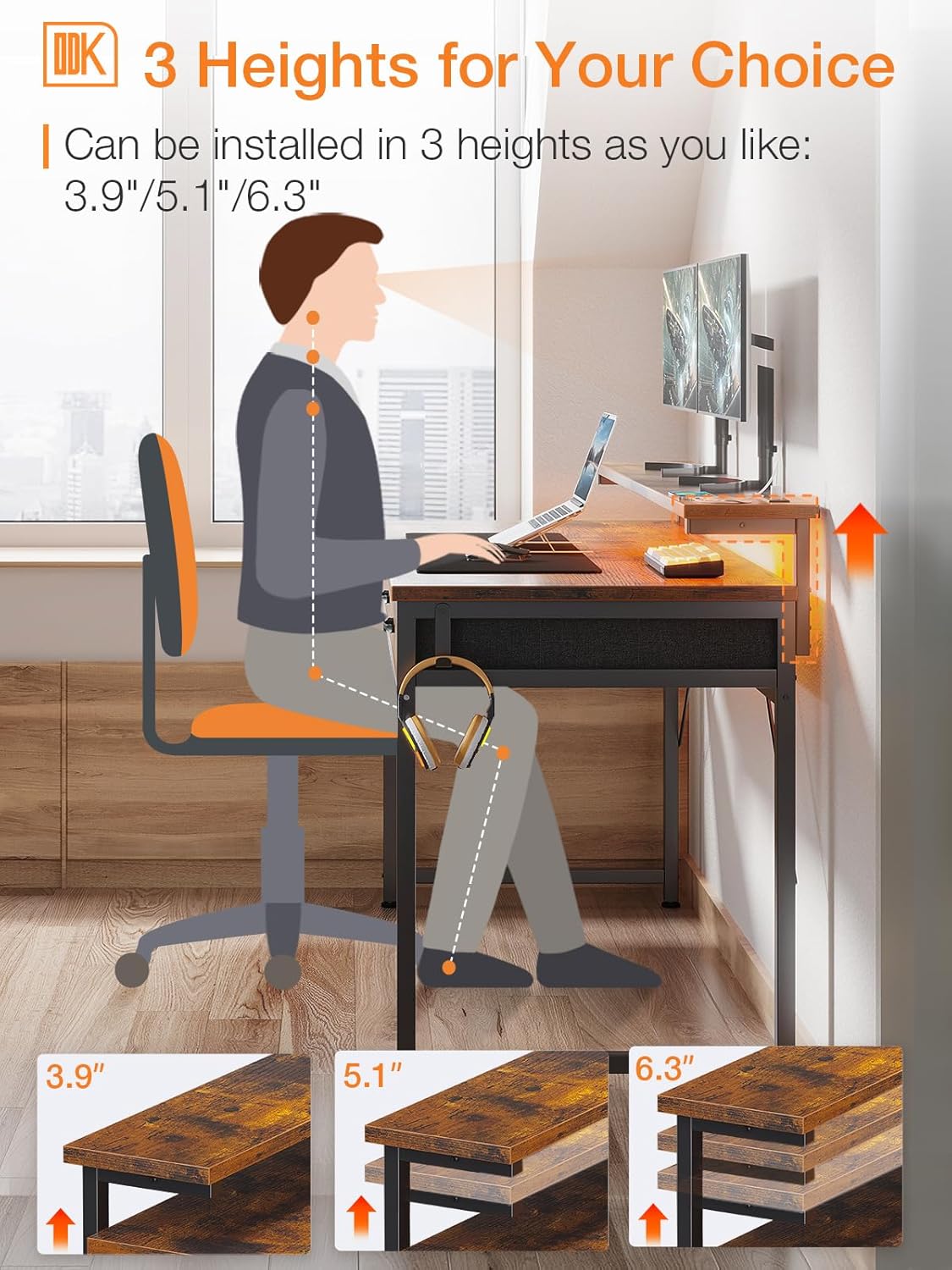
Image: Adjustable monitor stand height options.
4.4. Storage Drawers
The desk includes three large-capacity fabric drawers for organizing office or study supplies, keeping them dust-free and easily accessible.

Image: Three fabric storage drawers.
5. Maintenance
- Cleaning: Wipe the desk surfaces with a soft, damp cloth. Avoid harsh chemicals or abrasive cleaners that may damage the finish.
- Tightening Screws: Periodically check all screws and connections to ensure they remain tight. Retighten as necessary to maintain stability.
- Electrical Components: Keep the USB ports and power outlets free from dust and debris. Do not expose electrical components to liquids.
- Drawer Care: The fabric drawers can be spot cleaned with a mild detergent if needed. Ensure they are completely dry before reinserting.
6. Troubleshooting
| Problem | Possible Cause | Solution |
|---|---|---|
| Desk is wobbly/unstable. | Screws are loose; uneven floor. | Tighten all assembly screws. Adjust the foot pads on the desk legs to level the desk. |
| USB ports/power outlets not working. | Desk not plugged in; power strip switch off; faulty connection. | Ensure the desk's main power cord is securely plugged into a working wall outlet. Check if the power strip switch (if any) is on. Verify all internal connections of the power hub. |
| LED lights not turning on. | Power connection loose; remote control battery low; LED strip damaged. | Check the power connection to the LED strip. Ensure the remote control has working batteries. If issues persist, contact customer support. |
| Drawers do not slide smoothly. | Obstruction in the drawer slot; drawer not fully expanded. | Remove the drawer and check for any obstructions. Ensure the fabric drawer is fully expanded and correctly inserted into the frame. |
7. Specifications
- Brand: ODK
- Model: 55 Inch Computer Desk
- Product Dimensions: 19.7"D x 55"W x 31"H
- Desktop Material: Engineered Wood
- Base Material: Metal
- Color: Rustic Brown (Note: Other colors may be available for different models)
- Item Weight: 20 Kilograms
- Number of Drawers: 3
- Monitor Stand Heights: 3.2", 4.3", 5.5" (Adjustable)
- Power Outlets: 3 AC Outlets (120V/12A)
- USB Ports: 2 USB Charging Ports (5V-2A)
- Power Cord Length: 4.9 Feet
- LED Lights: 10 Static Colors, 6 Brightness Grades, 10 Dynamic Modes, Memory Function
- Maximum Weight Recommendation: 150 Pounds
- Assembly Required: Yes (Recommended 2 people)
8. Warranty and Customer Support
ODK is committed to providing high-quality products and excellent customer service. If your ODK desk arrives damaged, has missing parts, or is scratched, please contact our professional customer support team. We aim to help you solve any problems within 24 hours.
For support, please visit the ODK Store on Amazon or refer to the contact information provided in your product packaging.


