
Introduction
ThxToms Heated Glove Liners are designed to provide warmth and comfort in cold conditions. These ultra-thin, rechargeable gloves feature heating elements that cover the entire hand, sensitive touchscreen fingertips, and adjustable temperature settings. They can be worn alone or as liners under heavier gloves, making them suitable for various outdoor activities and for individuals experiencing cold hands due to conditions like Raynaud's or arthritis.
Package Contents
Please verify that all items are present in your package:
- 1 Pair of ThxToms Heated Glove Liners
- 2 x 7.4V 2500mAh Rechargeable Lithium-Ion Batteries
- 1 x Dual Charger (US standard)
- 1 x User Manual
- 1 x Laundry Bag
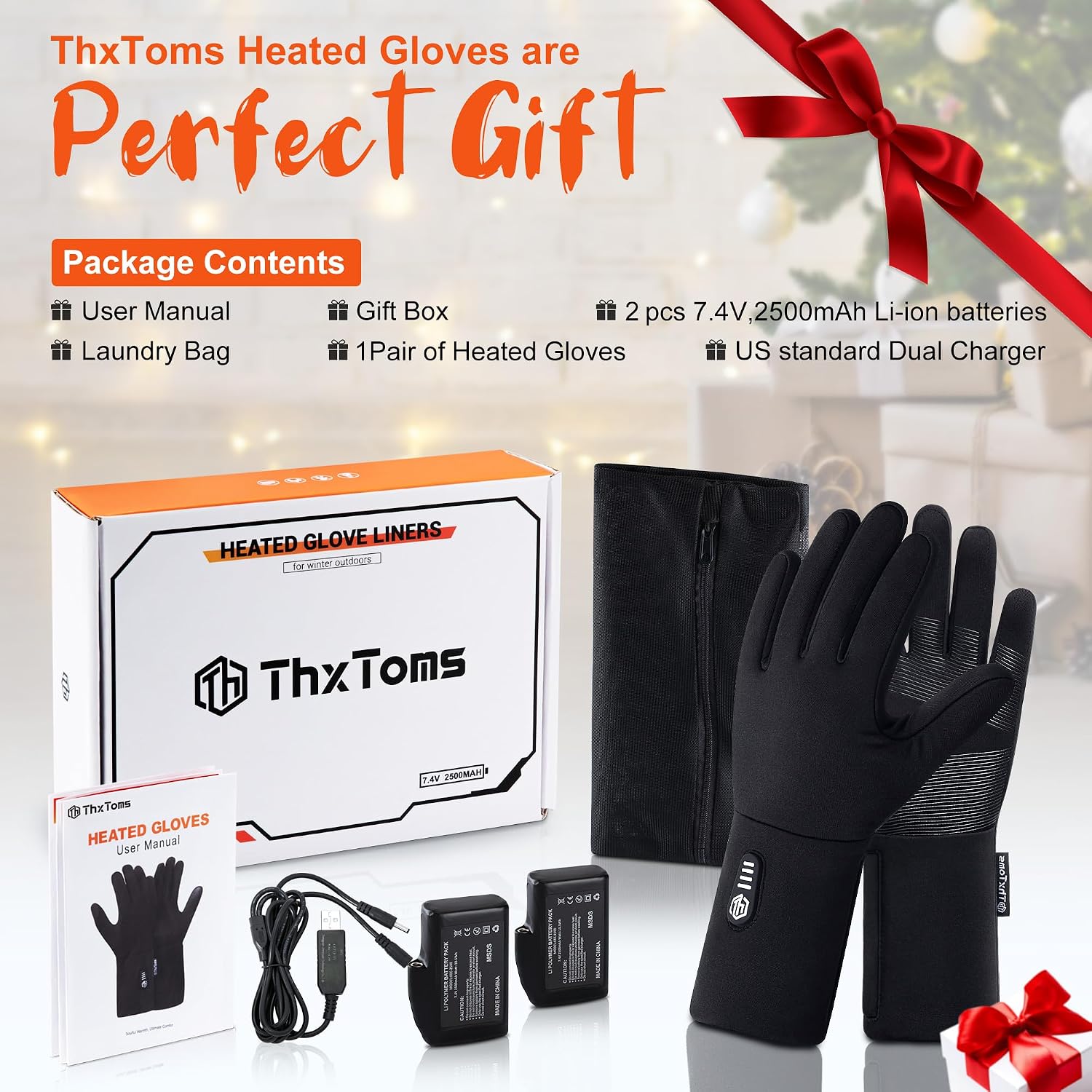
Image: Contents of the ThxToms Heated Glove Liners package, including gloves, batteries, charger, user manual, and laundry bag.
Product Features
- Ultra-Thin Design: Made from soft milk silk composite material, offering flexibility and comfort.
- Full Hand Heating: Heating elements cover the entire back of the hand and all fingers, extending to the fingertips.
- Adjustable Temperature: Three heat settings (High, Medium, Low) for personalized warmth.
- Long-Lasting Battery: Equipped with 7.4V 2500mAh rechargeable Li-ion batteries, providing up to 7 hours of heat on the low setting.
- Touchscreen Compatibility: Conductive fabric on the thumb and forefinger allows for use with touchscreen devices.
- Non-Slip Grip: Silicone pattern on the palm enhances grip.
- Versatile Use: Can be worn as standalone gloves or as an insulating layer under other gloves.

Image: Detailed view of the glove features, including touchscreen design, non-slip silicone, soft milk silk material, and suitability for outdoor work, winter sports, arthritis, and poor circulation.

Image: Comparison illustrating the comprehensive heating coverage of ThxToms gloves versus other brands that may only heat the back of the hand.
Setup
- Charge Batteries: Fully charge both 7.4V 2500mAh Li-ion batteries using the provided dual charger before the first use. The charger indicator lights will typically change from red to green when charging is complete.
- Connect Batteries: Locate the power cable inside the small pocket on the cuff of each glove. Connect a fully charged battery to the cable.
- Secure Batteries: Carefully place the connected battery into the glove's pocket and zip it securely to prevent it from falling out during use.

Image: Visual guide showing the four steps for setting up the heated gloves: charging batteries, connecting to gloves, placing in pocket, and powering on.
Operating Instructions
- Power On: With the batteries connected and secured, press and hold the power button located on the glove cuff for approximately 3 seconds. The indicator light will illuminate, typically starting on the highest heat setting (Red).
- Adjust Heat Level: Briefly press the power button to cycle through the three heat settings:
- High (Red Light): Provides the highest heat, approximately 140-150°F (60-65°C), with an estimated battery life of 2.5-3 hours.
- Medium (Blue Light): Provides moderate heat, approximately 122-131°F (50-55°C), with an estimated battery life of 3.5-5.5 hours.
- Low (Green Light): Provides gentle heat, approximately 104-113°F (40-45°C), with an estimated battery life of 6-7 hours.
- Power Off: To turn off the gloves, press and hold the power button for approximately 3 seconds until the indicator light extinguishes.
Battery Level Display
The power button also functions as a battery level indicator. The number of illuminated bars or the color of the light may indicate the remaining battery charge (e.g., 4 bars for 100%, 3 bars for 75%, 2 bars for 50%, 1 bar for 25%). Refer to the visual guide below for specific indications.

Image: Diagram showing the three adjustable temperature levels (High, Medium, Low) with corresponding temperatures and battery life, along with a visual representation of the battery power display on the glove.
Care and Maintenance
- Remove Batteries: Always remove the batteries from the glove pockets before cleaning.
- Hand Wash Recommended: For best results and to prolong the life of the heating elements, hand wash the gloves gently with mild detergent in cold water.
- Machine Wash (with caution): If machine washing, place the gloves inside the provided laundry bag. Use a gentle cycle with cold water.
- Drying: Do not wring or twist the gloves. Air dry them completely before storing or re-inserting batteries. Do not tumble dry, iron, or dry clean.
- Storage: Store the gloves and batteries in a cool, dry place away from direct sunlight when not in use. Ensure batteries are partially charged (around 50%) for long-term storage to maintain battery health.
Troubleshooting
| Problem | Possible Cause | Solution |
|---|---|---|
| Gloves not heating | Battery not charged Battery not connected properly Glove not powered on | Ensure batteries are fully charged. Verify battery is securely connected to the glove's power cable. Press and hold the power button for 3 seconds to turn on. |
| Short battery life | High heat setting used continuously Batteries not fully charged Extreme cold affecting battery performance | Use lower heat settings for longer duration. Ensure batteries are fully charged before each use. Battery performance naturally decreases in very cold temperatures. |
| Touchscreen not responding | Conductive fabric not making contact Glove tip dirty | Ensure the conductive thumb/forefinger tip fully touches the screen. Clean the touchscreen area of the glove. |
| One glove not heating | Battery issue in one glove Connection issue in one glove | Swap batteries between gloves to isolate the problem (glove or battery). Check the battery connection in the non-heating glove. |
Specifications
- Brand: ThxToms
- Model: Heated Glove Liners
- Material: Polyester (Milk silk composite)
- Battery: 7.4V 2500mAh Lithium-Ion (rechargeable)
- Heating Levels: 3 (High, Medium, Low)
- Max Heating Time: Up to 7 hours (on Low setting)
- Department: Unisex-adult
- Special Features: Reflective, Thermal, Touch Screen Support
- Hand Orientation: Ambidextrous
Size Chart
To ensure the best fit, please measure your hand width and finger length and compare with the chart below:

Image: Detailed size chart for ThxToms Unisex Heated Glove Liners, showing measurements for Palm Width, Middle Finger Length, Full Length, and Cuff Width for sizes S, M, L, and XL.
Warranty and Support
For product support, warranty information, or any inquiries regarding your ThxToms Heated Glove Liners, please contact ThxToms customer service. You can typically find contact details through the retailer's platform where you purchased the product or on the official ThxToms website. Please have your purchase details and model information ready when contacting support.