
Chessnut Air+
Chessnut Air+ Electronic Chess Set User Manual
Model: Air+
Introduction
Welcome to the Chessnut Air+ Electronic Chess Set. This manual provides detailed instructions for setting up, operating, maintaining, and troubleshooting your new electronic chess board. The Chessnut Air+ combines a traditional wooden chess board with advanced technology, offering full piece recognition, AI adaptive gameplay, and seamless integration with various chess applications.

Image: The Chessnut Air+ electronic chess board with all chess pieces in their starting positions. The board features a light wood finish with darker squares, and the pieces are made of wood in light and dark tones.
What's Included
Upon unboxing, please verify that all components are present:
- Chessnut Air Electronic Chessboard
- 34 high-quality wooden pieces with sensor chips (including 2 extra queens)
- USB-C charging cable
- Quick start guide
Setup Instructions
1. Charging the Board
Before initial use, fully charge your Chessnut Air+ board. Connect the provided USB-C charging cable to the port on the side of the board and to a suitable USB power source. The Power LED indicator will show charging status.
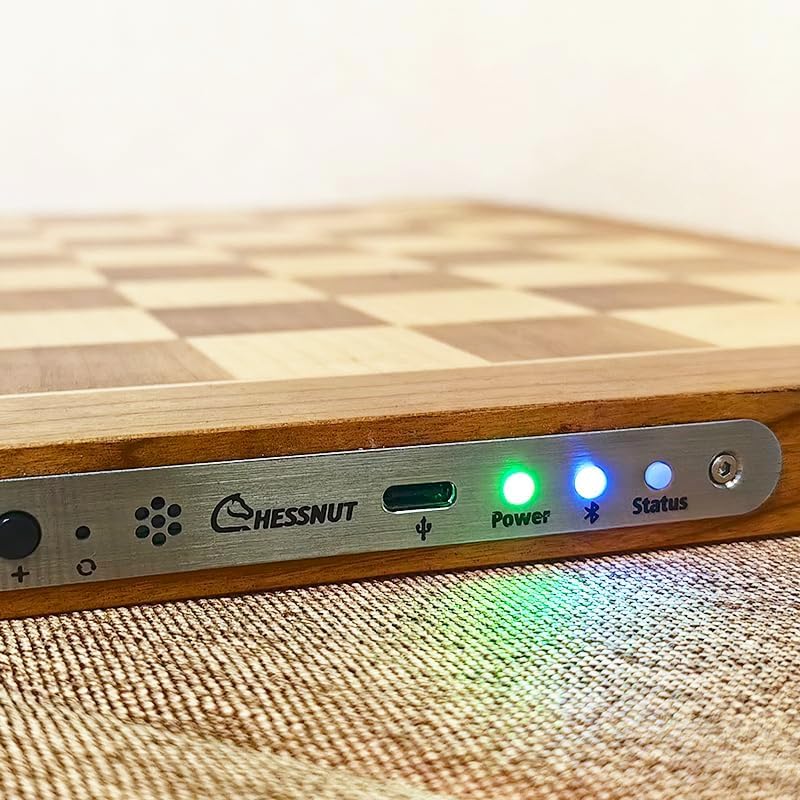
Image: A close-up view of the side panel of the Chessnut Air+ board, showing the USB-C charging port, a green Power LED, and blue Status LEDs. The Chessnut logo is also visible.
2. Installing the Chessnut App
The Chessnut Air+ requires the Chessnut application to function. Download the official Chessnut app from your device's app store (available for iOS and Android) or from the Chessnut website for Windows and Mac OS. Ensure your device meets the minimum system requirements.

Image: A graphic illustrating the broad compatibility of the Chessnut Air+ with various operating systems, including Mac OS, Windows, iOS, and Android. It shows individuals using the board with a computer and a tablet.
3. Pairing with Your Device
- Turn on the Chessnut Air+ board.
- Open the Chessnut app on your device.
- Navigate to the pairing section within the app (usually indicated by a Bluetooth icon).
- Select your Chessnut Air+ from the list of available devices to establish a Bluetooth connection. The Status LED on the board will indicate a successful connection.
4. Piece Placement
Place the chess pieces on the board in their standard starting positions. The board's full piece recognition technology will detect their presence. The app will verify correct placement before starting a game.
Operating Instructions
Basic Gameplay
- Moving Pieces: The board automatically recognizes piece movements. For optimal recognition, lift pieces cleanly from their square and place them firmly on the destination square.
- LED Indicators: When playing against the AI or an online opponent, LEDs embedded in the board will illuminate to indicate your opponent's moves (from-square and to-square).
- Move Validation: The app validates all moves. If an illegal move is attempted, the app will notify you, and the board's LEDs may indicate the error.
- Captures: When capturing a piece, remove the opponent's piece first, then move your attacking piece to the captured square.
- Special Moves: For castling, move the king first, then the rook. For pawn promotion, replace the pawn with the desired promoted piece (e.g., queen). The board supports Chess960 (Fischer Random Chess) rules.

Image: A close-up of the Chessnut Air+ board showing illuminated LED lights on two squares, indicating a move. Dark chess pieces are visible on the board.
AI-Powered Training
The Chessnut Air+ features an adaptive AI with 20 adjustable difficulty levels, suitable for all skill levels. Utilize the app for:
- Game Analysis: Review past games to identify strengths and weaknesses.
- Puzzles: Engage in weekly puzzles to sharpen tactical skills.
- Competitive Leagues: Participate in online leagues for continuous improvement.
Online Play and Third-Party Software
Connect your Chessnut Air+ to popular online chess platforms like Chess.com and Lichess through the Chessnut app. The board also supports various third-party software, including Chessbase, Shredder, Arena, LucasChess, and Fritz, enhancing your training and analysis capabilities. Drivers may be required for some third-party applications.

Image: A diagram illustrating the compatibility of Chessnut Air+ with multiple third-party chess software applications, including Shredder, LucasChess, Arena, Fritz, and Chessbase, indicating expanded functionality.
The Chessnut app also supports features such as Live Broadcast, OTB (Over-The-Board) Games Support, Import UCI Engine, and a Board Editor.

Image: A list of key features and advantages of the Chessnut Air+ board, such as online play, live broadcast, OTB game support, UCI engine import, weighted pieces, adaptive AI, board editor, Chess960, wooden frame, LED indicators, and support for Blitz and Bullet modes.
Maintenance
- Cleaning: Use a soft, dry cloth to gently wipe the wooden board and pieces. Avoid abrasive cleaners or excessive moisture, which can damage the wood finish and electronic components.
- Storage: Store the chess set in a cool, dry place away from direct sunlight and extreme temperatures to prevent warping or damage to the wood.
- Battery Care: For long-term storage, ensure the board is partially charged (around 50%) and recharge it periodically to maintain battery health.
Troubleshooting
Connection Issues
- Board not connecting to app: Ensure the board is powered on and fully charged. Verify Bluetooth is enabled on your device. Restart both the board and the app.
- App not recognizing moves: Ensure pieces are placed and moved cleanly. Check the app settings for a "latency" option; increasing this (e.g., to 500ms or 750ms) can improve recognition for sliding pieces.
LED Malfunctions
- LEDs staying on or flickering: This can sometimes indicate the app is confused. Try closing and restarting the Chessnut app. If the issue persists, restart the board.
General App Issues
- App freezing or crashing: Ensure your app is updated to the latest version. Clear the app's cache or reinstall if necessary.
- Router blocking access: If experiencing issues with online features or account creation, check your router settings. You may need to add "chessnut.com" to allowed sites.
Specifications
| Product Dimensions | 15.74 x 15.74 x 0.1 inches |
| Item Weight | 3.2 pounds |
| King Height | 2.7 inches |
| Batteries | 1 Lithium Polymer battery (included) |
| Recommended Age | 8 years and up (Note: Product title indicates 8 and up, while manufacturer specifications list 18 months - 5 years. The 8+ age range is more appropriate for chess gameplay.) |
| Connectivity | Bluetooth |
| Charging Port | USB-C |
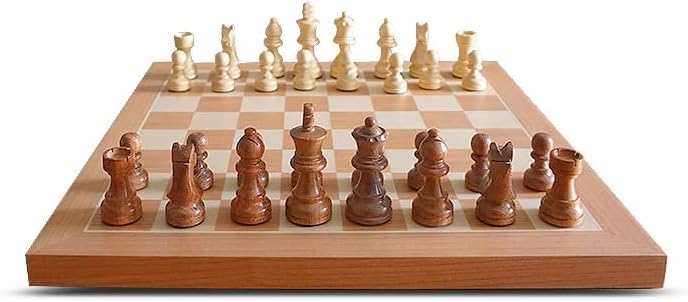
Image: A diagram illustrating the dimensions and weights of individual chess pieces, including King, Queen, Bishop, Knight, Rook, and Pawn, for the Chessnut Air+ set.
Warranty and Support
The Chessnut Air+ Electronic Chess Set comes with a one-year limited warranty. Additionally, Chessnut provides up to 365 days of complimentary technical support. For warranty claims or technical assistance, please refer to the contact information provided in your quick start guide or visit the official Chessnut website.
Related Documents - Air+
 |
Chessnut Electronic Chess Set Quick Guide - Features, Setup, and Connectivity A comprehensive quick guide for the Chessnut Electronic Chess Set (CP101), detailing its buttons, LEDs, app integration, connectivity options, tutorial resources, and contact information. Learn how to set up and use your smart chess board. |
 |
Chessnut Evo User Manual: Features, Specifications, and Usage Guide Comprehensive user manual for the Chessnut Evo, detailing its features, connectivity options, AI battles, online play, training modes, specifications, and FCC compliance information. Learn how to connect to Wi-Fi, update software, and utilize various chess functionalities. |
 |
Chessnut Go Electronic Chess Set Quick Guide A quick guide to the Chessnut Go Electronic Chess Set, covering buttons, LEDs, app usage, device connection, and troubleshooting. |