

1. Important Safety Information
Please read all instructions carefully before installation and use. Retain this manual for future reference.
- Electrical Safety: Always disconnect power at the circuit breaker before installing, cleaning, or servicing the fan. Ensure all electrical connections comply with local codes and ordinances.
- Professional Installation: Installation should be performed by a qualified electrician.
- Mounting: The fan must be mounted to a structurally sound ceiling capable of supporting the fan's weight.
- Blade Clearance: Ensure there is adequate clearance between the fan blades and any objects or walls.
- Power Source: Use only with the specified DC motor power source.
2. Product Overview
The LEDIARY 27-inch Flower Low Profile Ceiling Fan is designed for indoor use, combining efficient air circulation with modern lighting. Its flush mount design is suitable for rooms with low ceilings, such as bedrooms, kitchens, dining rooms, living rooms, lounges, and children's rooms.
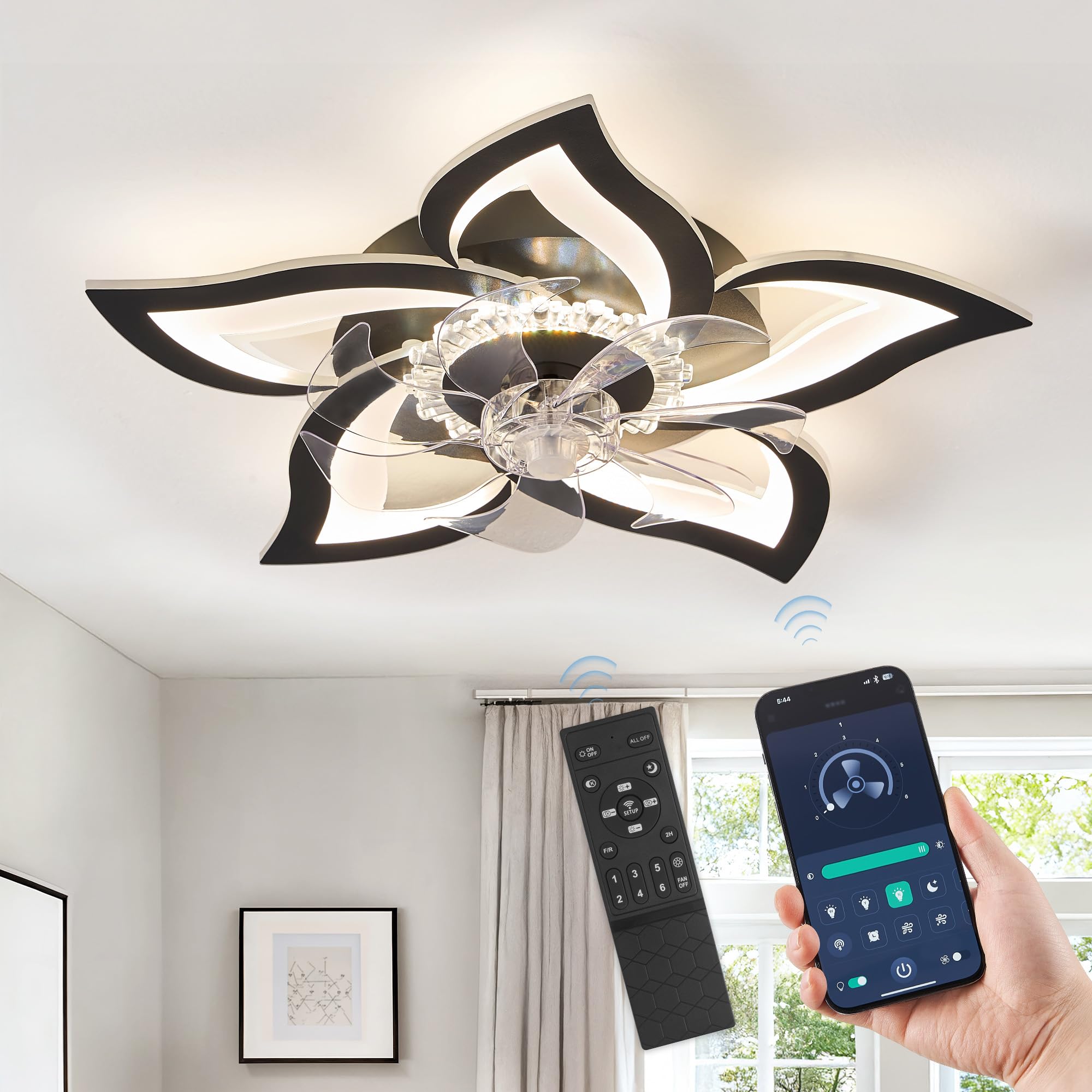
Figure 2.1: LEDIARY 27-Inch Flower Low Profile Ceiling Fan (Black variant shown)
Key Features:
- Modern Low Profile Design: Flower-shaped design with a 27-inch diameter, ideal for low ceilings.
- Efficient DC Motor: Provides ultra-powerful airflow with quiet operation. Features 6 speed settings and a reversible mode for year-round comfort.
- Dimmable LED Light: Integrated LED light strip offers 10%-100% brightness dimming and 3000K-6000K stepless color temperature adjustment.
- Dual Control Options: Operable via the included remote control and a mobile application (Fan Pro) via Bluetooth.

Figure 2.2: Product dimensions and design elements.
3. Package Contents
Verify that all components are present and undamaged before beginning installation.
- Ceiling Fan Unit (with integrated LED light)
- Fan Blades (5 plastic blades)
- Remote Control
- Mounting Hardware Kit
- User Manual

Figure 3.1: Detailed view of fan components: 5 plastic fan blades, modern petal design, and high-quality acrylic lampshade.
4. Specifications
| Feature | Description |
|---|---|
| Brand | LEDIARY |
| Model Number | 36426885-1bbc-49f4-b5fc-0196ea32c26c |
| Color | Black |
| Material | Acrylic |
| Style | Modern |
| Light Fixture Form | Ceiling |
| Room Type | Bedroom, Kitchen, Dining Room, Home, Office, Kids Room |
| Power Source | DC Motor |
| Installation Type | Flush Mount |
| Special Features | Adjustable Color Temperature, Dimmable, Timer |
| Control Method | Remote, App |
| Light Source Type | LED |
| Finish Type | Matte Black |
| Shade Material | Acrylic |
| Number of Light Sources | 1 |
| Shape | Flower |
| Size | 27 Inch |
| Item Weight | 7.76 pounds |
| Product Dimensions | 27 x 27 x 4.7 inches |
| Batteries Required | 2 AAA batteries (for remote, not included) |
| Color Temperature | 3000K-6000K (Adjustable) |
| Brightness | 10%-100% (Dimmable) |
5. Installation Instructions
Warning: To avoid possible electrical shock, ensure electricity is turned off at the main circuit breaker before installation. It is recommended to have this product installed by a licensed electrician.
- Prepare for Installation: Turn off power at the circuit breaker. Clear the installation area.
- Mounting Bracket: Secure the mounting bracket to the ceiling junction box using appropriate hardware. Ensure it is firmly attached.
- Wiring: Connect the fan's electrical wires to the household wiring according to local electrical codes. Typically, this involves connecting live, neutral, and ground wires.
- Attach Fan Body: Carefully lift the fan body and attach it to the mounting bracket. Secure it with the provided screws.
- Install Fan Blades: Attach the 5 plastic fan blades to the motor housing.
- Restore Power: Once installation is complete and all connections are secure, restore power at the circuit breaker.
6. Operating Instructions
Your LEDIARY ceiling fan can be controlled using the included remote control or the 'Fan Pro' mobile application.
6.1. Remote Control Functions
Insert 2 AAA batteries (not included) into the remote control. Point the remote towards the fan for optimal response.
- ON/OFF: Turns the fan and light on or off.
- Fan Speed (1-6): Adjusts fan speed from 1 (lowest) to 6 (highest).
- Light Brightness (+/-): Increases or decreases the light brightness (10%-100%).
- Color Temperature (K button): Cycles through preset color temperatures (e.g., warm white, neutral white, cool white).
- Color Temperature (+/-): Fine-tunes the color temperature (3000K-6000K).
- Reversible Mode (F/R): Changes the direction of fan rotation. Use downdraft mode (forward) for cooling in summer and updraft mode (reverse) for circulating warm air in winter.
- Timer (2H): Sets the fan to turn off automatically after 2 hours.
- Night Light Mode (Moon icon): Activates a low-brightness, warm light setting.

Figure 6.1: Remote control and mobile application for fan and light operation.

Figure 6.2: Light dimming from 10% to 100% brightness.

Figure 6.3: Stepless color temperature adjustment from 3000K (warm) to 6000K (cool).

Figure 6.4: Reversible fan mode for cool airflow in summer and warm airflow in winter.
6.2. App Control
Download the 'Fan Pro' application from your mobile device's app store. Connect to the fan via Bluetooth to access all functions, including fan speed, light settings, and timer.
7. Maintenance
Regular maintenance ensures optimal performance and longevity of your ceiling fan.
- Cleaning: Turn off power before cleaning. Use a soft, damp cloth to wipe down the fan blades and light fixture. Avoid abrasive cleaners that may damage the finish.
- No Lubrication: The fan motor is permanently lubricated and does not require oiling.
8. Troubleshooting
If you experience issues with your fan, refer to the following common problems and solutions:
| Problem | Possible Cause | Solution |
|---|---|---|
| Fan does not start | No power supply; Loose wire connections; Remote control batteries low/dead. | Check circuit breaker; Verify all wire connections are secure; Replace remote control batteries. |
| Light does not work | Loose wire connections; LED driver issue. | Verify light wire connections; Contact customer support if LED driver is suspected. |
| Remote control not working | Batteries low/dead; Remote not paired; Obstruction between remote and receiver. | Replace batteries; Refer to remote pairing instructions (if applicable); Ensure clear line of sight. |
| Fan wobbles | Loose mounting screws; Unbalanced blades. | Tighten all mounting screws; Ensure blades are securely attached and balanced. |
9. Warranty and Support
LEDIARY flush mount ceiling fans come with a 5-year motor support and a 2-year limited support on other parts. For technical assistance or warranty claims, please contact LEDIARY customer support.
Customer Support: Provide 24-hour online technical support and worry-free warranty.
For further assistance, please visit the LEDIARY Store.