
Introduction
Thank you for purchasing the HSH 360° Rotating L Shaped Computer Desk. This manual provides detailed instructions for assembly, operation, maintenance, and troubleshooting to ensure safe and efficient use of your new desk. Please read this manual thoroughly before beginning assembly or use.

Image: The HSH 360° Rotating L Shaped Computer Desk, configured in an L-shape, providing ample workspace and integrated storage.
Safety Information
- Ensure all parts are present and undamaged before assembly. Do not proceed with assembly if any parts are missing or damaged.
- Assemble the desk on a soft, clean surface to prevent scratches or damage.
- Do not overtighten screws during assembly, as this may damage the material.
- Keep small parts and packaging materials away from children and pets to prevent choking hazards.
- The desk has a maximum weight capacity of 350 lbs. Do not exceed this limit.
- Periodically check all connections and fasteners to ensure they remain tight and secure.
- When rotating the desk, ensure there is sufficient clearance to avoid hitting walls or other furniture.
Package Contents
Before beginning assembly, verify that all components listed below are included in your package. All necessary hardware and assembly tools are provided.
- Desk panels (main desktop, storage unit panels, drawer fronts)
- 3 Drawers with slides
- 2 Shelves
- 360° Rotating mechanism
- All necessary assembly hardware (screws, dowels, brackets, etc.)
- Assembly Instruction Manual
Setup and Assembly Instructions
Assembly of the HSH 360° Rotating L Shaped Computer Desk typically takes less than 60 minutes with clear, step-by-step instructions provided in the included manual. It is recommended to have at least one person for assembly. All required tools are included.
- Unpack and Organize: Carefully unpack all components and lay them out on a clean, soft surface. Identify each part using the labels and the assembly diagram.
- Assemble the Storage Unit: Begin by assembling the main frame of the storage unit, including the side panels and fixed shelves. Ensure all connections are secure.
- Install Drawer Slides: Attach the drawer slides to the interior of the storage unit and to the sides of the drawer boxes as per the instructions.
- Assemble Drawers: Construct the three drawers and install them into the storage unit.
- Attach Rotating Mechanism: Secure the 360° rotating mechanism to the top of the storage unit. Pay close attention to the orientation as indicated in the assembly guide to ensure proper function.

Image: Detail of the 360° free rotating mechanism, crucial for the desk's versatile configurations.
- Connect Desk Sections: Attach the main desktop section to the rotating mechanism and the storage unit. Ensure all brackets and fasteners are firmly secured for stability.

Image: Example of a metal bracket providing additional support to the desk structure.
- Final Checks: Once assembled, gently test the stability of the desk and the smooth operation of the rotating mechanism and drawers.
Operating Instructions
The HSH 360° Rotating L Shaped Computer Desk offers versatile configurations to suit your space and needs.
360° Rotation Feature:
The desk's unique design allows the main desktop to swivel 360 degrees relative to the storage unit. This enables various configurations, including:
- L-Shape Configuration: Ideal for corner spaces, providing a large work surface and easy access to storage.
- Straight Configuration: Suitable for linear spaces, extending the desk length.
- Compact Configuration: Swivel the desktop over the storage unit for a more compact footprint when not in use.
To rotate, gently push or pull the main desktop section. Ensure no objects are obstructing the movement path. For optimal stability, position the desk in a desired configuration and ensure it is not forced beyond its natural rotation limits.

Image: Visual representation of the desk's 360° rotation capability, showing different possible layouts.
Video: This short video demonstrates the 360-degree rotation feature of the HSH L-shaped desk, showcasing its flexibility in adapting to different room layouts and user needs.
Storage Usage:
The desk includes three spacious drawers and two open shelves for organized storage of office supplies, books, and other items.

Image: The integrated storage unit with three drawers and two open shelves, designed for efficient organization.
Maintenance and Care
- Cleaning: Wipe the desk surfaces with a dry, soft cloth. Avoid using harsh chemicals, abrasive cleaners, or excessive moisture, as these can damage the finish.
- Spills: In case of spills, wipe them immediately with a dry cloth to prevent staining or damage to the engineered wood.
- Sunlight and Heat: Avoid prolonged exposure to direct sunlight or extreme heat sources, which can cause fading or warping.
- Hardware Check: Periodically inspect all screws and fasteners to ensure they are tight. Retighten if necessary to maintain stability.
Troubleshooting
Desk is Wobbly:
- Ensure all assembly screws are fully tightened.
- Verify that the desk is placed on a flat, even surface. Adjust if necessary.
Drawers Do Not Slide Smoothly:
- Check that the drawer slides are correctly installed and aligned.
- Ensure no foreign objects are obstructing the drawer slides.
Rotating Mechanism is Stiff:
- Ensure the rotating mechanism is clean and free of debris.
- Verify that the desk is not overloaded or unevenly weighted.
- Check for any obstructions around the rotating part of the desk.
Specifications
| Brand | HSH |
| Model Number | LC060103 |
| Product Dimensions (D x W x H) | 19.7"D x 55"W x 29.99"H |
| Weight Capacity | 350 LBS |
| Material | Engineered Wood |
| Color | Light Grey Oak |
| Number of Drawers | 3 |
| Number of Shelves | 2 |
| Special Features | 360° Rotating, Reversible |
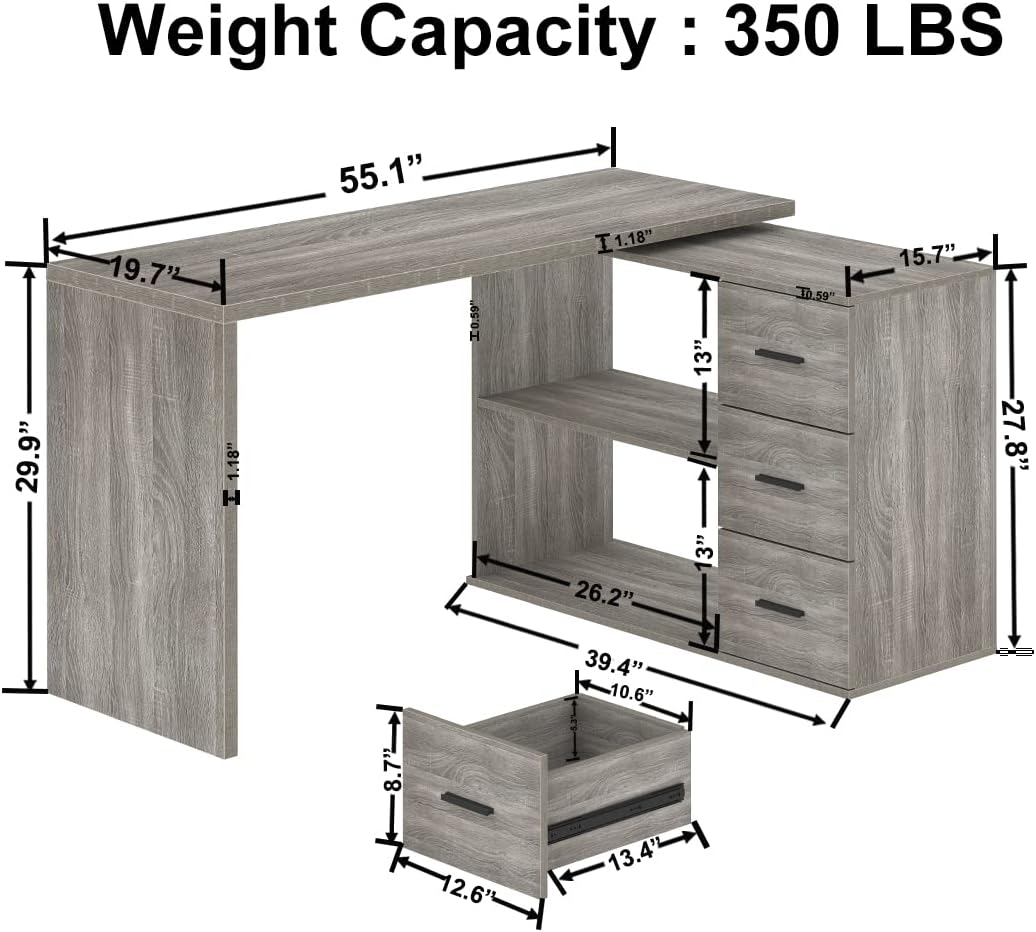
Image: Detailed dimensions and weight capacity of the HSH 360° Rotating L Shaped Computer Desk.
Warranty and Support
HSH is committed to providing high-quality products and excellent customer service.
- Quality Assurance: This product comes with a 12-Month Quality Assurance.
- Returns: Enjoy a 30-Day Free Return policy.
- Customer Service: For any questions, concerns, or assistance with assembly or product issues, please contact our 24-Hour friendly customer service. Refer to your purchase documentation for contact details.