1. Introduction
The Seesii NanoVNA-F V3 is an advanced Vector Network Analyzer designed for precise measurement of RF components and antenna systems. This upgraded model features a wide frequency range from 1MHz to 6GHz, a 4.3-inch touchscreen display, and enhanced scanning capabilities. It is an essential tool for radio enthusiasts, engineers, and technicians working with MF/HF/VHF/UHF/SHF bands.
Key features include:
- Ultra-wide 1MHz-6GHz measuring frequency range.
- 4.3-inch 800x480 large touchscreen display for clear data visualization.
- Fast scan speed up to 200 points/second with up to 801 scanning points.
- Support for Time Domain Reflector (TDR) function for cable length and fault detection.
- Compatibility with PC software like NanoVNA-Saver for data transfer and analysis.
- Built-in 4500mAh rechargeable battery for extended portable use.
- Durable metal casing for effective electromagnetic interference shielding.

2. Package Contents
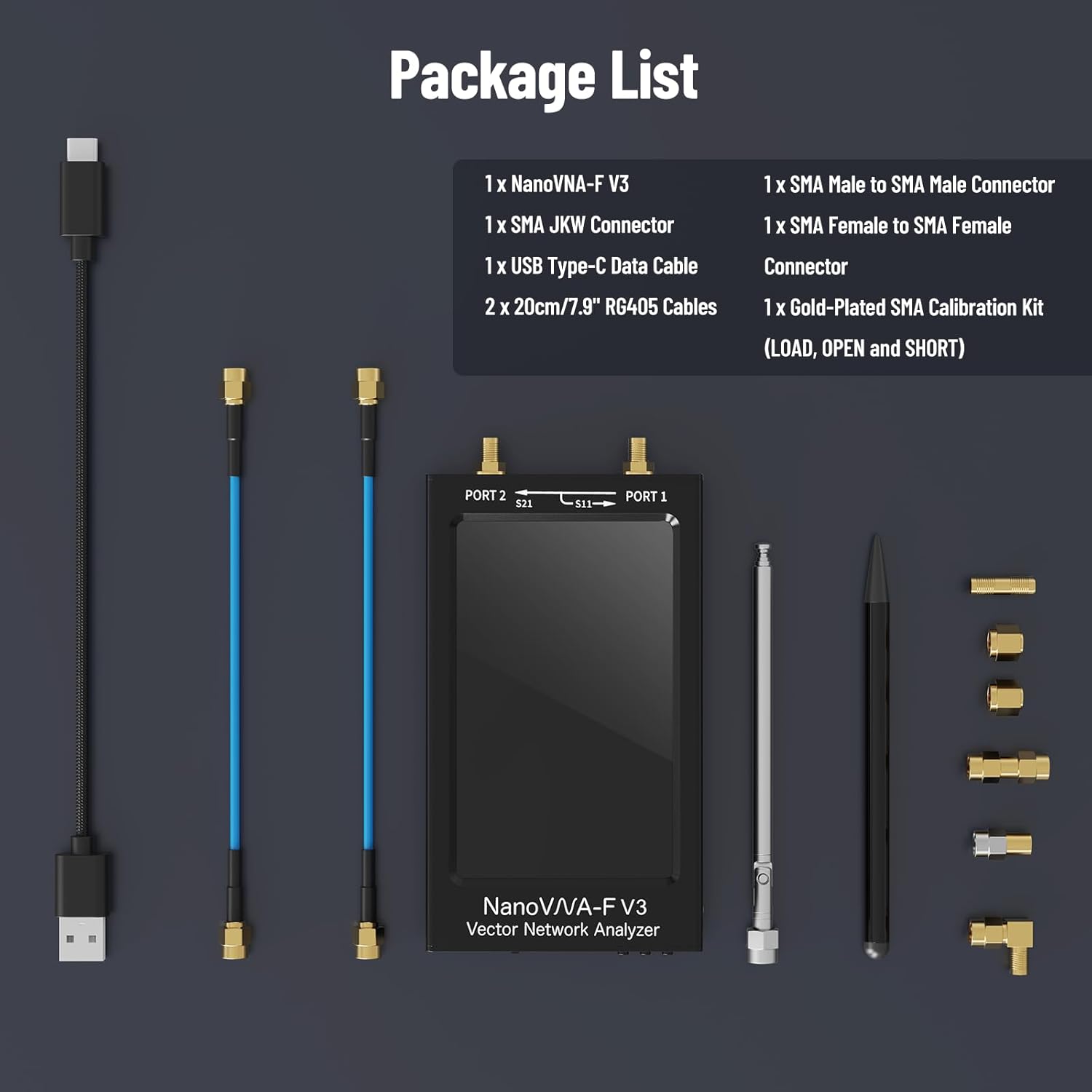
Upon opening the package, please verify that all items listed below are present and in good condition:
- 1 x NanoVNA-F V3 Unit
- 1 x Gold-Plated SMA Calibration Kit (LOAD, OPEN, and SHORT)
- 1 x SMA Female to SMA Female Connector
- 1 x SMA Male to SMA Male Connector
- 1 x SMA JKW Connector
- 2 x 20cm/7.9" RG405 Cables
- 1 x USB Type-C Data Cable
3. Device Overview
Familiarize yourself with the physical components and ports of the NanoVNA-F V3.

- Port 1 (TX): Transmit port for S11 measurements.
- Port 2 (RX): Receive port for S21 measurements.
- Physical Buttons: For navigation and control, complementing the touchscreen.
- Indicator Light: Provides status information, such as charging status.
- Output 5V/1A: USB output for powering external devices.
- Power Switch: To turn the device on or off.
- Type-C Charging/Data Port: For charging the internal battery and connecting to a PC.
- 4.3" IPS LCD+RTS: The main display and resistive touchscreen interface.
4. Setup and Initial Use
4.1 Charging the Device
Before first use, ensure the NanoVNA-F V3 is fully charged. Connect the provided USB Type-C data cable to the device's Type-C port and a compatible USB power adapter (not included). The LED charging indicator will illuminate during charging and turn off when fully charged. A full charge typically takes approximately 3 hours and provides up to 8 hours of working time.

4.2 Powering On/Off
To power on the device, slide the power switch to the "ON" position. To power off, slide the switch to the "OFF" position.
4.3 Basic Navigation
The NanoVNA-F V3 features a 4.3-inch resistive touchscreen for primary interaction. Use the included stylus or your finger to navigate menus and select options. Physical buttons are also available for certain functions and navigation.

5. Operating the NanoVNA-F V3
5.1 Calibration
Calibration is crucial for accurate measurements. The NanoVNA-F V3 supports up to 12 calibration result storage slots. Use the provided Gold-Plated SMA Calibration Kit (LOAD, OPEN, and SHORT) to perform a full calibration before making critical measurements. Refer to the on-screen instructions for the calibration procedure.
5.2 Measurement Functions
The NanoVNA-F V3 supports a wide array of measurement functions and display formats, making it versatile for various RF testing scenarios. These include:
- Log Mag (S11, S21)
- Linear Mag (S11, S21)
- Phase
- Smith Chart (R+jX, R+L/C)
- VSWR (Voltage Standing Wave Ratio)
- Polar
- Group Delay
- Resistance
- Reactance
- Time Domain Reflector (TDR) for cable length and fault detection.

5.3 Connecting to PC Software
The NanoVNA-F V3 can be connected to a PC for enhanced data analysis and control using compatible software such as NanoVNA-Saver. Connect the device to your computer using the provided USB Type-C data cable. Ensure the necessary drivers are installed on your PC for proper communication.

6. Maintenance
6.1 Cleaning
To maintain the device's performance and appearance, regularly clean the exterior with a soft, dry cloth. For the screen, use a microfiber cloth specifically designed for electronic displays. Avoid using abrasive cleaners or solvents that could damage the casing or screen.
6.2 Battery Care
The NanoVNA-F V3 is equipped with a built-in 4500mAh rechargeable battery. To prolong battery life, avoid fully discharging the battery frequently. Store the device in a cool, dry place when not in use for extended periods. If storing for a long time, charge the battery to approximately 50% capacity.
6.3 Storage
Store the NanoVNA-F V3 and its accessories in a protective case to prevent physical damage and dust accumulation. Keep it away from extreme temperatures, humidity, and direct sunlight.
7. Troubleshooting
This section provides solutions to common issues you might encounter with your NanoVNA-F V3.
| Problem | Possible Cause | Solution |
|---|---|---|
| Device does not power on. | Low battery or power switch is off. | Ensure the power switch is in the "ON" position. Connect the device to a power source using the USB Type-C cable and allow it to charge for at least 30 minutes before attempting to power on again. |
| Inaccurate measurements. | Improper calibration or faulty cables/connectors. | Perform a full calibration using the provided calibration kit. Ensure all cables and connectors are securely attached and in good condition. Check for any physical damage to the SMA ports. |
| Touchscreen unresponsive. | Software glitch or physical damage. | Restart the device by powering it off and then on again. If the issue persists, ensure the screen is clean and free of debris. If still unresponsive, contact customer support. |
| Cannot connect to PC. | Incorrect cable, driver issues, or software incompatibility. | Ensure you are using the provided USB Type-C data cable. Verify that the necessary drivers for the NanoVNA-F V3 are installed on your PC. Try a different USB port on your computer. Ensure your PC software (e.g., NanoVNA-Saver) is up to date. |
8. Specifications
Detailed technical specifications for the NanoVNA-F V3.
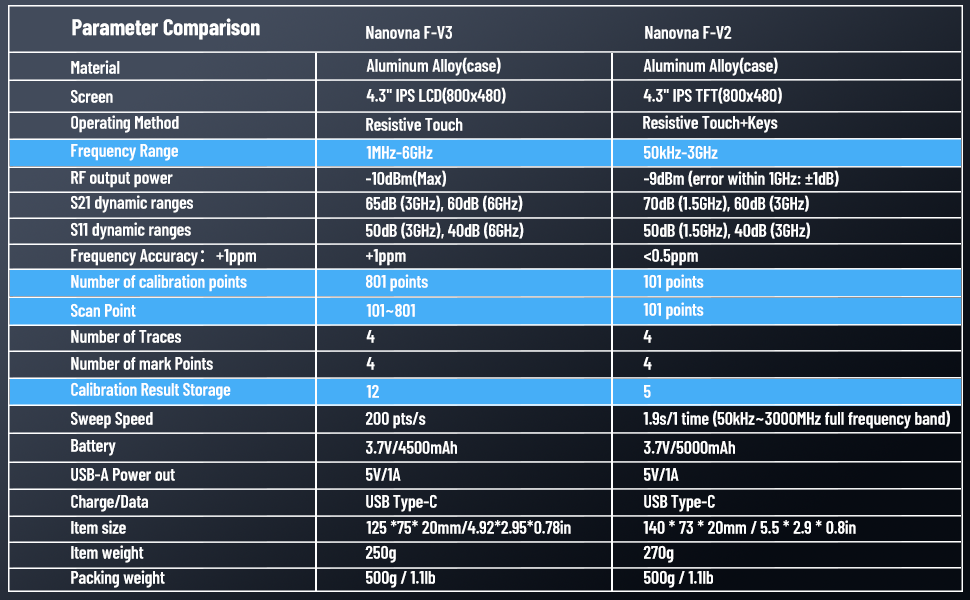
| Feature | Specification |
|---|---|
| Model Number | NanoVNA-F V3 |
| Frequency Range | 1MHz - 6GHz |
| Display | 4.3-inch IPS LCD (800x480) Resistive Touchscreen |
| S21 Dynamic Range | 65 dB (3GHz), 60 dB (6GHz) |
| S11 Dynamic Range | 50 dB (3GHz), 40 dB (6GHz) |
| Scan Points | 101-801 points |
| Scan Speed | Up to 200 points/second |
| Calibration Result Storage | 12 slots |
| Battery | Built-in 3.7V / 4500mAh rechargeable battery |
| Battery Life | Up to 8 hours |
| Charging Port | USB Type-C |
| Output | 5V/1A |
| Dimensions | 125mm x 75mm x 20mm (4.92" x 2.95" x 0.78") |
| Weight | Approx. 250g (0.55 lbs) |
| Case Material | Metal (Aluminum Alloy) |
| Compatible Devices | PC (with NanoVNA-Saver software) |
| Country of Origin | China |
9. Warranty and Support
Seesii stands behind the quality of the NanoVNA-F V3 with comprehensive customer support and warranty services.
- Warranty: The NanoVNA-F V3 comes with a 3-year warranty.
- Money-Back Service: A 90-day money-back service is provided.
- Technical Support: 7*24 hours technical service and lifetime customer support are available.
- FCC Compliance: The product complies with FCC regulations, backed by a Supplier's Declaration of Conformity (SDoC), ensuring its safety and reliability.
For any questions, technical assistance, or warranty claims, please contact Seesii customer service. Our dedicated after-sales service team is committed to assisting you promptly and resolving any issues you may encounter.


