
G-TiDE EWB23
G-TiDE EWB23 True Wireless Stereo Earbuds User Manual
Model: EWB23
1. Introduction
Welcome to the user manual for your G-TiDE EWB23 True Wireless Stereo Earbuds. This guide provides detailed instructions on how to set up, operate, maintain, and troubleshoot your earbuds to ensure the best possible audio experience. Please read this manual carefully before using your device.
Key Features:
- Touch Sensor Controls
- Stereo Calls and Music Playback
- Automatic Flip (Auto-pairing/Connection)
- Wireless Bluetooth Connectivity
- Compact Wireless Charging Case
2. Product Components
The G-TiDE EWB23 package includes the following items:
- G-TiDE EWB23 True Wireless Stereo Earbuds (Left and Right)
- Wireless Charging Case
- User Manual
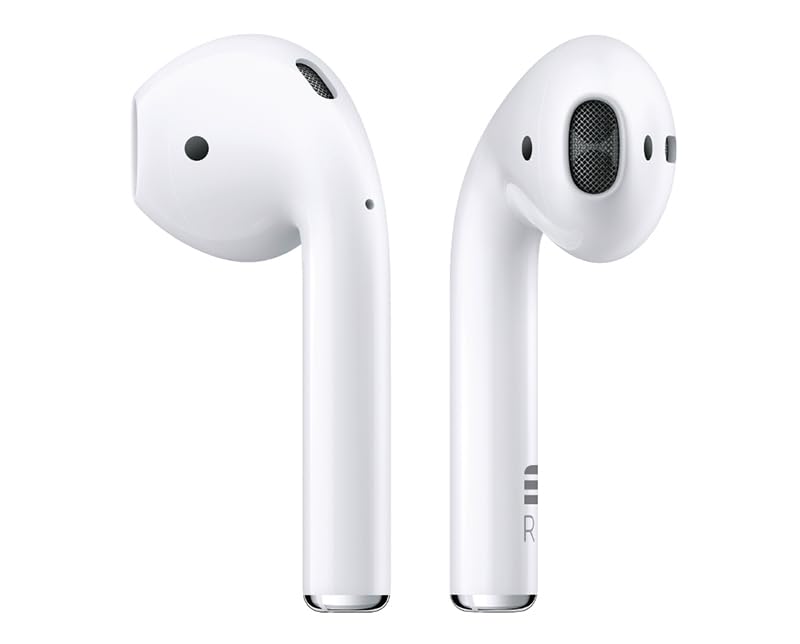
Figure 2.1: G-TiDE EWB23 True Wireless Stereo Earbuds with their charging case.

Figure 2.2: Front view of the earbuds securely placed inside the charging case.

Figure 2.3: Side view of the earbuds within the charging case, showing their compact design.
3. Setup
3.1 Charging the Earbuds and Case
Before first use, fully charge both the earbuds and the charging case.
- Place the earbuds into the charging case, ensuring they are correctly seated.
- Connect the charging case to a power source using a compatible USB cable (not specified if included, assume standard USB-C or Micro-USB).
- The indicator lights on the case will show the charging status. Once fully charged, the lights will indicate completion or turn off.
3.2 Initial Pairing with a Device
Follow these steps to pair your G-TiDE EWB23 earbuds with your mobile phone or other Bluetooth-enabled device:
- Ensure the charging case is charged and the earbuds are inside.
- Open the charging case lid. The earbuds will automatically power on and enter pairing mode (indicated by flashing lights on the earbuds). This is the "Automatic Flip" feature.
- On your device, go to Bluetooth settings and turn Bluetooth on.
- Search for available devices. Select "G-TiDE EWB23" from the list.
- Once connected, you will hear a confirmation tone, and the earbud indicator lights will stop flashing.
Note: After initial pairing, the earbuds will automatically connect to the last paired device when you open the charging case, provided Bluetooth is enabled on your device.
4. Operating Instructions
4.1 Power On/Off
- Power On: Open the charging case lid, or press and hold the touch sensor on both earbuds for a few seconds.
- Power Off: Place the earbuds back into the charging case and close the lid. Alternatively, disconnect them from Bluetooth and they may power off automatically after a period of inactivity, or press and hold the touch sensor for a longer duration.
4.2 Touch Control Functions
The G-TiDE EWB23 earbuds feature intuitive touch controls. The specific functions may vary slightly, but common controls are as follows:
| Action | Left Earbud | Right Earbud |
|---|---|---|
| Play/Pause Music | Single tap | Single tap |
| Next Track | Double tap | Double tap |
| Previous Track | Triple tap | Triple tap |
| Answer/End Call | Single tap | Single tap |
| Reject Call | Press and hold (2s) | Press and hold (2s) |
| Volume Up | N/A (or specific gesture if available) | Press and hold (e.g., 3s) |
| Volume Down | Press and hold (e.g., 3s) | N/A (or specific gesture if available) |
| Activate Voice Assistant | Press and hold (e.g., 2s) | Press and hold (e.g., 2s) |
Note: Specific touch gestures for volume control or voice assistant may vary. Refer to the quick start guide included in your package for precise controls if different from above.
4.3 Stereo Calls and Music
The G-TiDE EWB23 earbuds support true wireless stereo audio for both music playback and phone calls, providing an immersive sound experience.
5. Maintenance
5.1 Cleaning
To maintain optimal performance and hygiene:
- Gently wipe the earbuds and charging case with a soft, dry, lint-free cloth.
- Do not use abrasive cleaners, alcohol, or chemical solvents.
- Keep the charging contacts on both the earbuds and the case clean and free of debris.
5.2 Storage
When not in use, store the earbuds in their charging case to protect them and keep them charged. Store in a cool, dry place away from extreme temperatures and direct sunlight.
5.3 Battery Care
To prolong battery life:
- Avoid fully discharging the battery frequently.
- Charge the earbuds and case regularly, even if not used for extended periods.
- Do not expose to high temperatures.
6. Troubleshooting
If you encounter issues with your G-TiDE EWB23 earbuds, try the following solutions:
| Problem | Possible Solution |
|---|---|
| Earbuds not pairing |
|
| No sound from one earbud |
|
| Charging case not charging |
|
| Touch controls not responding |
|
7. Specifications
| Feature | Detail |
|---|---|
| Brand | G-TiDE |
| Model Name | EWB23 |
| Connectivity Technology | Wireless (Bluetooth) |
| Ear Placement | In-Ear |
| Form Factor | In-Ear |
| Material | Plastic |
| Special Features | Touch Control |
| Compatible Devices | Cellular Phones |
| Included Components | Wireless Charging Case |
| Noise Control | None |
| Color | White |
8. Warranty Information
Your G-TiDE EWB23 True Wireless Stereo Earbuds come with a Two-Year Warranty from the date of purchase. This warranty covers manufacturing defects and ensures your product performs as expected under normal use.
Please retain your proof of purchase for warranty claims. For detailed warranty terms and conditions, or to initiate a warranty claim, please contact G-TiDE customer support.
9. Support
If you require further assistance or have questions not covered in this manual, please contact G-TiDE customer support.
- Website: www.gtide.com (Placeholder - please visit the official G-TiDE website for actual support links)
- Email: support@gtide.com (Placeholder)
- Phone: +1-XXX-XXX-XXXX (Placeholder)
We are committed to providing you with the best possible experience with your G-TiDE product.
10. Important Note Regarding Videos
While the product listing indicates the presence of videos, specific video URLs and metadata (such as creator type or filename) were not provided in the source data. Therefore, no product videos could be embedded in this manual. Please refer to the product's official page or manufacturer's website for any available video content.
Ask a question about this manual
Ask about setup, troubleshooting, compatibility, parts, safety, or missing instructions. Manuals+ will review the question and use this page’s manual context to help answer it.