
Peak MACH-829
Peak Solice Pro Cordless Tattoo Machine Pen
User Manual
Introduction
Thank you for choosing the Peak Solice Pro Cordless Tattoo Machine Pen. This professional-grade equipment is designed for versatility and performance, offering a fully adjustable stroke length and cordless operation for an enhanced tattooing experience. This manual provides essential information for the proper setup, operation, and maintenance of your device.
Please read this manual thoroughly before using the Solice Pro to ensure safe and optimal performance.
Product Overview
The Peak Solice Pro is a lightweight, pen-style modular tattoo machine engineered for precision and comfort. Its key features include:
- Cordless Operation: Equipped with an 1800mAh PowerPack battery for up to 10 hours of tattooing power.
- Adjustable Stroke Length: Easily change stroke from 2.4mm to 4.2mm with a simple knob turn.
- Modular Design: Features a detachable PowerPack and an RCA module for wired setup flexibility.
- Lightweight Construction: Weighs only 7.2oz (with PowerPack) for comfortable extended use.
- Powerful Motor: Utilizes an 1827 coreless motor for consistent performance.
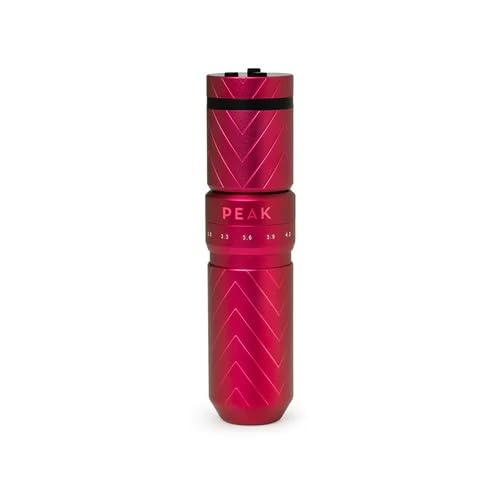
Image: The Peak Solice Pro Cordless Tattoo Machine Pen, showcasing its sleek red design and compact form factor.
Components Included
Your Peak Solice Pro package includes the following items:
- 1 x Solice Pro Tattoo Machine Pen (main body)
- 1 x PowerPack Battery (1800mAh)
- 1 x RCA Module (for wired setup)
- 2 x Battery Pack Converters (3.5mm + RCA inputs)
- 3 x O-rings (spare)
- 2 x Allen Keys
- 1 x Spare Flywheel
- 1 x USB-C Charging Cable
- 1 x RCA Cord
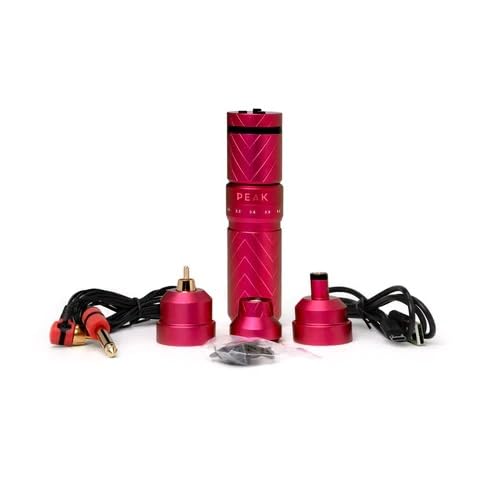
Image: All components of the Peak Solice Pro package, including the machine, PowerPack, RCA module, cables, and accessories.
Setup
Follow these steps to prepare your Solice Pro for use:
- Attach Power Source:
- For Cordless Operation: Gently twist and attach the PowerPack battery to the top of the Solice Pro machine body until it is securely seated.
- For Wired Operation: Attach the RCA Module to the top of the Solice Pro machine body. Connect the provided RCA cord from the module to your preferred power supply.
- Charge PowerPack (if using cordless): Connect the USB-C charging cable to the PowerPack and a suitable USB power adapter. The PowerPack display will indicate charging status. Ensure the PowerPack is fully charged before first use for optimal battery life.
- Insert Needle Cartridge: Carefully insert your desired needle cartridge into the front opening of the machine until it clicks into place. Ensure it is seated firmly.

Image: The Peak Solice Pro machine demonstrating its modularity, showing the main body with the PowerPack and RCA module detached.
Operating Instructions
Once assembled and charged, you can begin operating your Solice Pro:
- Power On/Off: Press and hold the power button on the PowerPack (or your external power supply if wired) to turn the machine on or off.
- Adjust Voltage: Use the '+' and '-' buttons on the PowerPack display to adjust the operating voltage. The recommended operating voltage range is 4V to 12V, with a recommendation not to exceed 10V for prolonged periods.
- Adjust Needle Depth: Rotate the grip of the machine to adjust the needle depth according to your preference and the specific needle cartridge being used.
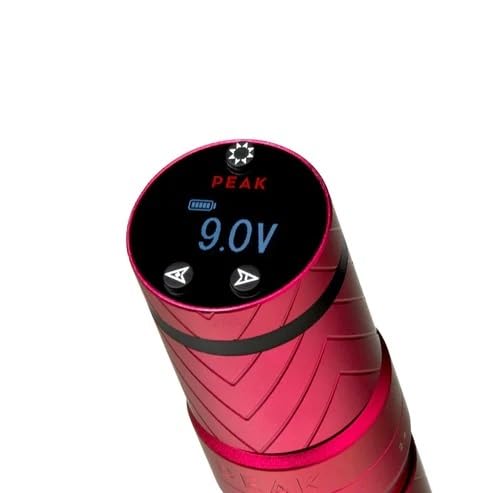
Image: A close-up view of the Peak Solice Pro PowerPack display, showing the current voltage setting and battery level indicators.
Adjustable Stroke Feature
The Solice Pro features a unique adjustable stroke mechanism, allowing you to switch between different stroke lengths (2.4mm to 4.2mm) to suit various tattooing styles and techniques. To adjust the stroke:
- Locate the stroke adjustment knob on the machine body, typically below the PowerPack or RCA module.
- Gently turn the knob to select your desired stroke length. The markings on the machine indicate the available stroke options (e.g., 2.4mm, 3.3mm, 3.6mm, 3.9mm, 4.2mm).
- Ensure the knob is securely set at the chosen stroke length before operation.
Power Management
The included PowerPack provides up to 10 hours of cordless tattooing power, depending on voltage settings and usage. To maximize battery life and ensure consistent performance:
- Always fully charge the PowerPack before each tattooing session.
- Monitor the battery indicator on the PowerPack display during use.
- If the battery runs low during a session, you can switch to the RCA module and connect to a wired power supply to continue working without interruption.
- Use only the provided USB-C charging cable or a high-quality, compatible USB-C cable for charging.
Maintenance
Proper maintenance ensures the longevity and hygiene of your Solice Pro machine:
- Cleaning: After each use, wipe down the exterior of the machine with a clean cloth and an approved disinfectant solution. Do not submerge the machine in liquid.
- Lubrication: Periodically apply a small amount of machine lubricant (specifically designed for tattoo machines) to moving parts as recommended by the manufacturer to ensure smooth operation.
- Storage: Store the machine in a clean, dry place away from direct sunlight and extreme temperatures.
- Inspection: Regularly inspect the machine for any signs of wear, damage, or loose components. If any issues are found, contact customer support.
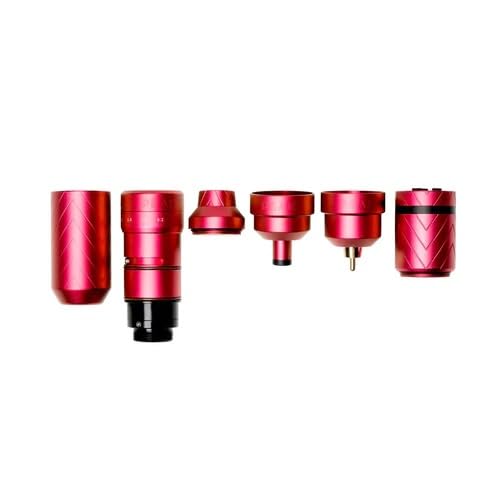
Image: The Peak Solice Pro machine disassembled into its main components, illustrating its modular design for cleaning and maintenance.
Troubleshooting
If you encounter issues with your Solice Pro, refer to the following common problems and solutions:
| Problem | Possible Cause | Solution |
|---|---|---|
| Machine does not turn on. | Low battery; PowerPack not attached correctly; RCA cable loose (wired). | Charge PowerPack; Ensure PowerPack/RCA module is securely attached; Check RCA cable connection. |
| Machine runs inconsistently or makes unusual noise. | Needle cartridge not seated correctly; Low voltage; Machine requires lubrication; Internal issue. | Re-seat needle cartridge; Increase voltage; Apply lubricant; Contact customer support if problem persists. |
| Battery life is shorter than expected. | High voltage usage; Frequent on/off cycles; Battery degradation over time. | Operate at lower voltage when possible; Ensure full charge before use; Battery replacement may be needed over time. |
| Stroke adjustment knob is stiff. | Debris or lack of lubrication. | Clean the area around the knob; Apply a small amount of machine lubricant. |
If you experience issues not listed here or if the suggested solutions do not resolve the problem, please contact Peak customer support for further assistance.
Specifications
Detailed technical specifications for the Peak Solice Pro Cordless Tattoo Machine Pen:
| Feature | Specification |
|---|---|
| Product Dimensions | 5.12 x 1.25 x 1.25 inches |
| Item Model Number | MACH-829 |
| UPC | 840331501193 |
| Manufacturer | Peak |
| ASIN | B0CCSHBLVG |
| Country of Origin | China |
| Net Weight (with PowerPack) | 7.2oz |
| Motor | 1827 Coreless Motor |
| Operating Voltage | 4V - 12V (Recommended: Not to exceed 10V) |
| Battery Capacity | 1800mAh (PowerPack) |
| Charging Port | USB-C |
| Stroke Length | Adjustable from 2.4mm - 4.2mm |
Warranty and Support
For information regarding product warranty, returns, or technical support, please contact the manufacturer, Peak, directly. Refer to the contact information provided on the product packaging or the official Peak website. Keep your proof of purchase for any warranty claims.
Related documentsMACH-829


Ask a question about this manual
Ask about setup, troubleshooting, compatibility, parts, safety, or missing instructions. Manuals+ will review the question and use this page’s manual context to help answer it.