
Introduction
The Hohem RS01 is a versatile 3-in-1 accessory designed to enhance your mobile photography and videography experience. It functions as an extendable selfie stick, a stable tripod, and includes a detachable remote control for convenient operation. This device is compatible with Hohem iSteady V2, X2, and Pro4 gimbals. Please read this manual carefully to ensure proper use and maintenance of your RS01.
Package Contents
Verify that all items are present in your package:
- Selfie Stick Tripod
- Remote Control
Product Overview and Features
The Hohem RS01 combines multiple functionalities into a compact design:
- 3-in-1 Design: Integrates a selfie stick, tripod, and remote control for versatile use.
- Extendable & Retractable: Extends up to 510mm, ideal for self-portraits and group photos.
- Detachable Remote Control: Allows remote operation of compatible gimbals for photo/video capture, zoom, and mode switching.
- Quick Connection: Automatic connection between the Hohem gimbal and remote control after power-on.
- Universal Compatibility: Features a 1/4" standard screw mount for easy attachment to various gear.
- Compact & Portable: All-in-one design ensures easy storage and transport.
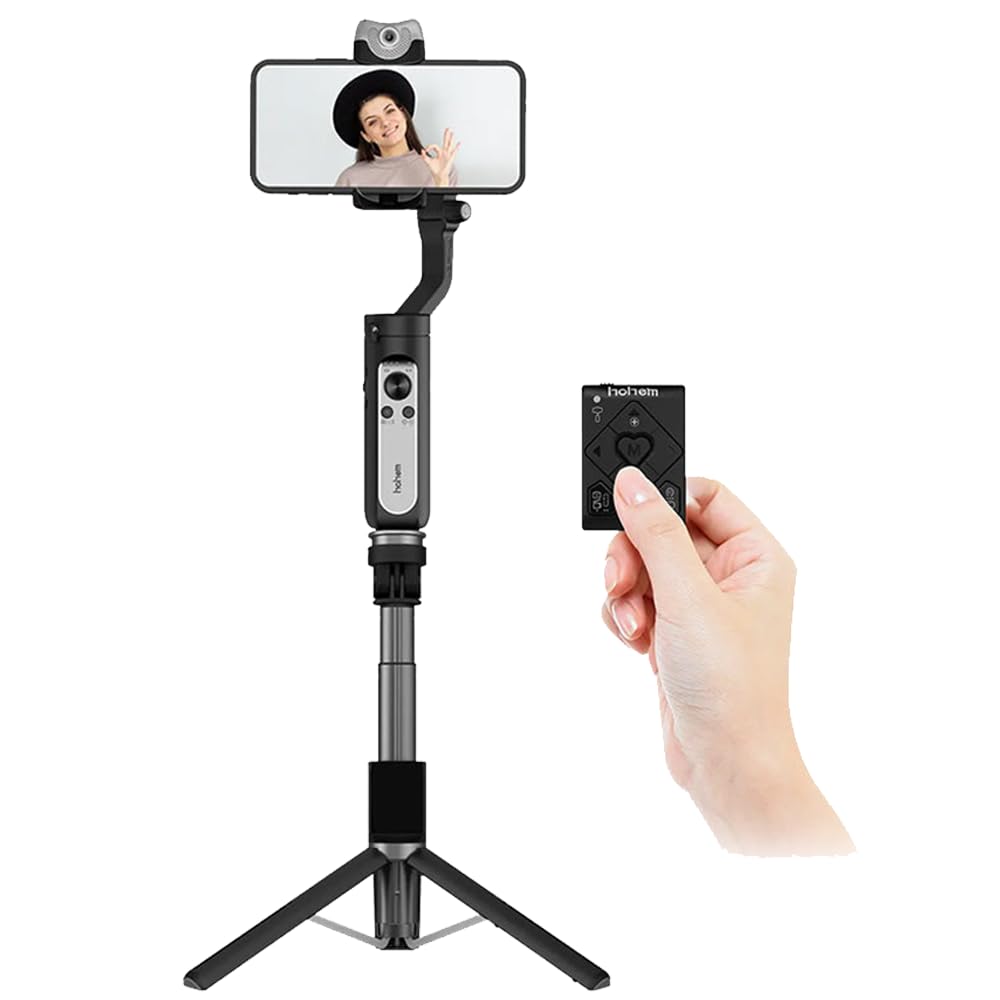
Figure 1: Hohem RS01 in its compact, folded tripod configuration.

Figure 2: Key components of the Hohem RS01, including the 1/4 inch thread for gimbal attachment, wireless remote holder, and anti-slip rubber feet.
Video 1: A brief demonstration of the Hohem RS01's features, including its extendable design and tripod functionality.
Setup Instructions
- Unfolding the Tripod: Gently pull the three legs outwards from the base of the selfie stick until they lock into place, forming a stable tripod.
- Extending the Selfie Stick: Hold the base firmly and pull the top section upwards to extend the stick to your desired length. The maximum extended length is 510mm.
- Attaching a Gimbal: The RS01 features a 1/4" standard screw mount at the top. Screw your compatible Hohem gimbal (iSteady V2, X2, or Pro4) onto this mount until secure.
- Remote Control Pairing: Ensure your Hohem gimbal is powered on. The RS01 remote control will automatically connect to the gimbal after both devices are powered on. If pairing is not automatic, refer to your gimbal's manual for specific Bluetooth pairing instructions.

Figure 3: Diagram illustrating the maximum extended length of the Hohem RS01, which is 510mm.

Figure 4: Visual representation of the quick connection process between the Hohem RS01 remote and a compatible gimbal.
Operating Instructions
Using the Remote Control
The detachable remote control allows for convenient operation of your gimbal from a distance. Ensure it is paired with your gimbal before use.
- Photo/Video Capture: Press the designated button on the remote to take photos or start/stop video recording.
- Zoom In/Out: Use the zoom controls to adjust the focal length of your camera (functionality depends on gimbal and phone app).
- Joystick Control: The joystick allows for precise control over the gimbal's movement and camera angle.
- Switch Working Mode: Cycle through different gimbal modes (e.g., Pan Follow, Lock Mode) using the mode switch button.

Figure 5: The Hohem RS01 showing its detachable wireless remote control for convenient operation.
Switching Between Selfie Stick and Tripod Modes
- Selfie Stick Mode: Keep the tripod legs folded and use the extended stick for handheld shots.
- Tripod Mode: Unfold the legs and place the RS01 on a flat, stable surface for stationary shots or group photos.
Maintenance
- Cleaning: Wipe the device with a soft, dry cloth. Avoid using harsh chemicals or abrasive materials.
- Storage: Store the RS01 in a cool, dry place away from direct sunlight and extreme temperatures. Ensure it is fully retracted and the tripod legs are folded for compact storage.
- Battery Care: The remote control uses a Lithium Ion battery. If storing for extended periods, ensure the battery has some charge to prevent deep discharge.
Troubleshooting
- Remote Control Not Connecting:
- Ensure both the remote and the compatible Hohem gimbal are powered on. Check the remote's battery. If issues persist, refer to your specific Hohem gimbal's user manual for detailed pairing instructions.
- Selfie Stick Not Extending/Retracting Smoothly:
- Check for any obstructions or debris in the extension mechanism. Do not force the stick. Clean the extending sections if necessary.
- Tripod Instability:
- Ensure the tripod legs are fully extended and locked into position on a flat, stable surface. Avoid placing heavy objects on the tripod that exceed its capacity.
Specifications
| Feature | Detail |
|---|---|
| Brand | Hohem |
| Model | RS01 |
| Product Dimensions | 17 x 38 x 29 cm (folded) |
| Extended Length | Up to 510 mm |
| Item Weight | 125 g |
| Material | Aluminium |
| Compatible Devices | Hohem iSteady V2, X2, Pro4 |
| Special Feature | Detachable Remote Control |
| Battery Type (Remote) | Lithium Ion (included) |
| Country of Origin | China |
Warranty and Support
For warranty information or technical support, please contact:
- Manufacturer: Hohem Technology
- Importer/Packer (India): Origin Marketing Pvt. Ltd.
- Contact Number: 9870294946
- Email: service@originmarketing.in
Please retain your proof of purchase for warranty claims.


