
1MORE S30
1MORE Fit SE S30 Open-Ear Wireless Earbuds User Manual
Model: S30
Product Overview
The 1MORE Fit SE S30 Open-Ear Wireless Earbuds are designed for comfort and situational awareness, making them ideal for sports and active lifestyles. They feature a lightweight design, IPX5 water resistance, and up to 30 hours of total playback time with the charging case. Enjoy clear audio and calls with Bluetooth 5.3 connectivity and integrated microphones.

Image: 1MORE Fit SE S30 Open-Ear Wireless Earbuds and their charging case.
What's Included
- 1MORE Fit SE S30 Open-Ear Wireless Earbuds (Left and Right)
- Charging Case
- USB-C Charging Cable
- User Manual
Product Components
Familiarize yourself with the different parts of your earbuds and charging case.

Image: Diagram illustrating the open-ear design and comfort features of the 1MORE Fit SE S30 earbuds.
- Earbud Body: Contains the speaker and internal electronics.
- Ear Hook: Designed to securely fit over the ear.
- Touch Control Area: For managing playback and calls.
- Microphones: Four MEMS microphones for clear calls.
- Charging Contacts: For charging the earbuds within the case.
- Charging Case: Stores and charges the earbuds, with a USB-C port for external charging.
- Status Indicator Light: On the charging case, indicates charging status and battery level.
Setup
1. Charging the Earbuds and Case
Before first use, fully charge the earbuds and the charging case.
- Place the earbuds into the charging case. Ensure they are correctly seated.
- Connect the USB-C charging cable to the charging port on the case and to a power source.
- The indicator light on the charging case will show the charging status. A full charge provides up to 30 hours of total playback time with the case, and 10 hours per single earbud charge.

Image: The 1MORE Fit SE S30 earbuds placed inside their charging case.
2. Bluetooth Pairing
Pair your earbuds with your device for the first time.
- Open the charging case. The earbuds will automatically enter pairing mode. The indicator light on the case will flash.
- On your device (smartphone, tablet, etc.), go to Bluetooth settings and enable Bluetooth.
- Select "1MORE Fit SE S30" from the list of available devices.
- Once connected, the indicator light on the charging case will turn off.
Note: For subsequent uses, the earbuds will automatically connect to the last paired device when removed from the case.

Image: Diagram illustrating the Bluetooth 5.3 chip, indicating advanced connectivity.
Operating Instructions
1. Wearing the Earbuds
For optimal comfort and sound, wear the earbuds correctly.
- Gently place the earbud over your ear.
- Adjust the ear hook behind your ear until it feels secure and comfortable.
- Ensure the speaker is positioned correctly near your ear canal without blocking it, allowing for open-ear audio.
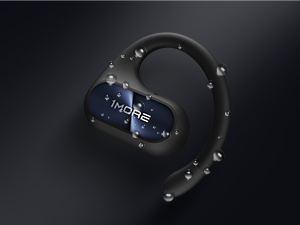
Image: Visual guide on how to properly wear the 1MORE Fit SE S30 earbuds for a secure fit.
2. Touch Controls
The earbuds feature touch-sensitive controls for easy management of music and calls.
| Action | Gesture |
|---|---|
| Answer Call | Double Tap |
| End/Reject Call | Long Press |
| Play/Pause Music | Double Tap |
| Volume Adjustment (when not connected to phone via Bluetooth) | Triple Tap |

Image: Illustration of touch control gestures for managing calls and music on the earbuds.
3. 1MORE MUSIC App
Download the 1MORE MUSIC app for additional features and customization, including EQ settings and firmware updates. Refer to the app for detailed instructions on its functionalities.
Maintenance
- Cleaning: Use a soft, dry cloth to clean the earbuds and charging case. Do not use harsh chemicals or abrasive materials.
- Water Resistance: The earbuds are IPX5 water-resistant, meaning they can withstand splashes and sweat. Do not submerge them in water. Ensure they are dry before placing them back in the charging case.
- Storage: Store the earbuds in their charging case when not in use to protect them and keep them charged. Avoid extreme temperatures.
- Battery Care: To prolong battery life, avoid fully discharging the earbuds and case frequently. Charge them regularly.

Image: An earbud with water droplets, demonstrating its IPX5 water resistance.
Troubleshooting
| Problem | Possible Solution |
|---|---|
| Earbuds not pairing | Ensure earbuds are charged. Place them in the case, close, then open to re-enter pairing mode. Check your device's Bluetooth settings. |
| No sound from one earbud | Ensure both earbuds are charged and connected. Try resetting the earbuds by placing them in the case and closing it for a few seconds. |
| Low volume | Adjust volume on both your device and the earbuds (if applicable via app). Ensure earbuds are worn correctly. |
| Earbuds not charging | Check the charging cable and power source. Ensure earbuds are properly seated in the case and charging contacts are clean. |
| Call quality issues | Ensure microphones are not obstructed. Move closer to your connected device. Avoid noisy environments. |
Specifications
| Model | S30 (EF606) |
| Brand | 1MORE |
| Earbud Type | Open-Ear, Ear Hook Style |
| Connectivity | Bluetooth 5.3 |
| Impedance | 16 Ohms |
| Water Resistance | IPX5 |
| Playback Time | Up to 10 hours (earbuds), up to 30 hours (with charging case) |
| Microphones | 4 MEMS Microphones with AI Algorithm for Noise-Free Calls |
| Driver | 14.2mm DLC Dynamic Driver with DBB Bass Enhancement |
| Weight | Approx. 10g per earbud |
| Included Accessories | USB-C Cable, Wireless Charging Case |
| Origin | China |
| UPC | 190280000927 |
Warranty and Support
Warranty Information
This product comes with a 1-year warranty from the date of purchase. Please retain your proof of purchase for warranty claims. The warranty covers manufacturing defects but does not cover damage caused by misuse, accidents, unauthorized modifications, or normal wear and tear.
Customer Support
For technical assistance, troubleshooting, or warranty inquiries, please contact 1MORE customer support through their official website or the contact information provided with your product packaging. You can also visit the 1MORE Store on Amazon for more information.
Important Safety Information
- Do not disassemble or modify the product.
- Keep away from extreme temperatures, humidity, and liquids.
- Avoid prolonged exposure to high volume levels to prevent hearing damage.
- Use caution when using earbuds in situations requiring awareness of your surroundings.
- Dispose of the product and its battery responsibly according to local regulations.
Product Videos
Video: An official product video showcasing the 1MORE Fit SE S30 Open-Ear Wireless Earbuds in various active scenarios, highlighting their secure fit and open-ear design for situational awareness during sports and daily activities.
Related documentsS30


Ask a question about this manual
Ask about setup, troubleshooting, compatibility, parts, safety, or missing instructions. Manuals+ will review the question and use this page’s manual context to help answer it.