1. Introduction
Thank you for choosing the MWXNE 4000W Pure Sine Wave Power Inverter. This device converts 24V DC battery power into 110V/120V AC household power, suitable for various applications including home backup, RVs, and off-grid systems. This manual provides essential information for safe installation, operation, maintenance, and troubleshooting.
The inverter features two AC outlets, two 18W USB-A ports, one 24W USB-A port, and one 60W USB-C (Type-C) PD port, allowing for simultaneous charging of multiple devices. It utilizes advanced pure sine wave technology, providing stable AC output comparable to grid power. It offers up to 94.2% conversion efficiency, minimizing power loss and ensuring quiet, efficient operation.
2. Important Safety Instructions
Please read and understand all safety instructions before installing or operating the inverter. Failure to follow these instructions may result in electric shock, fire, or serious injury.
- Electrical Safety: Ensure proper grounding. Do not open the inverter casing; there are no user-serviceable parts inside.
- Ventilation: Install the inverter in a well-ventilated area to prevent overheating. Do not block ventilation openings.
- Environment: Avoid exposure to water, rain, snow, spray, or excessive dust. Do not operate in areas with flammable fumes or gases.
- Battery Connection: Connect the inverter only to a 24V DC power source. Ensure correct polarity (+ to + and - to -) to prevent damage.
- Load Capacity: Do not exceed the inverter's rated continuous power output of 4000W. Overloading can cause damage and fire hazards.
- Children: Keep the inverter out of reach of children.

3. Package Contents
Verify that all items are present in the package:
- 1x MWXNE 4000W Pure Sine Wave Inverter
- 1x User Manual
- 2x Battery Cables (Red and Black)
- 1x Wireless Remote Controller
- 1x Wired Remote Controller with 16.2 ft cable
- Several Fuses
- 1x Spanner
- 1x Earth Wire

4. Product Overview
The MWXNE 4000W Pure Sine Wave Inverter is designed for reliable power conversion. Familiarize yourself with its components and features.

4.1. LCD Display
An integrated LCD screen displays real-time operational data such as input/output voltage, frequency, power consumption, and protection status, providing clear alerts for any issues.

4.2. Intelligent Cooling Fan
The inverter features an intelligent cooling fan system that operates based on internal temperature and load, ensuring efficient heat dissipation and quiet operation.

5. Setup and Installation
Proper installation is crucial for the inverter's performance and safety. Ensure all connections are secure and correct.
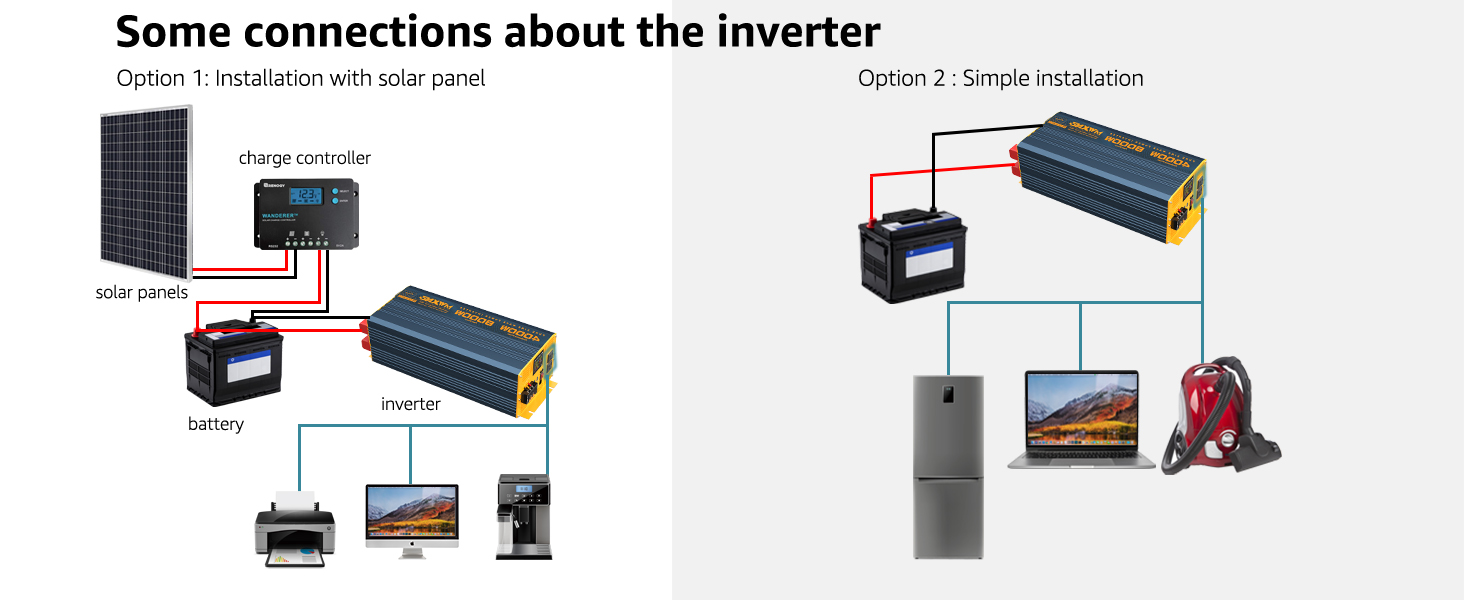
5.1. Connecting to a Battery System
- Ensure the inverter's power switch is in the OFF position.
- Connect the red battery cable to the positive (+) terminal of the 24V DC battery and the positive (+) terminal on the inverter.
- Connect the black battery cable to the negative (-) terminal of the 24V DC battery and the negative (-) terminal on the inverter.
- Connect the earth wire from the inverter's grounding terminal to a suitable ground point.
- Ensure all connections are tight and secure.

6. Operation
Once properly installed, the inverter can power a wide range of AC devices.
6.1. Powering On/Off
- After connecting the battery, switch the inverter's main power switch to the ON position. The LCD display will illuminate.
- Plug your AC devices into the inverter's AC outlets.
- To turn off, first disconnect all AC loads, then switch the inverter's main power switch to OFF.
6.2. USB Charging
The inverter provides multiple USB ports for charging mobile devices:
- Two 18W USB-A ports
- One 24W USB-A port (QC3.0)
- One 60W USB-C PD port
Connect your USB-compatible devices directly to these ports for fast charging.

6.3. Typical Applications
The compact design of the inverter makes it suitable for various applications, including long car trips, family vacations, and camping. It can power a range of electronic devices such as CPAP machines, cameras, nebulizers, televisions, DVD players, and small appliances like mini-fridges.



7. Remote Control
The inverter includes both wired and wireless remote controls. The wireless remote allows for convenient operation from a distance, while the wired remote provides direct control with a backlit display for monitoring status.
7.1. Wired Remote Control
Connect the wired remote control cable to the designated port on the inverter. The wired remote allows you to turn the inverter on/off and monitor its status from a convenient location up to 16.2 feet away.

7.2. Wireless Remote Control
The wireless remote control provides the flexibility to operate the inverter from a greater distance (up to 1km in open areas). Ensure the inverter's main power switch is in the ON position for the wireless remote to function.

8. Maintenance
Regular maintenance helps ensure the longevity and optimal performance of your inverter.
- Cleaning: Periodically clean the exterior of the inverter with a dry, soft cloth. Do not use liquid cleaners or solvents.
- Ventilation: Ensure the cooling vents are free from dust and debris. Use compressed air to clear any blockages if necessary.
- Connections: Regularly check all electrical connections (battery cables, grounding wire) to ensure they are tight and free from corrosion.
- Storage: If storing the inverter for an extended period, disconnect it from the battery and store it in a cool, dry place.
9. Troubleshooting
This section addresses common issues you might encounter with your inverter.
| Problem | Possible Cause | Solution |
|---|---|---|
| Inverter does not turn on | Loose battery connections; Low battery voltage; Blown fuse; Inverter switch off. | Check battery cable connections; Recharge or replace battery; Check and replace fuses; Ensure inverter switch is ON. |
| No AC output | Overload protection activated; Overheating; Low/High input voltage; Device not properly plugged in. | Reduce load; Allow inverter to cool down; Check battery voltage; Ensure device is fully plugged into AC outlet. |
| LCD display shows incorrect readings or freezes | Temporary software glitch; Sensor anomaly. | Turn the inverter off, wait a few seconds, then turn it back on. If the issue persists, contact customer support. |
| F10 Error (specific to 48V models, but general over-voltage warning) | Input voltage exceeds inverter's acceptable range (e.g., battery overcharged). | Check battery charging system (e.g., solar charge controller settings) to ensure battery voltage remains within the inverter's specified operating range. |
| Cooling fan is noisy or cycles frequently | High internal temperature due to heavy load or poor ventilation. | Ensure adequate ventilation around the inverter. Reduce the load if possible. This behavior can be normal under heavy use. |
10. Specifications
Technical specifications for the MWXNE 4000W Pure Sine Wave Power Inverter (Model: 4000W-24V).
| Feature | Detail |
|---|---|
| Model | 4000W-24V |
| Continuous Power | 4000 Watts |
| Input Voltage | DC 24V |
| Output Voltage | AC 110V / 120V |
| Output Waveform | Pure Sine Wave |
| Conversion Efficiency | Up to 94.2% |
| AC Outlets | 2 |
| USB-A Ports | 2 x 18W, 1 x 24W (QC3.0) |
| USB-C Port | 1 x 60W (PD) |
| Product Dimensions | 4.1 x 15.2 x 6.7 inches |
| Item Weight | 26.9 pounds |
| Safety Certifications | FCC, CE, ROHS, PSE |
11. Warranty and Support
This product comes with a 24-month warranty from the date of purchase. For warranty claims or technical assistance, please contact MWXNE customer service.
Customer Service: Please refer to the contact information provided in your purchase documentation or visit the official MWXNE store on Amazon for support options: MWXNE Amazon Store.


