1. Introduction
The MWXNE 4000W Pure Sine Wave Power Inverter is designed to convert 12V DC power from your battery into 110V/120V AC power, suitable for various household and recreational vehicle (RV) applications. This inverter features dual AC outlets, multiple USB charging ports (including USB-C PD 60W and USB-A QC3.0), an intelligent LCD display, and both wired and wireless remote controls for convenient operation. It provides stable and efficient power, ensuring optimal performance for your electronic devices.
2. Package Contents
Please verify that all items listed below are included in your package:
- 1x MWXNE 4000W Pure Sine Wave Inverter
- 1x User Manual
- 2x Battery Cables (Red for Positive, Black for Negative)
- 1x Wireless Remote Controller
- 1x Wired Remote Controller
- Some Fuses (Spare)
- 1x Spanner
- 1x Earth Wire
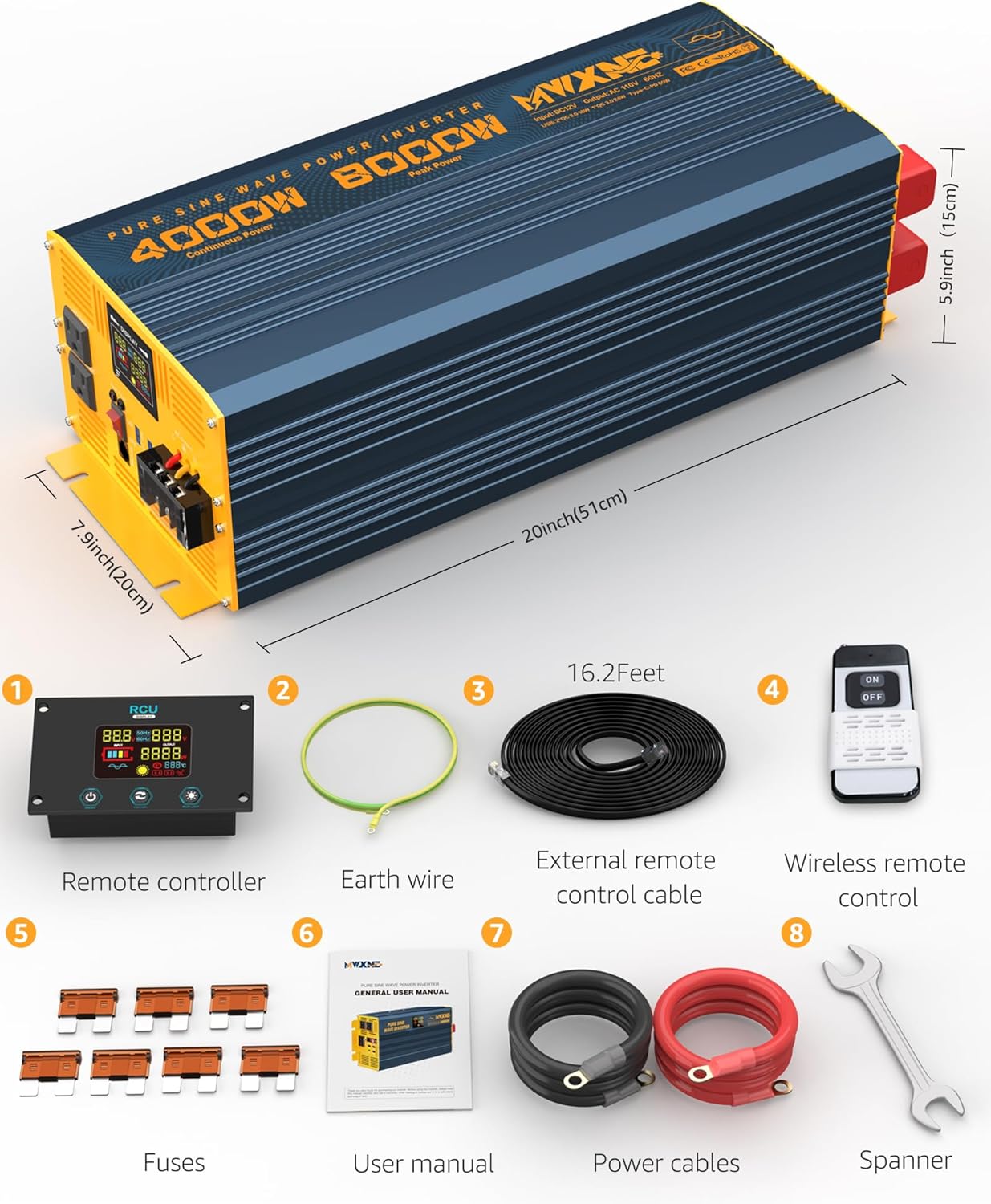
Image 2.1: All components included in the MWXNE 4000W Power Inverter package, showing the inverter, remote controls, cables, fuses, spanner, and user manual.
3. Technical Specifications
| Feature | Specification |
|---|---|
| Continuous Power | 4000W |
| Input DC Voltage | 12V |
| Output AC Voltage | 110V / 120V |
| Output Waveform | Pure Sine Wave |
| AC Outlets | 2 |
| USB-A Ports | 3 (2x 18W QC3.0, 1x 24W QC3.0) |
| USB-C Port | 1 (60W PD) |
| Conversion Efficiency | Up to 94.2% |
| Product Dimensions | 20 x 7.9 x 5.9 inches |
| Item Weight | 28.9 pounds |

Image 3.1: Front and back panels of the MWXNE 4000W Power Inverter, highlighting the intelligent cooling fan, positive and negative terminals, LCD display, power indicator, USB ports, dual AC outlets, and power switch.
4. Setup Instructions
4.1 Connecting to a 12V Battery
- Ensure the inverter's power switch is in the 'OFF' position.
- Connect the red battery cable to the positive (+) terminal of the inverter and the positive (+) terminal of your 12V battery.
- Connect the black battery cable to the negative (-) terminal of the inverter and the negative (-) terminal of your 12V battery.
- Tighten all connections securely using the provided spanner. Loose connections can cause overheating and damage.
Video 4.1: This video demonstrates the process of connecting the MWXNE Power Inverter to a battery, showing the secure attachment of positive and negative cables to the inverter terminals and the battery. It also illustrates plugging in and charging electronic devices using the inverter's AC and USB ports.
4.2 Grounding the Inverter
For safety, it is crucial to properly ground the inverter. Connect the provided earth wire to the grounding terminal on the inverter and to a suitable ground point (e.g., vehicle chassis, earth rod).
5. Operating Instructions
5.1 Powering On/Off
- After connecting the battery, turn the main power switch on the inverter to the 'ON' position. The LCD display will illuminate.
- To power off, switch the main power switch to 'OFF'.
- The wired and wireless remote controllers can also be used to turn the inverter on or off from a distance. Ensure the main switch is 'ON' for remote control functionality.
5.2 Using AC Outlets and USB Ports
- Plug your AC-powered devices into the dual 110V/120V AC outlets.
- Connect your USB-powered devices to the USB-A (18W QC3.0, 24W QC3.0) or USB-C (60W PD) ports for fast charging.
- Ensure the total power consumption of all connected devices does not exceed the inverter's continuous power rating of 4000W.

Image 5.1: A detailed view of the MWXNE 4000W Power Inverter's output panel, showing the dual AC outlets, multiple USB-A ports (including QC3.0), and a USB-C PD 60W port for charging various electronic devices.
5.3 LCD Display Overview
The intelligent LCD display provides real-time monitoring of the inverter's status:
- Input Voltage: Displays the current DC voltage from the battery.
- Output Voltage: Shows the AC output voltage (110V/120V).
- Output Wattage: Indicates the current power consumption of connected devices.
- Battery Level: Graphic representation of the battery charge status.
- Temperature: Displays the internal temperature of the inverter.
- Protection Status: Icons illuminate to indicate active protection modes (e.g., low voltage, overvoltage, overload, overheating, short circuit).

Image 5.2: The color LCD display of the MWXNE 4000W Power Inverter, showing real-time monitoring of input/output voltage, wattage, battery level, temperature, and various protection indicators.
6. Safety Protections
The MWXNE Pure Sine Wave Inverter is equipped with a comprehensive safety guarantee system to protect both the inverter and your connected devices. It has passed FCC, CE, ROHS, and PSE certifications.
- Under-Voltage Protection: Automatically shuts down if the input DC voltage drops too low.
- Overvoltage Protection: Protects against excessively high input DC voltage.
- Overload Protection: Prevents damage when connected devices draw too much power.
- Overheating Protection: Activates cooling fans and/or shuts down if internal temperature becomes too high.
- Short Circuit Protection: Safeguards against short circuits in the output.
- Reverse Polarity Protection: Protects against incorrect battery terminal connections.

Image 6.1: A visual representation of the inverter's safety features, including short circuit, overload, low/over voltage, battery low/over voltage, over temperature, and reverse polarity protection.
7. Maintenance
7.1 Fuse Replacement
If the inverter stops functioning due to a blown fuse, follow these steps to replace it:
- Ensure the inverter is completely disconnected from the battery and all loads.
- Carefully remove the screws on the inverter housing to access the internal components.
- Locate the fuses inside the inverter. They are typically small, colored plastic components.
- Using a suitable tool (e.g., pliers), gently pull out the old, blown fuse.
- Insert a new fuse of the correct amperage into the empty slot. Refer to the specifications or the original fuse for the correct rating.
- Carefully reassemble the inverter housing and secure all screws.
Video 7.1: This video provides a step-by-step guide on how to safely open the inverter housing, locate the internal fuses, remove a blown fuse, and replace it with a new one, followed by reassembling the unit.
8. Troubleshooting
If you encounter issues with your MWXNE Power Inverter, refer to the following common troubleshooting steps:
- No Power Output: Check battery connections for tightness and corrosion. Ensure the inverter's power switch is ON. Verify battery voltage is within the operating range.
- Overload Indication: Reduce the total load connected to the inverter. Disconnect high-power devices and reconnect them one by one.
- Overheating: Ensure the inverter is in a well-ventilated area. Clear any obstructions from the cooling fans. Reduce the load if operating continuously at high power.
- Low/Over Voltage Alarm: Check your battery's charge level and voltage. Recharge or replace the battery if necessary.
- Error Codes: The LCD display may show specific error codes (e.g., E06, F13). Consult the full user manual for detailed explanations and solutions for each code.
If the problem persists after attempting these steps, please contact customer support.
9. Warranty and Support
9.1 Warranty Information
The MWXNE 4000W Pure Sine Wave Power Inverter comes with a 24-month warranty from the date of purchase. This warranty covers manufacturing defects and malfunctions under normal use conditions. Please retain your proof of purchase for warranty claims.
9.2 Customer Service
For any questions, technical assistance, or warranty claims, please contact MWXNE customer service. Refer to the contact information provided in your user manual or on the official MWXNE website. Our team is available 24/7 to assist you.


