
PET MARVEL PET-145-TOI-WHT
Pet Marvel Self-Cleaning Automatic Litter Box User Manual
Model: PET-145-TOI-WHT
1. Introduction
The Pet Marvel Self-Cleaning Smart Automatic Cat Litter Box is an advanced solution designed to simplify cat waste management. This innovative system provides a clean and hygienic environment for your feline companion while significantly reducing the need for manual cleaning.
Equipped with smart automatic cleaning technology, the litter box features built-in sensors that detect when your cat has finished using the unit. This triggers an efficient cleaning process, scooping and depositing waste into a separate compartment, ensuring a fresh and odor-free litter bed for continuous use.
2. Safety Information
Please read all safety instructions carefully before operating the device.
- This product must be operated strictly in accordance with the instructions provided in this manual. Any actions outside of these guidelines may lead to device malfunction or damage.
- Ensure the power adapter is correctly connected to a suitable power outlet. Do not use damaged power cords or adapters.
- Keep the device away from water or excessive moisture to prevent electrical shock.
- Do not allow children or pets to play with the device or its components.
- Ensure the litter box is placed on a stable, level surface.
- Do not attempt to disassemble or repair the unit yourself. Contact qualified service personnel for assistance.
- Regularly check for any obstructions or foreign objects within the litter box that could impede its operation.
3. Product Overview
The Pet Marvel litter box integrates advanced features for convenience and hygiene. Key components include the main unit, waste collection drawer, litter chamber, and control panel.
3.1 Key Features
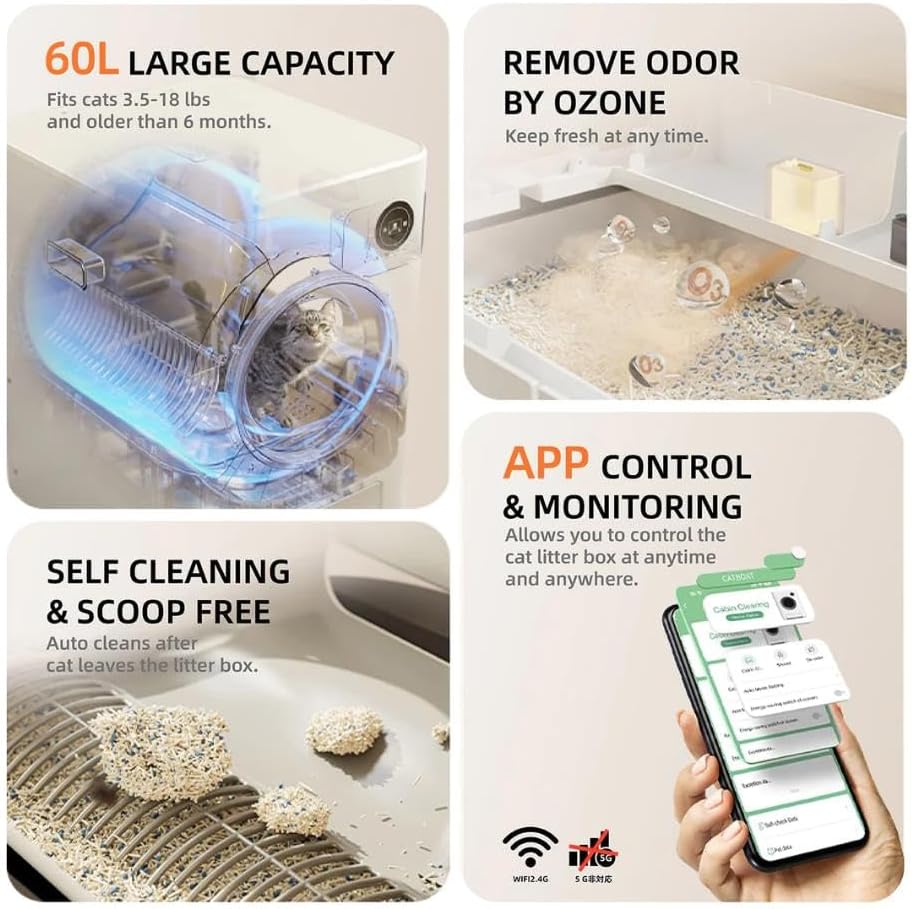
- APP Control & Monitoring: Manage and monitor the litter box remotely via a dedicated smartphone application.
- Care Security System: Multiple safety features, including gravity sensors and an active subject detector, ensure pet safety during operation.
- Low Noise Operation: Operates at a quiet level of 46dB, minimizing disturbance to your pet and household.
- Self-Cleaning & Scoop-Free: Automatically cleans after each use, eliminating the need for manual scooping.
- Large Inner Space & Odor Removal: Spacious 60L capacity accommodates cats up to 8kg and features ozone deodorization for effective odor control.
- OLED Touch Panel: Provides easy status checks and manual operation directly on the unit.
3.2 Product Components and Features Visuals




4. Setup
4.1 Unpacking and Placement
- Carefully remove the litter box and all accessories from the packaging. Retain packaging for future transport or storage.
- Place the unit on a firm, level, and dry surface in a well-ventilated area, away from direct sunlight or heat sources. Ensure there is enough space around the unit for easy access and maintenance.
4.2 Power Connection
- Connect the provided power adapter to the power input port on the back of the litter box.
- Plug the power adapter into a standard electrical outlet.
4.3 Filling the Litter Chamber
- Open the top lid or access panel to the litter chamber.
- Pour clumping cat litter into the chamber, ensuring it does not exceed the maximum fill line (Max Cat Litter Capacity: 4.3L). Refer to Figure 3.2.6 for compatible litter types.
- Close the lid securely.
4.4 App Download and Initial Connection
- Download the official Pet Marvel app from your smartphone's app store (iOS or Android).
- Ensure your smartphone is connected to a 2.4GHz Wi-Fi network. 5GHz networks are not supported.
- Enable Bluetooth on your smartphone for the initial connection process.
- Follow the in-app instructions to pair your litter box with your smartphone. This may involve pressing a button on the unit or scanning a QR code.
5. Operating Instructions
5.1 Automatic Operation
Once set up and powered on, the Pet Marvel litter box operates automatically. The built-in sensors detect when your cat enters and exits the unit. After a set delay (configurable via the app), the self-cleaning cycle will initiate, sifting the litter and depositing waste into the sealed drawer.
5.2 Manual Operation (OLED Touch Panel)
The OLED touch panel on the unit provides quick access to status information and manual controls:
- Status Display: View current status, such as cleaning cycle in progress, waste drawer full, or error codes.
- Manual Clean: Press the designated button to initiate a cleaning cycle manually.
- Empty Litter: Use this function to empty the entire litter chamber for deep cleaning or litter replacement.
5.3 App Control Functions
The Pet Marvel app offers comprehensive control and monitoring capabilities:
- Remote Cleaning: Start a cleaning cycle from anywhere.
- Scheduled Cleaning: Set custom cleaning schedules.
- Usage Tracking: Monitor your cat's litter box usage patterns and frequency.
- Health Reports: Access data records related to your cat's habits, which can be useful for health monitoring.
- Notifications: Receive alerts for full waste drawers, low litter levels, or system errors.
- Settings: Adjust various parameters, including delay before cleaning, odor control intensity, and safety settings.
5.4 Waste Drawer Management
- When the waste drawer is full, the app will send a notification, and the unit's display may indicate this.
- Carefully pull out the waste drawer from the front of the unit.
- Dispose of the waste in a sanitary manner.
- Replace the waste drawer firmly back into the unit until it clicks into place.
6. Maintenance
6.1 Regular Cleaning
For optimal performance and hygiene, regular cleaning of the litter box is recommended. Many components are removable for easy cleaning.
- Waste Drawer: Empty and clean the waste drawer regularly, ideally every few days or when notified by the app. Use mild soap and water, then dry thoroughly.
- Litter Chamber: Periodically empty all litter and wipe down the inside of the chamber with a damp cloth and mild, pet-safe cleaner. Ensure it is completely dry before refilling with fresh litter.
- Exterior: Wipe the exterior surfaces with a soft, damp cloth as needed.
- Sensors: Gently wipe the sensor areas (e.g., active subject detector, gravity sensors) to ensure they remain free of dust or debris, which could affect their accuracy.
6.2 Litter Type Compatibility
The Pet Marvel litter box is designed to work with all kinds of clumping cat litter. For best results, use high-quality clumping litter that forms solid clumps to ensure efficient sifting and waste removal. Avoid non-clumping or crystal litters as they may not be compatible with the automatic sifting mechanism.
6.3 Odor Removal System
The unit features an ozone deodorization system to effectively remove unpleasant odors. Ensure the system is active via the app settings for continuous odor control. No specific maintenance is required for the ozone generator itself, but keeping the unit clean will enhance its effectiveness.
7. Troubleshooting
If you encounter issues with your Pet Marvel litter box, please refer to the following common problems and solutions. For more complex issues, consult the in-app diagnostics or contact customer support.
| Problem | Possible Cause | Solution |
|---|---|---|
| Unit not powering on. | Power cord disconnected; power outlet issue. | Check power cord connection; try a different outlet. |
| Cleaning cycle not starting automatically. | Sensors obstructed; cat still in unit; waste drawer full. | Clean sensors; ensure cat has exited; empty waste drawer. |
| App connectivity issues. | Incorrect Wi-Fi band (5GHz); weak Wi-Fi signal; Bluetooth off. | Ensure 2.4GHz Wi-Fi; move unit closer to router; enable Bluetooth for initial setup. Re-pair if necessary. |
| Litter not clumping properly or sticking. | Incorrect litter type; high humidity. | Use high-quality clumping litter; ensure proper ventilation in the room. |
| Odor persists despite deodorization. | Waste drawer full; unit needs cleaning; ozone system off. | Empty waste drawer; perform thorough cleaning; check ozone setting in app. |
| Unusual noises during operation. | Obstruction in mechanism; worn parts. | Check for and remove any foreign objects. If noise persists, contact support. |
8. Specifications
Detailed technical specifications for the Pet Marvel Self-Cleaning Automatic Litter Box:

| Attribute | Value |
|---|---|
| Brand | PET MARVEL |
| Model Number | PET-145-TOI-WHT |
| Product Dimensions (L x W x H) | 52 x 54 x 68 cm |
| Net Weight | 14.4 kg |
| Color | White |
| Material | Acrylonitrile Butadiene Styrene (ABS), Polypropylene (PP) |
| Drawer Capacity | 8L |
| Max Cat Litter Capacity | 4.3L |
| Power Voltage | 12 Volt DC |
| Power Rating | 15W |
| Noise Level | <50dBA (typically 46dB during operation) |
| Connectivity | Wi-Fi (2.4GHz only), Bluetooth |
| Specific Uses | Indoor |
| Pet Life Stage | All Life Stages |
9. Warranty & Support
For warranty information, technical support, or service inquiries, please contact Pet Marvel customer service through the following channels:
- Refer to the contact information provided in the product packaging or on the official Pet Marvel website.
- Utilize the support features within the Pet Marvel mobile application.
- Keep your purchase receipt or proof of purchase for warranty claims.
Please note that the warranty typically covers manufacturing defects and does not cover damage caused by misuse, accidents, or unauthorized modifications.
Related documentsPET-145-TOI-WHT


Ask a question about this manual
Ask about setup, troubleshooting, compatibility, parts, safety, or missing instructions. Manuals+ will review the question and use this page’s manual context to help answer it.