
Introduction
Thank you for purchasing the AMIEROUS AR-1635 Mini Rice Cooker. This versatile appliance is designed for convenient cooking at home, in your car, or in a truck, offering multi-voltage compatibility (12V/24V/110V). With its compact 2L capacity and multiple cooking functions, you can enjoy freshly prepared meals wherever you are. Please read this manual thoroughly before use to ensure safe and optimal operation.
Safety Instructions
- Read all instructions before operating the appliance.
- Do not touch hot surfaces. Use handles or knobs.
- To protect against electrical shock, do not immerse cord, plugs, or the heating base in water or other liquid.
- Close supervision is necessary when any appliance is used by or near children.
- Unplug from outlet when not in use and before cleaning. Allow to cool before putting on or taking off parts.
- Do not operate any appliance with a damaged cord or plug, or after the appliance malfunctions or has been damaged in any manner.
- The use of accessory attachments not recommended by the appliance manufacturer may cause injuries.
- Do not use outdoors.
- Do not let cord hang over edge of table or counter, or touch hot surfaces.
- Do not place on or near a hot gas or electric burner, or in a heated oven.
- Extreme caution must be used when moving an appliance containing hot oil or other hot liquids.
- Always attach plug to appliance first, then plug cord into the wall outlet. To disconnect, turn any control to "off", then remove plug from wall outlet.
- Do not use appliance for other than intended use.
- This appliance is for household use only.
- Do not use the inner pot on a gas or electric cooktop.
- Ensure the voltage used matches the appliance's specifications (12V/24V/110V).
Package Contents
Your AMIEROUS AR-1635 Mini Rice Cooker package includes the following items:
- AMIEROUS AR-1635 Mini Rice Cooker (Main Unit)
- Removable Aluminum Inner Liner
- Detachable Lid
- Steam Tray
- Measuring Rice Cup
- Serving Spoon
- Power Cord (for 110V AC)
- Car/Truck Power Cord (for 12V DC / 24V DC)
- Instruction Manual

Figure 1: Included components of the AMIEROUS AR-1635 Mini Rice Cooker.
Product Overview
Familiarize yourself with the parts of your AMIEROUS AR-1635 Mini Rice Cooker:
- Main Unit: Houses the heating element and control panel.
- Detachable Lid: Seals the cooking chamber. Features a detachable inner lid for easy cleaning.
- Aluminum Inner Liner: Non-stick cooking pot with water level markings.
- Steam Tray: For steaming vegetables or other foods.
- Digital Control Panel: Features an LCD display and buttons for various functions.
- Touch-Open Button: For easy and safe lid opening.
- Power Sockets: Separate sockets for 12V/24V DC and 110V AC power cords.

Figure 2: Front view of the AMIEROUS AR-1635 Mini Rice Cooker.

Figure 3: Rear view of the AMIEROUS AR-1635 Mini Rice Cooker with power input details.
Specifications
| Feature | Description |
|---|---|
| Brand | AMIEROUS |
| Model Name | AR-1635 |
| Capacity | 2 Liters (up to 3 cups uncooked rice, 6 cups cooked) |
| Power Source | DC+AC (12V Car, 24V Truck, 110V Home/Office) |
| Wattage | 350 watts |
| Product Dimensions | 10.24"D x 8.27"W x 9.45"H |
| Material | Acrylonitrile Butadiene Styrene (ABS), Stainless Steel |
| Special Features | Car use, Home use, 24-hour Delay Timer, Keep Warm Function, 6 Preset Digital Functions |
Setup
- Unpack: Carefully remove all components from the packaging.
- Clean: Wash the removable inner liner, steam tray, measuring cup, and serving spoon with warm, soapy water. Rinse thoroughly and dry. Wipe the exterior of the main unit with a damp cloth.
- Placement: Place the rice cooker on a stable, flat, and heat-resistant surface. Ensure adequate ventilation around the unit.
- Power Connection:
- For home/office use: Connect the 110V AC power cord to the appropriate socket on the back of the cooker, then plug it into a standard wall outlet.
- For car/truck use: Connect the 12V DC (car) or 24V DC (truck) power cord to the corresponding socket on the back of the cooker, then plug it into your vehicle's power outlet.
Operating Instructions
Basic Rice Cooking
- Measure Rice: Use the provided measuring cup to add the desired amount of rice to the removable inner liner. (e.g., 1-3 cups uncooked rice).
- Rinse Rice (Optional): Rinse the rice under cold water until the water runs clear.
- Add Water: Add water to the inner liner according to the water level markings inside the pot, corresponding to the amount of rice used. For optimal results, follow a 1:1 ratio for rice to water (e.g., 1 cup rice to 1 cup water).
- Place Inner Liner: Carefully place the inner liner with rice and water into the main unit.
- Close Lid: Close the lid securely until it clicks into place.
- Select Function: Press the 'Menu' button on the digital control panel to cycle through the preset functions (Quick Cook, Soft Cook, Brown Rice Porridge, Oatmeal Porridge, Mixed Grain Porridge, Soup). For white rice, select 'Quick Cook' or 'Soft Cook'.
- Start Cooking: Press the 'Start' button. The cooker will begin the cooking cycle. The display will show the remaining cooking time.
- Keep Warm: Once cooking is complete, the cooker will automatically switch to 'Keep Warm' mode. The display will show '0:00' and the 'Keep Warm' indicator will light up.
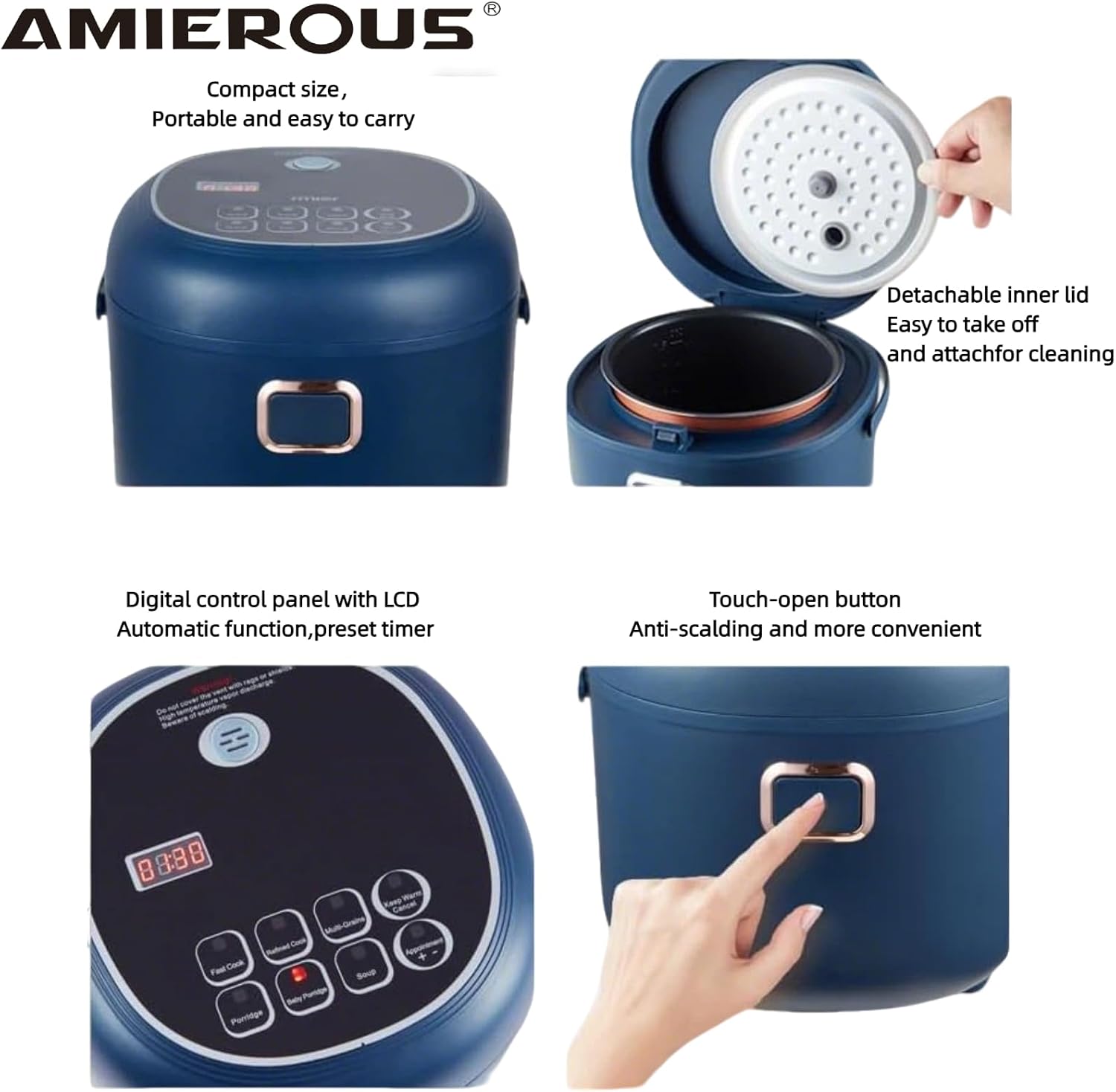
Figure 4: Digital control panel and touch-open button.
Multi-functional Programs
The AMIEROUS AR-1635 offers 6 preset digital functions to cater to various cooking needs:
- Quick Cook: For faster cooking of white rice.
- Soft Cook: For a softer texture of white rice.
- Brown Rice Porridge: Optimized for cooking brown rice to a porridge consistency.
- Oatmeal Porridge: For preparing creamy oatmeal.
- Mixed Grain Porridge: Suitable for various grain mixtures.
- Soup: For cooking soups and stews.
To select a program, press the 'Menu' button repeatedly until the desired function is highlighted on the LCD display, then press 'Start'.
Delay Timer Function
The 24-hour delay timer allows you to set a delayed start time for your cooking. This is ideal for preparing ingredients in advance and having a hot meal ready at a specific time.
- Prepare Ingredients: Add rice and water (or other ingredients) to the inner liner as usual.
- Select Program: Choose your desired cooking program using the 'Menu' button.
- Set Delay Time: Press the 'Delay' button. Use the '+' and '-' buttons to adjust the desired delay time (up to 24 hours).
- Start Delay: Press the 'Start' button. The timer will count down, and the cooker will automatically begin the selected program once the delay time expires.
Keep Warm Function
The 'Keep Warm' function automatically activates after a cooking cycle is complete, maintaining the food at an optimal serving temperature. To manually activate or deactivate 'Keep Warm' mode, refer to the specific instructions in your recipe book or the control panel interface.
Note: While the 'Keep Warm' function is convenient, prolonged use (several hours) may cause the rice at the bottom of the pot to dry out or harden. It is recommended to serve rice shortly after cooking is complete.
Video 1: Demonstration of the AMIEROUS Mini Rice Cooker's easy operation and durable design.
Cleaning and Maintenance
Proper cleaning and maintenance will extend the life of your rice cooker:
- Unplug: Always unplug the rice cooker from the power outlet and allow it to cool completely before cleaning.
- Inner Liner & Accessories: The removable aluminum inner liner, steam tray, measuring cup, and serving spoon can be washed with warm, soapy water. Rinse thoroughly and dry completely. These parts are generally not dishwasher safe; hand washing is recommended.
- Detachable Inner Lid: The inner lid is detachable for easy cleaning. Remove it and wash with warm, soapy water, then rinse and dry.
- Main Unit: Wipe the exterior of the main unit with a damp cloth. Do not immerse the main unit in water or any other liquid. Ensure no water enters the power sockets.
- Condensation: After each use, wipe away any condensation that collects on the inside of the lid and around the heating element. Leave the lid open for a period to allow all moisture to evaporate before storing.
- Storage: Store the rice cooker in a dry place, away from direct sunlight and moisture.
Troubleshooting
| Problem | Possible Cause | Solution |
|---|---|---|
| Cooker does not turn on | No power supply; loose connection | Check if the power cord is securely plugged into both the cooker and the outlet. Try a different outlet. |
| Rice is too hard/dry | Insufficient water; lid not properly closed | Add more water next time (e.g., 1:1.25 rice to water ratio). Ensure the lid is sealed. |
| Rice is too soft/mushy | Too much water | Reduce water next time. Ensure water level matches rice amount. |
| Rice sticks to the bottom | Inner pot not properly cleaned; prolonged 'Keep Warm' | Ensure inner pot is clean before use. Avoid leaving rice on 'Keep Warm' for extended periods. |
| Steam/water leaks from lid | Lid not properly sealed; gasket dirty/damaged | Ensure lid is closed tightly. Clean or inspect the lid gasket for damage. |
Warranty and Support
AMIEROUS products are manufactured to the highest quality standards. For warranty information, technical support, or customer service inquiries, please refer to the contact information provided on your product packaging or visit the official AMIEROUS website. Please retain your proof of purchase for warranty claims.