1. Introduction
This user manual provides detailed instructions for the setup, operation, and maintenance of your Herwicm Compound Trinocular Microscope. Designed for research-grade professional use, this microscope offers 40X-5000X magnification, two levels of mechanical stage, and LED illumination, making it suitable for various scientific and educational applications. Please read this manual thoroughly before using the microscope to ensure proper function and longevity.

Figure 1: Herwicm Compound Trinocular Microscope and included accessories.
2. Safety Information
Always observe the following safety precautions to prevent damage to the microscope or personal injury:
- Handle the microscope with care. Avoid sudden impacts or vibrations.
- Do not disassemble the microscope. Refer servicing to qualified personnel.
- Keep the microscope away from direct sunlight, high temperatures, dust, and corrosive chemicals.
- Ensure the power supply is compatible with the microscope's requirements (240 Volts).
- Unplug the microscope before cleaning or when not in use.
- Avoid touching optical surfaces with bare hands. Use lens paper or a soft, lint-free cloth for cleaning.
- Do not use excessive force when adjusting components.
3. Package Contents
Verify that all items are present and in good condition upon unpacking:
- Herwicm Compound Trinocular Microscope unit
- Wide-angle eyepieces (WF10X and WF25X)
- Achromatic objective lenses (4X, 10X, 40X, 100X)
- Power adapter
- USB video camera (if included with your specific package)
- Prepared slides set
- Blank slides and cover slips
- Specimen gathering equipment
- Dust cover
- User Manual

Figure 2: Key components and features of the microscope.
4. Setup
- Unpacking: Carefully remove all components from the packaging. Retain the original packaging for future storage or transport.
- Placement: Place the microscope on a stable, level surface, away from direct sunlight and heat sources.
- Eyepiece Installation: Insert the desired eyepieces (WF10X or WF25X) into the eyepiece tubes of the trinocular head.
- Objective Lens Rotation: Rotate the revolving nosepiece to ensure the 4X objective lens is positioned directly above the stage.
- Power Connection: Connect the power adapter to the microscope's power input and then to a suitable electrical outlet.
- Illumination Check: Locate the light switch on the base of the microscope and turn it on to verify the LED illumination is functional.
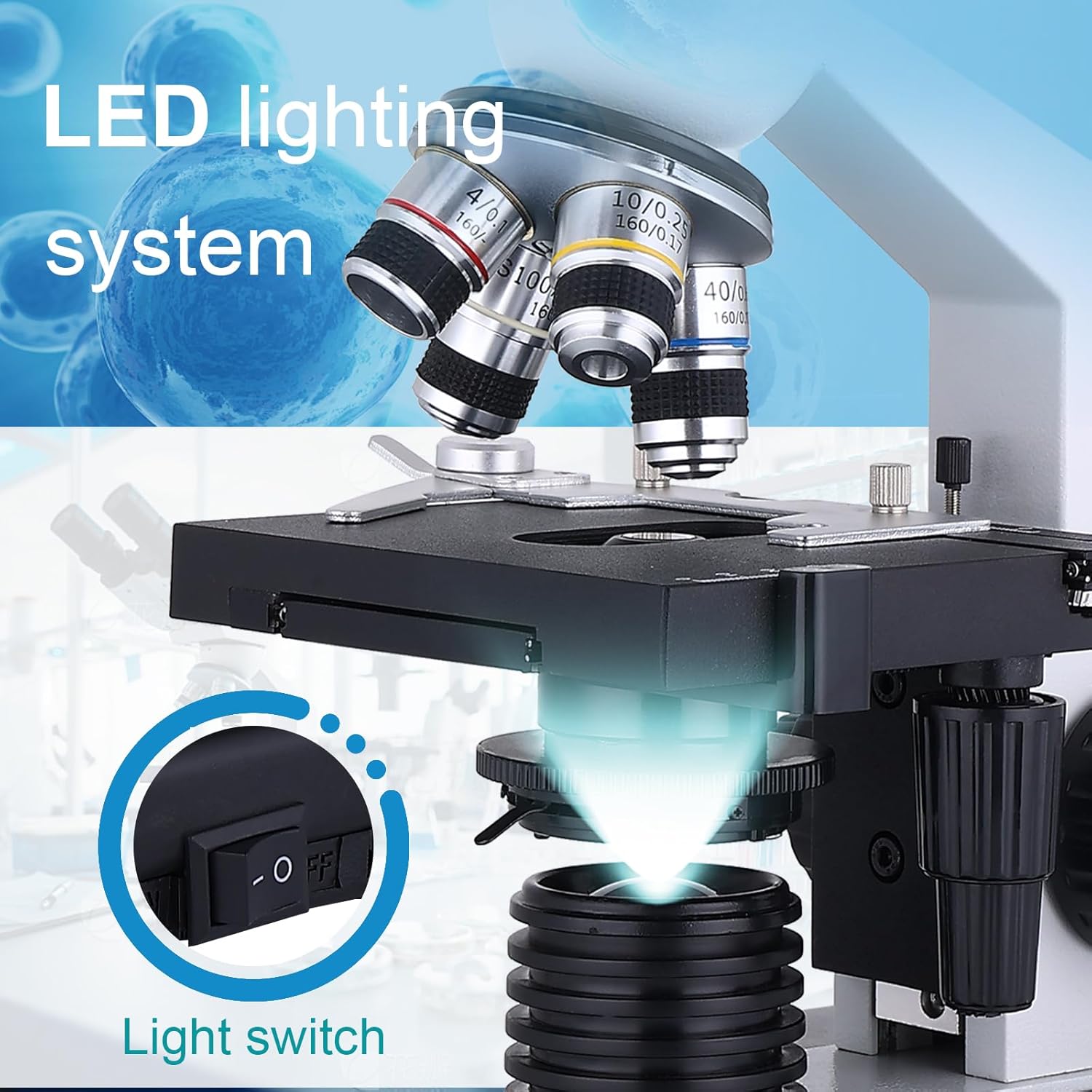
Figure 3: The LED lighting system and light switch for illumination control.
5. Operating Instructions
5.1 Preparing a Specimen
- Place a prepared slide or your own specimen on a blank slide onto the mechanical stage.
- Secure the slide using the stage clips.
- Use the X-Y axis adjustment knobs to center the specimen under the objective lens.

Figure 4: Details of the precision mechanical stage with metal calipers and coaxial adjustment.
5.2 Adjusting Magnification
- The microscope features 195 flat-field achromatic objective lenses: 4X, 10X, 40X, and 100X.
- Combined with WF10X and WF25X eyepieces, total magnification ranges from 40X to 5000X.
- To change magnification, rotate the revolving nosepiece to select the desired objective lens. Start with the lowest magnification (4X) for initial viewing.
- For higher magnifications (e.g., 100X), immersion oil may be required for optimal clarity.

Figure 5: The four achromatic objective lenses (4x, 10x, 40x, 100x) providing various magnification levels.
5.3 Focusing
- Use the coarse focus knob (larger knob) to bring the specimen into approximate focus.
- Then, use the fine focus knob (smaller knob) for precise focusing and to achieve a sharp image.
- The coaxial design allows for easy and integrated control of both coarse and fine adjustments.
5.4 Illumination Control
- The microscope features an LED illumination system.
- Adjust the light intensity using the brightness adjustment knob located on the base.
- The Abbe condenser allows for easy adjustment of light intensity and aperture for different specimens.
5.5 Trinocular Head Usage
- The trinocular head provides a dedicated port for attaching an electronic eyepiece or microscope camera (camera not included).
- This allows for viewing, broadcasting, recording, and capturing enlarged specimen images on an external display.
- The hinged viewing tube offers binocular viewing with adjustable interpupillary distance (56-74mm) and diopter adjustment for comfortable observation for both adults and children. The head is 30° tilted and 360° rotatable.

Figure 6: The 360-degree rotatable trinocular head for flexible viewing and sharing.
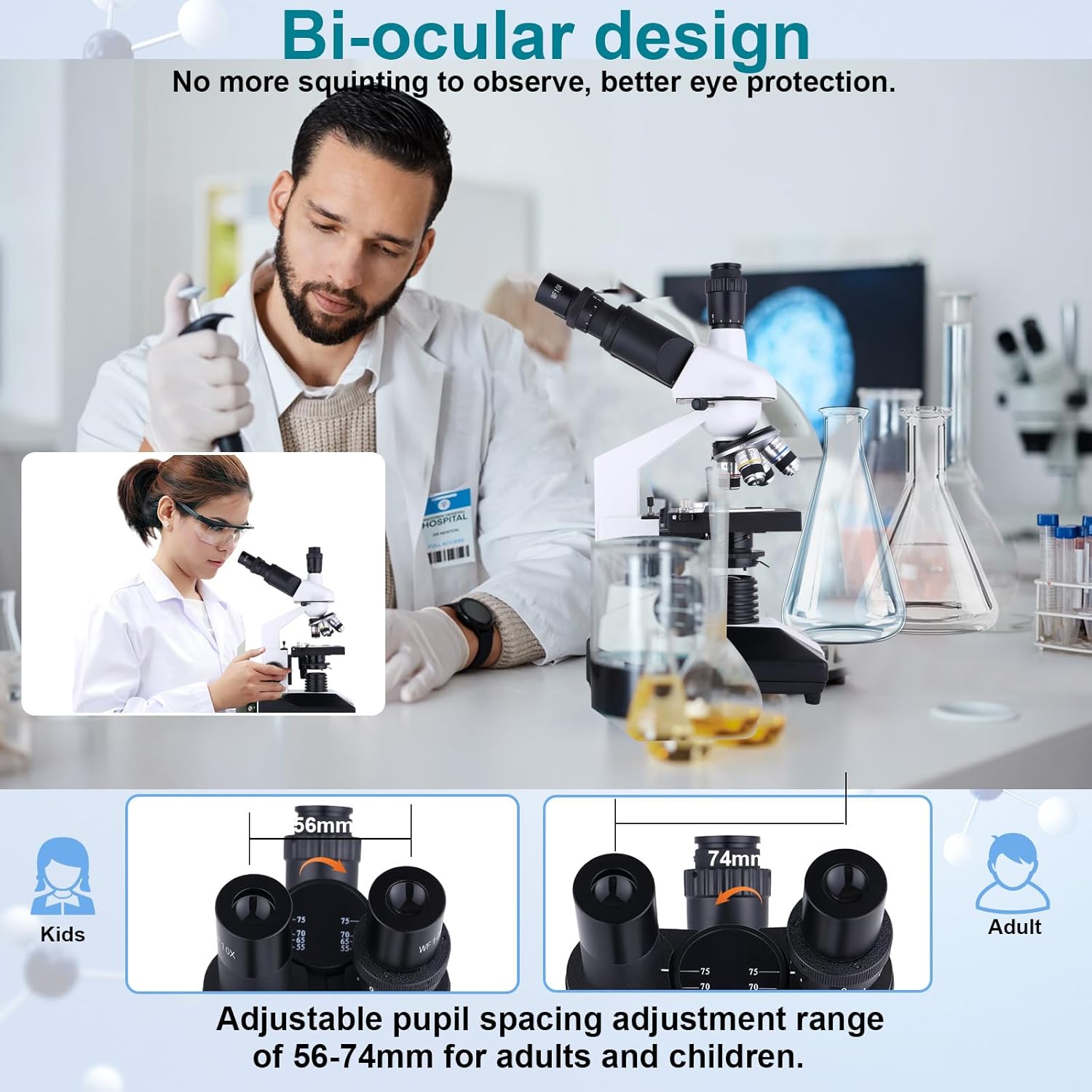
Figure 7: The bi-ocular design with adjustable pupil spacing (56-74mm) for comfortable viewing.
6. Maintenance
- Cleaning Lenses: Use a soft brush to remove dust, then gently wipe with lens paper or a microfiber cloth. For stubborn smudges, use a small amount of lens cleaning solution.
- Cleaning Body: Wipe the microscope body with a soft, damp cloth. Avoid harsh chemicals.
- Storage: When not in use, cover the microscope with the provided dust cover and store it in a cool, dry place to prevent dust accumulation and damage.
- Handling: Always carry the microscope by its arm and base. Avoid touching the lenses directly.
7. Troubleshooting
| Problem | Possible Cause | Solution |
|---|---|---|
| Image is blurry or unclear. | Improper focusing, dirty lenses, incorrect objective selection, lack of immersion oil for high magnification. | Adjust coarse and fine focus knobs. Clean objective and eyepiece lenses. Ensure correct objective is selected. Apply immersion oil for 100X objective. |
| No illumination. | Power not connected, light switch off, bulb failure. | Check power connection. Ensure light switch is on. Contact customer support if bulb is faulty. |
| Stage not moving smoothly. | Dust or debris on the stage mechanism. | Clean the mechanical stage area. Do not force movement. |
| Difficulty with camera connection/software. | Incompatible software, outdated drivers, incorrect connection. | Ensure your operating system is compatible with the camera software. Download the latest drivers from the manufacturer's website if available. Verify USB connection. |
8. Specifications
- Model Name: RM
- Brand: Herwicm
- Magnification: 40X-5000X
- Objective Lenses: 195 Flat-field Achromatic (4X, 10X, 40X, 100X)
- Eyepieces: WF10X, WF25X
- Viewing Head: Trinocular, 30° inclined, 360° rotatable
- Interpupillary Distance: Adjustable, 56-74mm
- Focusing: Coaxial Coarse & Fine Adjustment
- Stage: Double-layer Mechanical Stage
- Illumination: LED, adjustable brightness
- Condenser: Abbe Condenser
- Material: Metal
- Color: White and Black
- Product Dimensions: 15.15 x 11.81 x 7.67 inches
- Item Weight: 9.33 pounds (4.24 Kilograms)
- Voltage: 240 Volts
9. Warranty and Support
For warranty information or technical support, please contact Herwicm customer service through the retailer where the product was purchased or visit the official Herwicm website. Please have your product model number (RM) and purchase details ready when contacting support.


