
1. Introduction
This manual provides comprehensive instructions for the ZdalaMit RC-1227 Replacement Remote Control. It is designed to be fully compatible with various Denon AV Receiver models, offering a straightforward, no-programming setup for immediate use. Please read this manual carefully to ensure proper operation and longevity of your remote control.
2. Package Contents
- 1 x ZdalaMit RC-1227 Replacement Remote Control
- (Batteries are not included)
3. Compatible Denon AV Receiver Models
The RC-1227 remote control is compatible with the following Denon AV Receiver models:
- AVR-S750H
- AVR-X1600H
- AVR-X1500H
- AVR-S740H
- AVR-X1500HOM
- AVR-X1600H DAB
- AVR-X1700H
4. Setup and Battery Installation
This remote control requires two (2) AAA size alkaline batteries (not included). No programming is required; simply insert the batteries, and the remote will be ready for use with your compatible Denon AV Receiver.
- Locate the battery compartment on the back of the remote control.
- Slide the battery compartment cover downwards or in the direction indicated by an arrow to open it.
- Insert two new AAA alkaline batteries, ensuring the positive (+) and negative (-) terminals match the diagrams inside the compartment.
- Slide the battery compartment cover back into place until it clicks securely.
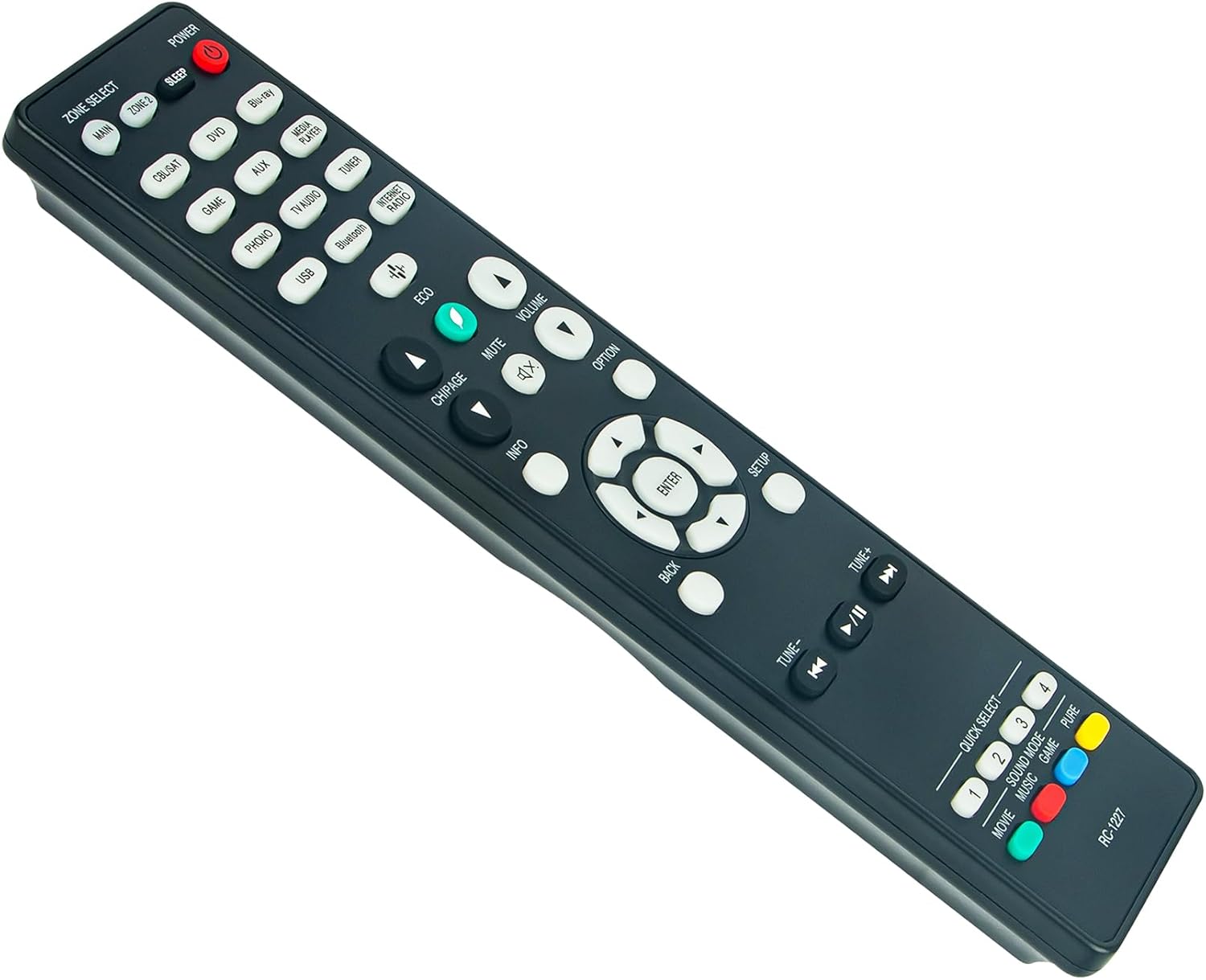
Figure 1: Rear view of the RC-1227 remote control, illustrating the location of the battery compartment. The compartment cover is typically slid open to insert batteries.
5. Operating Instructions
Once batteries are installed, the RC-1227 remote control is ready to operate your Denon AV Receiver. Point the remote control directly at your AV receiver and press the desired function buttons.

Figure 2: Front view of the RC-1227 remote control, displaying all buttons for various functions such as power, input selection, volume, navigation, and quick select options.
Key Functions:
- POWER: Turns the AV receiver on or off.
- ZONE SELECT (MAIN, ZONE 2): Selects the audio zone to control.
- INPUT SELECTORS (CBL/SAT, DVD, Blu-ray, GAME, AUX, MEDIA PLAYER, PHONO, TV AUDIO, TUNER, USB, BLUETOOTH, INTERNET RADIO): Selects the desired input source.
- VOLUME (+/-): Adjusts the master volume level.
- MUTE: Mutes or unmutes the audio output.
- NAVIGATION BUTTONS (Up, Down, Left, Right, ENTER): Used for menu navigation and selection.
- BACK: Returns to the previous menu or screen.
- SETUP: Accesses the receiver's setup menu.
- INFO: Displays information about the current source or settings.
- OPTION: Accesses context-sensitive options.
- QUICK SELECT (1, 2, 3, 4): Provides quick access to pre-configured settings or favorite inputs.
- ECO: Activates or deactivates ECO mode for power saving.
- CH/PAGE (+/-): Changes channels or pages in certain modes.
- TUNER CONTROLS (TUNE-, TUNE+, Play/Pause, Skip): Controls radio tuning and media playback.
6. Maintenance
- Battery Replacement: Replace batteries when the remote's response becomes sluggish or stops working. Always replace both batteries simultaneously with new AAA alkaline batteries.
- Cleaning: Use a soft, dry cloth to clean the remote control. Do not use liquid cleaners or abrasive materials, as they may damage the surface or internal components.
- Storage: If the remote control will not be used for an extended period, remove the batteries to prevent leakage and potential damage.
7. Troubleshooting
- Remote not working:
- Ensure batteries are inserted correctly with the correct polarity (+/-).
- Replace old batteries with new AAA alkaline batteries.
- Ensure there are no obstructions between the remote control and the AV receiver's infrared sensor.
- Confirm that the remote is pointed directly at the AV receiver.
- Intermittent operation:
- Check battery levels and replace if necessary.
- Ensure the remote is within effective operating range and line of sight.
8. Specifications
| Feature | Detail |
|---|---|
| Model | RC-1227 |
| Brand | ZdalaMit |
| Compatibility | Denon AV Receivers (AVR-S750H, AVR-X1600H, AVR-X1500H, AVR-S740H, AVR-X1500HOM, AVR-X1600H DAB, AVR-X1700H) |
| Power Source | 2 x AAA Alkaline Batteries (not included) |
| Dimensions | 6 x 2 x 0.5 inches |
| Item Weight | 2 ounces |
| Color | Black |
| Special Feature | Pre-Programmed, No Setup Required |
9. Warranty and Support
For any questions or support regarding your ZdalaMit RC-1227 Replacement Remote Control, please contact the seller or manufacturer directly. Specific warranty details may vary; please refer to your purchase documentation for more information.