
5TH WHEEL M2
5TH WHEEL M2 Electric Scooter User Manual
Model: M2 | Brand: 5TH WHEEL
1. Important Safety Information
Before operating your 5TH WHEEL M2 Electric Scooter, please read this manual thoroughly to ensure safe usage and prevent injury. Always wear a helmet and appropriate safety gear. Adhere to local laws and regulations regarding electric scooter use.
- Always wear a helmet and protective gear (knee pads, elbow pads).
- Do not ride in wet conditions or on slippery surfaces.
- Ensure all components are securely fastened before each ride.
- Maintain a safe speed and distance from other vehicles and pedestrians.
- Avoid riding under the influence of alcohol or drugs.
2. Setup and Assembly
Your 5TH WHEEL M2 Electric Scooter comes partially assembled. Follow these steps to complete the setup:
- Unfold the Scooter: Carefully unfold the main body of the scooter until it locks into place. Ensure the folding mechanism is securely engaged.
- Attach the Handlebar: Gently pull the main wire from the stem. Align the handlebar with the stem and carefully connect the main wire. Ensure the connection is tight and secure.
- Secure the Handlebar: Insert the handlebar into the stem. Use the provided tools to tighten the screws on the handlebar clamp, ensuring it is firmly attached and aligned with the front wheel.
- Initial Charge: Before your first ride, fully charge the scooter's battery. Refer to the charging instructions in the Maintenance section.

3. Operating Instructions
Familiarize yourself with the scooter's controls and features before riding.
3.1 Powering On and Off
- To Power On: Press and hold the power button on the LED display until the screen illuminates.
- To Power Off: Press and hold the power button until the display turns off.
3.2 LED Display Functions
The multifunctional LED display shows important riding information:
- Speed: Current riding speed.
- Battery Level: Remaining battery charge.
- Speed Gear: Current speed mode (1, 2, or 3).
- Lights Indicator: Shows if headlights/taillights are active.
- APP Link: Indicates connection status to the mobile application.

3.3 Speed Modes and Throttle
- The scooter features multiple speed gears. Short press the power button to cycle through the gears (1, 2, 3).
- To accelerate, gently press the throttle lever located on the right handlebar.
- The M2 e-scooter can reach speeds up to 15.5 mph.
3.4 Braking System
The M2 is equipped with a triple braking system for enhanced safety:
- Motor Brake: Engages when the throttle is released or brake lever is pressed.
- Disc Brake: Activated by the brake lever on the left handlebar.
- Foot Brake: A physical brake located on the rear fender, to be used in conjunction with the hand brake for emergency stops.

3.5 Lights
- Headlight: Double-press the power button to turn the front LED headlight on or off.
- Taillight: The rear taillight activates automatically when the scooter is powered on and brightens when brakes are applied.
3.6 Folding Mechanism
The scooter features a hidden folding system for easy storage and transport.
- To fold, locate the folding latch near the base of the stem. Follow the instructions to release the latch and fold the stem downwards until it clicks into place.
- To unfold, reverse the process, ensuring the stem is fully extended and locked before riding.

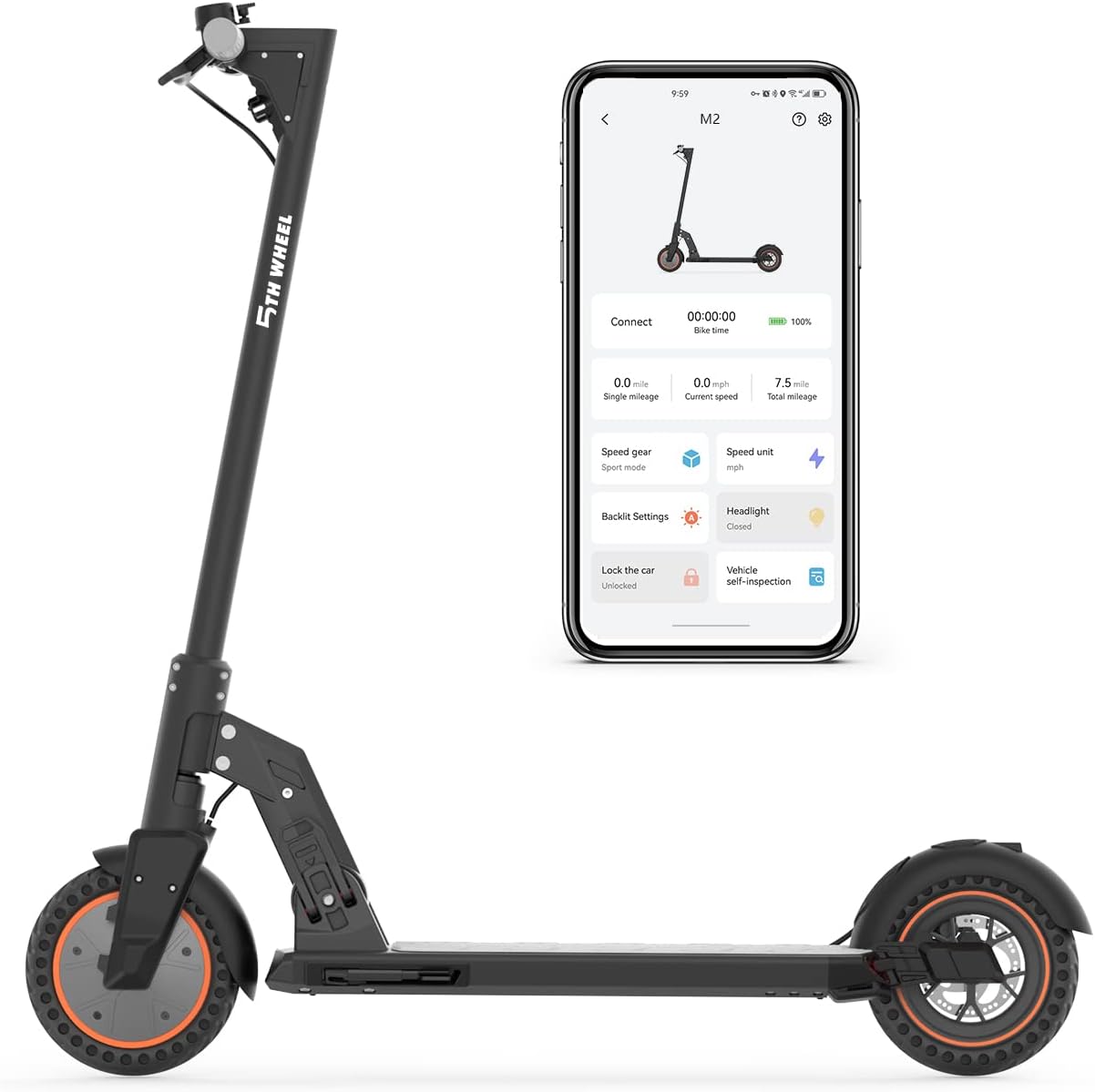
3.7 Mobile App Connectivity
Connect your scooter to the dedicated mobile app for additional controls and features:
- Lock/unlock the scooter.
- Control lights (on/off).
- Adjust speed gears.
- Activate cruise control.
- Perform vehicle self-inspection.
3.8 Official Product Video
Video: An official product video from 5TH WHEEL SMART showcasing the M2 Electric Scooter for adults, highlighting its features and usage.
4. Maintenance
Regular maintenance ensures the longevity and optimal performance of your scooter.
4.1 Battery Care
- Charge the battery fully before first use.
- Charging time is approximately 5 hours.
- Avoid completely draining the battery. Charge regularly, even if not in use for extended periods.
- The scooter features 5 advanced intelligent battery management systems: Short circuit protection, Overcurrent protection, Overcharge protection, Over-discharge protection, and abnormal temperature protection.
4.2 Tire Care
- The M2 kick scooter has 8.5-inch honeycomb tires, designed for shock absorption and durability.
- These solid tires offer good anti-skid effects, high elasticity, and wear resistance, eliminating the risk of flats.
- Regularly inspect tires for wear and tear.
4.3 General Cleaning and Storage
- Clean the scooter with a damp cloth. Do not use high-pressure water or immerse it in water.
- Store the scooter in a cool, dry place away from direct sunlight and extreme temperatures.
5. Troubleshooting
If you encounter issues with your scooter, refer to these common solutions:
- Scooter not turning on: Ensure the battery is charged. Check all cable connections, especially the main line to the handlebar.
- Reduced range or speed: This could indicate a low battery charge or a need for battery recalibration. Ensure tires are free of debris.
- Brakes not responding: Check the brake lever and disc brake caliper for any obstructions or damage. Ensure cables are properly tensioned.
- Unusual noises: Inspect wheels, motor, and suspension for loose parts or foreign objects.
For persistent issues, please contact customer support.
6. Specifications
| Feature | Detail |
|---|---|
| Brand | 5TH WHEEL |
| Model Name | 5LCHM02 (M2) |
| Motor Power | Rated 350W (Peak 700W) |
| Max Speed | 15.5 mph |
| Max Distance Range | 19 Miles |
| Battery | 36V/7.5Ah Lithium Battery |
| Charging Time | 5 Hours |
| Weight Limit | 220 Pounds |
| Tire Size | 8.5 Inches (Honeycomb) |
| Suspension Type | Dual Suspension |
| Brake Style | Front Braking, Rear Braking (Triple System) |
| Frame Material | Aluminum |
| Product Dimensions | 43.7"L x 8.07"W x 17.13"H |
| Item Weight | 44 Pounds |
| Special Features | Foldable, Lights, Non-Slip Deck |
7. Warranty Information
5TH WHEEL provides a 1-year warranty for the M2 Electric Scooter to ensure your peace of mind. All adult electric scooters have received UL certification.
For accessories, consumable parts, and local after-sales service, the warranty may differ. Please refer to the updated warranty and user manual on the product page or contact customer support for detailed information.
8. Customer Support
If you have any questions, require assistance, or need to claim warranty service, please contact 5TH WHEEL customer support through their official website or the contact information provided with your purchase.
Please have your product model (M2) and purchase details ready when contacting support.
Related documentsM2


Ask a question about this manual
Ask about setup, troubleshooting, compatibility, parts, safety, or missing instructions. Manuals+ will review the question and use this page’s manual context to help answer it.