1. Product Overview
The HAvern Tuya Smart Door Lock with Camera is an advanced security solution designed for home use. It integrates multiple unlocking methods including biometric fingerprint recognition, electronic password, IC card, and traditional mechanical key. The built-in camera provides enhanced monitoring capabilities, allowing for remote viewing and interaction via the Tuya application.
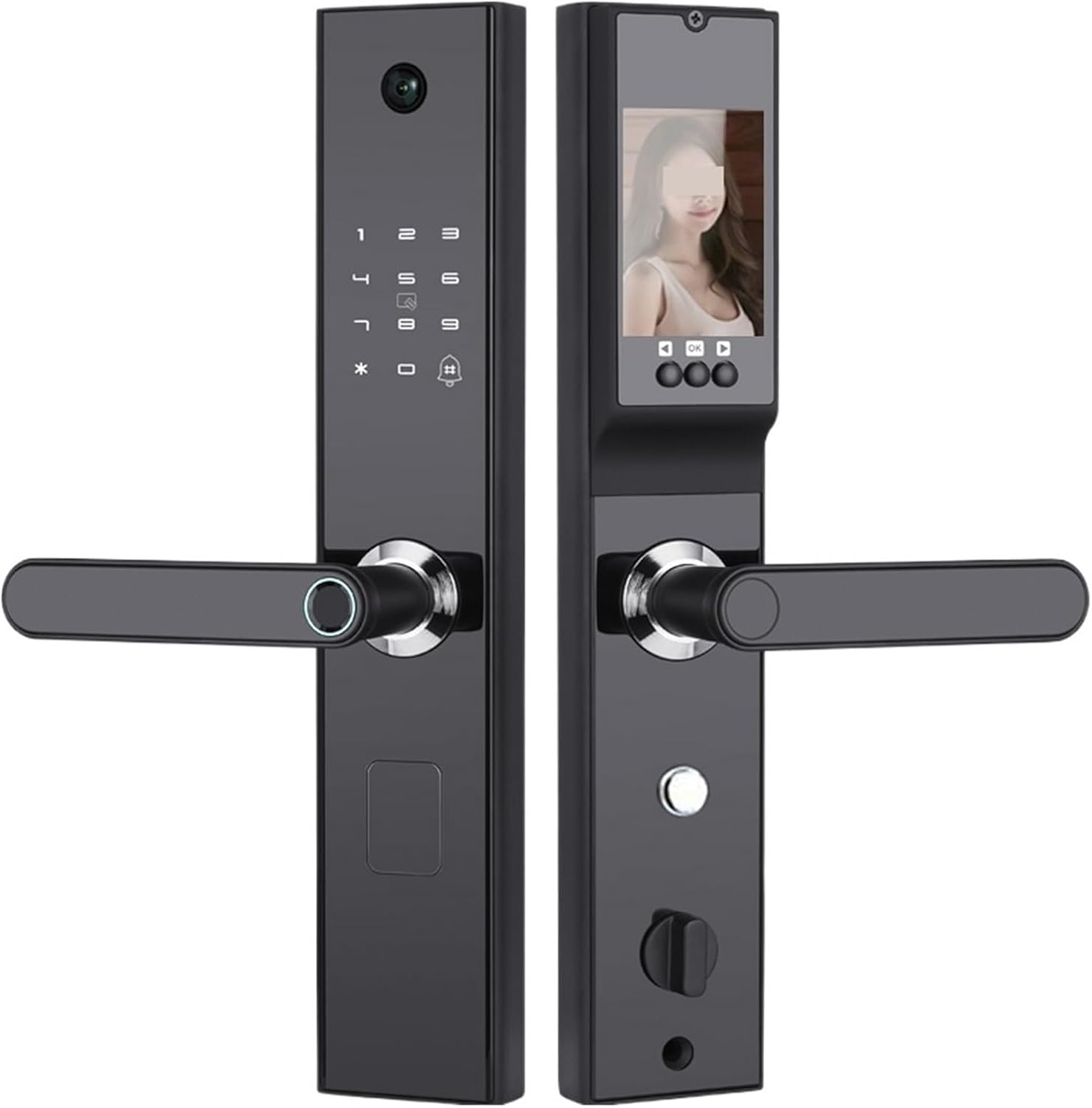
Image 1.1: Front and back panels of the HAvern Tuya Smart Door Lock. The front panel features a keypad, camera, and fingerprint sensor on the handle. The back panel includes a display screen and internal locking mechanism.
2. Package Contents
Please verify that all items listed below are included in your package:
- 1 x Smart Door Lock Unit (Front and Back Panels)
- 1 x Lock Cylinder
- 1 x Charging Cable
- 1 x Castle (Mortise Lock Body)
- 1 x Rechargeable Battery
- 2 x IC Cards
- 2 x Mechanical Keys
- Set of Mounting Screws and Accessories
3. Setup and Installation
This section provides general guidelines for installing your smart door lock. Professional installation is recommended for optimal performance and security.
- Prepare the Door: Ensure your door meets the required dimensions for the lock body (30X240(6068) mortise). Remove any existing lock hardware.
- Install the Mortise Lock Body: Insert the mortise lock body (castle) into the door edge and secure it with screws.
- Install the Lock Cylinder: Insert the lock cylinder into the mortise lock body.
- Mount the Front Panel: Route the connecting cables from the front panel through the door. Align the front panel with the mortise and secure it.
- Mount the Back Panel: Connect the cables from the front panel to the back panel. Align the back panel and secure it to the door using the provided screws. Ensure the handles operate smoothly.
- Insert Battery: Install the rechargeable battery into the designated compartment on the back panel.
- Initial Configuration: Follow the on-screen prompts on the lock's display or refer to the Tuya app for initial setup, including setting the administrator password and registering the first fingerprint.

Image 3.1: The HAvern Smart Door Lock installed on a door, with the fingerprint sensor illuminated, indicating readiness for biometric identification. The 'Powered by Tuya' logo is visible, signifying smart home integration.
4. Operating Instructions
4.1 Unlocking Methods
The HAvern Smart Door Lock offers multiple secure ways to unlock your door:
- Fingerprint Unlocking: Place a registered finger on the fingerprint sensor located on the handle. The lock will verify the fingerprint and unlock.
- Password Unlocking: Enter your registered password on the keypad, followed by the '#' key. The lock supports anti-peep passwords, allowing you to enter random digits before or after your actual password for added security.
- IC Card Unlocking: Present a registered IC card to the card reader area on the lock's front panel. The lock will verify the card and unlock.
- Mechanical Key Unlocking: In case of emergency or battery depletion, insert the mechanical key into the keyhole at the bottom of the front panel and turn to unlock.

Image 4.1: A close-up view of the fingerprint sensor integrated into the handle and the illuminated numeric keypad on the HAvern Smart Door Lock, demonstrating the primary access methods.
4.2 Tuya App Control
The lock integrates with the Tuya Smart application, providing remote control and monitoring features:
- Remote Unlocking: Unlock your door remotely via the app.
- Temporary Passwords: Generate and send temporary passwords to guests or service providers.
- Access Logs: View a history of who entered and when.
- Real-time Monitoring: Utilize the built-in camera to view who is at your door.
- User Management: Add, modify, or delete fingerprints, passwords, and IC cards.

Image 4.2: The HAvern Smart Door Lock's internal display showing a live view from the camera, alongside a smartphone screen demonstrating the Tuya app's interface for remote door management and visitor interaction.
5. Maintenance
Regular maintenance ensures the longevity and optimal performance of your smart door lock.
- Cleaning: Wipe the lock's surface with a soft, dry cloth. Avoid using abrasive cleaners or solvents that may damage the finish or electronic components.
- Battery Management: The lock is powered by a rechargeable battery. Monitor the battery level via the Tuya app or the lock's display. Recharge the battery using the provided charging cable when the low battery warning appears.
- Mechanical Components: Periodically check the handles and lock mechanism for smooth operation. Do not lubricate with oil-based products, as this can attract dust and debris.
- Firmware Updates: Keep the lock's firmware updated through the Tuya app to ensure access to the latest features and security enhancements.
6. Troubleshooting
If you encounter issues with your HAvern Smart Door Lock, refer to the following common problems and solutions:
| Problem | Possible Cause | Solution |
|---|---|---|
| Lock does not respond | Low battery; System error | Recharge or replace battery; Use mechanical key; Perform a system reset (refer to app for instructions). |
| Fingerprint not recognized | Finger wet/dirty; Finger not placed correctly; Fingerprint not registered | Ensure finger is clean and dry; Place finger flat on sensor; Re-register fingerprint if necessary. |
| Password not accepted | Incorrect password; Keypad malfunction | Verify password; Try again; Check for keypad damage. |
| Cannot connect to Tuya App | Wi-Fi issue; App not configured correctly | Check Wi-Fi connection; Re-pair the lock with the app; Ensure app is updated. |
If the problem persists, please contact customer support for further assistance.
7. Specifications
Detailed technical specifications for the HAvern Tuya Smart Door Lock (Model 30X240(6068)):
- Brand: HAvern
- Model: 30X240(6068)
- Special Feature: Fingerprint, Keyless Entry, Integrated Camera
- Lock Type: Biometric Smart Lock
- Style: Modern
- Color: Tuya Black
- Controller Type: Hand Control, SmartThings (via Tuya App)
- Item Weight: Approximately 1 Grams (Product listing discrepancy, actual weight is higher for a door lock)
- Control Method: App (Tuya Smart)
- Connectivity Protocol: Wi-Fi
- ASIN: B0CCMW7FJ3


