
1. Introduction
Thank you for choosing the Amicool Cobocen Portable Blender Model A9. This personal mini blender is designed for convenience and efficiency, allowing you to prepare fresh smoothies, shakes, and juices anywhere. Please read this manual carefully before use to ensure safe and optimal performance.
2. Safety Information
To prevent injury or damage, always follow these basic safety precautions:
- Ensure the red arrow on the cup aligns with the switch on the base before operating. The magnetic safety switch prevents operation if not correctly assembled.
- Do not immerse the blender base in water for extended periods, despite its IP67 waterproof rating. The charging port is waterproof, but prolonged submersion is not recommended.
- Keep hands and utensils out of the blender jar while blending to prevent severe injury.
- Do not overfill the blender. Fill ingredients up to 80% of the cup capacity.
- Avoid blending extremely hot liquids, as pressure buildup can cause the lid to eject.
- Keep out of reach of children.
- Do not operate the blender when empty.
- This appliance is equipped with overheating prevention. If the motor stops due to overheating, allow it to cool down before resuming use.
3. Product Components
The Amicool Cobocen Portable Blender includes the following parts:
- Blender Base with Motor and Control Button
- 600ml Blending Cup with 6 Stainless Steel Blades
- Sport Lid with Handle
- Bottom Lid (for converting to a portable bottle)
- USB Type-C Charging Cable
- Cleaning Brush
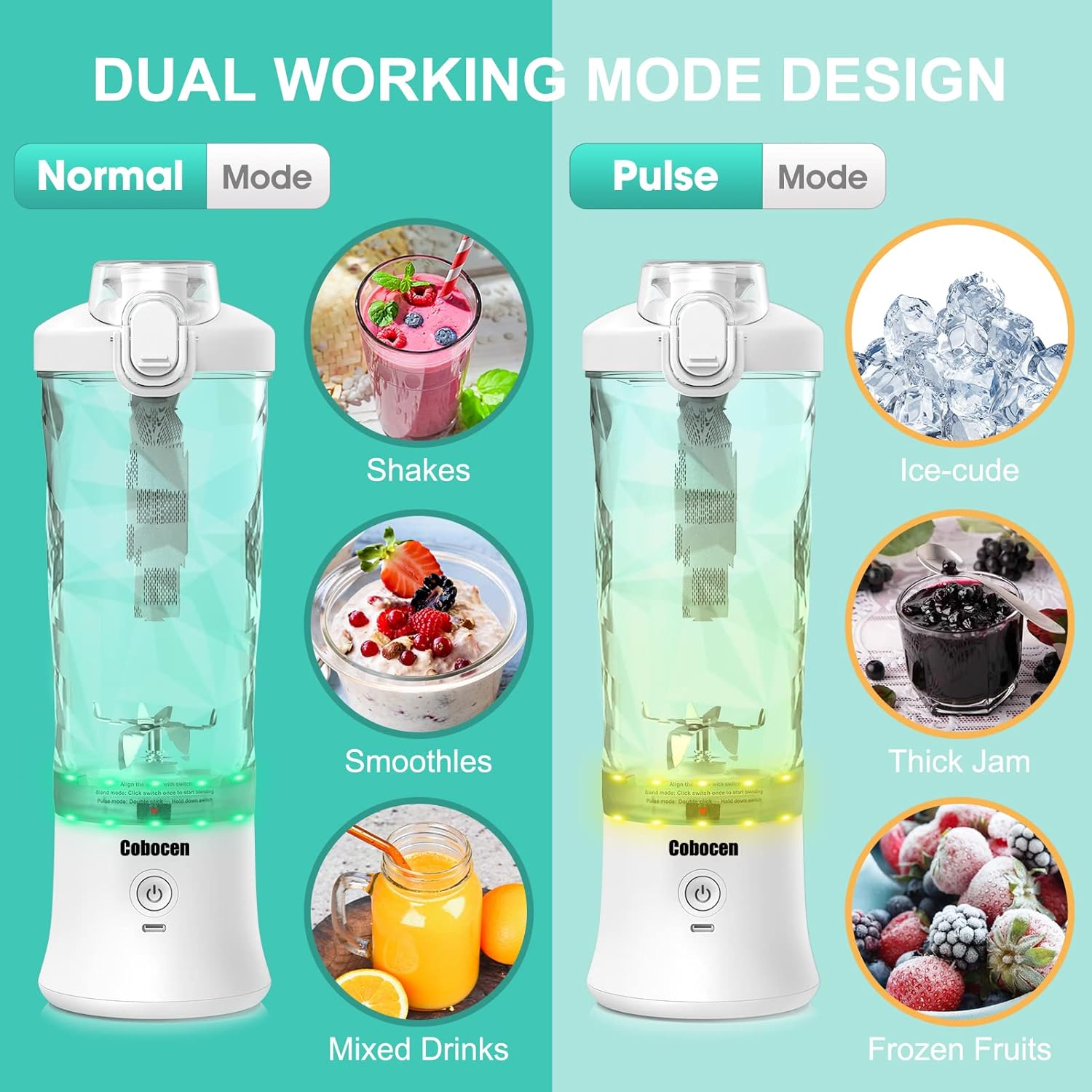
Image: Amicool Cobocen Portable Blender showing its main components.
4. Setup and Charging
4.1 Initial Charge
Before first use, fully charge the blender. Connect the USB Type-C charging cable to the blender's charging port and a compatible USB power source (e.g., mobile charger, laptop, car charger). The indicator light will show charging status.
The built-in 4000 mAh rechargeable battery provides power for multiple blends on a single charge.

Image: Battery level indicator showing charge status.
4.2 Assembly
- Place the blending cup onto the motor base.
- Twist the cup clockwise until the red arrow on the cup aligns with the power button on the base. This activates the magnetic safety switch.
- Ensure the sport lid is securely fastened to the blending cup.
5. Operating Instructions
The Amicool Cobocen Portable Blender features two blending modes: Blend Mode and Pulse Mode.
5.1 Preparing Ingredients
- Cut fruits and vegetables into small pieces (approximately 1 inch / 2.5 cm).
- Add ingredients to the blending cup, filling it around 60% of its capacity.
- Add liquid (water, milk, juice) or ice cubes, filling the cup up to 80% of its capacity. Do not exceed the MAX line.

Image: Illustration of adding ingredients to the blender cup.
5.2 Blend Mode (Normal Mode)
This mode is ideal for smoothies, fruit shakes, and mixed drinks with softer ingredients.
- Ensure the cup is securely attached and the red arrow aligns with the power button.
- Press the power button once. The green light will flash, and the blender will operate automatically for 30 seconds.
- For best results, gently shake the blender during operation to ensure all ingredients are blended evenly.
- The blender will auto-stop after 30 seconds.
5.3 Pulse Mode
Use Pulse Mode for harder ingredients like frozen fruit, ice cubes, or to create thicker consistencies like jams.
- Ensure the cup is securely attached and the red arrow aligns with the power button.
- Quickly double-press the power button. The yellow light will flash.
- Press and hold the power button to blend. Release the button to stop blending.
- The Pulse Mode will automatically switch to Blend Mode after 5 seconds of inactivity.

Image: Dual working modes: Blend Mode and Pulse Mode.
5.4 Converting to a Portable Bottle
After blending, you can replace the motor base with the included bottom lid to convert the blending cup into a portable bottle for easy transport.
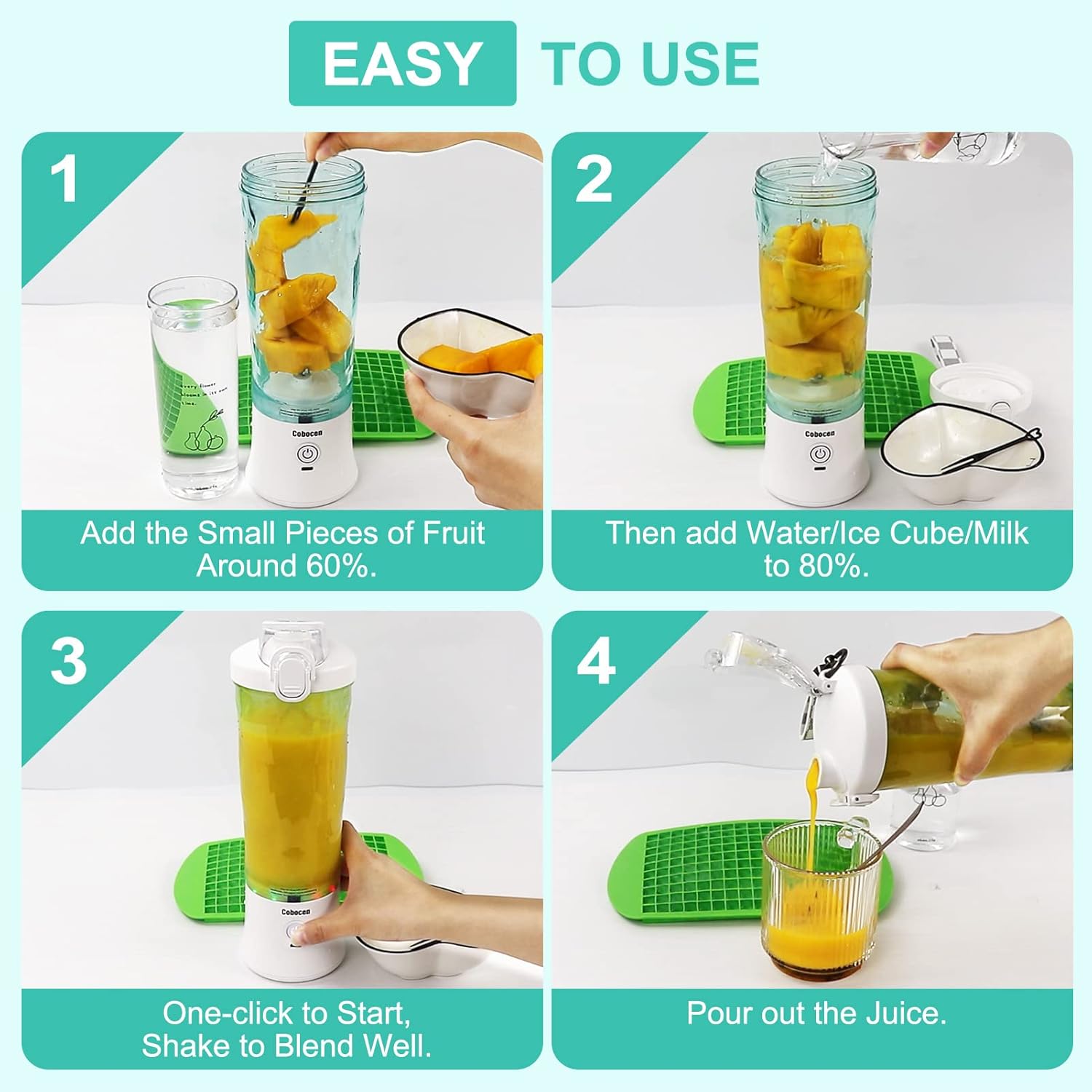
Image: Converting the blender cup to a portable bottle.
6. Cleaning and Maintenance
Proper cleaning ensures the longevity and hygiene of your blender.
6.1 One-Touch Cleaning
- After use, add a small amount of dish soap and water to the blending cup.
- Secure the lid and press the power button to start the automatic cleaning cycle.
- Rinse the cup thoroughly with water.
6.2 Manual Cleaning
- The blender is detachable for easy cleaning. Separate the cup from the base.
- Use the provided cleaning brush to clean around the blades carefully.
- The base is IP67 waterproof and can be rinsed under a tap. Note: Do not soak the base in water for a long time.
- Ensure all parts are dry before reassembling or storing.

Image: Waterproof design allows for easy rinsing.
7. Troubleshooting
| Problem | Possible Cause | Solution |
|---|---|---|
| Blender does not start. |
|
|
| Ingredients are not blending smoothly. |
|
|
| Leakage from the cup. |
|
|
8. Specifications
- Model Number: A9
- Capacity: 600 ml
- Power: 270 Watts (Max)
- Voltage: 7.4 Volts
- Battery: 4000 mAh (Rechargeable)
- Blades: 6-blade 304 Stainless Steel
- Dimensions: 31.6 x 9.9 x 9.9 cm
- Weight: 920 g
- Special Features: Portable, USB Rechargeable, IP67 Waterproof Base, Magnetic Safety Switch
- Recommended Use: Smoothies, Shakes, Juices, Baby Food, Ice Crush
9. Warranty and Support
For warranty information or technical support, please contact Amicool customer service through your purchase platform or the contact details provided with your product packaging. Please retain your proof of purchase for warranty claims.
10. Product Video
Video: Demonstrates the features and usage of the Cobocen Portable Blender, including charging, blending modes, and cleaning.