
Introduction
This user manual provides detailed instructions for the safe and effective operation of your IROO Mini Karaoke Machine. Please read this manual thoroughly before use and retain it for future reference. This portable karaoke machine is designed to provide an engaging and fun musical experience for children and families, featuring wireless microphones, various voice effects, and colorful lighting.
Safety Information
- Adult Supervision: Always ensure adult supervision when children are using the karaoke machine.
- Power Source: Use only the provided charging cables. Do not use damaged cables or chargers.
- Water Exposure: Keep the device away from water or any liquids to prevent electric shock or damage.
- Cleaning: Clean the device with a soft, dry cloth. Do not use abrasive cleaners or solvents.
- Ventilation: Ensure proper ventilation around the device during use and charging.
- Volume Control: The device features scientifically controlled volume to protect sensitive ears. Avoid prolonged listening at maximum volume.
Package Contents
Upon opening your IROO Mini Karaoke Machine package, you should find the following items:
- 1 x IROO Mini Karaoke Machine (Main Speaker Unit)
- 2 x Wireless Microphones
- 2 x Charging Cables (Type-C)
- 1 x User Manual (this document)
- 1 x Karafun Premium 1-Month Access Card (or similar promotional material)
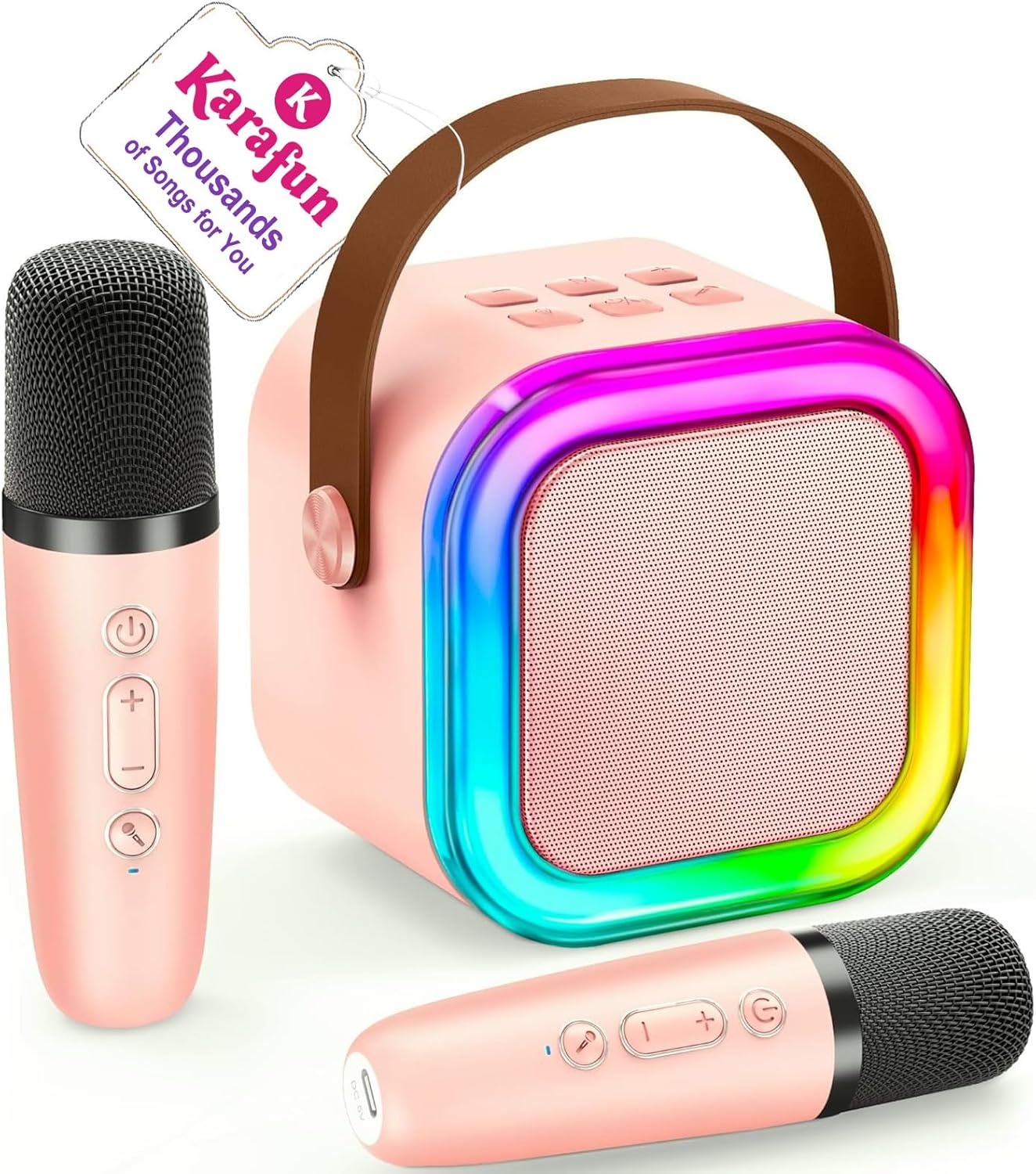
Image: The IROO Mini Karaoke Machine in pink, accompanied by two matching wireless microphones. A tag indicating "Karafun Thousands of Songs for You" is attached to the machine's handle.
Product Overview
The IROO Mini Karaoke Machine is a compact and portable audio system designed for entertainment. It features a main speaker unit with integrated controls and colorful LED lights, along with two wireless microphones for duet singing.

Image: An exploded view diagram illustrating the internal audio components of the karaoke machine, emphasizing its DSP chip, HiFi sound quality, and 3D surround sound capabilities.

Image: The IROO Mini Karaoke Machine illuminated with vibrant, dancing LED lights, creating a colorful atmosphere in a room.
Setup
- Charging: Before first use, fully charge the karaoke machine and both microphones using the provided Type-C charging cables. The charging port for the main unit is typically located on the side or back, and for the microphones, it's usually at the bottom.
- Power On: Press and hold the power button on the main speaker unit until the indicator lights illuminate and you hear a power-on prompt. Do the same for each wireless microphone.
- Microphone Pairing: The wireless microphones are designed to automatically pair with the main speaker unit upon powering on. If pairing does not occur automatically, refer to the troubleshooting section.
Operating Instructions
Bluetooth Connectivity
- Activate Bluetooth: Ensure the karaoke machine is powered on and in Bluetooth pairing mode (indicated by a voice prompt "Bluetooth" or a flashing blue light).
- Enable Device Bluetooth: On your smartphone, tablet, or other Bluetooth-enabled device, go to Bluetooth settings and turn on Bluetooth.
- Select Device: Look for "IROO K-51" or a similar name in the list of available devices and select it to pair. A successful connection will be confirmed by a voice prompt.
- Play Music: Once connected, you can stream music from your device (e.g., Spotify, YouTube, Karafun) through the karaoke machine.

Image: A visual representation of the IROO Mini Karaoke Machine wirelessly connecting to a mobile device via Bluetooth, highlighting its ultra-portable design.
Other Playback Modes
- TF Card Mode: Insert a TF (Micro SD) card loaded with MP3 music files into the designated slot on the main unit. The machine will automatically switch to TF Card mode and begin playback.
- USB Mode: Connect a USB drive with MP3 music files to the USB port on the main unit. The machine will automatically switch to USB mode and begin playback.
- Headphone Output: For private listening, connect headphones to the 3.5mm headphone jack.

Image: A group of children enjoying the karaoke machine, illustrating its versatility with multiple connection options such as Bluetooth, TF Card, USB, and compatibility with phones, computers, pads, and laptops.
Voice Effects and Lighting
- Voice Effects: The microphones feature buttons to cycle through 5 fun voice effects: Original Voice, Female Voice, Male Voice, Baby Voice, and Monster Voice. Experiment with these to enhance your singing experience.
- LED Lights: The main speaker unit has colorful disco lights. Use the independent light button to turn them on/off or change modes, adding a dynamic visual element to your performance.

Image: Two children actively singing into the microphones, with graphic overlays indicating the five available vocal effects: Original Voice, Female Voice, Male Voice, Baby Voice, and Monster Voice.
Video: A demonstration of the IROO Mini Karaoke Machine, showcasing its unboxing, features, microphone voice effects, and colorful lighting in action. This video provides a comprehensive overview of the product's functionality.
Maintenance
- Cleaning: Use a soft, dry, lint-free cloth to wipe down the exterior of the karaoke machine and microphones. Do not use liquid cleaners or sprays directly on the device.
- Storage: When not in use, store the karaoke machine and microphones in a cool, dry place, away from direct sunlight and extreme temperatures.
- Battery Care: To prolong battery life, avoid fully discharging the device frequently. Charge it regularly, even if not in constant use.
Troubleshooting
| Problem | Possible Cause | Solution |
|---|---|---|
| Device won't turn on. | Low battery. | Charge the device fully. |
| Microphones not pairing. | Microphones are off or too far from the main unit. | Ensure microphones are powered on and within range (50 ft). Restart both the main unit and microphones. |
| No sound from speaker. | Volume too low; device not connected; incorrect mode. | Increase volume on both the machine and connected device. Ensure proper Bluetooth connection or correct mode (TF/USB). |
| Sound distortion or howling. | Microphone too close to speaker; high volume. | Move microphone further from the speaker. Reduce volume. |
| Bluetooth connection unstable. | Interference; device too far. | Move closer to the main unit. Avoid obstacles. Disconnect and reconnect Bluetooth. |
Specifications
- Model Number: K-51
- Brand: IROO
- Product Dimensions: 3.78 x 4.53 x 5.51 inches
- Item Weight: 1.17 pounds
- Material: Aluminum, Plastic
- Connectivity Technology: Bluetooth 5.3
- Audio Input: Micro SD/Bluetooth MP3 Music Player
- Connector Type: 3.5mm headphone, Type-C Charging
- Number of Channels: 1
- Recommended Age: 3 years and up
Warranty and Support
IROO stands behind the quality of its products. Your IROO Mini Karaoke Machine comes with a:
- 365-Day Warranty: Enjoy peace of mind with a full year of warranty coverage from the date of purchase.
- Free Replacement: In case of manufacturing defects or issues covered under warranty, a free replacement will be provided.
- Technical Support: For any questions, technical assistance, or troubleshooting not covered in this manual, please contact IROO customer support.
For further assistance, please visit the official IROO store or contact their customer service team.


