
Introduction
Thank you for purchasing the OSWIN HJ808 RC Speed Boat. This manual provides essential information for the safe operation, maintenance, and troubleshooting of your new remote control boat. Please read this manual thoroughly before use to ensure proper function and to maximize your enjoyment.
Important Safety Information
WARNING: Failure to use the product in the intended manner following all instructions can result in damage and/or personal injury. Failure to store, handle and use LiPo batteries per all instructions may result in excessive heat, fire and/or personal injury. Only use compatible LiPo battery chargers, never charge batteries unattended and never attempt to alter or use damaged LiPo batteries. If a LiPo battery becomes hot or begins to swell, disconnect it from the charger or other device immediately.
- Always operate the boat in open water areas, away from swimmers, wildlife, and obstacles.
- Do not operate in saltwater.
- Ensure all hatches are securely closed before placing the boat in water.
- Adult supervision is recommended for users under 14 years of age.
- Never touch the propeller when the boat is powered on.
- Always remove batteries from the boat and remote control when not in use.
Package Contents
Please verify that all items listed below are included in your package:
- OSWIN HJ808 RC Speed Boat (x1)
- 2.4GHz Remote Control (x1)
- Rechargeable 1100mAh LiPo Battery (x2)
- USB Charging Cable (x1)
- Display Stand (x1)
- Spare Propeller (x2)
- Front Bumper (x1)
- Wrench (x1)
- Instruction Manual (x1)

Image: Contents of the OSWIN HJ808 RC Speed Boat package, including the boat, remote, batteries, charger, stand, spare propellers, front bumper, wrench, and manual.
Setup
Charging the Boat Battery
Connect the rechargeable LiPo battery to the USB charging cable. Plug the USB cable into a compatible USB power adapter (not included). The charging indicator light will show the charging status. Ensure the battery is fully charged before first use. Charging time is approximately 2-3 hours. Do not leave batteries charging unattended.
Installing Boat Battery
Open the double-layer waterproof hatch on the top of the boat. Connect the fully charged LiPo battery to the boat's power connector. Carefully place the battery inside the compartment and ensure all wires are tucked away. Securely close both layers of the waterproof hatch to prevent water ingress.

Image: Internal view of the boat showing the battery compartment, water cooling system, and the double-layer waterproof design for the hatch.
Installing Remote Control Batteries
Open the battery compartment on the back of the remote control. Insert 3 "AA" batteries (not included), observing the correct polarity. Close the battery compartment.
Pairing the Remote Control
Ensure the boat battery is connected and the hatches are sealed. Place the boat in water. The boat's motor will only energize when it senses water (Water-Off Sensor). Turn on the remote control. The remote and boat should automatically pair. If pairing fails, turn both off and repeat the process.
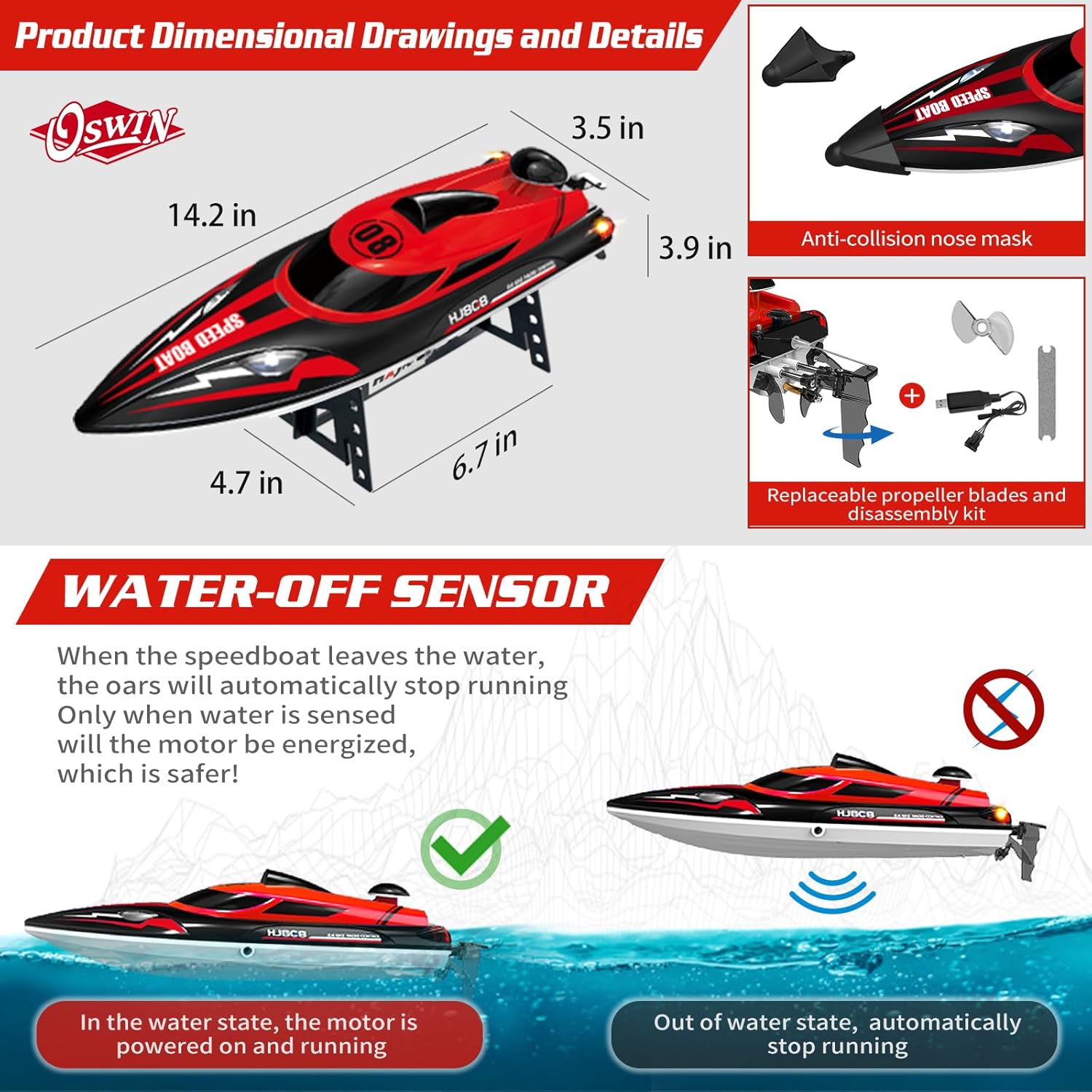
Image: Diagram illustrating the water-off sensor, showing the boat's motor is powered on when in water and automatically stops when out of water for safety.
Operating Instructions
Once the boat is set up and paired, you are ready to operate it. Always ensure you have a clear operating area.
Basic Controls
- Throttle Trigger: Pull to move forward, push to move backward.
- Steering Wheel: Turn left to steer left, turn right to steer right.

Image: The 2.4GHz remote control for the OSWIN HJ808 RC Speed Boat, demonstrating its control distance of up to 500 feet and indicating out-of-range and low power warnings.
Self-Righting Function (Capsized Boat Reset)
If the boat capsizes during operation, use the remote control to activate the self-righting function. This allows the boat to automatically flip back over without manual intervention. Refer to the remote control diagram for the specific button (often a click of the steering wheel or a dedicated button).

Image: Diagram showing the "Capsized boat reset" function, where a click on the remote control automatically rights the boat. Also illustrates the "Demonstrate Figure 8 Navigation" feature.
Figure 8 Demonstration Mode
The boat features a one-click demonstration mode where it will automatically navigate in a figure-8 pattern. Activate this function by double-clicking the designated button on the remote control (refer to the remote control diagram).
Alarms and Indicators
- Low Voltage Alarm: The remote control will emit an alarm (e.g., red light flashing) when the boat's battery is low, indicating it's time to return the boat to shore.
- Out-of-Control Distance Alarm: If the boat goes beyond the effective control range (approximately 500 feet), the remote control will alert you (e.g., green light flashing), helping to prevent loss of the boat.
- LED Lights: Bright LED lights on the boat assist with night operation and visibility.
Maintenance
Proper maintenance will extend the life and performance of your OSWIN HJ808 RC Speed Boat.
- Cleaning: After each use, especially in freshwater, wipe down the boat with a soft, dry cloth. Ensure no water remains inside the hull.
- Water Circulation Cooling System: The boat is equipped with a water circulation cooling system to prevent the motor from overheating. Ensure the water intake and outlet are clear of debris.
- Double-Layer Waterproof Sealing: Regularly inspect the rubber seals on the hatches for any signs of wear or damage. Ensure they are clean and properly seated to maintain the waterproof integrity.
- Propeller Maintenance: Check the propeller for any damage or entanglement after each use. Use the provided wrench to replace damaged propellers.
- Storage: Store the boat and remote control in a cool, dry place away from direct sunlight. Remove all batteries from both the boat and the remote control before storage.
Troubleshooting
| Problem | Possible Cause | Solution |
|---|---|---|
| Boat does not respond to remote control. |
|
|
| Boat runs slowly or intermittently. |
|
|
| Water inside the boat hull. |
|
|
| Boat capsizes frequently. |
|
|
Specifications
- Model: HJ808
- Brand: OSWIN
- Dimensions: 14.37 x 3.93 x 3.74 inches (36.5 x 10 x 9.5 cm)
- Item Weight: 2.05 pounds (0.93 kg)
- Max Speed: 22+ MPH
- Control Frequency: 2.4 GHz
- Control Distance: Up to 500 feet (150 meters)
- Boat Battery: 1100mAh LiPo (x2 included)
- Remote Control Battery: 3 x "AA" (not included)
- Recommended Age: 14 years and up
- Features: Water-Off Sensor, Self-Righting Function, Figure 8 Demonstration, Low Voltage Alarm, Out-of-Range Alarm, Water Circulation Cooling System, Double-Layer Waterproof Hatch.
Image: Detailed product dimensions and key features of the OSWIN HJ808 RC Speed Boat, including the anti-collision nose mask and replaceable propeller blades.
Warranty and Support
For warranty information or technical support, please contact OSWIN customer service through the retailer where the product was purchased or visit the official OSWIN website. Please retain your proof of purchase for any warranty claims.


