1. Introduction
This manual provides essential information for the safe and efficient use of your SIEMENS EH631BEB6E Induction Hob. Please read these instructions carefully before installation and operation, and keep them for future reference.
The SIEMENS EH631BEB6E is a modern induction hob designed for domestic cooking. It features multiple cooking zones and intuitive controls for precise temperature management.
2. Safety Information
General Safety:
- Ensure the appliance is installed by a qualified technician.
- Do not allow children to operate the hob unsupervised.
- Keep flammable materials away from the hob during operation.
- Do not store items on the cooking surface.
- Always use appropriate cookware for induction hobs.
Electrical Safety:
- Verify that the voltage and frequency match the specifications on the rating plate.
- The appliance must be properly earthed.
- Do not use extension cords or multiple adapters.
- Disconnect the appliance from the power supply before cleaning or maintenance.
3. Installation and Setup
3.1 Unpacking:
Carefully remove the hob from its packaging. Inspect for any damage during transit. Retain packaging materials for potential future transport or service.
3.2 Installation Requirements:
- The installation area must be well-ventilated.
- Ensure sufficient clearance around the hob as specified in the installation diagram.
- The countertop material must be heat-resistant.
- The hob requires a dedicated electrical circuit.
3.3 Cut-out Dimensions:
Refer to the diagram below for precise cut-out dimensions and minimum clearances. The countertop must support approximately 60 kg. Appropriate support structures should be used if necessary.
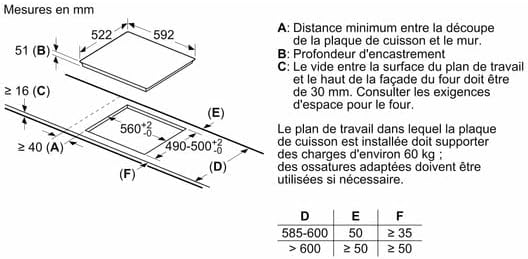
Image Description: This diagram illustrates the necessary cut-out dimensions in millimeters for installing the SIEMENS EH631BEB6E induction hob. It shows the hob's dimensions (522x592 mm) and the required countertop opening (560x490-500 mm). Key clearances are indicated: A (minimum distance from wall, ≥40 mm), B (recess depth, 51 mm), C (gap between countertop surface and oven front, ≥16 mm). A table provides values for D (585-600 mm), E (50 mm), and F (≥35 mm or ≥50 mm depending on D). It also states that the countertop must support approximately 60 kg.
3.4 Electrical Connection:
The electrical connection must be performed by a qualified electrician in accordance with local regulations. Ensure the power supply is disconnected before making any connections.
4. Operating Instructions
4.1 Control Panel Overview:
The hob features a touch control panel. The main controls include power on/off, cooking zone selection, power level adjustment, and timer functions.

Image Description: A close-up view of the SIEMENS EH631BEB6E induction hob's control panel. The panel shows illuminated red digital displays for power levels (e.g., '7.', '8', '2', '14 min') and various touch controls including power on/off, cooking zone indicators, plus/minus buttons for adjustment, and a timer button. The SIEMENS logo is visible at the top center of the control area.
4.2 Switching On/Off:
- To switch on, touch the Power On/Off symbol.
- To switch off, touch the Power On/Off symbol again.
4.3 Selecting a Cooking Zone and Setting Power Level:
- Place suitable cookware on the desired cooking zone.
- Touch the corresponding cooking zone selection symbol.
- Use the '+' or '-' symbols to adjust the power level from 1 to 9.
4.4 Timer Function:
The timer can be set for individual cooking zones or as a minute minder. Refer to the full manual for detailed timer programming.
4.5 Cookware Compatibility:
Only use cookware made of ferromagnetic material (e.g., cast iron, enameled steel, stainless steel with a magnetic base). A magnet should stick to the bottom of the pan. The base diameter of the cookware should match the cooking zone size.
5. Cleaning and Maintenance
5.1 Daily Cleaning:
- Always ensure the hob is cool before cleaning.
- Wipe the ceramic glass surface with a damp cloth and a mild detergent.
- For stubborn stains, use a specialized ceramic hob cleaner.
- Dry the surface thoroughly to prevent water marks.
5.2 Avoiding Damage:
- Do not use abrasive cleaners, scouring pads, or harsh chemicals.
- Avoid dropping heavy objects on the hob surface.
- Do not slide rough-bottomed pans across the surface.
6. Troubleshooting
This section addresses common issues you might encounter with your induction hob.
Problem: Hob does not switch on.
- Possible Cause: No power supply.
- Solution: Check the circuit breaker and ensure the hob is properly connected to the power supply.
- Possible Cause: Control panel locked.
- Solution: Refer to the manual for unlocking procedures (e.g., child lock).
Problem: Cooking zone not heating.
- Possible Cause: Incorrect cookware.
- Solution: Use only induction-compatible cookware.
- Possible Cause: Cookware too small or not centered.
- Solution: Ensure cookware covers at least two-thirds of the cooking zone and is centered.
Problem: Display shows an error code.
- Solution: Note the error code and consult the full user manual or contact customer service for specific instructions.
7. Technical Specifications
| Feature | Specification |
|---|---|
| Brand | SIEMENS |
| Model Number | EH631BEB6E |
| Product Dimensions (L x W x H) | 76 x 12 x 60 cm |
| Weight | 1 kg |
| Installation Cut-out (W x D) | Approx. 560 x 490-500 mm |
| Power Supply | Refer to rating plate on appliance |
Note: All specifications are approximate and subject to change. For precise details, refer to the rating plate on your appliance. The listed weight of 1 kg is based on provided product data.
8. Warranty and Customer Support
For warranty information, please refer to the warranty card included with your product or visit the official SIEMENS website. Keep your proof of purchase for warranty claims.
If you encounter issues not covered in the troubleshooting section or require technical assistance, please contact SIEMENS customer support. Contact details can typically be found on the official SIEMENS website or in the product packaging.
Online Resources:
- Official SIEMENS Website: siemens-home.bsh-group.com
- Product Registration: Register your product online to receive updates and support.