
DUSKTEC TD4C001
DUSKTEC Smart LED Downlights User Manual
Model: TD4C001
1. Introduction
Thank you for choosing DUSKTEC Smart LED Downlights. These 10W RGB color-changing spot lights offer voice and app control, dimmable functionality, and cool white lighting, designed for recessed ceiling installation. This manual provides detailed instructions for installation, operation, and troubleshooting to ensure optimal performance and safety.

Image: The DUSKTEC Smart LED Downlights package showing four lights and a smartphone displaying the control app interface.
2. Safety Information
Please read all safety warnings carefully before installation and use. Failure to follow these instructions may result in electric shock, fire, or other injuries.
- WARNING: Risks of electric shock from improper usage. Use with caution! Refer to the user manual.
- Always cut off the power supply before installation or maintenance.
- This product is designed for indoor use only.
- Ensure the voltage supply matches the product specifications (AC 220-240V, 50/60Hz).
- Do not attempt to modify or disassemble the product.
- Keep out of reach of children.
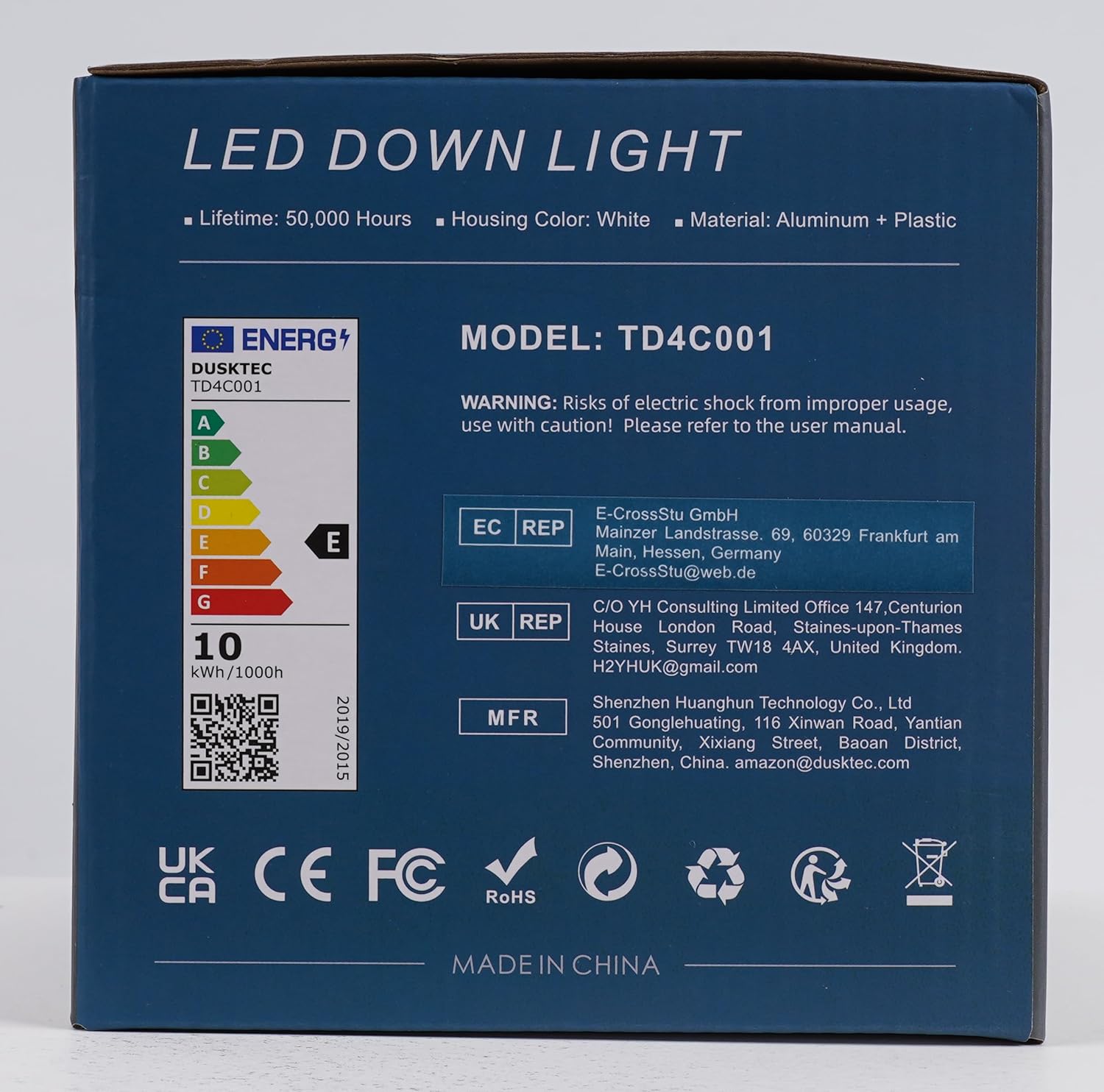
Image: The back of the product packaging, highlighting safety warnings, model number TD4C001, and energy efficiency information. It also shows manufacturer details and compliance marks like UKCA, CE, FC, and RoHS.
For more energy efficiency details, scan the QR code or visit the EPREL database.
3. Specifications
| Feature | Specification |
|---|---|
| Model Number | TD4C001 |
| Brand | DUSKTEC |
| Power Source | AC |
| Voltage | 220-240 Volts (AC) |
| Wattage | 10 Watts |
| Light Source Type | LED |
| Color Temperature | RGB + 5000K Daylight White |
| Brightness | 1000 Lumens |
| CRI (Color Rendering Index) | 85.00 |
| Product Dimensions | 4.8"L x 4.8"W x 1.73"H (122mm x 122mm x 44mm) |
| Required Hole Diameter | 95-110mm (3.8-4.3 inches) |
| Material | Acrylonitrile Butadiene Styrene (ABS) / Plastic |
| IP Rating | IP44 |
| Lifetime | 50,000 Hours |
| Control Method | Voice (Alexa), APP (BRmesh), Bluetooth |
| Indoor/Outdoor Usage | Indoor use only |

Image: A technical diagram illustrating the dimensions of the downlight (122mm diameter, 44mm height, 150mm cable length) and required ceiling hole size (95-110mm). Key specifications like voltage (AC220-240V), wattage (10W), color temperature (5000K), brightness (1000Lm), and IP44 rating are also shown.
4. Setup and Installation
Follow these steps for safe and proper installation of your DUSKTEC Smart LED Downlights.
4.1. Physical Installation Steps
- Cut off the power supply: Before starting any electrical work, ensure the main power supply to the installation area is turned off at the circuit breaker.
- Drill a hole in the ceiling: Using an appropriate hole saw, drill a circular hole in the ceiling with a diameter between 95mm and 110mm (3.8 to 4.3 inches).
- Connect according to the color code: Connect the live wire and neutral wire from your ceiling wiring to the corresponding wires on the downlight. The earth wire is not required for this product. Ensure connections are secure.
- Pull up the spring clips: Gently push the spring clips on the sides of the downlight upwards.
- Place the lamp into the hole: Carefully insert the downlight into the prepared ceiling hole. The spring clips will automatically secure the light in place.
- Successful installation: Once the light is securely in place, you can restore power to the circuit.

Image: A four-step diagram illustrating the installation process: 1. Cut power and drill hole (96-110mm). 2. Connect AC 200-240V wires (Live and Neutral). 3. Pull up spring clips. 4. Insert lamp into hole for successful installation.
4.2. App Setup (BRmesh)
The DUSKTEC Smart LED Downlights are controlled via the "BRmesh" application. Follow these steps to set up the app and connect your lights:
- Download "BRmesh" App: Search for "BRmesh" in the Google Play Store (for Android) or Apple App Store (for iOS) and download the application to your mobile phone.
- Alternatively, Scan QR Code: You can also scan the QR code provided below to directly download the app.
- Enable Bluetooth and Start App: Ensure Bluetooth is enabled on your mobile device. Open the BRmesh app and follow the on-screen instructions to add and pair your DUSKTEC Smart LED Downlights.
Note: The BRmesh app supports Android 6.0 or higher and iOS 11.0 or higher. No network or registration is required for initial setup and control via Bluetooth.

Image: Instructions for easy app setup, showing icons for Google Play and App Store, a QR code for app download, and indicators that no network or registration is required. The QR code links to http://www.tianchengqingyimei.com/news/html/?434.html.
5. Operating Instructions
Your DUSKTEC Smart LED Downlights offer various control options for a personalized lighting experience.
5.1. App Control (BRmesh)
The BRmesh app provides comprehensive control over your downlights:
- Color Changing: Access 16 million colors and 5000K daylight white. Use the color wheel or preset options to select your desired light color.
- Dimmable Functionality: Adjust the brightness level from 0% to 100% to suit your mood or activity.
- Timing Function: Set schedules to automatically turn lights on or off at specific times. For example, set lights to turn on at 18:00 and off at 23:00.
- Synchronized Music: The lights can change colors automatically to the rhythm of music played through your device.
- Group Control: Control multiple lights simultaneously by creating groups within the app. A maximum of 125 lights can be connected and grouped. You can create groups for different rooms like Bathroom, Bedroom, or Dining Room.

Image: A living room scene demonstrating the multicolor capabilities of the downlights, showing different colored lights illuminating the walls. A smartphone screen displays the BRmesh app's color selection interface with a color wheel and brightness slider.

Image: A child sleeping in a cozy room, with a smartphone displaying the BRmesh app's timing function interface. The app shows options to set "ON" and "OFF" times, for example, 18:00 for on and 23:00 for off.

Image: A couple dancing in a living room with the downlights changing colors in sync with music. A smartphone displays a music player interface within the BRmesh app, showing musical notes flowing from the phone to the lights.

Image: A diagram illustrating the group control feature, showing different rooms (Bathroom, Bedroom, Dining Room) with lights grouped and controlled via the BRmesh app. It highlights that a maximum of 125 lights can be connected via Bluetooth.
5.2. Voice Control (Alexa)
The DUSKTEC Smart LED Downlights are compatible with Amazon Alexa, allowing for convenient voice control without the need for a separate hub.
- Ensure your Alexa device is set up and connected to the same network as your lights (if applicable for Alexa integration, though the product states "No Hub needed" and "Bluetooth").
- Enable the DUSKTEC skill in the Alexa app.
- Discover devices through the Alexa app or by saying, "Alexa, discover my devices."
- Once discovered, you can use voice commands such as:
- "Alexa, turn on the [light name]."
- "Alexa, turn off the [light name]."
- "Alexa, dim the [light name] to 60% brightness."
- "Alexa, change the [light name] to blue."

Image: A woman sitting on a couch interacting with an Amazon Echo device. Speech bubbles show "Alexa, dim the light to 60% brightness" and "Okay", demonstrating voice control functionality. The image also states "No Hub needed".
6. Maintenance
To ensure the longevity and optimal performance of your DUSKTEC Smart LED Downlights, follow these simple maintenance guidelines:
- Cleaning: Disconnect power before cleaning. Use a soft, dry cloth to wipe the surface of the downlight. Do not use abrasive cleaners, solvents, or harsh chemicals, as these can damage the finish or internal components.
- Inspection: Periodically check the downlights for any signs of damage, loose connections, or unusual operation. If any issues are observed, disconnect power and consult the troubleshooting section or contact customer support.
- No User-Serviceable Parts: The downlights do not contain any user-serviceable parts. Do not attempt to open or repair the unit yourself.
7. Troubleshooting
If you encounter any issues with your DUSKTEC Smart LED Downlights, refer to the following common problems and solutions:
| Problem | Possible Cause | Solution |
|---|---|---|
| Light does not turn on. | No power supply; Loose wiring; Faulty light. | Check circuit breaker. Ensure wires are securely connected. Test with another light if possible. |
| Cannot connect to BRmesh app. | Bluetooth is off; App version outdated; Light not in pairing mode. | Ensure Bluetooth is enabled on your phone. Update the BRmesh app. Try turning the light off and on to re-enter pairing mode. |
| Voice control (Alexa) not working. | Alexa skill not enabled; Device not discovered; Network issues. | Enable the DUSKTEC skill in the Alexa app. Ask Alexa to "discover devices." Check your Wi-Fi connection. |
| Lights flicker or behave erratically. | Unstable power supply; Loose connection; Interference. | Check power stability. Re-secure wiring connections. Move away from potential sources of interference. |
| Lights do not respond to commands. | Out of Bluetooth range; App glitch; Light needs reset. | Move closer to the lights. Close and reopen the app. Power cycle the lights (turn off and on at the switch). |
If the problem persists after trying these solutions, please contact DUSKTEC customer support.
8. Warranty and Support
DUSKTEC products are designed for reliability and performance. For any issues relating to the product, please do not hesitate to write to us.
- Customer Support Email: enquiry@dusktec.com
- Manufacturer: DUSKTEC (Shenzhen Huanghun Technology Co., Ltd)
- Address: 501, Gonglehuating, 116 Xinwan Road, Yantian Community, Xixiang Street, Baoan District, Shenzhen, China.
- Amazon Support Email: amazon@dusktec.com
Please retain your purchase receipt for warranty purposes. Specific warranty terms may vary by region; refer to your purchase documentation for details.

Image: The front of the DUSKTEC LED Downlight packaging, showing the brand logo, product name, and a note with the email address "enquiry@dusktec.com" for support. It also displays the model number TD4C001 and a barcode with the identifier X001TQEJEF.
For product identification, the barcode identifier is X001TQEJEF.
Ask a question about this manual
Ask about setup, troubleshooting, compatibility, parts, safety, or missing instructions. Manuals+ will review the question and use this page’s manual context to help answer it.