
Introduction
Thank you for choosing the Amicool Cobocen Portable Blender A9. This manual provides essential information for the safe and efficient operation, maintenance, and troubleshooting of your new portable blender. Please read these instructions carefully before first use and retain them for future reference.

Image: The Amicool Cobocen Portable Blender A9, shown with fresh fruit, ice cubes, an ice tray, and a cleaning brush, highlighting its versatility for various beverages.
Important Safety Instructions
To ensure safe operation and prevent damage, please observe the following safety guidelines:
- Always ensure the bottle is correctly aligned with the base (red arrow on bottle aligned with the switch) before operating. The blender will not start if not properly aligned, and indicator lights will flash.
- Do not immerse the blender base in water for extended periods, despite its IP67 waterproof rating. The charging port is waterproof and can be rinsed, but prolonged submersion is not recommended.
- Avoid blending hot liquids or ingredients. Pressure can build up, leading to an explosive discharge when opening the lid or leakage from the base.
- Keep hands and utensils out of the blender jar while operating to prevent injury.
- The blender features overheat protection. If the motor overheats, it will automatically shut off. Allow it to cool down before resuming use.
- This product is made from food-grade, non-toxic, BPA-free ABS material.
- Keep out of reach of children.
Package Contents
Upon unpacking, please verify that all the following items are included:
- Amicool Cobocen Portable Blender A9 (Main Unit)
- Hinged Lid
- Carrying Ring
- Additional Bottom Cover (for converting to a water bottle)
- USB Type-C Charging Cable
- Cleaning Brush
Product Overview
The Amicool Cobocen Portable Blender A9 is designed for convenience and efficiency. It features a diamond-patterned casing, a secure hinged lid, and a striped leather handle for easy portability.

Image: A detailed view of the blender's powerful 270W motor and six sharp stainless steel blades, designed for efficient blending of various ingredients.
Key components include:
- Blender Jar: 600ml capacity, made from food-grade ABS material.
- Blade Assembly: Six sharp stainless steel blades for effective blending.
- Motor Base: Contains the 270W motor, control button, and LED indicators.
- Lid: Hinged lid with a carrying ring for portability.
- Bottom Cover: An additional cover to seal the bottle for transport after blending.
Setup
Before first use, ensure the blender is fully charged. Wash all detachable parts (jar, lid, bottom cover, blade assembly) with warm soapy water and rinse thoroughly. Ensure all parts are dry before assembly.
Charging
The blender has a built-in 4000mAh rechargeable battery and a Type-C charging port. Connect the provided USB Type-C cable to the blender's charging port and to a compatible power source (AC adapter, laptop, power bank, or car charging port).

Image: Visual representation of the blender's battery level indicators, showing different light patterns corresponding to charge percentages.
The 12 intelligent LED indicator lights will show the battery status. A full charge is indicated when all lights are solid green. Charging time may vary depending on the power source.
Operating Instructions
The blender offers two operating modes: Blend Mode and Pulse Mode.
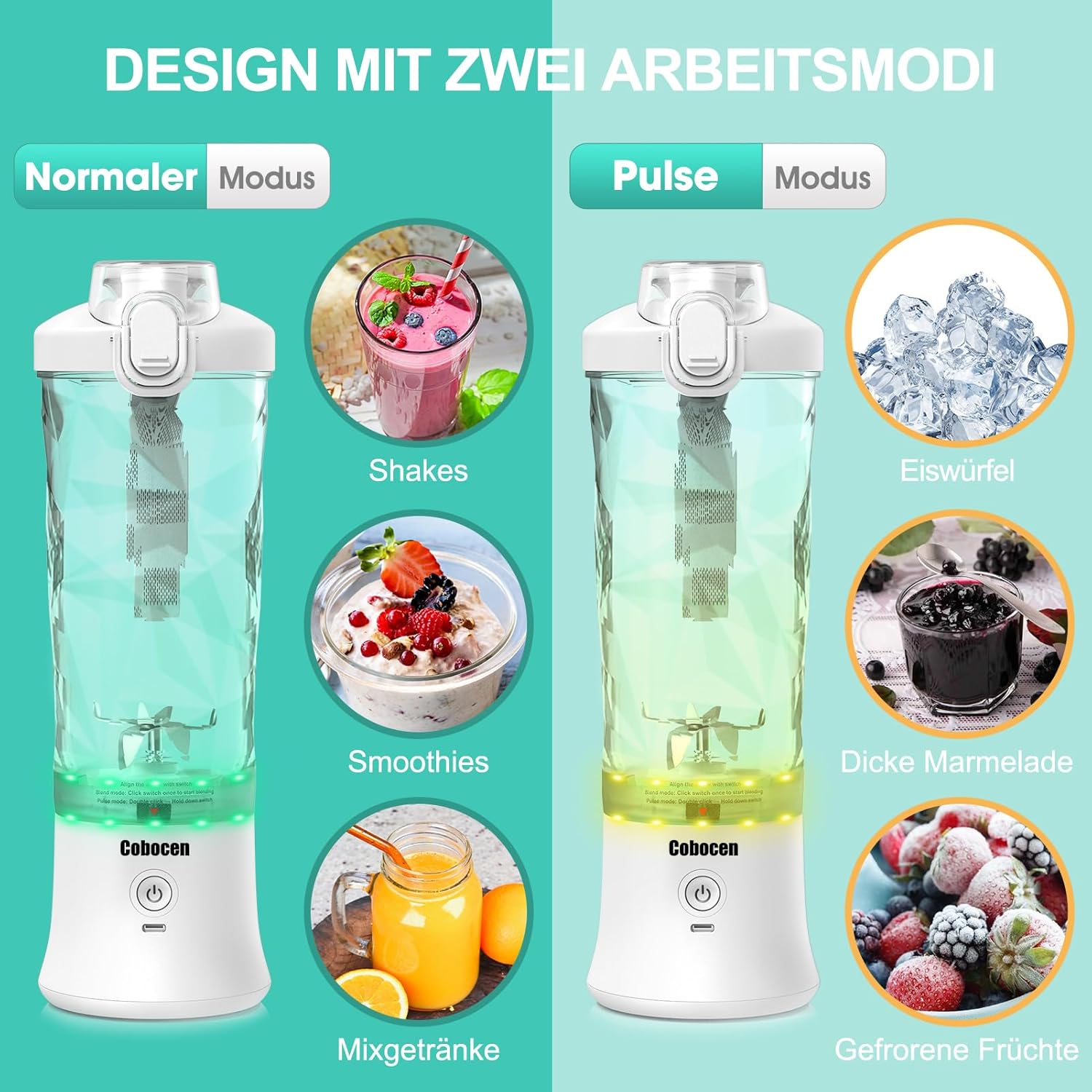
Image: Illustrates the two operating modes: Blend Mode for shakes, smoothies, and mixed drinks, and Pulse Mode for ice cubes, thick jams, and frozen fruits.
Preparation Steps:
- Cut ingredients into small pieces (approximately 1 inch or 2.5 cm).
- Add ingredients to the blender jar, filling up to about 60% of the capacity.
- Add liquid (water, milk, juice) up to about 80% of the capacity. Do not overfill.
- Securely attach the lid and ensure the red arrow on the bottle is aligned with the switch on the base.

Image: A step-by-step guide showing how to add fruit, then liquid, blend with a single click, and finally pour out the blended drink.
Blend Mode:
Ideal for softer ingredients like bananas, strawberries, and ice cubes for smoothies, milkshakes, and mixed drinks.
- With the bottle properly assembled and aligned, press the power button once.
- The green light will flash, and the blender will operate automatically for 30 seconds.
- Shake the blender gently during operation to ensure thorough mixing.
Pulse Mode:
Suitable for harder ingredients such as salads, jams, frozen fruits, and nuts, requiring more control.
- With the bottle properly assembled and aligned, double-click the power button.
- The yellow light will flash. Hold the button down to pulse blend manually.
- Release the button to stop blending.
- If left idle for 5 seconds in Pulse Mode, it will automatically switch to Blend Mode.
Portability:
After blending, you can replace the motor base with the additional bottom cover to convert the blender jar into a portable water bottle, making it easy to carry your drink on the go.
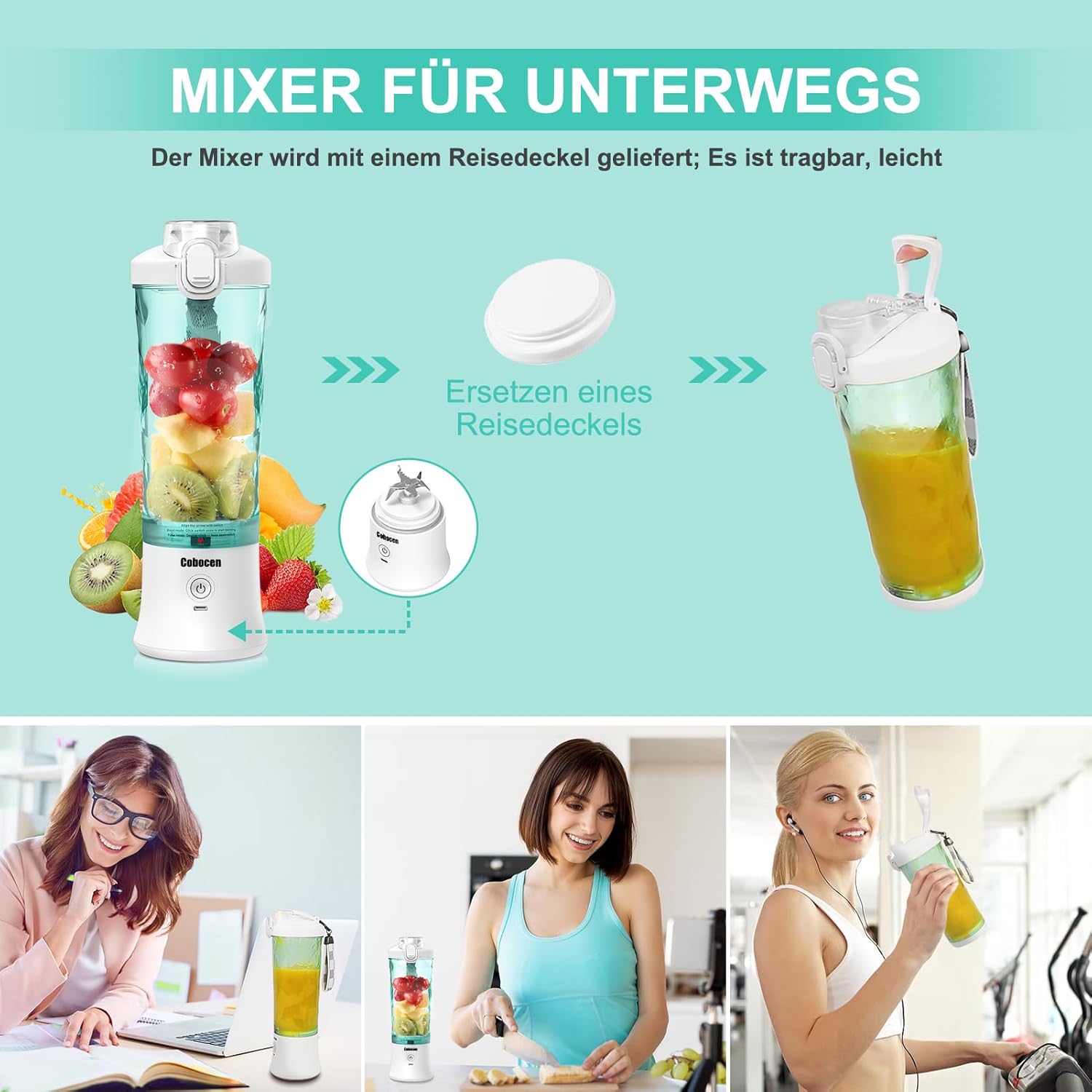
Image: The portable blender demonstrating its travel-friendly design, including the option to replace the motor base with a travel lid for easy transport.
Cleaning and Maintenance
Proper cleaning and maintenance will extend the life of your blender.

Image: The portable blender's base being rinsed under running water, illustrating its IP67 waterproof design for easy cleaning.
- One-Touch Cleaning: Add a small amount of dish soap and water to the cup. Press the power button to start automatic cleaning.
- Manual Cleaning: The blender is detachable. Separate the jar from the base. Use the included cleaning brush to clean the blades and inside of the jar.
- Waterproof Base: The integrated base has an IP67 waterproof rating. The charging port is also waterproof. You can rinse the base under running water. However, do not soak the entire base in water for prolonged periods.
- Ensure all parts are completely dry before reassembling or storing.
Troubleshooting
If you encounter issues with your blender, refer to the following common problems and solutions:
| Problem | Possible Cause | Solution |
|---|---|---|
| Blender does not start, lights flash. | Bottle not properly aligned with the base. | Ensure the red arrow on the bottle is aligned with the switch on the base. |
| Blender stops during operation. | Overheat protection activated or low battery. | Allow the motor to cool down. Charge the battery if low. |
| Ingredients are not blending smoothly. | Too many ingredients, insufficient liquid, or ingredients are too large. | Reduce ingredient quantity, add more liquid, or cut ingredients into smaller pieces. Use Pulse Mode for tougher items. |
| Leakage from the base. | Bottle not securely tightened or seal is compromised. | Ensure the bottle is firmly screwed onto the base. Check the silicone seal for proper placement and damage. Avoid blending hot liquids. |
| Battery life is shorter than expected. | Battery degradation over time or specific usage patterns. | Ensure full charge before use. If issues persist, contact customer support. |
Specifications
| Feature | Specification |
|---|---|
| Brand | Amicool |
| Model Number | A9 |
| Capacity | 600 Milliliters |
| Power | 270 Watts |
| Voltage | 5 Volts |
| Motor Speed | Up to 18,000 RPM |
| Blades | 6 Stainless Steel Blades |
| Battery | 4000 mAh Lithium-ion (included) |
| Charging Port | USB Type-C |
| Material | Food-grade ABS, Stainless Steel |
| Water Resistance | IP67 |
| Product Dimensions (L x W x H) | 8.5 x 8.5 x 28 cm |
| Item Weight | 900 grams |
| Special Features | One-hand drinking, Compact, Portable, USB Rechargeable, Pulse Technology, Safety Lock |
Warranty and Support
Specific warranty information for the Amicool Cobocen Portable Blender A9 is not provided in this manual. For warranty details, product support, or to inquire about spare parts, please refer to the product packaging or contact the retailer where you purchased the item. You may also visit the official Amicool website for further assistance.