Introduction
The FEELWORLD TP2A is a portable teleprompter designed to assist with video recording by displaying text for the speaker. It supports both smartphone/tablet prompting and DSLR camera or smartphone shooting, making it versatile for various production needs. This manual provides detailed instructions for setup, operation, and maintenance to ensure optimal performance of your device.
Package Contents
Please check the package carefully to ensure all items are present:
- 1× Tablet/smartphone clamp
- 1× Magnetic smartphone clamp
- 8× Lens adapter rings (49/52/55/58/62/67/72/77mm)
- 3× Foam rings
- 1× Remote controller
- 1× Drawstring bag
- 1× Microfiber cloth
- 1× User Manual
Key Features
- Dual Cold Shoe Mounts for attaching accessories.
- Supports smartphone/tablet prompting and DSLR camera or smartphone shooting.
- Compatible with wide-angle lenses for a larger field of vision.
- Utilizes a 70/30 beamsplitter teleprompter glass for clear reflection.
- Includes eight lens adapter rings (49/52/55/58/62/67/72/77mm) for broad compatibility.
- Three 1/4-20″ threads at the bottom for mounting options.
- Magnetic smartphone clamp supports both horizontal and vertical screen recording.
- Compatible with Android/iOS APP and includes a Bluetooth remote control.
Setup Guide
1. Attaching the Smartphone/Tablet Clamp
The TP2A is equipped with a versatile clamp for smartphones or tablets. Install the clamp with the appropriate side facing outwards for your device. Push the "PUSH" lock to the left to secure the clamp. To remove, push the "PUSH" lock to the right.

Image: The FEELWORLD TP2A teleprompter showing the smartphone/tablet clamp in position, ready for device insertion.
2. Attaching the Magnetic Smartphone Clamp
For smartphone shooting, attach the magnetic smartphone clamp to the teleprompter. This clamp securely holds your smartphone for recording, allowing for both horizontal and vertical orientations.

Image: The magnetic smartphone clamp attached to the teleprompter, demonstrating how a smartphone is held for recording.
3. Installing Lens Adapter Rings
Select the appropriate lens adapter ring (49/52/55/58/62/67/72/77mm) that matches your camera lens. Screw the adapter ring onto your camera lens, then attach the teleprompter to the adapter ring. This ensures a secure fit and prevents light leakage.

Image: A selection of lens adapter rings and an illustration of how to attach one to a camera lens before mounting the teleprompter.
4. Mounting the Teleprompter
The teleprompter can be mounted directly onto your camera lens using the adapter rings. Ensure the teleprompter is securely fastened and aligned with your camera for stable shooting. The unit also features three 1/4-20″ threads at the bottom for additional mounting options, such as tripods or light stands.

Image: The FEELWORLD TP2A teleprompter securely mounted onto a DSLR camera, demonstrating a typical setup for video recording.
Video: This video demonstrates the complete setup process of the FEELWORLD TP2A teleprompter, including attaching the smartphone/tablet clamp, installing lens adapter rings, and mounting the teleprompter for both DSLR and smartphone shooting scenarios. It also shows the teleprompter in action.
Operation
1. Using with a Smartphone/Tablet for Prompting
Place your smartphone or tablet into the designated clamp on the teleprompter. Open the FEELWORLD teleprompter app on your device and load your script. The text will be reflected onto the beamsplitter glass, allowing you to read it while maintaining eye contact with the camera. Refer to the setup video above for visual guidance on device placement.
2. Using with a DSLR Camera or Smartphone for Shooting
For DSLR shooting, ensure your camera is mounted with the correct lens adapter ring and the teleprompter is securely attached. For smartphone shooting, use the magnetic smartphone clamp to position your phone behind the beamsplitter glass. Adjust your camera settings as needed for optimal video quality. The video in the setup section also illustrates these operational modes.
3. Bluetooth Remote Control
The included Bluetooth remote control allows for convenient operation of the teleprompter app. Pair the remote with your smartphone or tablet. Use the buttons to control script playback (play/pause), adjust scrolling speed (up/down), change font size (left/right), navigate menus, and switch between horizontal/vertical screen modes. Note that some functions may vary depending on your smartphone brand.
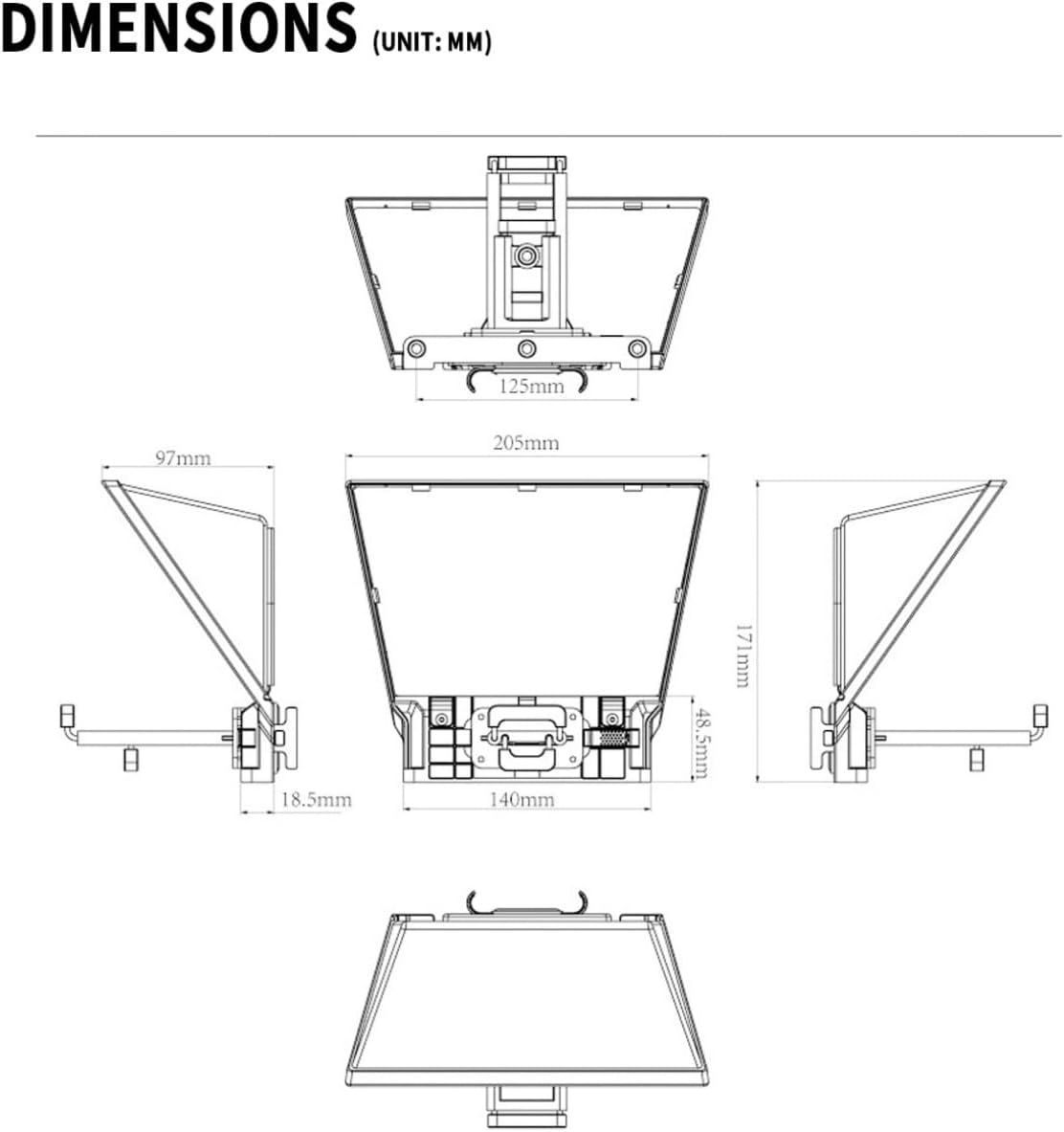
Image: The Bluetooth remote control for the FEELWORLD TP2A teleprompter, with its various buttons and their corresponding functions clearly labeled.
4. Teleprompter App (Android/iOS)
Download the official FEELWORLD teleprompter app from your device's app store. The app provides an interface to manage your scripts, adjust text size, speed, font color, background color, and enable loop play. Ensure your device is connected to the teleprompter via Bluetooth for full functionality.

Image: A screenshot of the FEELWORLD teleprompter application interface on a smartphone, showing options for script management and display settings.
Technical Specifications
| Feature | Specification |
|---|---|
| Model Number | FW-TP2A-MG |
| Package Dimensions | 8.7 x 7.09 x 4.02 inches |
| Item Weight | 2.86 pounds |
| Lens Adapter Rings Included | 49/52/55/58/62/67/72/77mm (8 sizes) |
| Mounting Threads | Three 1/4-20″ threads |
| Beamsplitter Glass Ratio | 70/30 |
| Manufacturer | SEETEC |
Image: The FEELWORLD TP2A teleprompter shown from multiple angles, highlighting its design and compatibility with a DSLR camera.
Care and Maintenance
- Cleaning: Use the provided microfiber cloth to gently clean the beamsplitter glass and other surfaces. Avoid abrasive cleaners or harsh chemicals that could damage the coatings or materials.
- Storage: When not in use, store the teleprompter in the drawstring bag to protect it from dust and scratches. Keep it in a dry, cool place away from direct sunlight.
- Handling: Handle the teleprompter with care, especially the glass component, to prevent breakage or misalignment.
Troubleshooting
- Text not clear/blurry: Ensure the beamsplitter glass is clean. Check that your smartphone/tablet is positioned correctly and the text is adequately bright. Adjust camera focus if necessary.
- Remote control not working: Verify that the remote control is paired via Bluetooth to your smartphone/tablet. Check battery levels in the remote.
- Text scrolling issues: Ensure the teleprompter app is running correctly. Adjust scrolling speed settings within the app.
- Light leakage: Ensure all components, especially the lens adapter ring and camera, are securely attached to the teleprompter to minimize external light interference.
Warranty and Support
FEELWORLD products come with a standard manufacturer's warranty. For specific warranty details, please refer to the warranty card included in your package or visit the official FEELWORLD website. For technical support, troubleshooting assistance, or spare parts, please contact FEELWORLD customer service through their official channels.


