
1. Introduction
The TRU Components TC-9927136 is a robust and durable real-time clock (RTC) module designed to provide precise timekeeping capabilities for various electronic projects and systems. This module communicates with a microprocessor via a simple serial interface, offering information on seconds, minutes, hours, day, date, month, and year. It is TTL-compatible with a VCC of 5V and operates within a temperature range of 0°C to +70°C.
2. Safety Information
- Ensure proper power supply connections. Incorrect voltage or polarity can damage the module.
- Handle the module with care to avoid electrostatic discharge, which can harm sensitive electronic components.
- Do not expose the module to temperatures outside its specified operating range (0°C to +70°C).
- Keep the module away from moisture and corrosive environments.
- Only use the specified CR2032 battery for power backup.
3. Product Overview
The TC-9927136 is a compact real-time clock module. It typically features a crystal oscillator for accurate timing, a battery holder for timekeeping backup, and pins for serial communication with a host microcontroller.
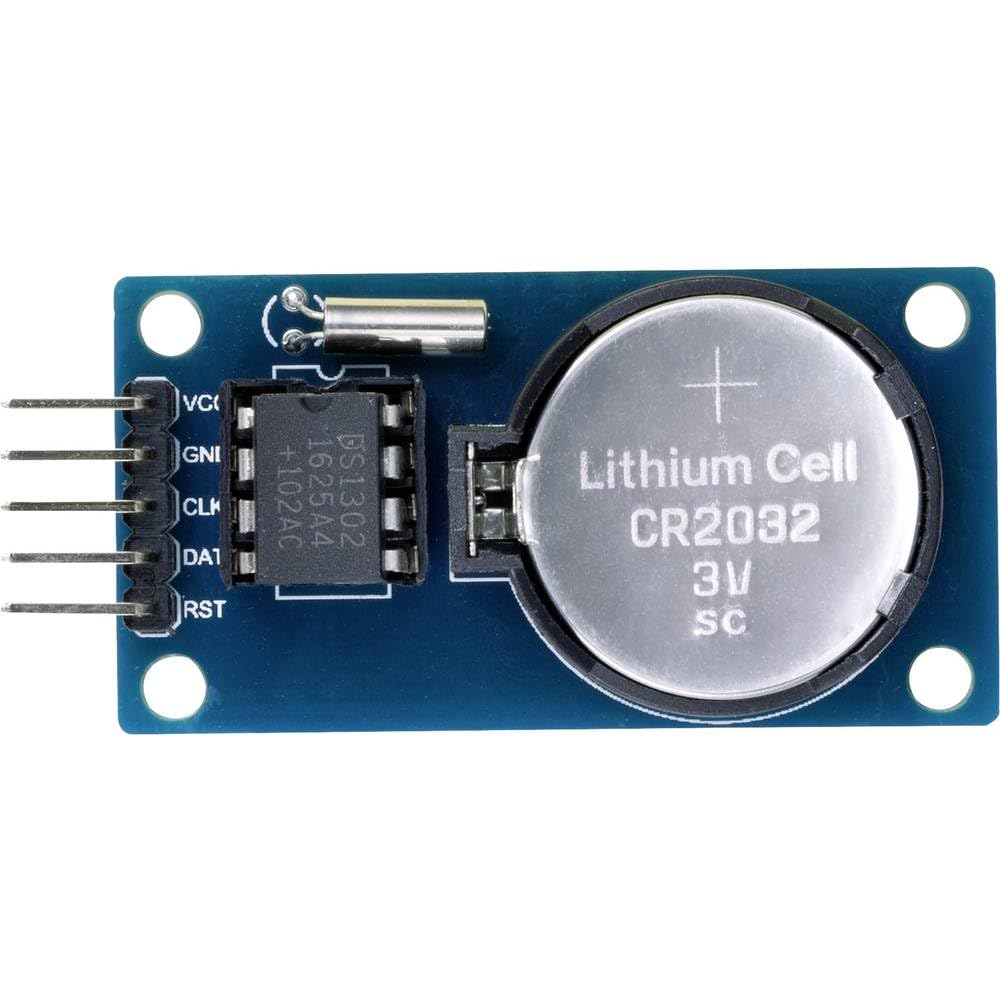
Image: TRU Components TC-9927136 Real-Time Clock Module, showing its compact design and components.
Key Features:
- Power supply: 1 x CR2032 (for backup)
- TTL-compatible VCC = 5V
- Temperature range: 0°C to +70°C
- Communicates via a simple serial interface with a microprocessor
- Provides real-time clock/calendar information: seconds, minutes, hours, day, date, month, and year
4. Specifications
| Parameter | Value |
|---|---|
| Model Number | TC-9927136 |
| Manufacturer | TRU Components |
| Power Supply (Backup) | 1 x CR2032 |
| Operating Voltage (VCC) | 5V (TTL-compatible) |
| Operating Temperature | 0°C to +70°C |
| Communication Interface | Serial |
| Product Dimensions | 8 x 17 x 33 cm |
| Weight | 224 Grams |
5. Setup
5.1. Power Supply
The module requires a 5V VCC power supply for operation. Additionally, a CR2032 coin cell battery must be installed into the designated battery holder on the module. This battery provides backup power to maintain timekeeping when the main 5V supply is disconnected.
5.2. Microprocessor Connection
Connect the TC-9927136 module to your microprocessor using its serial interface pins. Refer to the module's datasheet or pinout diagram for specific pin assignments (e.g., VCC, GND, SDA, SCL, or other serial communication lines). Ensure that the 5V VCC and ground connections are correctly established before attempting communication.
6. Operating Instructions
The TC-9927136 communicates via a serial interface. Interaction typically involves sending commands to read or set the time and date registers within the RTC chip.
6.1. Reading Time and Date
To read the current time and date, your microprocessor must initiate a serial communication sequence to query the RTC's internal registers. The data returned will typically include:
- Seconds
- Minutes
- Hours (in 24-hour or 12-hour format, depending on configuration)
- Day of the week
- Date (day of the month)
- Month
- Year
Consult the specific datasheet for the RTC chip used within the TC-9927136 module for detailed register addresses and communication protocols (e.g., I2C or SPI commands).
6.2. Setting Time and Date
To set the time and date, your microprocessor sends specific serial commands to write values into the RTC's registers. This process typically involves:
- Sending a command to enable write access to the RTC registers.
- Transmitting the desired values for seconds, minutes, hours, day, date, month, and year.
- Sending a command to disable write access, protecting the time from accidental changes.
It is recommended to set the time and date upon initial power-up or after a battery replacement to ensure accuracy.
7. Maintenance
7.1. Battery Replacement
The CR2032 backup battery has a limited lifespan. When the timekeeping becomes inaccurate after main power loss, it indicates that the battery needs replacement. Carefully remove the old battery from its holder and insert a new CR2032 battery, ensuring correct polarity. After replacement, the time and date will need to be reset via the serial interface.
7.2. Cleaning
If necessary, gently clean the module with a dry, soft cloth. Avoid using liquids or abrasive cleaners, as these can damage the electronic components.
8. Troubleshooting
- Module not responding: Check all power (VCC, GND) and serial communication connections. Ensure the 5V supply is stable.
- Incorrect time/date: Verify that the time and date were set correctly after power-up or battery replacement. Check the CR2032 battery for charge.
- Time drift: While RTCs are generally accurate, significant temperature fluctuations can affect precision. Ensure the module operates within its specified temperature range.
- Communication errors: Confirm that your microprocessor's serial communication settings (e.g., clock speed, data format) match the requirements of the RTC chip.
9. Warranty and Support
TRU Components products are manufactured to high standards. For specific warranty information or technical support, please refer to the documentation provided with your purchase or contact TRU Components customer service directly. Keep your purchase receipt for warranty claims.
