Product Overview
The ICUIXIAN XTA-409R is an Ultra HD 5x9 video wall controller designed for advanced display solutions. It supports multiple input and output options, offering flexible splicing modes for various applications.
Key features include:
- Four HDMI inputs (one 4K@60Hz, three 4K@30Hz) and one DP input (4K@60Hz).
- Nine HDMI outputs (1080p@60Hz) and one DP loop output.
- Support for various splicing modes: horizontal, vertical, and custom configurations.
- Ability to open up to 4 windows simultaneously with multiple display modes (single, picture-in-picture, picture-on-picture, four-picture split).
- High resolution support: input up to 3840x2160@60Hz, output up to 1920x1080@60Hz per channel.
- Image rotation capabilities: 90° rotation for full screen (single screen mode) and 180° rotation for the first line (two-line splicing mode).
- Control via infrared remote and RS232 serial port.
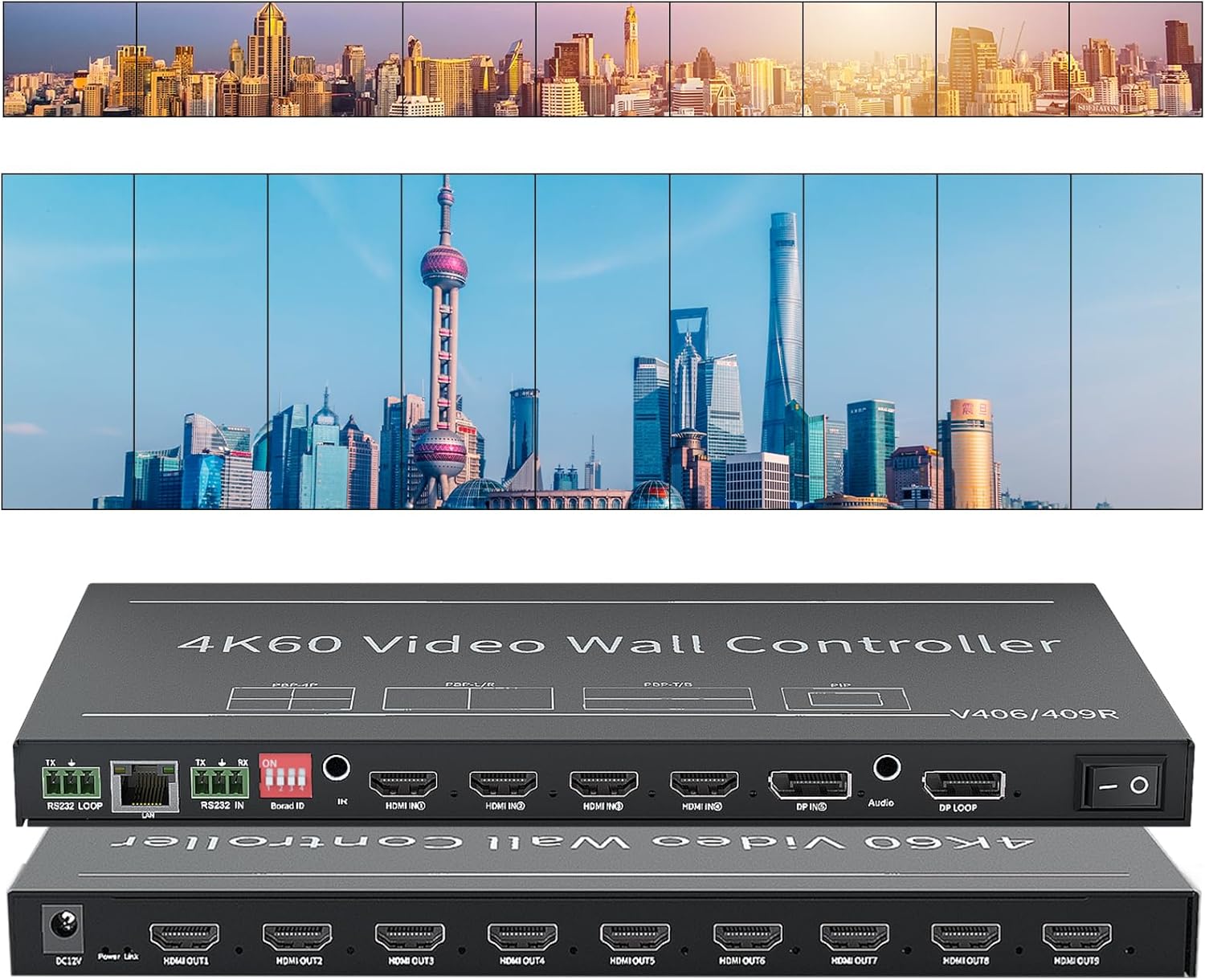
Image: The ICUIXIAN 5x9 Video Wall Controller (Model XTA-V409) shown with examples of horizontal and vertical video wall configurations it can create.
Setup and Connections
This section details the steps for setting up your video wall controller and connecting it to your display devices and input sources.
Package Contents
Before you begin, ensure all items are present:
- ICUIXIAN XTA-V409 Video Wall Controller
- Power Adapter
- Infrared Remote Control
- User Manual (this document)
Connecting the Device
Power Connection: Connect the provided DC 12V power adapter to the 'DC12V' port on the rear panel of the controller and then to a power outlet.
Input Source Connection: Connect your HDMI or DisplayPort (DP) input sources (e.g., PC, game console, Android box) to the 'HDMI IN' or 'DP IN' ports on the front panel. The controller supports one 4K@60Hz HDMI input, three 4K@30Hz HDMI inputs, and one 4K@60Hz DP input.
Display Output Connection: Connect your display screens (monitors, TVs, projectors) to the 'HDMI OUT' ports on the rear panel. The controller has nine HDMI outputs, each supporting up to 1080p@60Hz.

Image: Diagram illustrating the connection points on the front and rear panels of the video wall controller, showing HDMI/DP inputs and HDMI outputs connected to displays.
Audio Output (Optional): If desired, connect external audio devices to the 3.5mm audio output jack on the front panel.
RS232 Control (Optional): For advanced control, connect an RS232 cable from your control system to the 'RS232' port. There is also an RS232 loop-out port for cascading.
Network Interface (Optional): The RJ45TCP network protocol port can be used for network-based control, if supported by your system.
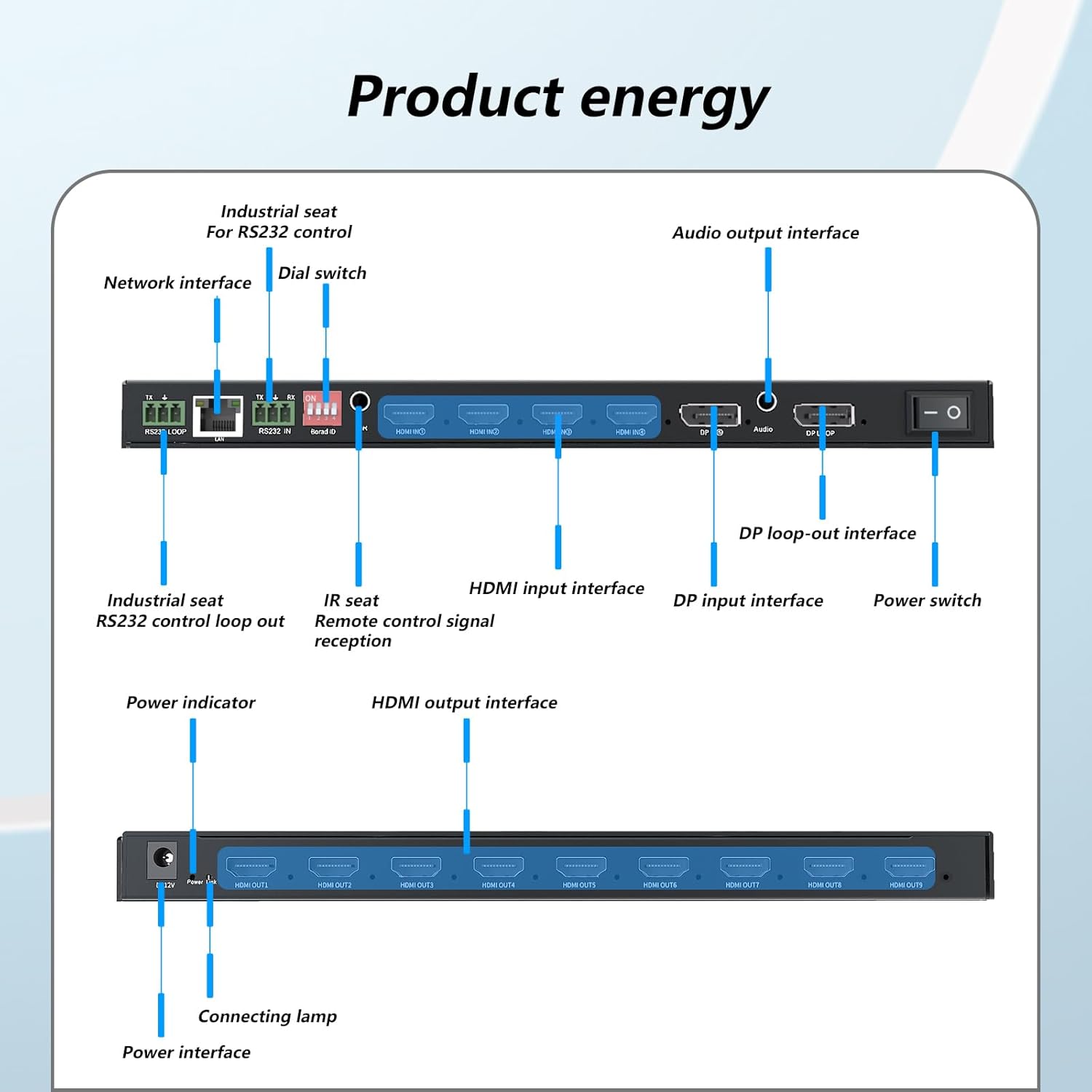
Image: Detailed diagram of the video wall controller's front and rear panels, labeling each port including network interface, RS232, HDMI inputs/outputs, DP input/loop-out, audio output, and power.
Operating Instructions
This section provides guidance on operating the ICUIXIAN XTA-V409 video wall controller.
Basic Operation
Power On: After connecting all cables, press the power switch on the front panel to turn on the device. The power indicator will illuminate.
Input Selection: Use the remote control or RS232 commands to select the desired input source (HDMI 1-4, DP). The selected input will be displayed across the connected video wall.
Splicing Modes: The controller supports various splicing modes. Refer to the product specifications for a detailed list. Common modes include:
- Horizontal Screen Display
- Vertical Screen Display
- Custom configurations (e.g., 3x3, 2x2, 2x3, 9x1, 2x4, 1x6)
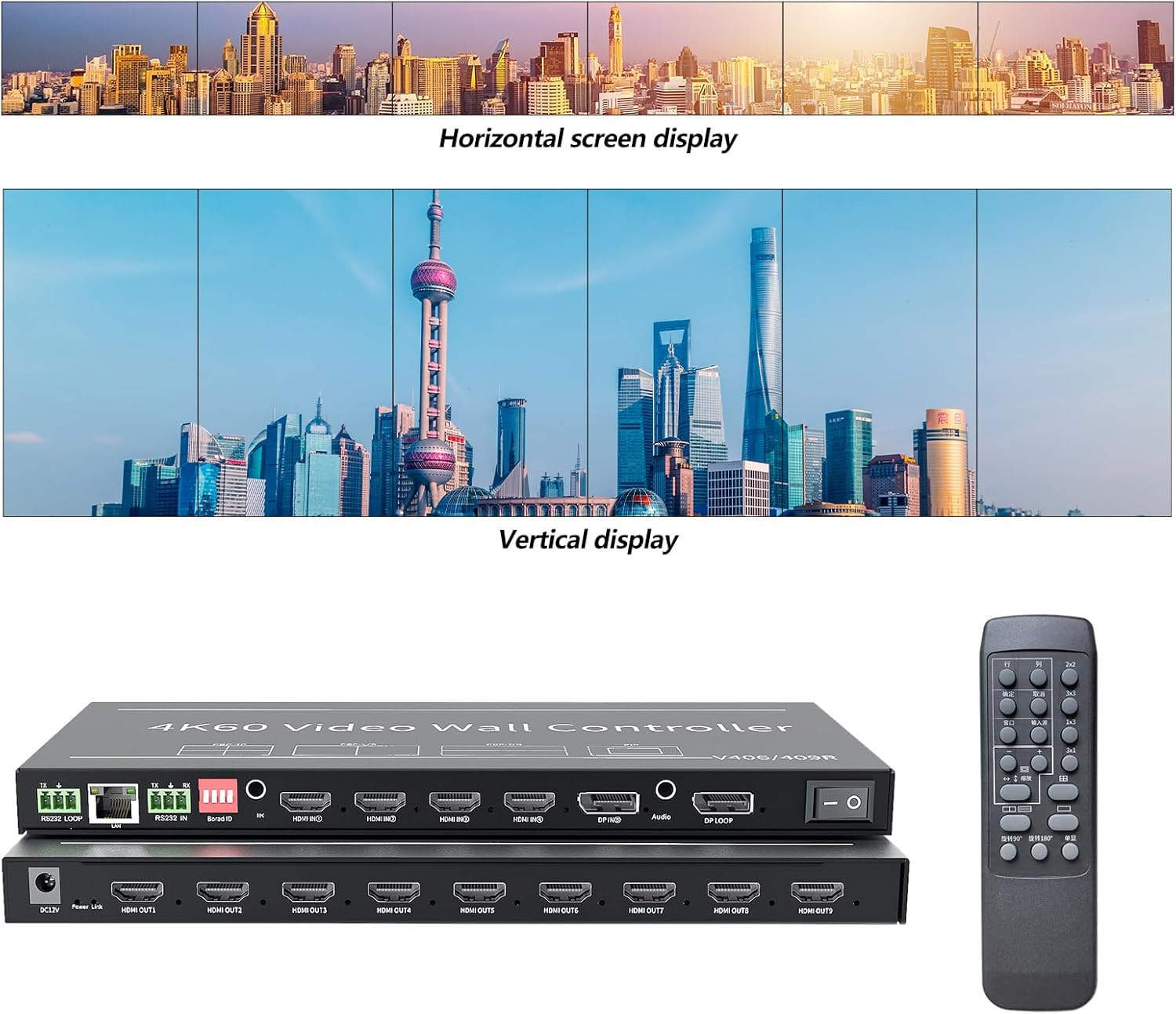
Image: Examples of horizontal and vertical video wall displays, demonstrating the controller's ability to arrange content across multiple screens.
Window Expansion Mode: The controller allows for up to 4 windows to be opened simultaneously. You can assign different input sources to these windows. Supported modes include single-screen, dual-screen picture-in-picture, dual-screen picture-on-picture, and four-picture split.

Image: The video wall controller with a remote control, highlighting its capability for 4K HD video splicing and remote operation.
Advanced Features
Image Rotation:
- 90° Rotation: Supported for the entire screen in single-screen mode, allowing for vertical screen installations without image deformation.
- 180° Rotation: Supported for the first line of displays in two-line splicing modes, useful for correcting inverted displays.

Image: Visual representation of 90-degree rotation for vertical screen installations and 180-degree rotation for two-row display configurations.
Cascading and Parallel Use: For larger video walls, multiple XTA-V409 units can be cascaded or used in parallel via the DP loop output and RS232 control for synchronized operation.
Custom Resolution: The output supports customized standard resolutions.
Maintenance
Proper maintenance ensures the longevity and optimal performance of your ICUIXIAN video wall controller.
- Cleaning: Use a soft, dry cloth to clean the exterior of the device. Do not use liquid cleaners or aerosols, as they may damage the internal components.
- Ventilation: Ensure the device is placed in a well-ventilated area. Do not block any ventilation openings. The controller features internal conduction heat dissipation and does not require external cooling measures.
- Power Management: Always power off the device before disconnecting cables or performing any maintenance.
- Environmental Conditions: Operate the device within the specified temperature range (0°C-50°C) and avoid excessive humidity.
Troubleshooting
This section addresses common issues you might encounter with the video wall controller.
| Problem | Possible Cause | Solution |
|---|---|---|
| No image on display screens. |
|
|
| Image is distorted or stretched. |
|
|
| Remote control not working. |
|
|
Specifications
Detailed technical specifications for the ICUIXIAN XTA-V409 Video Wall Controller.
| Feature | Detail |
|---|---|
| Model Number | XTA-V409 |
| Input Interface Maximum Video Pixel Frequency | 600MHz |
| Highest Supported Input Resolution | 3840x2160@60Hz |
| DP Signal | Display Port 1.2×1 |
| HDMI Signal | HDMI 2.0×1, HDMI 1.4×3 |
| Output Signal Maximum Video Pixel Frequency | 165MHz |
| Highest Supported Output Resolution (Single Screen) | 1920x1080@60Hz |
| HDMI Output Interface | HDMI 1.3×9 |
| DP Loop Out Signal | Display Port 1.2×1 |
| Audio Output | 3.5mm headphone socket |
| Control Method | Remote control, PC upper computer (RS232 serial port) |
| Product Factory Default Resolution | HDMI: 3840*2160@30Hz, DP: 3840*2160@60Hz |
| Support Custom Resolution | Yes |
| Operating Temperature | 0°C-50°C |
| Power Consumption | 12W |
| Dimensions (L×W×H) | 270mm × 122.5mm × 20.5mm (10.63 x 4.8 x 0.79 inches) |
| Item Weight | 10 pounds |
| Compatible Devices | PC, Television, Projection |
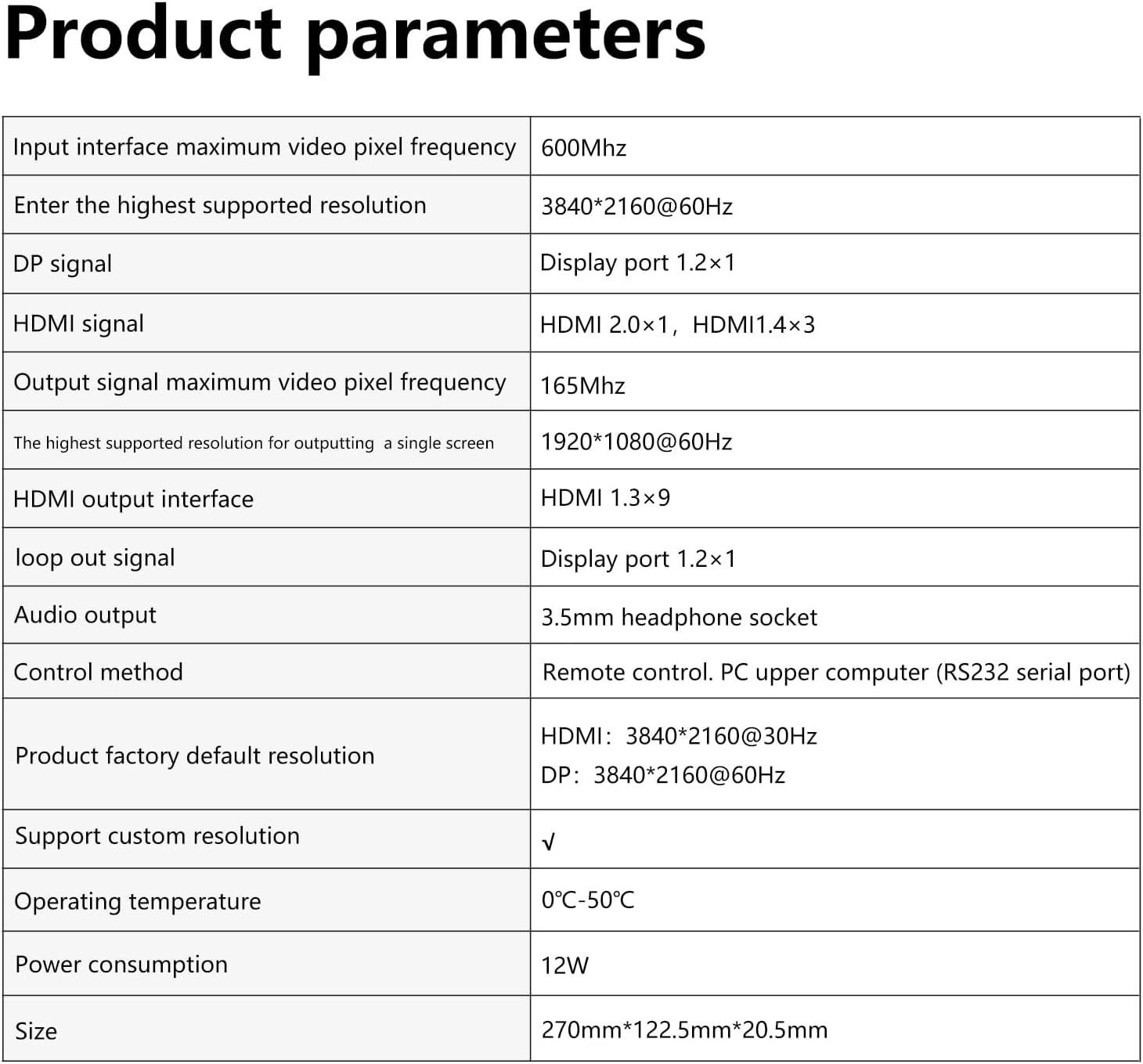
Image: A table summarizing the technical specifications and parameters of the video wall controller.

Image: Visual representation of the controller's compatibility with different display devices such as splicing screens, TVs, DLP rear projection, and projectors.
Warranty and Support
For warranty information and technical support, please refer to the documentation provided with your purchase or contact the manufacturer directly.
Manufacturer: XINTEAN
Brand: ICUIXIAN
Typically, warranty details are included on the product packaging or a separate warranty card. For the most up-to-date support resources, visit the official ICUIXIAN website or contact their customer service.


