
eeTao HLT-180-4202000 Hyleton Power Charger
User Manual
eeTao 42V AC/DC Adapter Charger
Model: HLT-180-4202000
1. Introduction
This manual provides essential information for the safe and effective use of your eeTao 42V AC/DC Adapter Charger. This charger is designed to provide reliable power supply for compatible 42VDC electric devices, such as electric scooters or similar battery-powered equipment. Please read this manual thoroughly before operation and retain it for future reference.
The charger features a wide input voltage range (100-240VAC 50/60Hz) and incorporates multiple safety protections including Over Voltage Protection (OVP), Over Current Protection (OCP), and Short Circuit Protection (SCP) to ensure safe charging.
2. Important Safety Information
Always observe the following safety precautions to prevent injury or damage to the product and connected devices:
- Indoor Use Only: This charger is designed for indoor use in dry conditions. Do not expose it to rain, moisture, or extreme temperatures.
- Voltage Compatibility: Ensure the input voltage of the charger matches the local power supply (100-240VAC).
- Device Compatibility: Only connect this charger to devices that require a 42VDC power supply and have a compatible connector type (e.g., 4-pin or barrel connector as specified). Connecting to incompatible devices may cause damage.
- Ventilation: Do not cover the charger during operation. Ensure adequate ventilation to prevent overheating.
- Cable Integrity: Regularly inspect the power cord and charger for any signs of damage. Do not use if the cord is frayed or the charger casing is cracked.
- Unplug When Not In Use: Disconnect the charger from the power outlet when not in use or during electrical storms.
- Battery Condition: Important Note: Rechargeable batteries have a limited lifespan, typically 1 to 3 years. An old or dead battery may not accept a charge, which is not an indication of a faulty charger. If you suspect battery issues, use a voltmeter to test the charger's output.
- Children and Pets: Keep the charger and its cables out of reach of children and pets.

Image: Diagram illustrating the security protection features of the eeTao charger, including temperature protection, short circuit protection, overcharge protection, anti-interference protection, and lightning protection.
3. Setup and Connection
Follow these steps to set up and connect your charger:
- Unpack: Carefully remove the charger and its components from the packaging.
- Inspect: Before first use, inspect the charger and cable for any visible damage.
- Connect to Device: Insert the charger's output connector (barrel or 4-pin, depending on your model) firmly into the charging port of your 42VDC device. Ensure a secure connection.
- Connect to Power Outlet: Plug the AC input cord of the charger into a standard 100-240VAC wall outlet.

Image: The eeTao 42V AC/DC Adapter Charger showing the main unit and the attached power cord with a barrel connector.

Image: The eeTao 42V AC/DC Adapter Charger showing the main unit and the attached power cord with a 4-pin connector, indicating compatibility with different device types.

Image: A close-up view of the barrel connector tip, highlighting its design for durable connection.
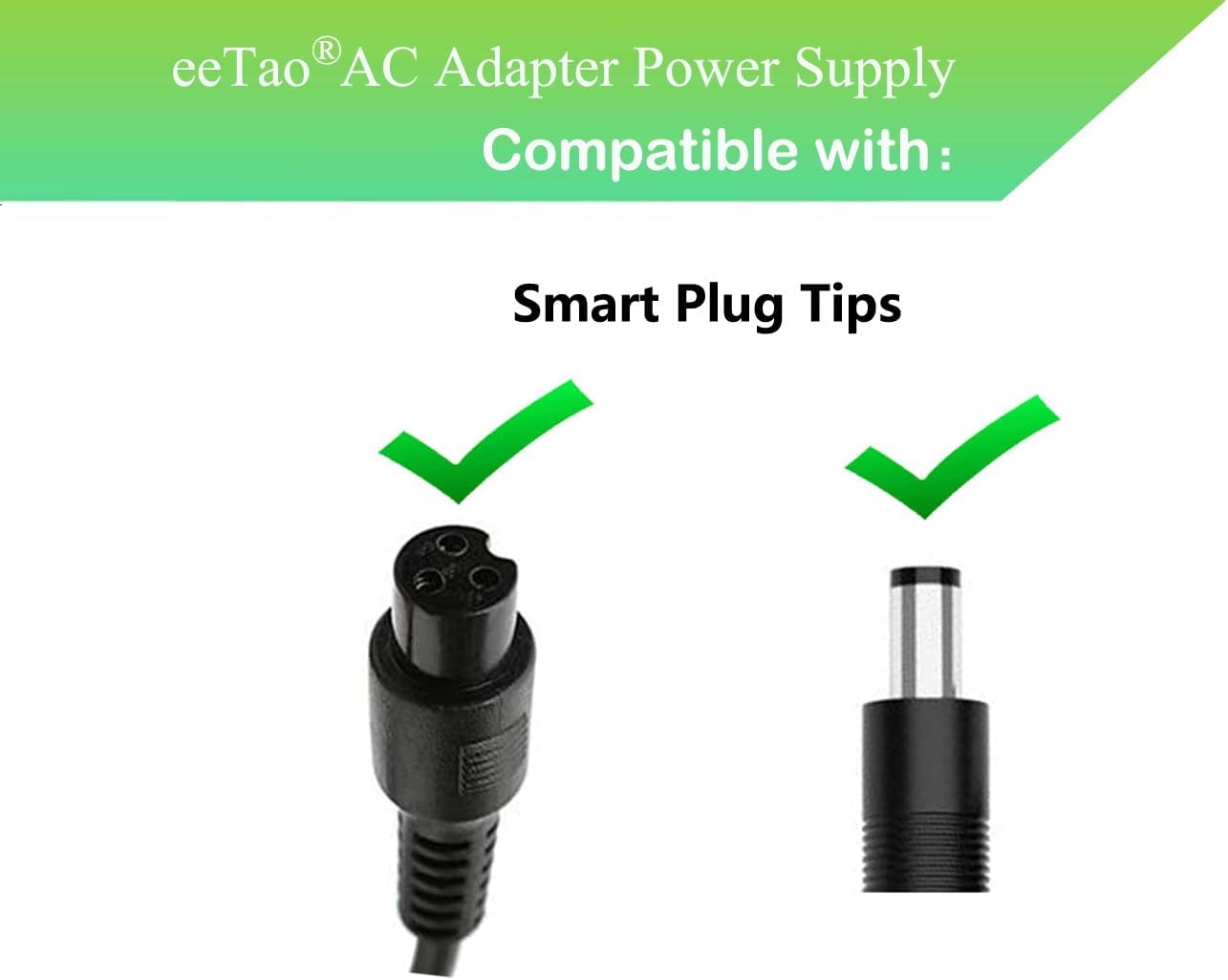
Image: An illustration showing two types of "Smart Plug Tips" - a 4-pin connector and a barrel connector, indicating the charger's compatibility with various devices.
4. Operating Instructions
Once connected, the charger will begin charging your device. Observe the LED indicator for charging status:
- Red Light: Indicates that the device is currently charging.
- Green Light: Indicates that charging is complete, and the battery is fully charged.

Image: A visual representation of the charging indicator light, showing a red light when charging and a green light when charging is finished.

Image: An electric scooter connected to the eeTao charger, demonstrating the charging process. The charger's LED is shown as green, indicating a full charge.
Once the green light appears, you may disconnect the charger from the device and the power outlet. While the charger has overcharge protection, it is good practice to disconnect it once charging is complete.
5. Care and Maintenance
Proper care will extend the life of your charger:
- Cleaning: Use a soft, dry cloth to clean the charger. Do not use liquid cleaners or solvents.
- Storage: Store the charger in a cool, dry place away from direct sunlight and moisture when not in use.
- Cable Management: Avoid sharp bends or kinks in the cable. Use the included cable tie to keep the cord neatly organized.
- Avoid Drops: Do not drop the charger or subject it to strong impacts.

Image: A cross-section diagram illustrating the internal construction of the charger's cable, showing the inner insulator, coarsening core, and TPE protective layer, indicating durable design.
6. Troubleshooting
If you encounter issues with your charger, refer to the following common problems and solutions:
| Problem | Possible Cause | Solution |
|---|---|---|
| Charger LED not lighting up. | No power from outlet, loose connection, or faulty charger. |
|
| Charger LED is red, but device is not charging or charges slowly. | Battery issue, incompatible device, or charger output issue. |
|
| Charger gets excessively hot. | Poor ventilation, overloading, or internal fault. |
|
7. Product Specifications
| Feature | Detail |
|---|---|
| Model Number | HLT-180-4202000 Hyleton Power Charger |
| Input Voltage | 100-240VAC, 50/60Hz |
| Output Voltage | 42VDC |
| Output Amperage | 1.55 Amps |
| Product Dimensions | 6 x 4 x 2 inches |
| Item Weight | 9.1 ounces |
| Connectivity Technology | Powerline |
| Connector Type | Barrel Connector (also compatible with 4-pin as per images) |
| Special Feature | Short Circuit Protection (OVP, OCP, SCP) |
| Included Components | 42V DC Power Supply Cord Cable PS Battery Charger |
8. Warranty and Support
For warranty information or technical support, please refer to the contact details provided with your purchase or visit the official eeTao store on Amazon:
Please have your model number (HLT-180-4202000) and purchase details ready when contacting support.
Ask a question about this manual
Ask about setup, troubleshooting, compatibility, parts, safety, or missing instructions. Manuals+ will review the question and use this page’s manual context to help answer it.