
MOMOHO B40
MOMOHO Portable Bluetooth Speaker with Time Display
Model: B40 User Manual
Introduction
Thank you for purchasing the MOMOHO Portable Bluetooth Speaker, Model B40. This speaker combines high-fidelity audio with practical features like a time display, alarm clock, and multiple connectivity options. This manual provides detailed instructions for setup, operation, maintenance, and troubleshooting to ensure you get the best experience from your device.
What's in the Box
- MOMOHO B40 Portable Bluetooth Speaker
- USB-C Charging Cable
- 3.5mm Stereo Audio Cable
- User Manual

Image: The MOMOHO B40 speaker in various usage scenarios, demonstrating its versatility.
Product Overview
Familiarize yourself with the speaker's buttons and ports:

Image: Front and rear view of the MOMOHO B40 speaker with labeled buttons and ports.
Front Panel Controls:
- M (Mode Check) Button: Press to cycle through Bluetooth, TF Card, and AUX modes.
- SET (Time Set) Button: Press to enter time/alarm setting mode. Long press may activate additional settings.
- Play/Pause/Power Button: Press to play/pause audio. Long press to power the speaker on/off. Also used to answer/end calls.
- Previous Track Button: Press to go to the previous track. Long press to decrease volume.
- Next Track Button: Press to go to the next track. Long press to increase volume.
Rear Panel Ports:
- TF Card Slot: Insert a TF (MicroSD) card (up to 32GB, MP3 format) for direct music playback.
- USB-C Charging Port: Connect the provided USB-C cable for charging.
- AUX Jack: Connect external audio devices using the 3.5mm stereo audio cable.
Setup
1. Charging the Speaker
- Connect the provided USB-C charging cable to the speaker's USB-C port.
- Connect the other end of the cable to a USB power adapter (not included) or a computer's USB port.
- The charging indicator light will illuminate. A full charge takes approximately 2.5 hours.
- Once fully charged, the indicator light may change color or turn off.
2. Powering On/Off
- To Power On: Long press the Play/Pause/Power button until the display lights up and you hear a power-on prompt.
- To Power Off: Long press the Play/Pause/Power button again until the display turns off and you hear a power-off prompt.
3. Setting the Time and Alarm

Image: The MOMOHO B40 speaker functioning as an alarm clock on a nightstand.
- To Set Time:
- With the speaker powered on, press the SET button once. The hour digits will start blinking.
- Use the Previous Track and Next Track buttons to adjust the hour.
- Press SET again to move to minute adjustment. The minute digits will blink.
- Use the Previous Track and Next Track buttons to adjust the minutes.
- Press SET a third time to confirm the time.
- Note: The speaker may default to a 24-hour format. If a 12-hour format is desired and not automatically available, check the manual for specific instructions or cycle through the time settings.
- To Set Alarm 1:
- After setting the time, press the SET button again. The Alarm 1 hour digits will blink.
- Adjust the hour using the Previous Track and Next Track buttons.
- Press SET to move to Alarm 1 minute adjustment.
- Adjust the minutes using the Previous Track and Next Track buttons.
- Press SET to confirm Alarm 1. The alarm icon will appear on the display.
- To Set Alarm 2:
- After setting Alarm 1, press the SET button again. The Alarm 2 hour digits will blink.
- Follow the same steps as Alarm 1 to set the hour and minutes for Alarm 2.
- Press SET to confirm Alarm 2. The second alarm icon will appear.
- To Turn Off/Snooze Alarm:
- When an alarm sounds, press any button (except the power button) to snooze it for a short period (e.g., 5-10 minutes).
- To completely turn off a sounding alarm, long press the Play/Pause/Power button.
- To disable an alarm permanently, cycle through the SET menu to the specific alarm and press the Play/Pause/Power button to toggle it off (the alarm icon will disappear).
Operating Instructions
1. Bluetooth Pairing
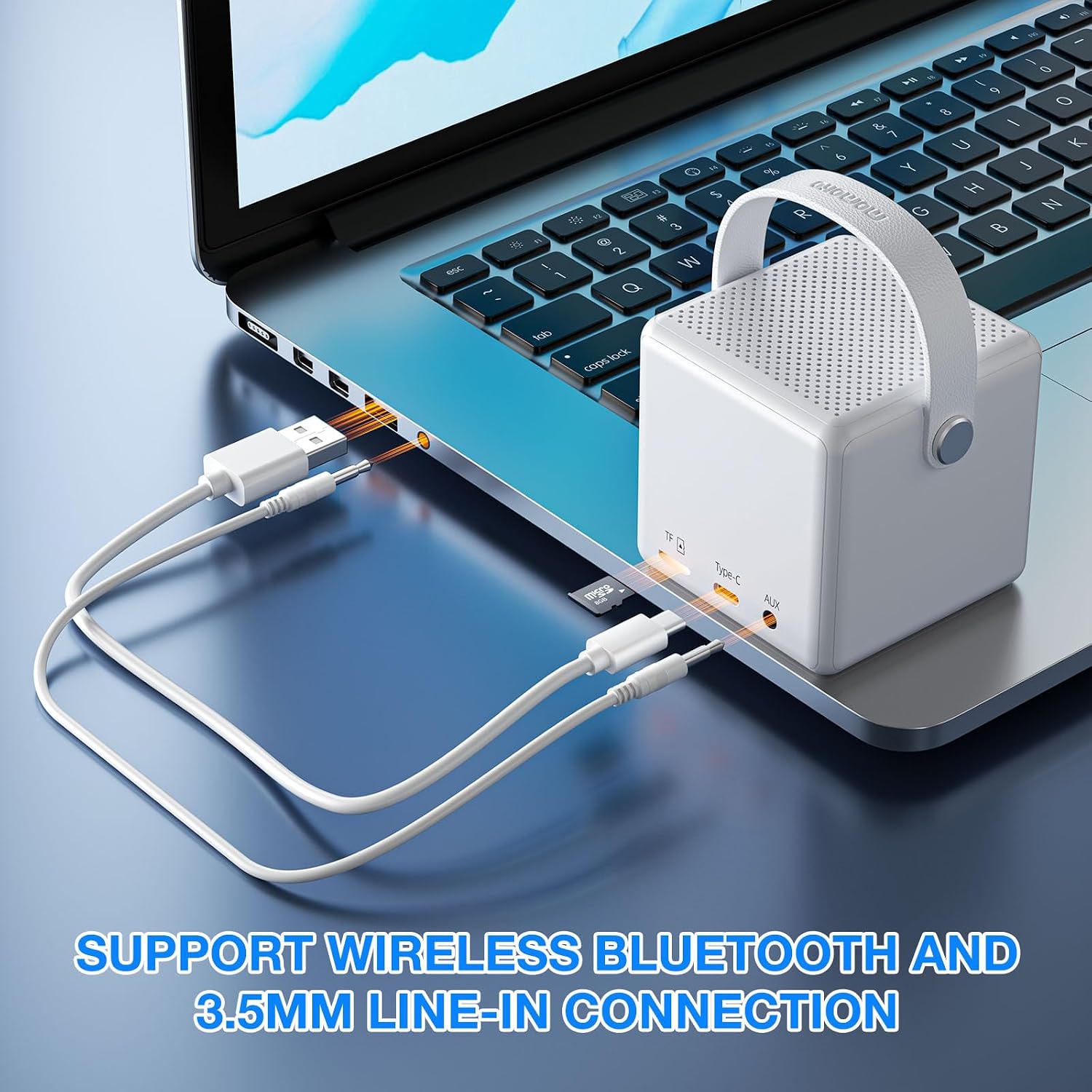
Image: The MOMOHO B40 speaker connected to various devices via Bluetooth.
- Power on the speaker. It will automatically enter Bluetooth pairing mode, indicated by a blinking Bluetooth icon or voice prompt.
- On your device (smartphone, tablet, laptop), enable Bluetooth and search for available devices.
- Select "MOMOHO B40" from the list.
- Once connected, you will hear a confirmation sound, and the Bluetooth icon will stop blinking.
- The speaker has a Bluetooth range of up to 50 feet (15 meters).
2. True Wireless Stereo (TWS) Pairing

Image: Two MOMOHO B40 speakers paired for True Wireless Stereo sound.
To achieve a powerful stereo sound experience, you can pair two MOMOHO B40 speakers together:
- Ensure both MOMOHO B40 speakers are powered on and not connected to any other Bluetooth device.
- On one of the speakers (this will be the primary speaker), long press the M (Mode Check) button until you hear a TWS pairing prompt. The speakers will search for each other.
- Once successfully paired, you will hear a confirmation sound, and the primary speaker's Bluetooth indicator will blink, while the secondary speaker's indicator will be solid.
- Now, connect your device to the primary speaker via Bluetooth as described in the "Bluetooth Pairing" section.
- Audio will now play in stereo through both speakers.
3. TF Card Playback
- Insert a TF (MicroSD) card with MP3 audio files into the TF card slot on the rear panel.
- The speaker will automatically switch to TF Card mode, or you can press the M (Mode Check) button to select TF Card mode.
- Use the Play/Pause, Previous Track, and Next Track buttons to control playback.
4. AUX Input
- Connect one end of the 3.5mm stereo audio cable to the AUX jack on the speaker's rear panel.
- Connect the other end to the headphone jack or audio output of your external device.
- The speaker will automatically switch to AUX mode, or you can press the M (Mode Check) button to select AUX mode.
- Audio playback will be controlled from your external device.
5. Hands-Free Calling

Image: The MOMOHO B40 speaker being used for hands-free calling.
When your speaker is connected to your phone via Bluetooth:
- To Answer a Call: Press the Play/Pause button once.
- To End a Call: Press the Play/Pause button once during a call.
- To Reject a Call: Long press the Play/Pause button when an incoming call rings.
Maintenance
- Clean the speaker with a soft, dry cloth. Do not use abrasive cleaners or solvents.
- The speaker is NOT waterproof. Avoid exposure to water or excessive moisture.
- Store the speaker in a cool, dry place when not in use.
- Avoid dropping the speaker or subjecting it to strong impacts.
- Charge the speaker regularly, even if not used frequently, to maintain battery health.
Troubleshooting
| Problem | Possible Solution |
|---|---|
| Speaker does not power on. | Ensure the speaker is charged. Connect it to a power source using the USB-C cable. |
| Cannot connect via Bluetooth. |
|
| No sound from speaker. |
|
| Time/Alarm settings are confusing or not working. |
|
| The number "90" blinks on the display. | This indicator is not explicitly defined in standard documentation. It may relate to battery percentage, volume level, or a specific mode. If it interferes with operation, try restarting the device. If the issue persists, contact customer support for clarification. |
Specifications
| Feature | Detail |
|---|---|
| Brand | MOMOHO |
| Model Number | B40 |
| Connectivity Technology | Bluetooth 5.2 |
| Wireless Range | Up to 50 feet (15 meters) |
| Speaker Maximum Output Power | 5 watts |
| Audio Output Mode | Stereo (with TWS pairing) |
| Playback Options | Bluetooth, TF Card (up to 32GB, MP3), AUX Input |
| Battery Average Life | 20 hours |
| Battery Charge Time | 2.5 hours |
| Control Method | Buttons |
| Built-in Microphone | Yes, for hands-free calling |
| Waterproof | No |
| Dimensions (D x W x H) | 2.83"D x 2.83"W x 3.1"H |
Product Video Overview
Video: A detailed overview of the MOMOHO B40 speaker, showcasing its digital clock, alarm clock functions, and various features.
Warranty and Support
The MOMOHO Portable Bluetooth Speaker, Model B40, comes with a 1-year limited warranty from the date of purchase. This warranty covers manufacturing defects and workmanship under normal use.
For warranty claims, technical support, or any questions not covered in this manual, please contact the seller or manufacturer directly through your purchase platform. Please have your order number and product model (B40) ready when contacting support.
For additional information or updates, please refer to the official MOMOHO brand store or product page on Amazon: MOMOHO Store
Ask a question about this manual
Ask about setup, troubleshooting, compatibility, parts, safety, or missing instructions. Manuals+ will review the question and use this page’s manual context to help answer it.