
Introduction
This manual provides comprehensive instructions for the assembly, operation, and maintenance of your FEZIBO Height Adjustable Electric Standing Desk. Please read this manual thoroughly before attempting assembly or operation to ensure safe and correct usage. Keep this manual for future reference.

Image: FEZIBO Electric Standing Desk in a home office setting, showcasing its design and functionality.
Safety Instructions
- Ensure all components are securely fastened before use.
- Keep children and pets away from the desk during operation to prevent injury.
- Do not place liquids directly on the control panel or near electrical components.
- Avoid overloading the desk beyond its maximum weight capacity of 180 pounds.
- Ensure there are no obstructions in the desk's path during height adjustment to prevent damage or injury.
- Only use the provided power adapter and cables.
Package Contents
Verify that all parts are present before beginning assembly. If any parts are missing or damaged, contact customer support.
- Desk Frame Components (Legs, Crossbar)
- Desktop Sections (Typically two pieces for assembly)
- Control Panel
- Power Adapter and Cable
- Assembly Hardware (Screws, Allen wrenches, etc.)
- Accessories (Cup Holder, Storage Hook, Cable Management Tray, Bundle Clamp)
Setup and Assembly
The desk platform is designed for straightforward assembly, typically arriving in two sections. Follow these general steps for setup:
- Unpack Components: Carefully remove all parts from the packaging and lay them out on a clean, soft surface to prevent scratches.
- Assemble Desk Frame: Attach the desk legs to the crossbar according to the included diagrams. Ensure all screws are tightened securely.
- Attach Desktop: Place the desktop sections onto the assembled frame. Align the pre-drilled holes and secure the desktop using the provided screws.
- Connect Electronics: Mount the control panel to the underside of the desk. Connect the motor cables and power adapter to the control box, then plug the power adapter into a wall outlet.
- Install Accessories: Attach the cup holder, storage hook, cable management tray, and bundle clamp as desired.
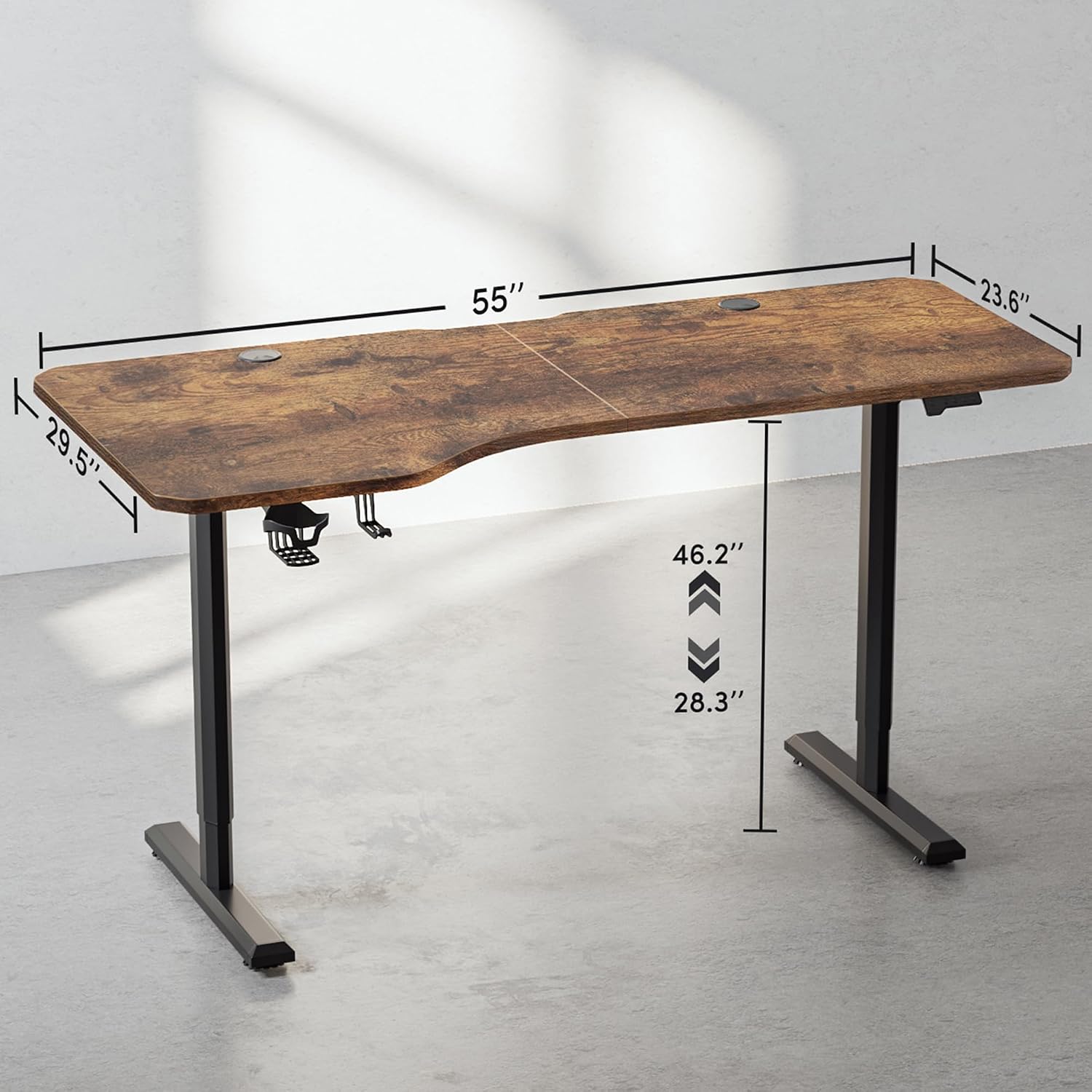
Image: Dimensional diagram of the FEZIBO Electric Standing Desk, illustrating its overall size and adjustable height range.
Operating Instructions
Your FEZIBO Electric Standing Desk features an intuitive control panel for easy height adjustment and memory settings.
Height Adjustment
- Use the Up Button (▲) to raise the desk.
- Use the Down Button (▼) to lower the desk.
- The desk can be adjusted to any height between 27.3 inches and 45.47 inches.

Image: Visual representation of the desk's height adjustment capability, showing the range from sitting to standing positions.
Preset Buttons
The desk includes three preset buttons to store and recall your preferred sitting and standing heights.
- Standing Height Setting: Adjust the desk to your desired standing height, then press and hold the 'Standing Height' button until the display flashes or a beep is heard.
- Sitting Height Setting: Adjust the desk to your desired sitting height, then press and hold the 'Sitting Height' button until the display flashes or a beep is heard.
- To recall a preset height, simply press the corresponding button.
Reset Function
If the desk encounters an error or behaves unexpectedly, use the Reset Button (C) to recalibrate the system. Press and hold the reset button until the desk moves to its lowest position and then slightly back up, indicating a successful reset.

Image: Detailed view of the multi-function intelligent keypad, highlighting the up, down, standing height, sitting height, and reset controls.
Anti-Collision Technology
The desk is equipped with an anti-collision sensor that detects obstacles in its movement path. If an obstruction is detected, the desk will automatically stop and reverse slightly to prevent damage or injury.
Integrated Features
The FEZIBO Electric Standing Desk includes several integrated features designed to enhance your workspace organization and convenience.
Convenience Accessories
- Cup Holder: A detachable cup holder is provided to keep your beverages secure and prevent spills on your desk surface.
- Storage Hook: A convenient hook allows you to hang headphones, bags, or other items, keeping your desktop clear.

Image: Close-up view of the integrated cup holder and storage hook, demonstrating their practical use.
Cable Management
- Cable Management Tray: A tray is included to neatly route and conceal power cords and other cables, reducing clutter.
- Bundle Clamp: Use the bundle clamp to secure groups of cables, maintaining an organized and tidy workspace.

Image: Close-up view of the cable management solutions, including the cable tray and bundle clamp, for an organized desk.
Maintenance
Regular maintenance ensures the longevity and optimal performance of your standing desk.
- Cleaning: Wipe the desk surface and frame with a soft, damp cloth. Avoid using abrasive cleaners or harsh chemicals that could damage the finish.
- Check Connections: Periodically inspect all screws and electrical connections to ensure they are tight and secure.
- Cable Management: Ensure cables are properly routed and not pinched or tangled, especially during height adjustments.
Troubleshooting
If you encounter issues with your FEZIBO Electric Standing Desk, refer to the following common problems and solutions:
| Problem | Possible Cause | Solution |
|---|---|---|
| Desk does not move | No power, loose connection, or system error. | Check power cable connection to the wall and control box. Perform a reset by holding the Reset button. |
| Uneven movement or desk stops mid-adjustment | System imbalance or anti-collision activated. | Ensure no obstructions are present. Perform a reset by holding the Reset button. |
| Anti-collision feature activates too frequently | Sensitive setting or minor obstructions. | Ensure the area around the desk is clear. Refer to the full manual for potential sensitivity adjustments (if available). |
| Desk makes unusual noises | Loose components or motor issue. | Check all screws and connections. If noise persists, contact customer support. |
Specifications
Key technical specifications for the FEZIBO Electric Standing Desk:
| Feature | Detail |
|---|---|
| Brand | FEZIBO |
| Model Number | 72b0595f-2888-48b8-9a0a-ced987771b6c |
| Product Dimensions (D x W x H) | 28" x 63" x 28" (at minimum height) |
| Minimum Height | 27.3 Inches |
| Maximum Height | 45.51 Inches |
| Tabletop Thickness | 10 Millimeters |
| Item Weight | 63 Pounds |
| Maximum Weight Recommendation | 180 Pounds |
| Base Material | Alloy Steel |
| Top Material Type | Wood |
| Finish Type | Laminated, Rusticbrown |

Image: The desk supporting a significant weight, illustrating its 132 LBS load capacity and durability tested over 50,000 lifts.
Warranty and Support
FEZIBO is committed to providing quality products and customer satisfaction.
- Warranty: This product comes with a 2-Year Warranty covering manufacturing defects. Please retain your proof of purchase.
- Customer Support: For assistance with assembly, operation, troubleshooting, or warranty claims, please contact FEZIBO Customer Support.
U.S. Customer Support:
- Phone: +1 702-620-5156
- Hours: Monday - Friday, 24/5