1. Product Overview
The Carpuride W708 Pro is a versatile 7-inch portable car stereo designed to enhance your driving experience with modern connectivity features. It offers wireless Apple CarPlay and Android Auto, allowing seamless integration with your smartphone for navigation, music, calls, and more. With multiple audio output options and support for a backup camera, it provides convenience and safety for a wide range of vehicles.

Image: Carpuride W708 Pro unit with its suction mount and a rear view camera.
2. Key Features
- Wireless CarPlay & Android Auto: Effortlessly connect your smartphone for navigation, calls, messages, and music using voice control (Siri or Google Assistant).
- Multiple Audio Output Modes: Built-in speaker, Car Bluetooth, AUX, and FM transmission for flexible audio routing.
- Dual Bluetooth Module: Upgraded Bluetooth 5.0 for seamless hands-free calling and music playback, and a second module for transmitting audio to your car's speakers.
- Phone Mirror Link: Compatible with Android and iOS phones for displaying content like navigation and videos directly on the 1024x600 HD capacitive touchscreen.
- Enhanced Audio Experience: Features a built-in preset EQ and a user-customized 16-band HD EQ with 12 adjustable frequency sections.
- Rear Camera Support: Automatically displays the rear view image when the vehicle is in reverse.
- Custom Boot LOGO & Screen: Personalize the device's startup display.
3. Package Contents
Please verify that all items are included in your package:
- Carpuride W708 Pro Unit (7-inch display)
- Self-adhesive bracket
- Suction mount bracket
- Car Charger (1.5m cable)
- Rear View Camera (1.2m cable)
- Camera Wire (6m cable)
- Suction Cup Gasket
- 3.5mm Audio Cable (0.5m)
- User Manual

Image: Detailed view of the Carpuride W708 Pro packing list and dimensions.
4. Installation
4.1 Mounting Options
The W708 Pro offers two primary mounting methods:
- Dashboard Mounting: Use the self-adhesive bracket to securely attach the unit to your dashboard.
- Suction Mount: Utilize the suction cup bracket for flexible placement on your windshield or dashboard. Both brackets offer 180° angle adjustment and 360° angle adjustment for optimal viewing.
4.2 Power Connection
Connect the provided car charger to your vehicle's cigarette lighter socket. The unit supports 12V-24V adaptive voltage, making it compatible with various vehicles including cars and trucks.
Image: Illustration of different mounting options for the Carpuride W708 Pro.
5. Connectivity
5.1 Wireless CarPlay & Android Auto
The W708 Pro supports wireless Apple CarPlay and Android Auto. Once connected, you can access navigation, music, phone calls, and messaging directly from the unit's screen, controlled via touch or voice commands (Siri/Google Assistant).

Image: Wireless and wired connectivity options for smartphones.
5.2 Dual Bluetooth Transmission
The W708 Pro features an upgraded dual Bluetooth module. One module connects to your phone for calls and audio streaming, while the second module can transmit audio to your vehicle's existing Bluetooth system, providing superior sound quality compared to FM transmission. This allows for hands-free calling and speaker monitoring through your car's speakers.
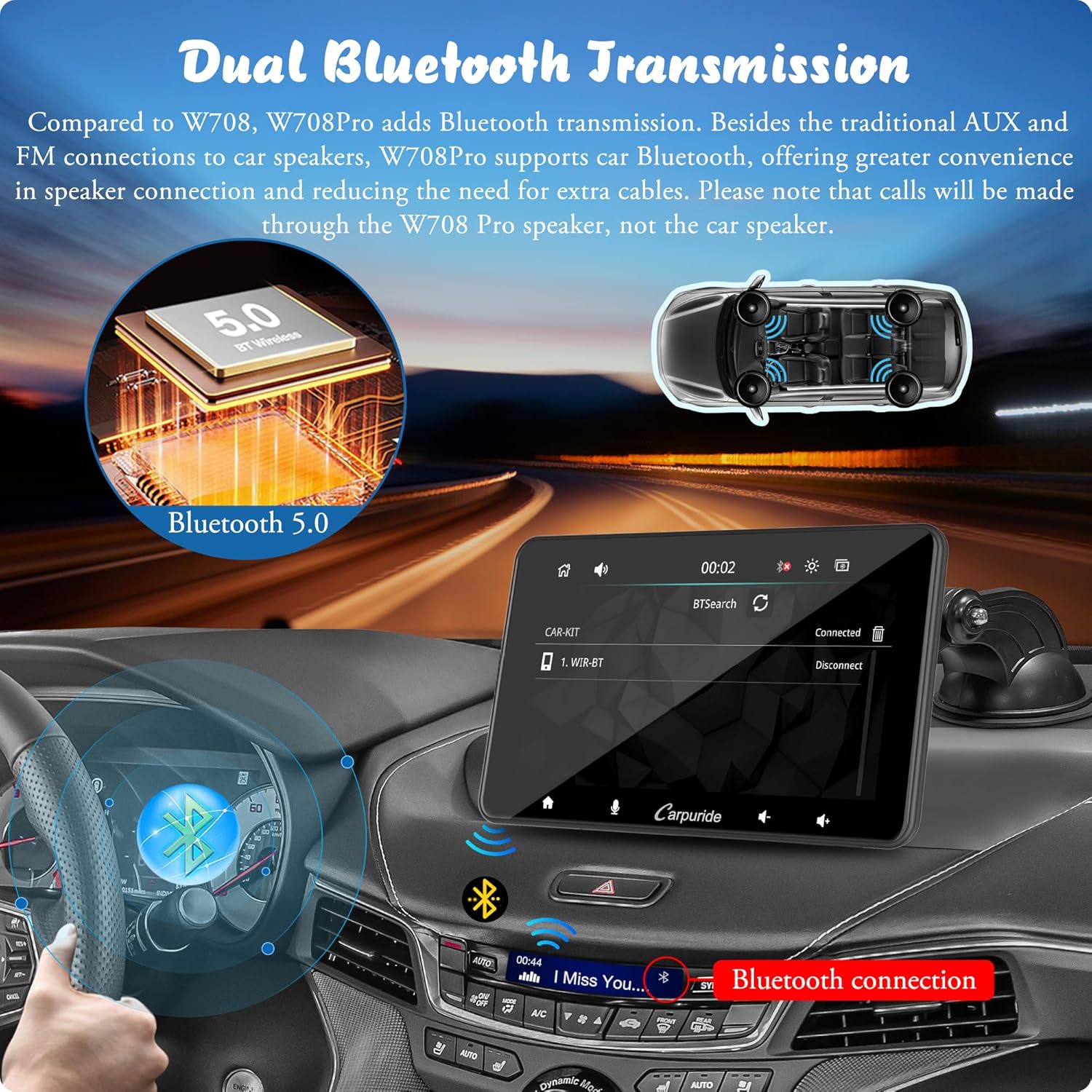
Image: Dual Bluetooth Transmission capability.
5.3 AUX Connection
For vehicles with an AUX input, you can connect the W708 Pro directly using the provided 3.5mm audio cable. This method typically offers the best audio quality by sending a direct audio signal to your car's amplifier.
5.4 FM Transmission
If your vehicle does not have Bluetooth or AUX input, the W708 Pro can transmit audio to your car's FM radio. Simply select an unused FM frequency on the W708 Pro and tune your car's radio to the same frequency.
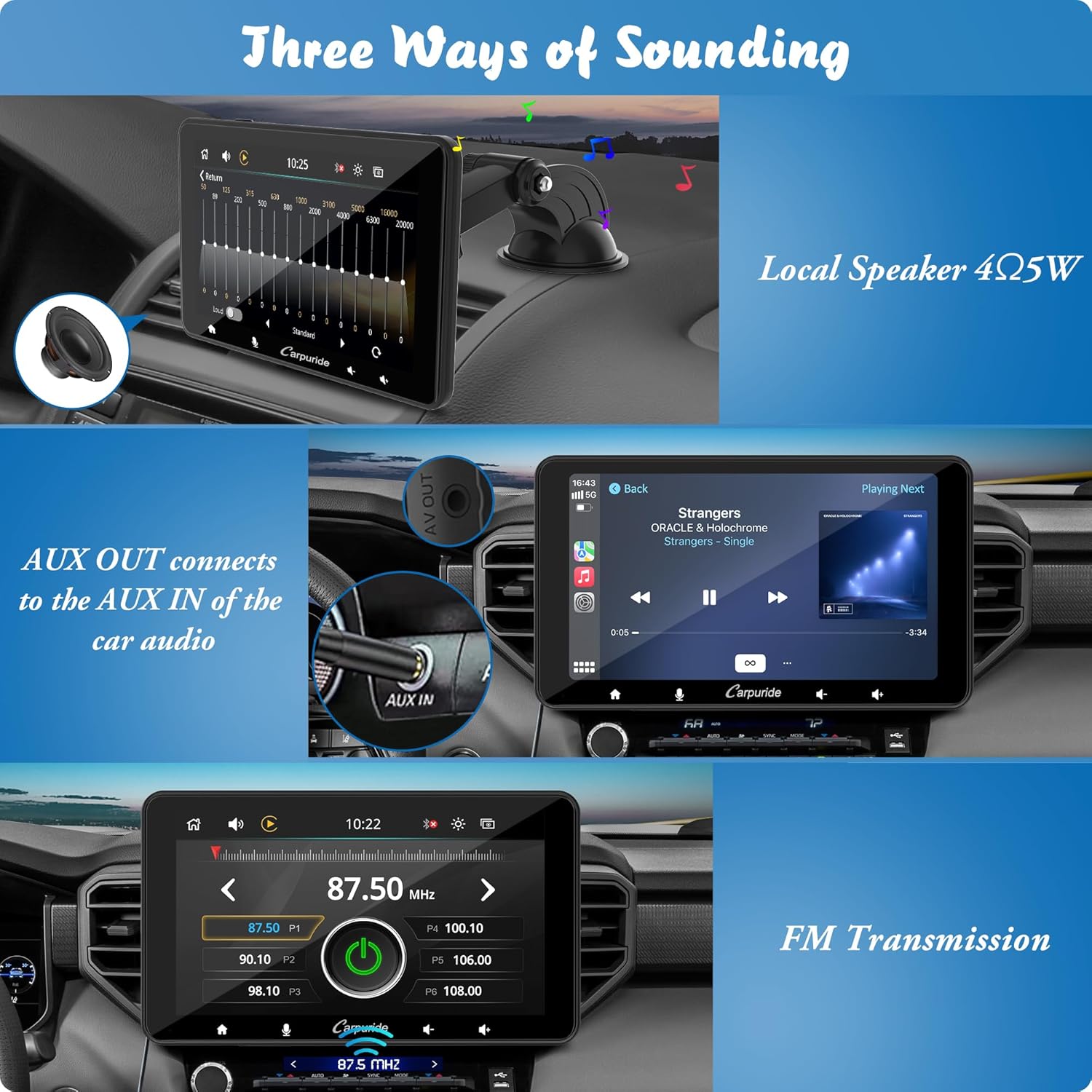
Image: Different audio output methods.
5.5 Mirror Link
The latest Phone Mirror-Link technology allows you to mirror your Android or iOS phone screen onto the W708 Pro. This is useful for accessing apps not natively supported by CarPlay/Android Auto, such as YouTube videos.
Video: Demonstrates how to connect the Carpuride unit to car Bluetooth for audio transmission and phone features, including using the car's built-in microphone for calls and playing music from a phone through the car's speakers.
6. Operating Instructions
6.1 Touch Screen Interface
The 7-inch 1024x600 HD capacitive touchscreen provides a responsive and clear viewing experience. Navigate through menus and applications with intuitive touch gestures.

Image: Details of the 7-inch HD touchscreen.
6.2 Voice Control
Utilize Siri or Google Assistant for hands-free control of navigation, phone calls, text messages, and music playback. This feature enhances safety by allowing you to keep your hands on the wheel and eyes on the road.

Image: GPS Navigation and Voice Control features.
6.3 Audio Equalizer (EQ)
Customize your sound experience with the built-in preset EQ or the user-customized 16-band HD EQ, featuring 12 adjustable frequency sections. This allows you to fine-tune the audio output to your preferences, whether you enjoy rock, jazz, or other genres.
6.4 Screen Brightness
The unit features a sensor light design for optimal visibility and eye protection while driving. You can also manually adjust the screen brightness via the settings menu.
7. Rear Camera Functionality
The Carpuride W708 Pro supports a rear view camera (included with model 708pro+cam). When the vehicle is shifted into reverse, the unit will automatically display the camera feed on the screen, aiding in safer parking and maneuvering.
7.1 Rear Camera Installation
Follow these steps to install the backup camera:
- Find the AV-IN interface on the head unit and connect the camera using the provided cables.
- Manage and organize the wiring, securing with cable ties/clips for a clean installation.
- Connect the red wire to the reverse light's anode, tapping into wiring near the back of the vehicle. Connect the black wire to the reverse light DC 12V.
Note: Consult your vehicle's instruction manual or seek professional help if unsure about wiring. Additional components or power sources may be required depending on the specific vehicle.

Image: Backup camera installation guide.
8. Compatibility
The Carpuride W708 Pro is designed for wide compatibility with various vehicle types, including cars, trucks, caravans, vans, trailers, and campers. Its portable design and flexible mounting options make it suitable for vehicles that may not have integrated infotainment systems.
Image: Wide vehicle compatibility of the Carpuride W708 Pro.
9. Maintenance and Software Updates
9.1 General Maintenance
To ensure the longevity and optimal performance of your Carpuride W708 Pro, keep the screen clean using a soft, dry cloth. Avoid exposing the unit to extreme temperatures or direct sunlight for prolonged periods. Ensure all cable connections are secure.
9.2 Software Upgrades
Carpuride provides support for software upgrades to improve functionality and add new features. Information on available updates and installation procedures can typically be found on the official Carpuride website or by contacting customer support. You can also customize the boot LOGO and screen for free.
10. Troubleshooting
10.1 Audio Quality Issues
If you experience poor audio quality, especially when using AUX or Bluetooth transmission to your car's speakers, try the following:
- Adjust Device Volume: Lower the volume on the Carpuride W708 Pro unit (e.g., to 50%) and increase the volume on your car's stereo. This allows your car's more powerful amplifier to handle the amplification, often resulting in clearer sound with less hiss.
- Check Connections: Ensure all cables (AUX, power) are securely connected.
- FM Interference: If using FM transmission, try different frequencies to find one with less interference.
10.2 Connectivity Problems
- Bluetooth Pairing: Ensure Bluetooth is enabled on both the W708 Pro and your smartphone. Forget previous pairings and attempt to re-pair.
- Wireless CarPlay/Android Auto: Check Wi-Fi and Bluetooth connections. Sometimes, restarting both the unit and your phone can resolve connection issues.
10.3 Unit Not Powering On
- Power Source: Verify that the car charger is properly inserted into the cigarette lighter and that the vehicle's power outlet is functioning.
- Cable Integrity: Inspect the power cable for any damage.
11. Specifications
| Feature | Specification |
|---|---|
| Model Name | W708 Pro (+cam) |
| Screen Size | 7 Inches (18 cm diagonal) |
| Resolution | 1024x600 HD |
| Connectivity Technology | Bluetooth 5.0, Auxiliary, Wi-Fi |
| Special Features | Touchscreen, Wireless CarPlay/Android Auto, Mirror Link, Voice Control, EQ |
| Item Weight | 2.14 pounds |
| Package Dimensions | 8.9 x 5.67 x 4.02 inches |
| Mounting Type | Dashboard Mount |
| Manufacturer | Carpuride |
12. Warranty and Support
For warranty information, technical support, or any inquiries regarding your Carpuride W708 Pro, please refer to the contact details provided in the physical user manual included with your product or visit the official Carpuride website. Customer satisfaction is a priority, and support is available to assist with any issues or questions you may have.


