
Clarion XC2510
Contents
Clarion XC2510 600 Watt 5-Ch, Class D Marine Amplifier User Manual
Model: XC2510 | Brand: Clarion
Introduction
Thank you for choosing the Clarion XC2510 Marine Amplifier. This high-performance 5-channel Class D amplifier is engineered to deliver robust and clear audio in demanding marine environments. Its compact design and advanced features ensure a superior listening experience on the water. This manual provides essential information for proper installation, operation, and maintenance of your amplifier.
Safety Information
Please read all safety instructions carefully before installing and operating the amplifier. Failure to do so may result in injury or damage to the unit or vessel.
- Always disconnect the vehicle's battery negative terminal before starting any electrical work.
- Ensure proper grounding to prevent electrical hazards.
- Do not expose the amplifier to extreme temperatures, direct sunlight, or excessive moisture beyond its marine rating.
- Use appropriate gauge wiring for power and speaker connections as specified in the installation section.
- Consult a professional installer if you are unsure about any part of the installation process.
Package Contents
Verify that all items are present in the package:
- Clarion XC2510 Marine Amplifier
- Wiring Harnesses (Power, Speaker, RCA)
- Mounting Hardware (Screws)
- User Manual (This document)
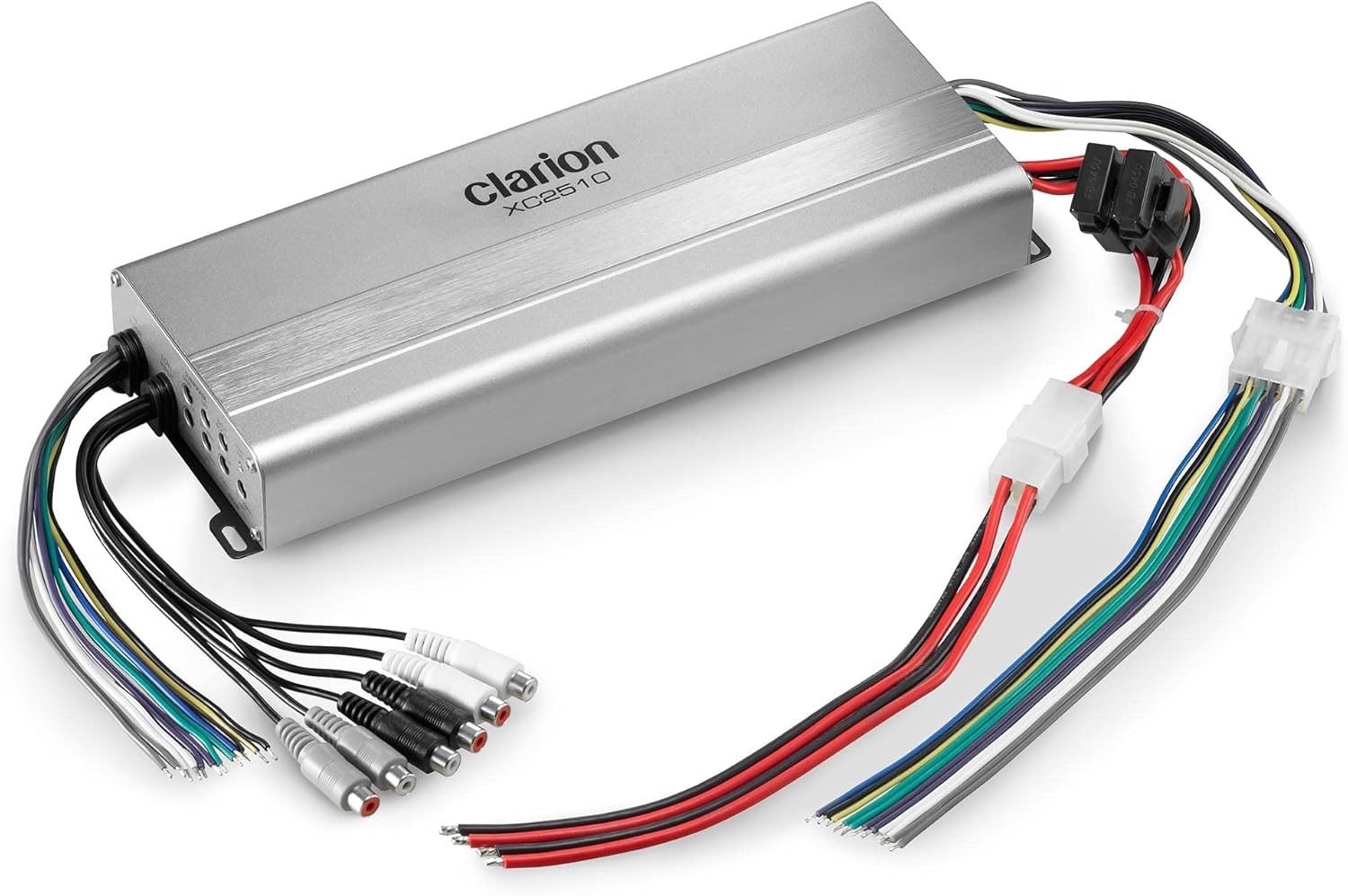
Image: The Clarion XC2510 amplifier shown with its various wiring harnesses for power, speakers, and RCA inputs. This illustrates the compact size and the connections required for installation.
Setup and Installation
Proper installation is crucial for optimal performance and longevity of your amplifier. Follow these steps carefully.
1. Mounting Location
- Choose a dry, well-ventilated location away from direct heat sources and excessive vibration.
- Ensure sufficient space around the amplifier for air circulation.
- Mount the amplifier securely using the provided hardware to prevent movement.
2. Wiring Connections
Refer to the wiring diagram for specific connections. Ensure all connections are secure and insulated.
- Power (BATT+): Connect to the positive terminal of the battery via an appropriate fuse (not included, typically 60A for this amplifier).
- Ground (GND): Connect to a clean, unpainted metal surface on the vessel's chassis or a dedicated ground bus.
- Remote (REM): Connect to the remote turn-on lead from your head unit.
- RCA Inputs (LOW INPUT): Connect to the RCA pre-outs of your head unit for front, rear, and subwoofer channels.
- Speaker Outputs: Connect your speakers to the corresponding output terminals. Observe correct polarity (+/-).

Image: A detailed view of the control panel on the Clarion XC2510 amplifier, showing the Low Input RCA jacks, gain controls for front, rear, and subwoofer channels, LPF/HPF crossovers, bass boost, and the power/protection indicator light.
Operating Instructions
Once installed, adjust the amplifier settings for optimal audio performance.
1. Gain Adjustment
Set the gain controls (FRONT, REAR, SUBWOOFER) to match the output voltage of your head unit. Start with the gain at minimum and slowly increase until distortion is audible, then back off slightly. This is not a volume control.
2. Crossover Settings
- LPF (Low Pass Filter): For the subwoofer channel, adjust the LPF (Variable 35-250Hz) to allow only low frequencies to pass to the subwoofer.
- HPF (High Pass Filter): For the front and rear channels, adjust the HPF (Variable 15-250Hz) to block low frequencies from reaching your full-range speakers, preventing distortion and improving clarity.
3. Bass Boost
The Bass Boost control (0-12dB) allows you to enhance low-frequency output. Use sparingly to avoid distortion and speaker damage.
Maintenance
The Clarion XC2510 is designed for marine use with a 4-layer conformal coated PCB assembly for protection. However, regular maintenance ensures its longevity.
- Keep the amplifier clean and free of dust and debris. Use a soft, dry cloth for cleaning.
- Ensure ventilation areas are not obstructed.
- Periodically check all wiring connections for tightness and corrosion.
- Avoid exposing the unit to direct water spray or submersion.
Troubleshooting
If you experience issues with your amplifier, refer to the following common problems and solutions:
| Problem | Possible Cause | Solution |
|---|---|---|
| No Power / PWR light off | Blown fuse, loose power/ground connection, no remote turn-on signal. | Check fuse, verify power/ground connections, check remote wire from head unit. |
| Protection (PRT) light on | Overheating, short circuit in speaker wiring, speaker impedance too low. | Allow amplifier to cool, check speaker wiring for shorts, ensure speaker impedance matches amplifier's rating. |
| No Sound | Loose RCA cables, incorrect gain settings, muted head unit. | Check RCA connections, adjust gain, ensure head unit is not muted. |
| Distorted Sound | Gain set too high, improper crossover settings, damaged speakers. | Reduce gain, adjust crossover frequencies, inspect speakers for damage. |
Specifications
| Feature | Detail |
|---|---|
| Model Number | XC2510 |
| Maximum Power Output | 700 Watts |
| Continuous Power (4-Ohms) | 50 Watts x 4 + 200 Watts x 1 |
| Continuous Power (2-Ohms) | 75 Watts x 4 + 300 Watts x 1 |
| Bridged Power (4-Ohms) | 150 Watts x 2 |
| Crossover Type | 12dB/Oct. Low/High Pass Electronic Crossover |
| Crossover Frequency (SUB) | Variable 35-250Hz |
| Crossover Frequency (FR/RR) | Variable 15-250Hz |
| PCB Assembly | 4 Layer Conformal Coated |
| Dimensions (L x W x H) | 6 x 4 x 6 inches (approximate) |
| Weight | 3 pounds |
Warranty and Support
The Clarion XC2510 Marine Amplifier comes with a 1-Year Manufacturer Warranty. For warranty claims or technical support, please contact Clarion customer service or visit their official website. Keep your proof of purchase for warranty validation.
For further assistance, you may visit the Clarion Store on Amazon.
Ask a question about this manual
Ask about setup, troubleshooting, compatibility, parts, safety, or missing instructions. Manuals+ will review the question and use this page’s manual context to help answer it.