1. Introduction
Thank you for choosing the iFi AUDIO micro iDSD Signature Finale. This device is a high-performance portable Digital-to-Analog Converter (DAC) and headphone amplifier designed to deliver exceptional audio quality for a wide range of headphones and audio sources. This manual provides essential information for the proper setup, operation, and maintenance of your device.
2. Product Overview
2.1 Key Features
- Cutting-edge 16-Core XMOS technology for MQA decoding.
- Enhanced volume knob for precise control.
- Upgraded ELNA Audio capacitor for superior performance.
- FINALE titanium grey chassis design.
- Versatile audio options tailored to personal preferences.
- Dual Burr-Brown DAC chips in a custom interleaved configuration for lower noise floor, improved channel separation, and finer musical detail.
- Supports PCM up to 768kHz, DSD up to 512, 2xDXD, and MQA natively.
- Up to 4100mW of power output, capable of driving sensitive in-ear monitors to current-hungry planar headphones.
- Built-in rechargeable battery for ultra-clean, stable DC power and portability, offering up to 12 hours of playback.
2.2 Device Components
Familiarize yourself with the various inputs, outputs, and controls of your micro iDSD Signature Finale.
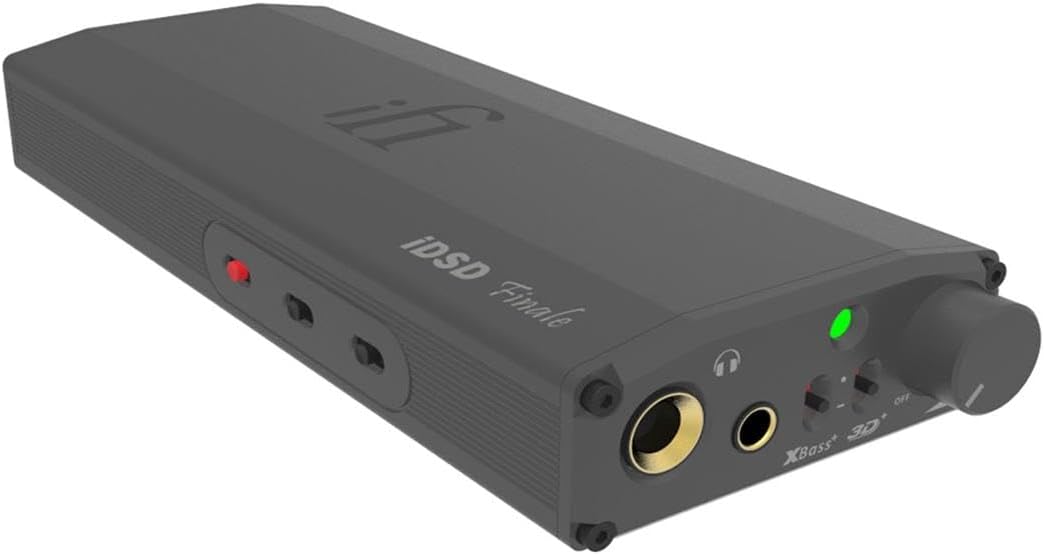
Figure 1: Front and Side View. This image displays the front panel with headphone outputs, volume knob, and various switches, along with the sleek side profile of the device.

Figure 2: Front Panel Controls. A detailed view of the front panel, highlighting the 6.3mm and 3.5mm headphone jacks, volume control, XBass and 3D+ switches, and power/status indicator.

Figure 3: Rear Panel Inputs. This image shows the rear panel, featuring SPDIF input (RCA), Digital Input (USB-A), and RCA line outputs.

Figure 4: Bottom Panel. The bottom of the device displays various technical specifications, power mode, filter settings, and iEMatch switches.
3. Setup Instructions
3.1 Charging the Device
Before initial use, fully charge the micro iDSD Signature Finale. Connect the device to a USB power source using the provided USB cable. The LED indicator will show charging status and turn off when fully charged.
3.2 Connecting to an Audio Source
- USB Digital Input: Connect your computer (Windows, macOS, Linux) or compatible mobile device to the USB-A Digital Input port on the rear panel (Figure 3) using a suitable USB cable. Ensure necessary drivers are installed for Windows systems (available on the iFi website).
- SPDIF Input: For coaxial or optical digital sources, connect to the SPDIF Input (RCA) on the rear panel (Figure 3).
3.3 Connecting Headphones or Speakers
- Headphones: Plug your headphones into either the 6.3mm (1/4 inch) or 3.5mm headphone jack on the front panel (Figure 2). The 4.4mm balanced output is also available for compatible headphones.
- External Amplifier/Active Speakers: Use the RCA Line Outputs on the rear panel (Figure 3) to connect to an external amplifier or powered speakers.
4. Operating Instructions
4.1 Power On/Off and Volume Control
- To power on the device, rotate the volume knob clockwise until it clicks. The LED indicator will illuminate.
- Adjust the volume by rotating the knob. Start with a low volume and gradually increase to a comfortable listening level.
- To power off, rotate the volume knob counter-clockwise until it clicks.
4.2 Sound Enhancement Features
- XBass: This feature enhances bass response. Activate or deactivate using the switch on the front panel (Figure 2).
- 3D+: This feature expands the soundstage, creating a more spacious listening experience. Activate or deactivate using the switch on the front panel (Figure 2).
4.3 Power Modes and Filters
The micro iDSD Signature Finale offers various power modes and digital filters, accessible via switches on the bottom panel (Figure 4). Experiment with these settings to find your preferred audio profile.
- Power Mode (Eco, Normal, Turbo): Adjusts the output power to match your headphones' sensitivity.
- Eco: For highly sensitive IEMs.
- Normal: For most headphones.
- Turbo: For demanding, high-impedance, or planar magnetic headphones.
- Digital Filters: Select from various digital filter options (e.g., Bit-Perfect, Standard) to fine-tune the sound characteristics. Refer to the iFi website for detailed descriptions of each filter.
- iEMatch: This feature optimizes output for highly sensitive in-ear monitors, reducing hiss and improving dynamic range.
5. Maintenance
- Keep the device clean by wiping it with a soft, dry cloth. Avoid using harsh chemicals or abrasive materials.
- Do not expose the device to extreme temperatures, humidity, or direct sunlight.
- Avoid dropping or subjecting the device to strong impacts.
- Ensure proper ventilation when in use to prevent overheating.
- When not in use for extended periods, store the device in a cool, dry place.
6. Troubleshooting
| Problem | Possible Cause / Solution |
|---|---|
| No sound output. |
|
| Distorted or poor sound quality. |
|
| Device not recognized by computer. |
|
| Battery not charging or device not holding charge. |
|
7. Specifications
| Feature | Detail |
|---|---|
| Model Number | micro iDSD Signature |
| Item Weight | 1.6 pounds |
| Product Dimensions | 6.8 x 2.6 x 1.1 inches |
| Compatible Devices | Headphones |
| Supported Software | MQA |
| Operating System Compatibility | Linux, Windows, macOS |
| Connectivity Technology | XLR (Note: The device primarily uses USB, SPDIF, 3.5mm, 6.3mm, and 4.4mm balanced outputs/inputs.) |
| Number of Channels | 16 (Refers to XMOS core technology) |
| DAC Chipset | Dual Burr-Brown DAC chips |
| Max PCM Sample Rate | 768kHz |
| Max DSD Sample Rate | DSD 512 |
| Output Power | Up to 4100mW |
8. Warranty and Support
The iFi AUDIO micro iDSD Signature Finale comes with a manufacturer's warranty. Please refer to the warranty card included with your product or visit the official iFi AUDIO website for detailed warranty terms and conditions specific to your region.
For technical support, troubleshooting assistance beyond this manual, or service inquiries, please contact iFi AUDIO customer support through their official website or the contact information provided in your product packaging. When contacting support, please have your product model and serial number ready.
9. Product Videos
No official product videos from the seller are available for embedding at this time.


