
Introduction
Thank you for choosing the Mobility Lab ML312194 Solar Power Bank. This portable 10000 mAh power bank is designed to provide reliable power for your electronic devices, featuring both USB and solar charging capabilities, an integrated LED flashlight, and a convenient carabiner for portability. Please read this manual carefully to ensure proper use and maintenance of your device.
What's in the Box
- Mobility Lab ML312194 Solar Power Bank
- Micro USB Charging Cable
- Carabiner

Image: The product packaging for the Mobility Lab ML312194 Solar Power Bank, showing the device and its key features.
Product Features
- High Capacity: 10000 mAh battery for multiple device charges.
- Dual Charging: Solar panel for emergency charging and Micro USB input for standard charging.
- Dual Output: Two USB output ports to charge multiple devices simultaneously.
- LED Indicators: Display remaining battery capacity.
- Integrated LED Flashlight: For illumination in low-light conditions.
- Durable Design: Robust construction suitable for outdoor use.
- Portability: Lightweight (250g) with an included carabiner for easy attachment to bags.
Setup
- Initial Charge: Before first use, fully charge the power bank using the Micro USB input port and the provided cable connected to a 5V/1A USB power adapter (not included). This ensures the internal battery is fully activated.
- Familiarize Components: Identify the Micro USB input port, USB output ports, LED indicators, solar panel, and LED flashlight.

Image: A top-down view of the power bank, highlighting the solar panel and the location of the USB output and Micro USB input ports.
Operating Instructions
Charging the Power Bank
The power bank can be charged via two methods:
- Via Micro USB (Recommended): Connect the provided Micro USB cable to the power bank's Micro USB input port and to a USB power source (e.g., wall adapter, computer USB port). The LED indicators will illuminate to show charging progress. A full charge typically takes several hours depending on the power source.
- Via Solar Panel: Place the power bank in direct sunlight. The solar panel will begin to convert sunlight into electrical energy to charge the internal battery. Solar charging is slower and primarily intended for emergency power replenishment or maintaining charge, not as a primary charging method. Ensure the solar panel is clean and unobstructed for optimal performance.
Charging External Devices
To charge your smartphone, tablet, or other electronic devices:
- Connect your device's USB charging cable to one of the power bank's USB output ports.
- Connect the other end of the cable to your device.
- The power bank will automatically begin charging your device. The LED indicators will show the remaining battery level of the power bank.
- Disconnect your device once fully charged or when you wish to stop charging.

Image: The solar power bank is shown connected to a smartphone with a USB cable, demonstrating its charging function. A carabiner is attached to the power bank.
LED Indicator Lights
The power bank features LED indicators to display its battery status:
- Each illuminated LED typically represents a percentage of the battery capacity (e.g., 4 LEDs = 75-100%, 3 LEDs = 50-75%, 2 LEDs = 25-50%, 1 LED = 0-25%).
- During charging, the LEDs will blink to indicate active charging and will become solid when that segment of charge is complete. All LEDs will be solid when fully charged.
LED Flashlight Operation
To use the integrated LED flashlight:
- Locate the power button (usually on the side or front).
- Press and hold the power button for approximately 2-3 seconds to turn the flashlight ON.
- Press and hold the power button again for 2-3 seconds to turn the flashlight OFF.
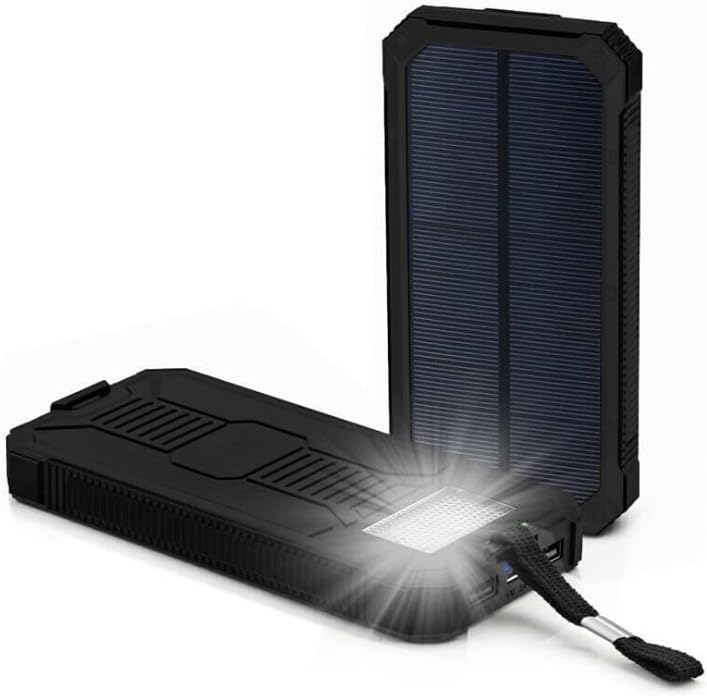
Image: The solar power bank is shown with its integrated LED flashlight turned on, providing illumination.
Maintenance
- Cleaning: Use a soft, dry cloth to clean the power bank. Do not use harsh chemicals or abrasive materials. Ensure the solar panel is kept clean for efficient charging.
- Storage: Store the power bank in a cool, dry place away from direct sunlight and extreme temperatures. For long-term storage, charge the power bank to about 50-75% every 3 months to preserve battery life.
- Avoid Damage: Do not drop, disassemble, or expose the power bank to water or fire.
Troubleshooting
- Power bank not charging:
- Ensure the Micro USB cable is securely connected to both the power bank and the power source.
- Try a different Micro USB cable or power adapter.
- If using solar charging, ensure the panel is in direct, strong sunlight and clean. Remember solar charging is slow.
- Device not charging from power bank:
- Ensure the power bank has sufficient charge (check LED indicators).
- Ensure your device's charging cable is securely connected to both the power bank and your device.
- Try a different USB output port on the power bank.
- Try a different charging cable for your device.
- Slow charging:
- Ensure you are using a 5V/1A or higher power adapter for charging the power bank via Micro USB.
- Solar charging is inherently slower than USB charging.
Specifications
| Model Name | BATTERIE EXTERNE SOLAIRE |
| Model Number | ML312194 |
| Brand | Mobility Lab |
| Battery Capacity | 10000 mAh |
| Color | Black |
| Input Port | Micro USB |
| Output Ports | 2 x USB (1A output current) |
| Voltage | 5 Volts (DC) |
| Item Weight | 250 Grams |
| Dimensions (L x W x H) | 161 x 79 x 17 mm (approx. 19.1 x 7.9 x 1.7 cm) |
| Special Features | Integrated LED Flashlight, Solar Panel, LED Charge Indicators, Carabiner included |
| Compatible Devices | Smartphones, Tablets, Electronic Devices |
Safety Information
- Do not expose the power bank to high temperatures (above 60°C/140°F) or direct sunlight for extended periods, as this may damage the battery.
- Do not immerse the power bank in water or expose it to rain or moisture.
- Do not drop, puncture, or disassemble the power bank.
- Keep out of reach of children.
- Use only certified charging cables and adapters.
- If the power bank swells, emits an odor, or becomes excessively hot, discontinue use immediately.
Warranty and Support
This Mobility Lab ML312194 Solar Power Bank comes with a 2-year warranty from the date of purchase. This warranty covers manufacturing defects. It does not cover damage caused by misuse, accidents, unauthorized modifications, or normal wear and tear.
For technical support or warranty claims, please contact your retailer or visit the official Mobility Lab website for customer service information. Please have your proof of purchase and product model number (ML312194) ready.
