
1. Introduction
Congratulations on your purchase of the RAYMOND WEIL Freelancer GMT Worldtimer watch, Model 2765-BKC-20001. This sophisticated timepiece is designed to display the time in 24 different time zones simultaneously, making it an ideal companion for global travelers. It features a robust stainless steel case with black DLC coating, a black dial with luminous indexes, and a comfortable black leather strap. Powered by the Swiss automatic Calibre RW3230 movement, this watch combines precision engineering with elegant design.
This manual provides detailed instructions on how to set up, operate, and maintain your Freelancer GMT Worldtimer watch to ensure its longevity and optimal performance.

Front view of the RAYMOND WEIL Freelancer GMT Worldtimer watch, showcasing the black dial and worldtimer cities.
2. Setup and Initial Adjustment
2.1 Initial Winding
Your Freelancer GMT Worldtimer is equipped with an automatic mechanical movement. If the watch has stopped or has not been worn for an extended period, it requires manual winding to initiate power reserve.
- Unscrew the crown at the 3 o'clock position (if it is a screw-down crown) and pull it out to position 1.
- Turn the crown clockwise approximately 30-40 times. This will build up a sufficient power reserve to start the watch.
- Push the crown back to position 0 and screw it down firmly to ensure water resistance.
2.2 Setting Local Time (Hour and Minute Hands)
The barrel-shaped hour and minute hands indicate your local time.
- Unscrew the crown at the 3 o'clock position and pull it out to position 2 (the outermost position). The seconds hand will stop.
- Turn the crown to set the correct local hour and minute. Ensure you distinguish between AM and PM if setting the date (though this model description doesn't explicitly mention a date, it's a common watch setting step).
- Once the time is set, push the crown back to position 0 and screw it down firmly.
2.3 Setting the Worldtimer Function (24 Cities and GMT Hand)
The worldtimer function allows you to view 24 time zones simultaneously. This is controlled by the crown at the 4 o'clock position.
- Identify your current local city on the rotating city disc.
- Turn the crown at the 4 o'clock position (marked with a world map symbol) until your local city is aligned with the 12 o'clock position on the dial.
- The 24-hour scale will now display the current time in the corresponding cities. The inner ring indicates day (light segment) and night (dark segment).
- The black GMT hand, with its prominent triangular red and white tip, indicates the prevailing hour in your "home" time zone, which you would have set previously using the 3 o'clock crown.

Side view of the watch, highlighting the crowns at 3 and 4 o'clock for time and worldtimer adjustments.
3. Operating the Watch
3.1 Reading Local Time
The primary hour and minute hands (barrel-shaped) indicate the current time in your immediate location. Read these hands against the main hour markers on the dial.
3.2 Reading World Time
Once the worldtimer crown (4 o'clock) is set to your local city at the 12 o'clock position, you can read the time in any of the 24 listed cities.
- Locate the desired city on the rotating disc.
- Read the corresponding hour on the adjacent 24-hour scale.
- The light and dark segments of the 24-hour scale indicate whether it is day or night in that specific time zone.
3.3 Using the GMT Hand
The black GMT hand, with its distinctive red and white tip, is designed to track a second time zone, typically your "home" time. This hand moves once every 24 hours.
- The GMT hand points to the 24-hour scale.
- To set the GMT hand, you would typically adjust it in conjunction with the local time setting, ensuring it reflects your desired second time zone.
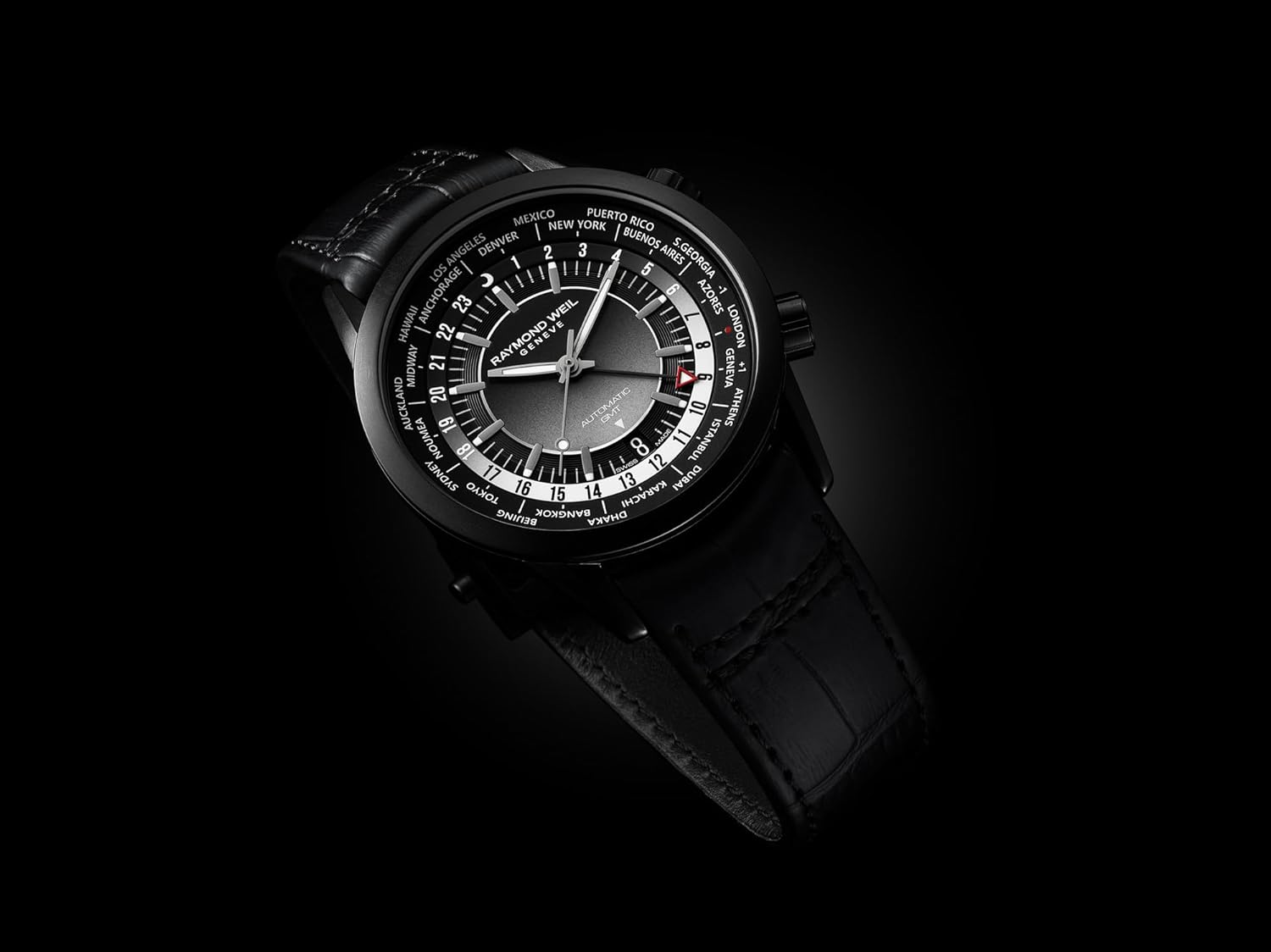
Detailed view of the watch dial, showing the city disc, 24-hour scale, and GMT hand.
4. Maintenance and Care
4.1 Cleaning Your Watch
To maintain the appearance of your watch, clean it regularly.
- For the case and metal bracelet (if applicable), use a soft, damp cloth. For stubborn dirt, a mild soap solution can be used, followed by rinsing with clean water and drying thoroughly.
- For the leather strap, wipe with a dry, soft cloth. Avoid prolonged exposure to water, direct sunlight, and harsh chemicals, as these can damage the leather.
- Always ensure the crowns are screwed down tightly before cleaning to prevent water ingress.
4.2 Water Resistance
Your RAYMOND WEIL Freelancer GMT Worldtimer watch is designed with a certain level of water resistance. Refer to the engraving on the case back for the specific water resistance rating (e.g., 5 ATM, 10 ATM).
- Important: Always ensure both crowns are fully screwed down (if applicable) before exposing the watch to water.
- Do not operate the crowns or pushers while the watch is wet or submerged.
- Water resistance is not a permanent feature and may decrease over time due to aging of gaskets or accidental impacts. It is recommended to have the water resistance checked every 2-3 years by an authorized service center.
4.3 Service and Storage
For optimal performance and longevity, it is recommended to have your mechanical watch serviced by an authorized RAYMOND WEIL service center every 3-5 years.
- When not wearing your watch, store it in a dry, cool place, away from direct sunlight and strong magnetic fields.
- Avoid exposing your watch to extreme temperatures or sudden temperature changes.

Rear view of the watch, displaying the automatic movement through the exhibition case back.
5. Troubleshooting
If you encounter any issues with your watch, please refer to the following common problems and solutions.
| Problem | Possible Cause | Solution |
|---|---|---|
| Watch has stopped or is running inaccurately. | Insufficient power reserve. | Manually wind the watch by turning the 3 o'clock crown clockwise 30-40 times. Wear the watch regularly to keep it wound. |
| Condensation under the crystal. | Water ingress due to open crown or compromised water resistance. | Immediately take the watch to an authorized service center to prevent further damage. Do not attempt to dry it yourself. |
| Worldtimer cities do not align correctly. | The 4 o'clock crown was not set properly. | Re-adjust the 4 o'clock crown to align your local city with the 12 o'clock position. |
For issues not covered here, or if problems persist, please contact an authorized RAYMOND WEIL service center.
6. Specifications
| Feature | Detail |
|---|---|
| Model Number | 2765-BKC-20001 |
| Movement | Swiss Automatic Calibre RW3230 |
| Power Reserve | 50 hours |
| Case Material | Stainless Steel with Black DLC Coating |
| Case Diameter | 40.5mm |
| Case Thickness | 9.7mm |
| Dial | Black, gradient tones, luminous indexes |
| Strap Material | Calf Leather, Black |
| Clasp | Folding clasp with double push-security system |
| Functions | Local Time (Hour, Minute), GMT Hand, Worldtimer (24 Cities, 24-hour scale, Day/Night indicator) |

Internal components of a mechanical watch movement, illustrating the complexity of Swiss horology.
7. Warranty and Support
7.1 Manufacturer's Warranty
Your RAYMOND WEIL watch is covered by a manufacturer's warranty against manufacturing defects. The duration and terms of the warranty may vary by region. Please refer to the warranty card provided with your watch or visit the official RAYMOND WEIL website for detailed information regarding your specific warranty coverage.
7.2 Customer Support
For any questions, service requests, or technical support, please contact an authorized RAYMOND WEIL service center or visit the official RAYMOND WEIL website.
Official Website: www.raymond-weil.com