1. Introduction
This manual provides detailed instructions for the setup, operation, maintenance, and troubleshooting of your truke Buds Clarity 5 True Wireless Earbuds. Please read this manual thoroughly before using the product to ensure optimal performance and longevity.

Image 1.1: truke Buds Clarity 5 True Wireless Earbuds and Charging Case in Blue.
2. Package Contents
Verify that all items are present in your package:
- truke Buds Clarity 5 True Wireless Earbuds (Left and Right)
- Wireless Charging Case
- USB Charging Cable
- User Manual
3. Product Overview
The truke Buds Clarity 5 earbuds feature a compact design with 13mm Titanium Speaker Drivers for rich audio. The accompanying charging case provides extended battery life and secure storage. The earbuds are equipped with 6-Mics ENC for clear calls and support Bluetooth 5.3 for stable connectivity.

Image 3.1: Overview of truke Buds Clarity 5 features, including elegant design, IPX5 water resistance, voice assistant compatibility, and Bluetooth 5.3.
4. Getting Started
4.1. Charging the Earbuds and Case
Before first use, fully charge the earbuds and the charging case. Connect the provided USB charging cable to the charging case and a power source. The indicator light on the case will show charging status. The earbuds charge automatically when placed inside the case.
- A full charge provides up to 10 hours of playtime for the earbuds.
- The charging case extends total playtime up to 80 hours.
- The earbuds support fast charging.

Image 4.1: Visual representation of the truke Buds Clarity 5's extended playtime, offering up to 80 hours with the charging case.
4.2. Pairing with Your Device
The earbuds feature one-step pairing for quick connection to your device.
- Open the charging case. The earbuds will automatically enter pairing mode.
- On your smartphone or Bluetooth-enabled device, go to Bluetooth settings.
- Select "truke Buds Clarity 5" from the list of available devices.
- Once connected, you will hear a confirmation prompt.
The earbuds utilize Bluetooth 5.3 technology for stable and efficient connections.
5. Operating Instructions
5.1. Touch Controls
The truke Buds Clarity 5 earbuds feature intuitive touch controls for managing audio playback, calls, and other functions. Specific touch gestures control various features, including volume control.
- Switching EQ Modes: Press and hold the right earbud for 3 seconds to cycle through the available EQ modes.
5.2. EQ Modes
Enhance your listening experience with three preset Equalizer (EQ) modes:
- Dynamic Mode: For balanced audio.
- Movie Mode: Optimized for cinematic sound.
- Bass Boost Mode: For enhanced low-frequency audio.

Image 5.1: Illustration of the three preset EQ modes available on the truke Buds Clarity 5 earbuds.
5.3. Dual Connectivity
The earbuds support dual connectivity, allowing you to seamlessly switch between two paired devices, such as a smartphone and a laptop. This enables you to answer calls on your phone while watching videos on another device without manually disconnecting and reconnecting.
- If the second device is not connected within 3 minutes, the dual-pairing feature will automatically close.
- To resume dual-pairing, tap either earbud four times, or place both earbuds back into the charging case and then take them out again.
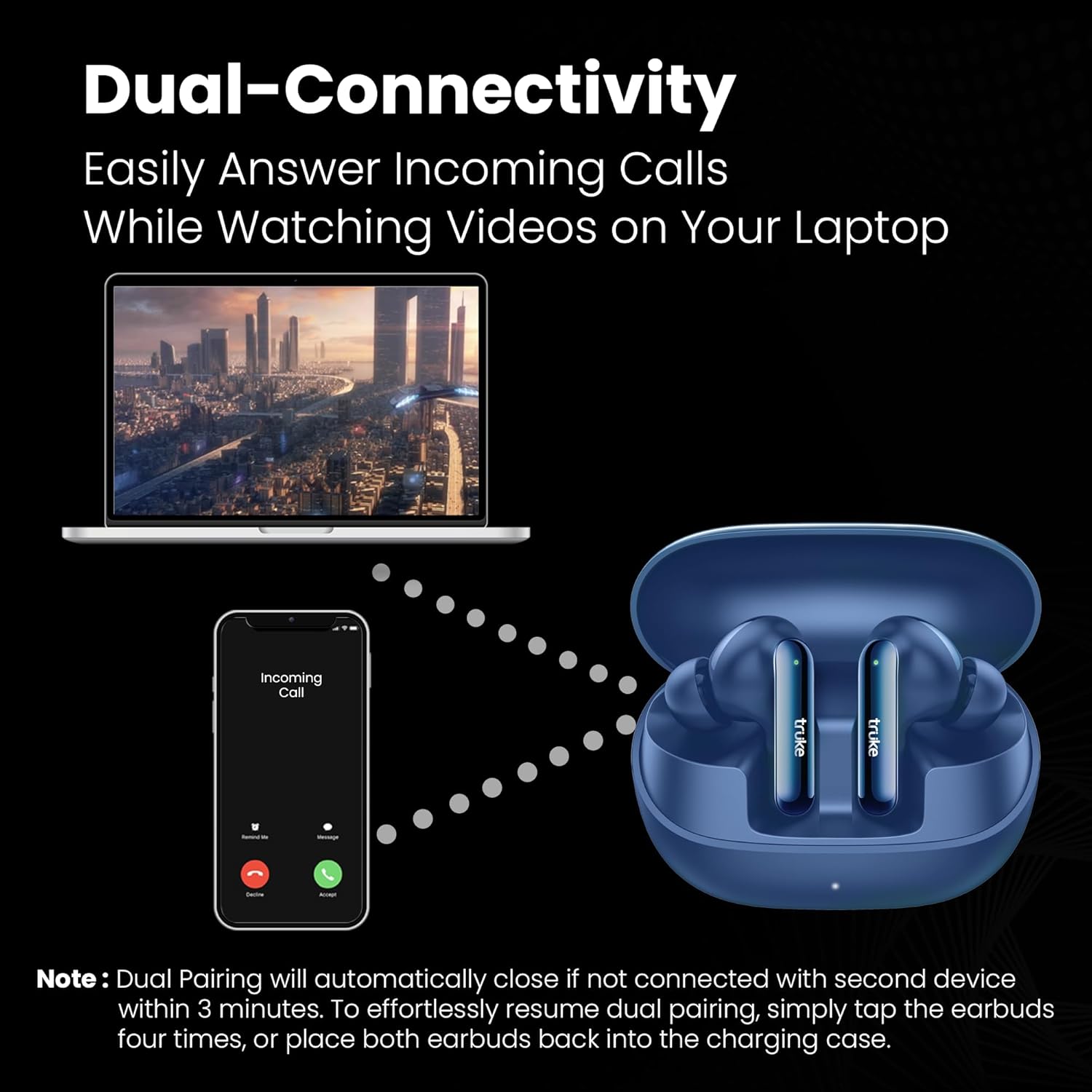
Image 5.2: Depiction of the dual-connectivity feature, showing earbuds connected to both a smartphone and a laptop.
5.4. Gaming Mode
For an optimized gaming experience, the earbuds offer an Ultra-Low Latency of 35ms. This ensures audio synchronization with on-screen action, providing a competitive edge in gaming.

Image 5.3: Earbuds shown in a gaming context, highlighting the 35ms ultra-low latency feature.
5.5. Call Management
The earbuds are equipped with Six-Mics ENC (Environmental Noise Cancellation) technology. This technology reduces background noise and enhances your voice, ensuring crystal-clear conversations even in noisy environments.

Image 5.4: An earbud illustrating the 6-Mics Advanced ENC technology, designed for clear conversations in various noisy settings.
6. Maintenance
To ensure the longevity and optimal performance of your truke Buds Clarity 5 earbuds, follow these maintenance guidelines:
- Cleaning: Regularly clean the earbuds and charging case with a soft, dry, lint-free cloth. Avoid using abrasive materials or harsh chemicals.
- Water Resistance: The earbuds are IPX5 Water Resistant, meaning they can withstand splashes and sweat. They are not designed for submersion in water. Avoid exposing them to heavy rain or showering.
- Storage: When not in use, store the earbuds in their charging case to protect them from dust and damage.
- Temperature: Avoid exposing the earbuds to extreme temperatures (hot or cold) as this can affect battery life and performance.
7. Troubleshooting
If you encounter issues with your truke Buds Clarity 5 earbuds, refer to the following common solutions:
| Issue | Possible Solution |
|---|---|
| Earbuds not pairing or connecting |
|
| Only one earbud is working |
|
| Low volume or poor sound quality |
|
| Charging issues |
|
8. Specifications
| Feature | Detail |
|---|---|
| Model Name | Clarity 5 (S222) |
| Connectivity | Bluetooth 5.3 |
| Audio Driver | 13mm Titanium Speaker Drivers |
| Microphone | Built-In (6-Mics ENC) |
| Battery Life (Earbuds) | Up to 10 Hours |
| Total Playtime (with Case) | Up to 80 Hours |
| Latency | 35ms Ultra-Low Latency |
| Water Resistance | IPX5 (Water Resistant) |
| Control Method | Touch |
| Item Weight | 38 Grams |
| Product Dimensions | 6.5 x 5.1 x 2.6 cm |
| Compatible Devices | Smartphones, Tablets, Laptops, Desktops |
9. Warranty and Support
Your truke Buds Clarity 5 earbuds come with a 12-Months Warranty, ensuring quality and customer satisfaction. truke maintains a vast service network with 350+ Active Service Centers for convenient and accessible support.
For any queries, technical assistance, or warranty claims, please contact truke customer support:
- Contact Number: +91 9354170767
- Email ID: support@eccentricindia.com

Image 9.1: Information regarding truke's 12-month warranty, extensive service center network, and customer support contact details.


