
Introduction
This manual provides comprehensive instructions for the safe and effective operation of your Luqeeg Metal Detector. Designed for treasure hunting, prospecting, and locating various metals, this device features advanced remote search and location detection systems. Please read this manual thoroughly before use to ensure optimal performance and longevity of your device.

Figure 1: The Luqeeg Metal Detector main unit (top) and the separate receiver box (bottom).
Safety Information
Always prioritize safety when operating the metal detector. Failure to follow safety guidelines may result in injury or damage to the device.
- Avoid using the device near other electronic devices or strong power sources to prevent interference.
- Ensure proper procedure for turning the device on and off.
- Handle and dispose of batteries properly according to local regulations.
- Do not attempt to modify or disassemble the device, as this may void the warranty and pose safety risks.
- Be aware of your surroundings when searching, especially in unfamiliar terrain.
Product Specifications
| Feature | Specification |
|---|---|
| Brand | Luqeeg |
| Model Number | Luqeegskpermc5z0 |
| Color | Orange |
| Material | Aluminum |
| Power Source | Battery Powered (Batteries not included) |
| Item Weight | 2.6 Pounds (approx. 1.18 kg) |
| Product Dimensions | 12.8 x 6.5 x 1.38 inches (approx. 32.5 x 16.5 x 3.5 cm) |
| Extended Length | 32.5 Centimeters |
| Adjustable Length | Yes |
| International Protection Rating | IP65 |
| Operating Frequency | 5.6E+3 KHz |
| Maximum Detection Depth | 30 meters (approx. 98 feet) |
| Maximum Detection Range | 1200 meters (approx. 3937 feet) |
| Display Style | LED or LCD |

Figure 2: Detailed dimensions of the metal detector and its receiver unit.
Setup and Assembly
- Unpacking: Carefully remove all components from the packaging. Verify that all parts listed in the packing list are present.
- Battery Installation: The device requires two 9-volt batteries (not included). Locate the battery compartments on both the main detector unit and the receiver box. Insert the batteries, ensuring correct polarity. Close the compartments securely.
- Antenna Attachment: Attach the provided antennas to the designated ports on the main detector unit. Ensure they are screwed in firmly but do not overtighten. The number of antennas may vary, but typically 6 antennas are used for optimal performance.
- Handle Assembly: If the handle is detachable, attach it to the main unit, ensuring it is securely fastened for comfortable and stable operation.
- Receiver Connection: The receiver box is a separate unit. While it does not require a physical cable connection to the main unit for operation, ensure it is within a reasonable proximity for signal reception.
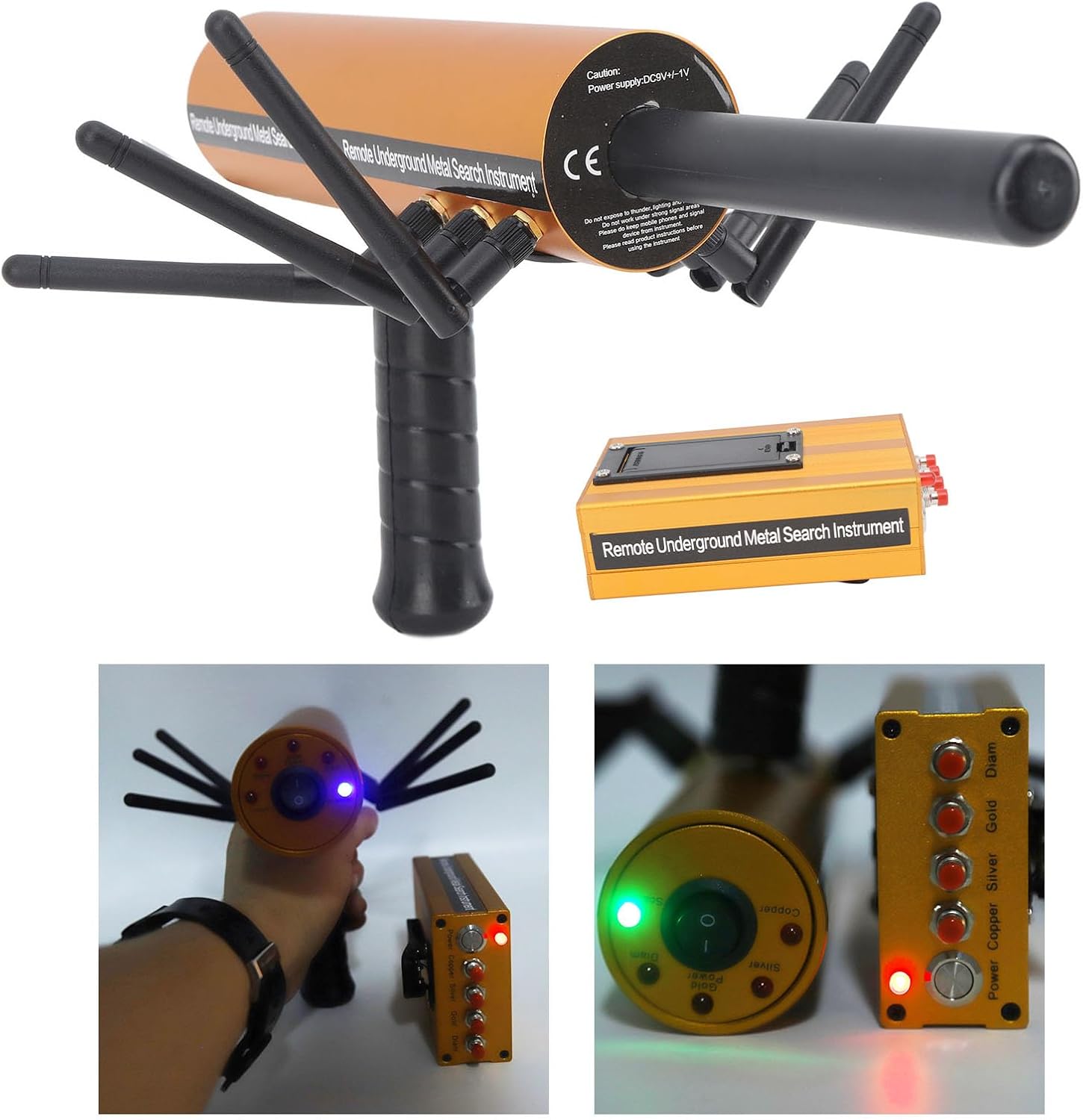
Figure 3: The control panel of the main detector unit, showing power switch, mode selection, and indicator lights.
Operating Instructions
1. Powering On and Initial Setup
- Power On: Locate the power switch on both the main detector unit and the receiver box. Turn both devices ON. Indicator lights should illuminate.
- Calibration: The device features a microelectronic processor control chip unit for self-testing and calibration. Allow a few moments for the system to initialize and calibrate automatically upon power-up.
- Frequency Regulation (Metal Type Selection): On the main unit, use the frequency regulator or mode selection buttons to choose the specific type of metal you wish to detect (e.g., Gold, Silver, Copper, Diam). This helps in identifying the specific type of metal.
2. Scanning and Detection
The Luqeeg Metal Detector utilizes a remote search system and location detection system for efficient scanning.
- Holding the Device: Hold the main detector unit comfortably by the handle. The antennas can be positioned forward, upwards, or downwards depending on your preferred scanning method and terrain. Experiment to find the optimal antenna position for your search area.
- Scanning Technique: Begin scanning the area by moving the detector slowly and steadily. The device will emit signals and process returns to identify potential targets.
- Signal Interpretation: When a metal object is detected, the device will provide an indication, often through changes in indicator lights or audible alerts on the receiver unit. The remote search system will guide you towards the general area of the buried object.
- Pinpointing: Once a general area is identified, narrow down the search by making smaller, more precise movements. The location detection system helps in accurately determining the buried location.
- Depth and Range: This detector is capable of detecting buried metal at depths of up to 30 meters and within a range of 1200 meters. The strength of the signal may indicate proximity and size of the object.

Figure 4: The detector's premium sensitivity allows for accurate detection of various metals underground.

Figure 5: The device is capable of deep searches, scanning up to 30 meters for comprehensive metal detection.
Maintenance
- Cleaning: After each use, especially in dusty or damp conditions, wipe down the detector with a soft, dry cloth. Do not use abrasive cleaners or solvents.
- Storage: Store the metal detector in a cool, dry place away from direct sunlight and extreme temperatures. If storing for an extended period, remove the batteries to prevent leakage.
- Battery Care: Always use fresh, high-quality 9-volt batteries. Replace batteries when performance degrades or indicator lights dim.
- Antenna Care: Ensure antennas are clean and free from debris. Handle them carefully to avoid bending or damage.
Troubleshooting
If you encounter issues with your Luqeeg Metal Detector, refer to the following common troubleshooting steps:
| Problem | Possible Cause | Solution |
|---|---|---|
| Device does not power on. | Dead or incorrectly installed batteries. | Check battery polarity and replace with fresh 9-volt batteries. Ensure both main unit and receiver are switched ON. |
| Poor detection sensitivity or no signals. | Incorrect metal type selected; environmental interference; loose antenna connection. | Verify the correct metal type is selected on the frequency regulator. Move away from strong electromagnetic fields. Ensure all antennas are securely attached. Practice in a known area with buried metal to familiarize yourself with its behavior. |
| Inaccurate pinpointing. | Rapid scanning speed; lack of practice. | Slow down your scanning movements, especially when narrowing down a target. Practice with known targets to improve accuracy. |
| Antennas feel loose. | Normal wear or insufficient tightening during assembly. | Gently tighten the antennas. Avoid over-tightening which can strip threads. If they remain excessively loose, contact customer support. |
If the problem persists after attempting these solutions, please contact Luqeeg customer support for further assistance.
Warranty and Support
Luqeeg is committed to providing high-quality products and satisfactory service. While specific warranty details are not provided in this manual, if you encounter any problems during use, please feel free to contact us. We are dedicated to providing a satisfactory answer and support for our intelligent metal detector.
For support, please refer to the contact information provided with your purchase or visit the official Luqeeg store page on Amazon: Luqeeg Store.