
Salange HY300
Contents
Salange HY300 Mini Projector User Manual
Model: HY300 | Brand: Salange
1. Introduction
Thank you for choosing the Salange HY300 Mini Projector. This smart projector offers a full HD 1080p experience with 4K video support, 8500 lumens brightness, and a 12000:1 contrast ratio. Featuring Android 11.0, 5G WiFi 6, and Bluetooth 5.0, it provides a versatile and immersive viewing experience. This manual will guide you through the setup, operation, maintenance, and troubleshooting of your new projector.

Figure 1: Salange HY300 Mini Projector
2. Setup Guide
2.1 Unboxing and Components
Carefully unpack your Salange HY300 Mini Projector. The package should contain the following items:
- Salange HY300 Projector (without built-in battery)
- Power Cable (EU Plug)
- Remote Control
Video 1: Unboxing and initial setup of the HY300 Projector.
2.2 Placement and Power Connection
Place the projector on a stable, flat surface. The HY300 features a 180° rotatable design, allowing you to project images onto walls or ceilings for flexible viewing angles. Connect the power cable to the projector and then to a power outlet.
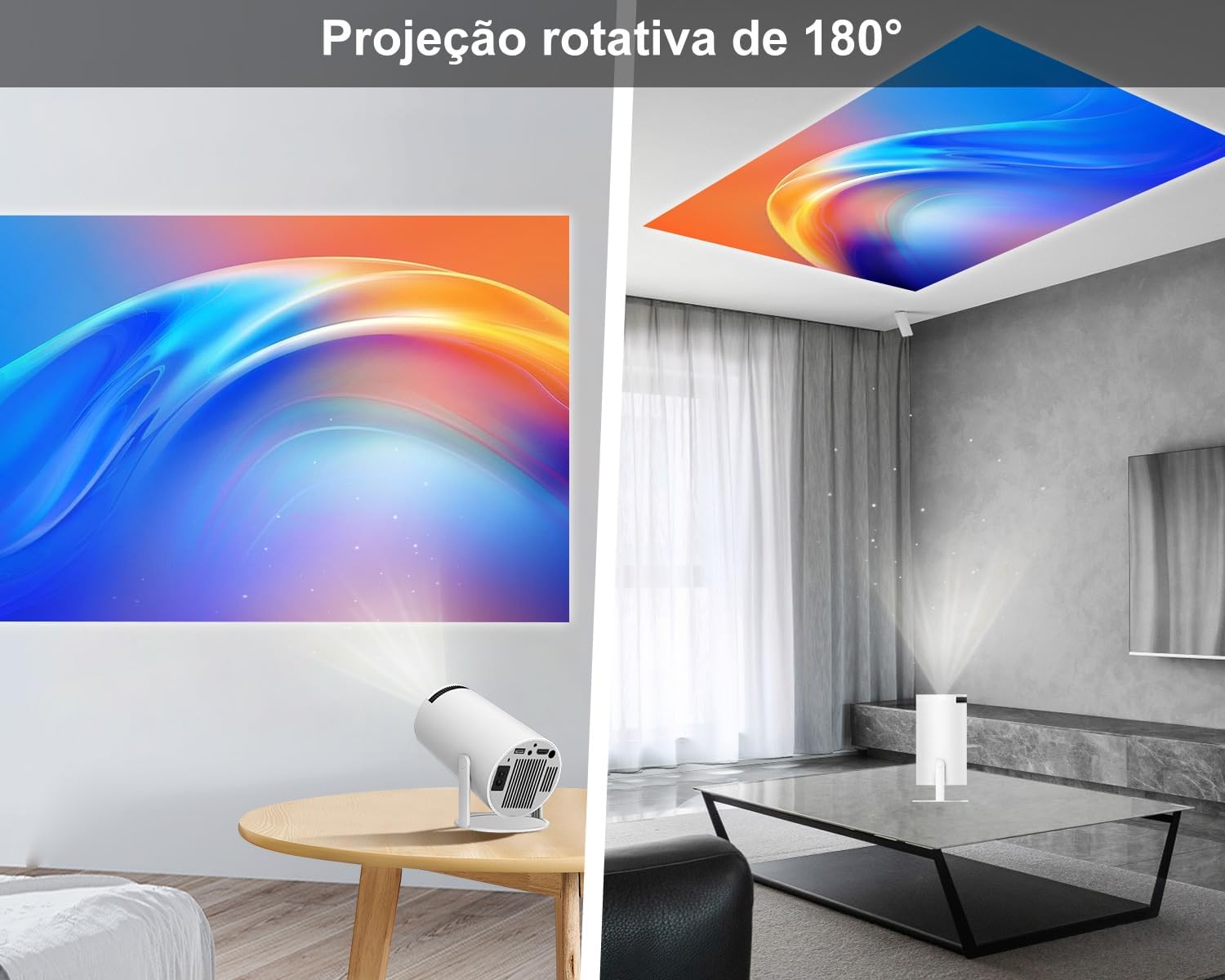
Figure 2: Projector's 180-degree rotation capability for versatile placement.
2.3 Focus and Keystone Correction
Adjust the focus manually using the focus ring on the projector until the image is clear. The projector supports automatic keystone correction and 4-point correction to easily fix irregular images, ensuring a perfectly rectangular display.

Figure 3: Manual focus adjustment ring on the projector.

Figure 4: Visual representation of automatic keystone correction.
2.4 Network and Bluetooth Connection
The projector supports 5G + 2.4G dual-band WiFi 6 for fast and stable internet connectivity. Navigate to the 'Settings' menu, select 'Network Setting' to connect to your Wi-Fi network. For audio, the built-in Bluetooth 5.0 chip allows easy connection to external soundbars, speakers, or headphones. Note: Bluetooth can only be used with audio devices, not smartphones for data transfer.

Figure 5: Diagram illustrating high-speed WiFi 6 connectivity.

Figure 6: Bluetooth 5.2 connection for external audio devices.
3. Operating Instructions
3.1 User Interface and Navigation
The Salange HY300 runs on the intelligent Android 11.0 system, providing access to over 4,000 applications via the Google Play Store. Navigate the interface using the included remote control. The intuitive layout makes it easy to find and launch your favorite streaming services, games, and other applications.

Figure 7: Android 11 operating system interface with various applications.
Video 2: Demonstration of the Mini Projector's WiFi and Bluetooth features with Android 11.
3.2 Media Playback and Connectivity
Connect various devices via HDMI, USB, or 3.5mm audio ports. Easily connect TV sticks, gaming consoles (PS4/PS5), PCs, smartphones, laptops, and USB flash drives. The projector also supports wireless screen mirroring for Android, iOS, and Windows devices.
- HDMI Input: For connecting external media players, gaming consoles, or computers.
- USB Input: For playing media directly from USB flash drives.
- Wireless Projection: Use the built-in WiFiDisplay or AirPin(PRO) applications for screen mirroring from your mobile devices or computer.

Figure 8: Various connectivity options including TV-Stick, PS5, USB, and Laptop.
Figure 9: Wired (HDMI) and wireless (Windows, iOS, Android) connection methods.
3.3 Screen Adjustment
The projector supports screen zoom from 60% to 100%, allowing you to adjust the screen size without moving the projector. It also offers various projection modes (Front, Rear, Ceiling, Rear Ceiling) to adapt to different installation environments.

Figure 10: Adjustable screen size from 60% to 100%.
4. Maintenance
Proper maintenance ensures the longevity and optimal performance of your projector.
- Cleaning: Regularly clean the lens with a soft, lint-free cloth. For the projector body, use a dry cloth. Avoid liquid cleaners directly on the lens.
- Storage: When not in use, store the projector in a cool, dry place, away from direct sunlight and excessive dust. Covering it can help prevent dust accumulation.
- Software Updates: Periodically check for system updates in the 'Settings' menu to ensure you have the latest features and performance improvements.
- Light Source: The LED light source has a long lifespan of up to 60,000 hours, minimizing the need for frequent replacements.
5. Troubleshooting
If you encounter any issues with your Salange HY300 projector, refer to the common problems and solutions below:
| Problem | Possible Cause | Solution |
|---|---|---|
| Blurry Image | Incorrect focus or keystone settings. | Adjust the manual focus ring. Check automatic keystone correction in 'Projection Setting'. |
| No Wi-Fi Connection | Incorrect password, out of range, or Wi-Fi is off. | Ensure Wi-Fi is enabled in 'Network Setting', re-enter password, or move closer to the router. |
| No Sound / Low Volume | Volume too low, external audio device not connected, or incorrect audio output. | Increase volume in 'Audio Setting'. Ensure Bluetooth speaker is paired or HDMI audio is correctly configured. |
| Apps not working (e.g., Prime Video) | App compatibility issues or outdated app version. | Ensure the app is updated. Some apps might require specific versions or workarounds (e.g., using Aptoide as mentioned in reviews). |
| HDMI input looping | Compatibility issue with specific HDMI devices. | Try a different HDMI cable or device. Ensure the projector's firmware is up to date. |
If the problem persists, please contact Salange customer support for further assistance.
6. Specifications
| Feature | Description |
|---|---|
| Model | HY300 |
| Native Resolution | 1280 x 720 pixels |
| Video Support | 1080p, 4K HD |
| Brightness | 8500 Lumens |
| Contrast Ratio | 12000:1 |
| Operating System | Android 11.0 |
| Wi-Fi | 5G + 2.4G Dual-band WiFi 6 |
| Bluetooth | Bluetooth 5.0 |
| Interfaces | USB, 3.5mm Audio, HDMI |
| Noise Level | 20 dB |
| Power Consumption | 50 watts |
| Light Source Life | Up to 60,000 hours |
| Dimensions | 10 x 10 x 17 cm |
| Weight | 740 g |
7. Warranty and Support
Salange offers a 2-year warranty for the HY300 Mini Projector. For any inquiries or support needs, Salange customer service is committed to responding within 24 hours. Please ensure your purchase is from an authorized Salange retailer to guarantee warranty and after-sales service.
- Warranty Period: 2 years
- Customer Support: Responses within 24 hours.
- Official Store: Verify purchase from authorized sellers like 'SalangeDirect' for valid warranty.
Documents and downloads
Ask a question about this manual
Ask about setup, troubleshooting, compatibility, parts, safety, or missing instructions. Manuals+ will review the question and use this page’s manual context to help answer it.