1. Introduction
Thank you for choosing the xinwld A97 Pro Wireless Earbuds. These earbuds are designed to provide a high-quality audio experience with advanced features such as Bluetooth 5.3 connectivity, noise cancellation, and IP7 waterproofing. This manual will guide you through the setup, operation, and maintenance of your new earbuds to ensure optimal performance and longevity.
2. What's in the Box
Please check the package contents to ensure all items are present:
- 2 x Bluetooth Earbuds (Left and Right)
- 1 x Portable Magnetic Charging Case
- 1 x Quick Charging Cable (Type-C)
- 1 x User Manual
- 2 x Silicone Replacement Ear Caps (various sizes)

Image: Package contents of the xinwld A97 Pro Wireless Earbuds.
3. Product Overview
The xinwld A97 Pro earbuds feature a sleek design and advanced technology for an immersive audio experience.

Image: xinwld A97 Pro Wireless Earbuds and Charging Case.
Key Features:
- Bluetooth 5.3: Ensures faster transmission speeds and stable connection.
- 13mm Speakers: Deliver powerful bass, clear treble, and rich mids.
- Noise Cancellation: Built-in microphones with call noise cancellation technology.
- LED Power Display: Real-time battery monitoring on the charging case.
- 36 Hours Playtime: Extended battery life with the charging case.
- IP7 Waterproof: Protection against water and sweat.
- Ergonomic Design: Lightweight and comfortable fit with multiple ear tip sizes.

Image: Bluetooth 5.3 Technology Overview.

Image: 13mm Speaker Driver for Immersive Sound.
4. Setup
4.1 Charging the Earbuds and Case
Before first use, fully charge the earbuds and the charging case.
- Connect the provided Type-C charging cable to the charging port on the case and a USB power source.
- The LED display on the charging case will show the battery percentage, indicating the charging status.
- Place the earbuds into the charging case. The earbuds will automatically begin charging.
A full charge provides approximately 8 hours of earbud usage, and the charging case extends total playtime up to 36 hours.
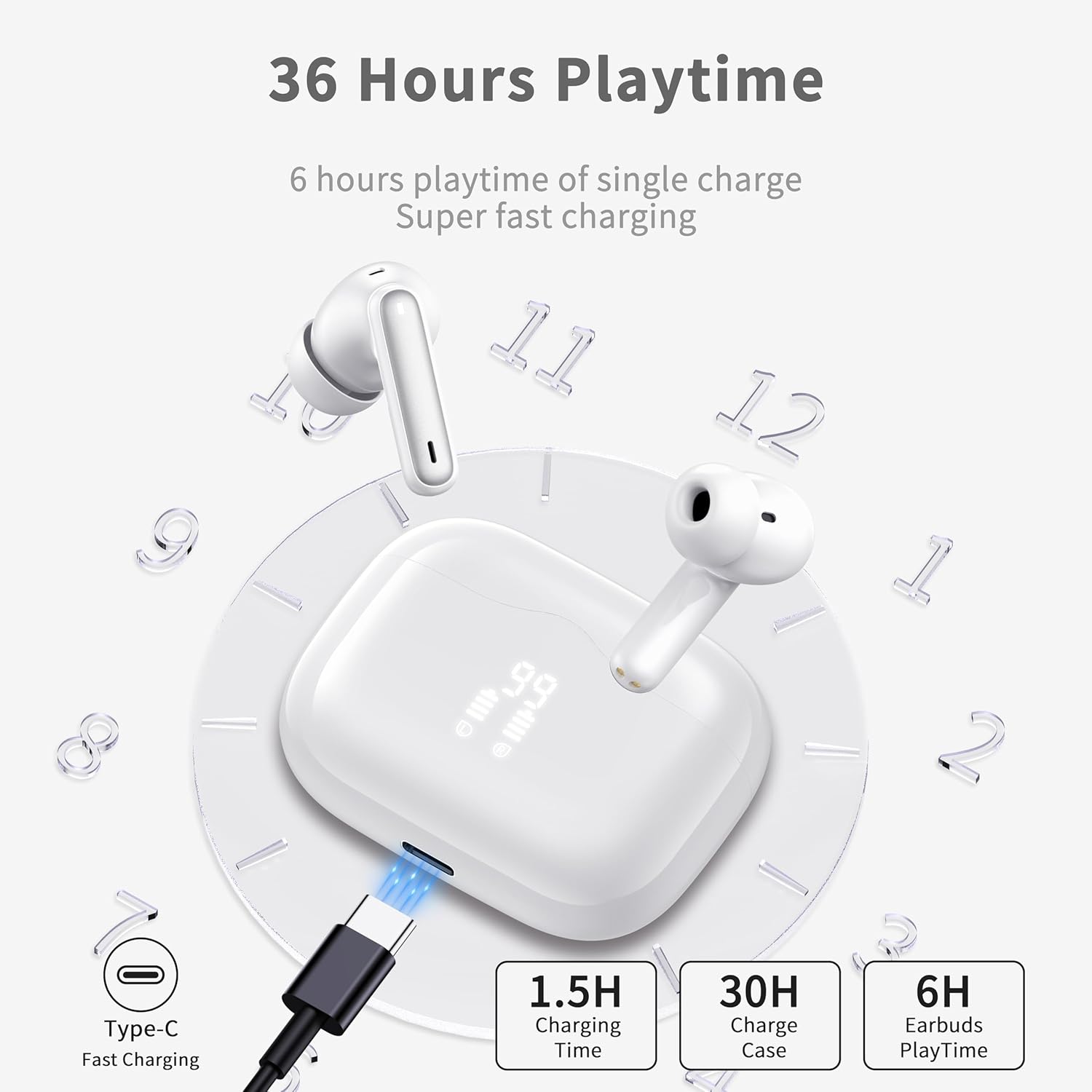
Image: Charging the Earbuds and Case.
4.2 Pairing with Your Device (One-Step Pairing)
The earbuds feature a simple one-step pairing process:
- Ensure your device's Bluetooth is turned on.
- Open the charging case. The earbuds will automatically power on and enter pairing mode.
- On your device, search for Bluetooth devices and select "A97 Pro" from the list.
- Once connected, you will hear a confirmation tone, and the earbuds are ready for use.
After the initial pairing, the earbuds will automatically connect to the last paired device when taken out of the case.

Image: One-Step Pairing Process.
4.3 Fitting the Earbuds
For optimal sound quality and comfort, choose the correct ear tip size and ensure a secure fit.
- Select the ear tips (S, M, L) that best fit your ear canals.
- Gently insert the earbuds into your ears and rotate them slightly until they feel secure and comfortable.

Image: Ergonomic Design for Comfortable Fit.
5. Operating the Earbuds
5.1 Touch Controls
The earbuds are equipped with sensitive touch sensors for easy control of various functions:

Image: One-Click Smart Control Functions.
| Action | Left Earbud | Right Earbud |
|---|---|---|
| Play/Pause | Tap once | Tap once |
| Next Track | Tap twice | Tap twice |
| Previous Track | Press and hold for 2s | Press and hold for 2s |
| Volume Down | Quickly tap three times | N/A |
| Volume Up | N/A | Quickly tap three times |
| Answer/End Call | Tap once | Tap once |
| Reject Call | Press and hold for 2s | Press and hold for 2s |
| Activate Voice Assistant | Tap four times | Tap four times |
5.2 Mono/Dual Mode
The earbuds support both mono and dual modes, allowing for flexible usage:
- Dual Mode: Use both earbuds for a stereo audio experience.
- Mono Mode: Use either the left or right earbud independently while the other remains in the charging case or is turned off. This is useful for awareness of your surroundings or extending battery life.

Image: Mono Mode / Dual Mode Functionality.
6. Maintenance
6.1 Water Resistance (IP7)
The xinwld A97 Pro earbuds are rated IP7 waterproof, meaning they are protected against the effects of temporary immersion in water. This makes them suitable for workouts and use in light rain or splashes.
- Do not intentionally submerge the earbuds for extended periods.
- Ensure earbuds are dry before placing them back into the charging case to prevent damage.

Image: IP7 Waterproof Feature.
6.2 Cleaning
Regular cleaning helps maintain the performance and hygiene of your earbuds:
- Use a soft, dry, lint-free cloth to wipe the earbuds and charging case.
- For ear tips, remove them from the earbuds and clean with a mild soap solution, then rinse and dry thoroughly before reattaching.
- Avoid using abrasive materials or harsh chemicals.
7. Troubleshooting
If you encounter any issues, please refer to the following common solutions:
- Earbuds not pairing:
Ensure both earbuds are charged. Place them back in the case, close it, then open it again to re-enter pairing mode. Forget the device on your phone's Bluetooth settings and try pairing again. - Only one earbud working:
Ensure both earbuds are charged. Place both earbuds back into the charging case, close the lid for 5 seconds, then open it again. This should reset the connection between them. - No sound:
Check the volume level on your connected device. Ensure the earbuds are properly paired and selected as the audio output. - Charging issues:
Verify the Type-C cable is securely connected to both the case and the power source. Try a different charging cable or power adapter. Ensure the charging contacts on the earbuds and inside the case are clean and free of debris. - Poor sound quality:
Ensure the earbuds are securely fitted in your ears. Try different sized ear tips for a better seal. Clean any debris from the earbud speakers.
If the problem persists, please contact customer support.
8. Specifications
| Feature | Specification |
|---|---|
| Model Name | A97 Pro |
| Connectivity Technology | Wireless (Bluetooth) |
| Bluetooth Version | 5.3 |
| Bluetooth Range | 10 Meters |
| Battery Life (Earbuds) | 8 Hours (single charge) |
| Total Playtime (with Case) | Up to 36 Hours |
| Charging Port | Type-C |
| Water Resistance Level | IP7 Waterproof |
| Control Method | Touch |
| Microphone | Included, with Noise Cancellation |
| Speaker Size | 13mm |
| Earbud Weight | 4 Grams (each) |
| Compatible Devices | Bluetooth-enabled devices (Android, iOS) |
9. Warranty and Support
9.1 Product Warranty
xinwld provides a one-year product warranty for all customers who purchase our products. Within one year from the purchase date, if your product suffers non-human damage or manufacturing defects under normal use conditions, we will provide free repair or replacement services. Customer satisfaction is always our top priority, and we will continue to strive to provide high-quality products and services to ensure your shopping experience is pleasant and worry-free.
Image: Warranty Information.
9.2 Customer Support
xinwld is committed to providing quality customer service to ensure customer satisfaction and a positive shopping experience. Our customer service team is always ready to answer your questions, resolve issues, and provide assistance. No matter what problem you encounter, you can contact our customer service team through online chat or email. We will strive to provide detailed and helpful answers. We welcome your valuable feedback and suggestions at any time.

Image: Customer Support.


