Introduction
This manual provides comprehensive instructions for the YUEHUA Travel Zipper TSA 007 Approved Luggage Code Lock. Please read this manual carefully before using the product to ensure proper operation and security.
The YUEHUA TSA 007 Combination Lock is designed for high security, offering 1000 digital password combinations. Its compact and portable design makes it ideal for securing luggage, backpacks, and various other items during travel or for household use. This lock is specifically suitable for iron suitcases and trunks.
Product Overview and Components
The YUEHUA TSA 007 Combination Lock features a robust design with key components for secure operation.

Image: The YUEHUA TSA 007 Approved Luggage Code Lock, showcasing its compact black design with the TSA 007 logo and three-digit combination wheels.

Image: Diagram illustrating the key components of the TSA 007 lock, including the Customs specific keyhole, Zinc alloy lock hook, TSA Customs Lock Mark, Switch button, Rotating password wheel, and Code adjusting rod.
- Customs Specific Keyhole: Used by TSA agents for inspection without damaging the lock.
- Zinc Alloy Lock Hook: Durable hook for securing zippers or other items.
- TSA Customs Lock Mark: Indicates TSA approval.
- Switch Button: Used to release the lock hook.
- Rotating Password Wheels: Three wheels for setting and entering the combination.
- Code Adjusting Rod: Internal mechanism for setting a new combination.
Setup: Setting Your Personal Combination
The initial password for this lock is set to 0-0-0. It is recommended that users reset their personal password as follows:

Image: Diagram showing the process of setting the lock's combination, highlighting the Code adjustment switch (A), Password Wheel (B), and Button (C).
- Adjust the password to the unlocked state (the original password is 0-0-0).
- Use a pen tip or other pointed tool to press the small red button (Code adjustment switch A) until you hear a "click" sound. Do not use too much force to prevent the adjustment hole from being punctured.
- Then turn the character on the three password wheels (B) to the number you want to set as your new combination.
- Push the unlock button (C) in the direction of the arrow all the way. You will hear a "click" sound again, and the small red button (Code adjustment switch A) will bounce back, indicating the password is successfully set.
- Please remember your personal password from now on.
To lock, scramble the numbers after closing the lock hook.
Operating Instructions
Using your YUEHUA TSA 007 Combination Lock is straightforward once your personal combination is set.
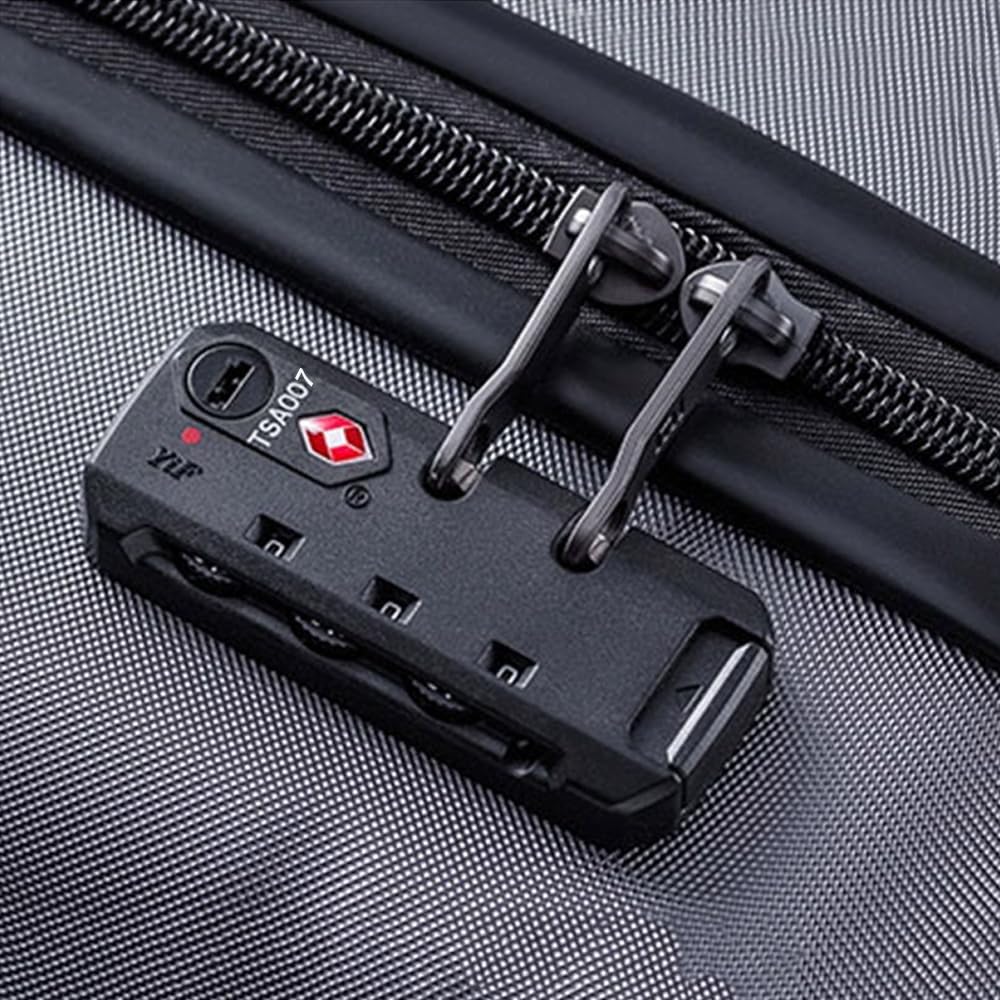
Image: The TSA 007 combination lock securely attached to the zippers of a piece of luggage, demonstrating its intended use.
- To Unlock: Rotate the three password wheels to your personal 3-digit combination. Once the correct combination is displayed, push the switch button in the direction of the arrow to release the lock hook.
- To Lock: Insert the lock hook into the desired loops (e.g., luggage zippers). Push the switch button to secure the hook. Then, scramble the numbers on the password wheels to secure the lock.
- TSA Inspection: This lock is TSA approved. This means that Transportation Security Administration (TSA) screeners can open your luggage for inspection without damaging the lock, using a special key. After inspection, they will relock your baggage.
- Application: The lock is suitable for various keyless applications, including suitcases, trunks, backpacks, and other items requiring a secure combination lock.
Maintenance
The YUEHUA TSA 007 Combination Lock is designed for durability and requires minimal maintenance.
- Keep the lock clean and free from dust or debris, especially around the combination wheels and the lock hook mechanism.
- Avoid exposing the lock to extreme temperatures or harsh chemicals, which could affect its material integrity.
- Do not attempt to force the lock open if the combination is incorrect, as this may damage the internal mechanism.
Troubleshooting
If you encounter any issues with your YUEHUA TSA 007 Combination Lock, consider the following:
- Lock not opening: Double-check that the correct 3-digit combination is aligned precisely on the wheels. Ensure the wheels are not stuck due to dirt; gently rotate them to clear any obstruction.
- Difficulty setting new combination: Ensure the lock is in the unlocked state (0-0-0 initially, or your current combination). Make sure the small red button is fully pressed in before rotating the wheels to the new combination.
- Lock hook not releasing/securing: Verify that the combination is correct. Check for any physical obstructions preventing the hook from moving freely.
If problems persist, please refer to the "Support" section for assistance.
Specifications
Detailed specifications for the YUEHUA TSA 007 Combination Lock:

Image: Technical diagram showing the dimensions of the TSA 007 lock, including length (76mm), width (33mm), and internal measurements (55mm, 21mm, 5mm).
| Feature | Detail |
|---|---|
| Model Number | Lock-TSA007 |
| Dimensions (L x W x H) | Approx. 2.99 x 1.3 x 0.55 inches (76mm x 33mm x 14mm) |
| Material | Metal + ABS Plastic (Iron, Zinc Alloy) |
| Color | Black |
| Lock Type | 3-Digit Combination Lock, TSA Approved |
| Password Combinations | 1000 possible combinations |
| Special Features | Keyless, Portable, TSA Compliant |
| Item Weight | Approx. 1.44 ounces (40.8 grams) |
Support
For any questions, concerns, or issues regarding your YUEHUA TSA 007 Combination Lock, please contact customer support. We are committed to your satisfaction and will reply to your inquiries within 24 hours.
Please refer to your purchase documentation or the seller's information for specific contact details.