
1. Introduction
This manual provides essential information for the proper operation and maintenance of your Baofeng DM-1702-GPS Digital and Analog Two Way Radio. The DM-1702-GPS is a versatile communication device featuring dual band (VHF 137-174MHz & UHF 400-470MHz) and dual mode (DMR Tier I & II and Analog) capabilities, along with integrated GPS functionality. It supports 1024 storage channels and offers high/low power settings (5W/1W).
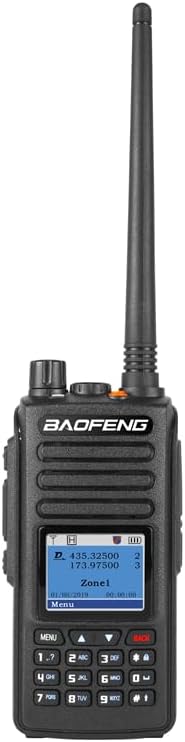
Figure 1: Baofeng DM-1702-GPS Digital and Analog Two Way Radio
2. Product Overview
2.1 Key Features
- Dual Mode Operation: Supports both Analog and Digital (DMR Tier I & II) communication.
- Integrated GPS Function: Provides precise geographic location data.
- High/Low Power Output: Adjustable 5W/1W for varied communication range.
- Extensive Channel Storage: 1024 programmable channels.
- Dual Display: Allows monitoring of two frequencies simultaneously.
- VOX Function: Voice-activated transmission for hands-free operation.
- DMR Protocol Support: Includes single call, group call, and all call functionalities.
- SMS Data Transmission: Capability to send and receive text messages.
- Digital Monitor Mode: Allows monitoring of color code, time slot, frequency, and contact ID in digital mode.
2.2 Package Contents
Upon unboxing, please verify that all items listed below are included in your package:
- 1 x Baofeng DM-1702-GPS Radio
- 1 x Desktop Charger
- 1 x Power Adapter
- 1 x Li-ion Battery
- 1 x Earphone
- 1 x Hang Strap
- 1 x Belt Clip
- 1 x User Manual (this document)

Figure 2: Standard Package Contents
2.3 Radio Components
Familiarize yourself with the various parts of your DM-1702-GPS radio:

Figure 3: Baofeng DM-1702-GPS Labeled Components
- Antenna: For transmitting and receiving radio signals.
- Power/Volume Knob: Turns the radio on/off and adjusts volume.
- SK1 (Side Key 1): Programmable shortcut button.
- PTT Button (Push-to-Talk): Activates transmission.
- SK2 (Side Key 2): Programmable shortcut button.
- Speaker: Outputs audio.
- Headset Port: For connecting external audio accessories.
- Mic (Microphone): For voice input.
- Screen: Displays operational information.
- Keypad: For inputting frequencies, channels, and menu navigation.
3. Setup
3.1 Battery Installation
- Align the battery pack with the grooves on the back of the radio.
- Slide the battery upwards until it clicks into place.
- To remove, press the battery release latch (if present) and slide the battery downwards.
3.2 Antenna Attachment
- Screw the antenna clockwise into the connector on the top of the radio until it is finger-tight. Do not overtighten.
3.3 Charging the Battery
- Connect the power adapter to the desktop charger.
- Plug the power adapter into an AC outlet.
- Place the radio (with battery installed) or the battery alone into the charging slot.
- The charger indicator light will typically show red during charging and green when fully charged.
4. Operating Instructions
4.1 Power On/Off and Volume Control
- Power On: Rotate the Power/Volume knob clockwise until you hear a click.
- Power Off: Rotate the Power/Volume knob counter-clockwise until you hear a click.
- Volume Adjustment: Rotate the Power/Volume knob to increase (clockwise) or decrease (counter-clockwise) the audio level.
4.2 Channel Selection
- Use the UP/DOWN arrow keys on the keypad to navigate through programmed channels.
- Alternatively, enter the desired channel number directly using the numeric keypad.
4.3 Transmitting and Receiving
- To transmit, press and hold the PTT button. Speak clearly into the microphone.
- Release the PTT button to receive.
4.4 DMR Mode Operation
The DM-1702-GPS supports various DMR call types:
- Single Call: Direct communication with a specific radio ID.
- Group Call: Communication with a predefined group of radios.
- All Call: Broadcast to all radios within range on the current channel.
Refer to the radio's menu system for selecting call types and contact IDs. Proper programming via software is often required for full DMR functionality.
4.5 GPS Functionality
The integrated GPS module allows the radio to acquire and display its current longitude and latitude. This information can be viewed on the display and, if configured, transmitted to other compatible radios or systems.
4.6 VOX Function
Voice Operated Exchange (VOX) allows for hands-free transmission. When VOX is enabled, the radio will automatically transmit when it detects your voice, and stop transmitting when you stop speaking. Adjust VOX sensitivity in the menu to prevent accidental transmissions.
4.7 Programming and Software
While basic operations can be performed via the keypad, advanced features, channel programming, and DMR settings are typically configured using dedicated programming software. This software usually requires a compatible programming cable to connect the radio to a computer. Ensure you use the correct software version for your DM-1702-GPS model.
5. Maintenance
5.1 Cleaning
- Wipe the radio's surface with a soft, damp cloth. Do not use harsh chemicals or abrasive cleaners.
- Ensure the radio is dry before use or charging.
5.2 Battery Care
- Avoid fully discharging the battery frequently to prolong its lifespan.
- Store the battery in a cool, dry place when not in use.
- If storing for extended periods, charge the battery to approximately 50% capacity.
5.3 Storage
- Store the radio in a dry, dust-free environment away from direct sunlight and extreme temperatures.
- Remove the battery if the radio will not be used for an extended period.
6. Troubleshooting
| Problem | Possible Cause | Solution |
|---|---|---|
| Radio does not power on | Low or dead battery; Incorrect battery installation | Charge battery; Reinstall battery correctly |
| No audio from speaker | Volume too low; Headset connected; Speaker damaged | Increase volume; Disconnect headset; Contact support |
| Cannot transmit or receive | Incorrect frequency/channel; Antenna not attached; Out of range | Verify channel settings; Attach antenna; Move closer to other radios |
| Programming software issues | Incorrect software version; Driver issues; Cable malfunction | Ensure correct software/drivers; Try different USB port/cable; Consult online resources or community forums for specific model programming tips. |
| GPS not acquiring signal | Indoors or obstructed view of sky; GPS module issue | Move to an open outdoor area; Allow time for signal acquisition. |
7. Specifications
| Feature | Specification |
|---|---|
| Model Number | DM-1702-GPS |
| Frequency Range | VHF 137-174MHz & UHF 400-470MHz |
| Output Power | 5W/1W (High/Low) |
| Number of Channels | 1024 |
| Battery Type | Li-ion (7.4 Volts) |
| Item Weight | 1.43 pounds |
| Color | Black |
| Special Feature | with GPS |
| Talking Range Maximum | 5 Kilometer |
| Water Resistance Level | Water Resistant |

Figure 4: Baofeng DM-1702-GPS Dimensions
8. Warranty and Support
8.1 Warranty Information
The Baofeng DM-1702-GPS radio comes with a 1-year warranty from the date of purchase. This warranty covers manufacturing defects and malfunctions under normal use. Please retain your proof of purchase for warranty claims.
8.2 Customer Support
For technical assistance, troubleshooting beyond this manual, or warranty inquiries, please contact BAOFENG customer support through their official channels. Refer to the product packaging or the manufacturer's website for the most current contact information.