1. Product Introduction
This manual provides detailed instructions for the Berrcom Non-Contact Forehead Thermometer JXB195 and the Berrcom Contactless 3-in-1 Thermometer JXB178. These devices are designed for accurate and hygienic temperature measurement for individuals of all ages, as well as objects and room environments. Please read this manual thoroughly before use to ensure proper operation and safety.

Image: The Berrcom JXB195 (left) and JXB178 (right) non-contact infrared thermometers.
2. Important Safety Information
Observe the following safety precautions to ensure safe and effective use of your Berrcom thermometers:
- Do not immerse the thermometer in water or other liquids.
- Keep the device out of reach of children and pets.
- Avoid dropping the thermometer or subjecting it to strong impacts.
- Do not expose the thermometer to direct sunlight, extreme temperatures, or high humidity.
- Clean the thermometer sensor gently with a cotton swab moistened with alcohol. Do not use abrasive cleaners.
- If the device is damaged, do not attempt to repair it yourself. Contact customer support.
- Ensure the measurement distance is maintained as specified for accurate readings.
- This device is intended for household use and is not a substitute for professional medical advice. Consult a healthcare professional if you have concerns about your health.
3. Product Overview
3.1 Berrcom JXB195 Non-Contact Forehead Thermometer
The JXB195 is a versatile non-contact infrared thermometer designed for quick and hygienic temperature readings. It features a large backlit display and can store multiple readings.
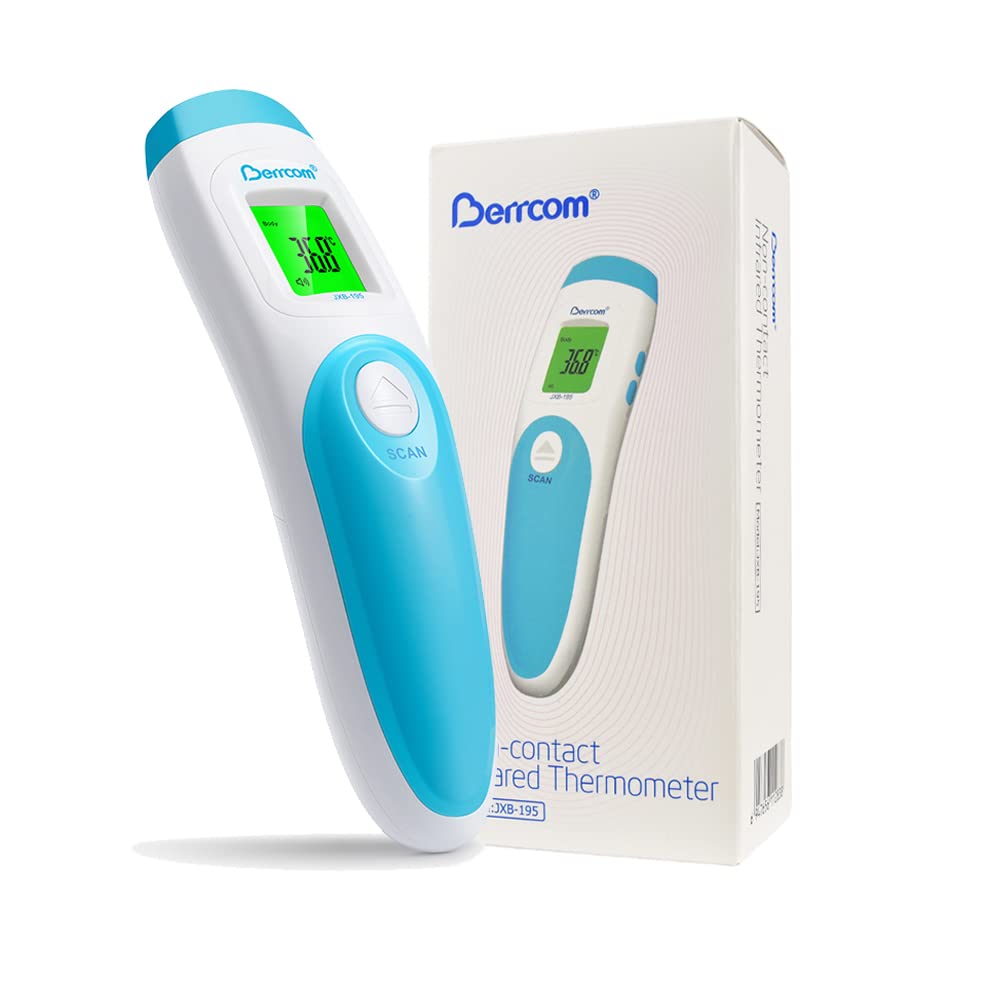
Image: The Berrcom JXB195 thermometer shown with its retail packaging.
3.2 Berrcom JXB178 Contactless 3-in-1 Thermometer
The JXB178 offers comprehensive temperature measurement capabilities, including body, object, and room temperature modes. Its ergonomic design ensures comfortable handling and ease of use for all ages.

Image: The Berrcom JXB178 thermometer displayed with its retail packaging.
3.3 Key Components (JXB178 Example)

Image: A detailed diagram of the Berrcom JXB178, highlighting key components such as the infrared probe, LCD display, mode button, memory key, and beeper.
- Infrared Probe: Sensor for temperature detection.
- LCD Display: Shows temperature readings, mode, and other indicators.
- Mode Button: Switches between Body, Object, and Room temperature modes (JXB178) or Body/Surface (JXB195).
- Memory Key (MEM): Accesses stored temperature readings.
- Mute/Buzzer Key: Toggles sound alerts.
- Scan Button: Initiates temperature measurement.
- Beeper: Emits sound alerts for fever or measurement completion.
4. Setup Guide
4.1 Battery Installation
Both JXB195 and JXB178 thermometers are battery-powered. Ensure correct battery polarity during installation.
- Locate the battery compartment cover on the back or bottom of the thermometer.
- Slide or open the cover according to the indicator.
- Insert the required batteries (typically AAA, refer to specifications for exact type) ensuring the positive (+) and negative (-) ends align with the markings inside the compartment.
- Close the battery compartment cover securely.
5. Operating Instructions
5.1 Taking a Measurement (Body Temperature)
- Ensure the thermometer is in Body mode. If not, press the 'Mode' button to switch.
- Hold the thermometer approximately 1-2 inches (3-5 cm) from the center of the forehead.
- Press the 'Scan' button once.
- The temperature reading will appear on the display almost instantly.
- The display backlight color will indicate the temperature status: Green for normal, Orange for elevated, Red for fever (JXB195 and JXB178).

Image: The JXB195 display illustrating the three-color backlight system: Green for normal temperature, Orange for elevated temperature, and Red for fever.
5.2 Object/Room Temperature Measurement (JXB178)
The JXB178 can also measure the temperature of objects and rooms.
- Turn on the thermometer.
- Press the 'Mode' button repeatedly until 'Object' or 'Room' mode is selected (indicated on the display).
- Point the thermometer at the object or towards the center of the room.
- Press the 'Scan' button. The temperature will be displayed.

Image: Demonstrating the use of the thermometer to measure the temperature of an object, such as a beverage in a cup.
5.3 Switching Temperature Units (°C/°F)
Both models allow switching between Celsius and Fahrenheit.
- With the thermometer turned OFF, press and hold the 'Scan' button (JXB195) or 'Mode' button (JXB178) for 3-5 seconds.
- The display will show the current unit, and then switch to the other unit. Release the button when the desired unit is displayed.

Image: The JXB195 display showing the temperature unit being switched between Celsius (°C) and Fahrenheit (°F).
5.4 Memory Recall
Both thermometers can store previous readings.
- Press the 'MEM' button to view the last recorded temperature.
- Press 'MEM' repeatedly to cycle through previous readings (up to 32 for JXB195).

Image: Illustrates the 32-reading memory function, allowing users to track temperature trends over time, useful for monitoring health.
5.5 Mute/Unmute Mode
The thermometers feature a mute mode for silent operation, ideal for use when a child is sleeping.
- Press the 'Mute/Buzzer' button (or corresponding button) to toggle the sound on or off.

Image: The JXB195 thermometer being used in a dimly lit room near a sleeping child, demonstrating its mute mode and clear backlit display for quiet readings.
6. Care and Maintenance
6.1 Cleaning the Thermometer
- Use a soft cloth or cotton swab lightly moistened with 70% isopropyl alcohol to clean the thermometer casing and the infrared sensor.
- Do not use abrasive cleaners, thinners, or benzene for cleaning.
- Ensure no liquid enters the interior of the thermometer.
- Allow the thermometer to dry completely before next use.
6.2 Storage
- Store the thermometer in a cool, dry place, away from direct sunlight and extreme temperatures.
- If the thermometer will not be used for an extended period, remove the batteries to prevent leakage and damage.
7. Troubleshooting
If you encounter issues with your Berrcom thermometer, refer to the table below for common problems and solutions.
| Problem | Possible Cause | Solution |
|---|---|---|
| No display/Thermometer won't turn on | Batteries are dead or incorrectly inserted. | Replace batteries with new ones, ensuring correct polarity. |
| Inaccurate readings | Incorrect measurement distance; dirty sensor; environmental factors (e.g., drafts). | Ensure correct distance (1-2 inches); clean the sensor; measure in a stable environment. |
| "Lo" or "Hi" displayed | Temperature is outside the measurable range. | Ensure the thermometer is in the correct mode (Body/Object/Room) and the temperature is within the specified range. |
| Fever alarm sounds for normal temperature | Temperature unit setting is incorrect or calibration issue. | Verify the temperature unit (°C/°F) is set correctly. If issues persist, contact support. |
| Display shows an error code | Internal malfunction. | Remove and reinsert batteries. If the error persists, contact customer support. |
8. Technical Specifications
| Feature | Berrcom JXB195 | Berrcom JXB178 |
|---|---|---|
| Model Number | JXB195 | JXB178 |
| Measurement Type | Non-Contact Forehead | Non-Contact Forehead, Object, Room |
| Temperature Units | °C / °F Switchable | °C / °F Switchable |
| Memory Capacity | 32 Readings | 32 Readings |
| Display | Digital, 3-Color Backlit LCD | Digital, 3-Color Backlit LCD |
| Fever Alarm | Yes (Beeping) | Yes (Beeping) |
| Mute Mode | Yes | Yes |
| Auto Shut-off | Yes (30 seconds) | Yes |
| Power Source | Battery Powered | Battery Powered |
| Age Range | All ages (Adults, Infants, Kids) | All ages (Adults, Infants, Kids) |
| Material | Silicone (Outer) | Silicone (Outer) |
| Color | White | White |
| Included Components | Berrcom Non Contact Forehead Thermometer JXB195, Berrcom Contactless Thermometer 3 in 1 for Adults and Kids JXB178 | |
9. Warranty and Support
Berrcom products are manufactured with high quality standards. For specific warranty details, please refer to the warranty card included with your product or visit the official Berrcom website or Amazon store. If you require technical assistance or have questions regarding your thermometer, please contact Berrcom customer support.
You can find more information and contact details on the official Berrcom Amazon store: Berrcom Amazon Store


